Ollama Security and Compliance
Local deployment naturally carries privacy advantages, but data staying on-device does not mean you can ignore everything: exposure surface, model licenses, and enterprise controls each have their own boundaries.
This chapter condenses security and compliance issues into an exposure surface map, a protection checklist, and a license review process.
Privacy Advantages and Boundaries of Local Deployment
First, the source of the advantage: when running locally, prompts and responses remain on your device throughout, never passing through any third-party servers. This is an architectural guarantee, not a vendor promise.
The official stance on data can be summarized in two points: when running locally, the official side cannot see your prompts and data; when using cloud models, the official side processes requests to provide the service, but states that it does not store or record content, nor use it for training, only collecting basic account information needed to provide the service.
At the same time, three boundaries must be recognized:
First, the privacy guarantee only covers the "transmission and processing path"; the quality and factual accuracy of model-generated content are not more reliable simply because it is local.
Second, the tools you integrate (editor plugins, Agent frameworks) may have their own data channels; Ollama being local does not mean the entire chain is local.
Third, conversation history is persisted by your own application, and its storage security falls within your responsibility.
Risks and Protection of Open Ports
Ollama by default only listens on the local loopback address, which is the prerequisite for security; the vast majority of security incidents start with "changing the listen address to 0.0.0.0".
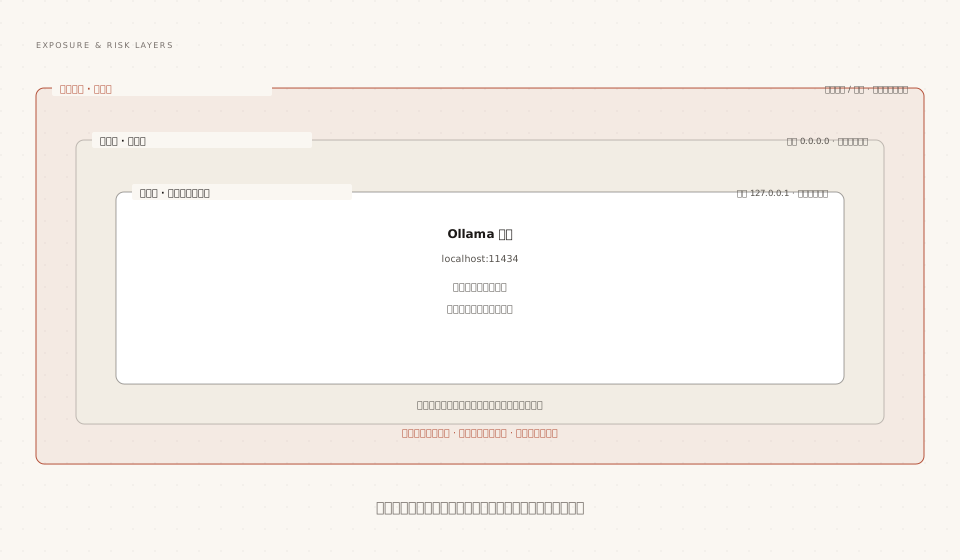
A frequently overlooked fact: it is not just the chat interface that gets exposed. The model management interface is also open to the outside, meaning anyone on the same network segment can call /api/delete to wipe out your models or /api/pull to fill up your disk and bandwidth.
The protection checklist is arranged by priority:
| Measure | Description |
|---|---|
| Keep loopback listening | Do not change OLLAMA_HOST unless there is a clear multi-user sharing requirement |
| Use a reverse proxy when sharing is necessary | Ollama still listens on 127.0.0.1, and Nginx performs authentication before forwarding (solution from the private deployment chapter) |
| Tighten cross-origin settings | Allow OLLAMA_ORIGINS on demand; do not indiscriminately allow all origins |
| Turn tunnels on and off as needed | Public tunnels such as ngrok and Cloudflare Tunnel are only for temporary demonstrations |
| Keep up the habit of upgrading | Follow official version updates and promptly fix known vulnerabilities |
A practical self-check command: access http://your-IP:11434/api/version from another device; if it returns a version number, your service is exposed to the network. In that case, go back to the table above and check item by item.
Model Licenses: Must-Check Before Commercial Use
Open source does not mean unrestricted use. Models in the model library each carry their own license terms. Common forms include permissive Apache 2.0-type licenses and community licenses with additional conditions (such as restrictions on user scale or commercial scenarios).
Standard actions for compliance checks:
Step 1: When selecting models, check the license information on the model library page and model card.
Step 2: Locally, use ollama show to view the license information bundled with the model and confirm it matches the library page.
Step 3: Before commercial deployment, have legal confirm the applicability of the terms, especially user scale limits and brand attribution requirements.
View model information (including license fields and capability list):
ollama show qwen3.5
Output:
  Model
    architecture        qwen35
    parameters          9.7B
    context length      262144
    embedding length    4096
    quantization        Q4_K_M
    requires            0.17.1

  Capabilities
    completion
    vision
    tools
    thinking

  Parameters
    temperature         1
    top_k               20
    top_p               0.95
    presence_penalty    1.5

  License
    Apache License
    Version 2.0, January 2004
If you redistribute customized versions based on someone else's model, the license obligations carry over. Declaring the source license truthfully in the LICENSE directive of the Modelfile is basic practice.
The license terms are governed by the latest text from the model publisher; the classifications in this tutorial are only a conceptual framework and do not constitute legal advice.
Access Control Recommendations for Enterprise Intranet
When introducing Ollama into an enterprise environment, it is recommended to build controls across three layers: network, proxy, and application, aligning with the topology in the private deployment chapter.
| Layer | Measure | Common Implementations |
|---|---|---|
| Network layer | Restrict accessible network segments, deny cross-segment access by default | VLAN isolation, VPN admission control, host firewall |
| Proxy layer | Unified entry point, account authentication, rate limiting, and auditing | Nginx + SSO, API gateway issuing API Keys |
| Application layer | Isolate instances and models by team, control quotas | Standalone containers, OLLAMA_NUM_PARALLEL quota planning |
Data classification is another necessary action from the enterprise perspective: for businesses involving core secrets, force the use of instances deployed in isolated network segments and enable pure local mode to cut off all cloud integration; only general business can use shared instances with Cloud hybrid capabilities.
Other ExtensionsAccess control and auditing solutions are common enterprise practices rather than official Ollama features. When implementing them, you should integrate with the company's existing security infrastructure. The principle is that all model calls can be attributed to a person and traced to a time.