Ollama Local AI Coding Assistant
This chapter customizes a coding-specific local model, example-coder, and connects it to VS Code and Claude Code, creating a fully offline coding assistant that costs no tokens.
The core work involves three things: selecting the right code model, writing a solid coding Modelfile, and integrating it into a convenient tool.
Step 1: Choosing a Code Model - VRAM Makes the Call
Code models show more noticeable capability differences than chat models, but the entry threshold is also higher. Choose according to your VRAM:
| Your Hardware | Recommended Model | Expected Performance |
|---|---|---|
| 24GB+ VRAM | qwen3-coder | Dedicated code models provide the strongest cross-file understanding; 30B-level parameters demand high VRAM, and long contexts require even more headroom. |
| 16GB RAM without a discrete GPU | qwen3.5:9b custom edition | Sufficient for everyday autocomplete, code explanation, and unit test writing |
| Old machine with 8GB RAM | qwen3.5:4b / 0.8b custom edition | Lightweight Q&A; leave complex tasks to the cloud |
If your VRAM is insufficient to run qwen3-coder, there is no need to regret it: use the :cloud tag to call the cloud version directly. Teams with sensitive code should run a compliance review first.
Pull according to your hardware:
ollama pull qwen3-coder        # 24GB+ 显存
ollama pull qwen3.5:9b         # 16GB 内存
Step 2: Write a Modelfile for Coding Scenarios
A bare model can write code, but it's not "professional"—no comments, prone to going off-topic, and sloppy formatting. Use a Modelfile to solidify coding standards:
Example
# If you have 24GB+ VRAM, replace the base with qwen3-coder
FROM qwen3.5:9b
SYSTEM """
You are the EXAMPLE team's coding assistant. Follow these rules:
1. Prefer complete, directly runnable code over snippets
2. Write Chinese comments for each key step, explaining"why""
3. Follow PEP 8 (Python) or the language's official style
4. When unfamiliar APIs are involved, remind to check official documentation; do not fabricate interfaces
5. Answer structure: one-sentence idea - code - notes
"""
# For code scenarios, keep it stable; lower the randomness
PARAMETER temperature 0.2
# Agent/editor scenarios have large code context; provide enough window
PARAMETER num_ctx 65536
Build your dedicated coding model:
ollama create example-coder -f Modelfile
To check whether it has been "properly tuned", test it with three standard tasks: make a function directly usable (check completeness), explain a piece of legacy code with pitfalls (check understanding), and ask it to write unit tests (check standard compliance). Only connect it to the editor after all three pass.
num_ctx 65536 is prepared for editor and Agent scenarios: they stuff an entire file or even multiple files into the context. When VRAM is tight, lower it to 32768, and use ollama ps to check whether PROCESSOR is still 100% GPU.
Step 3: Connect It to Your Editor
Custom models and bare models are no different in the eyes of the tools. The integration method is exactly the same as in Chapter 11.
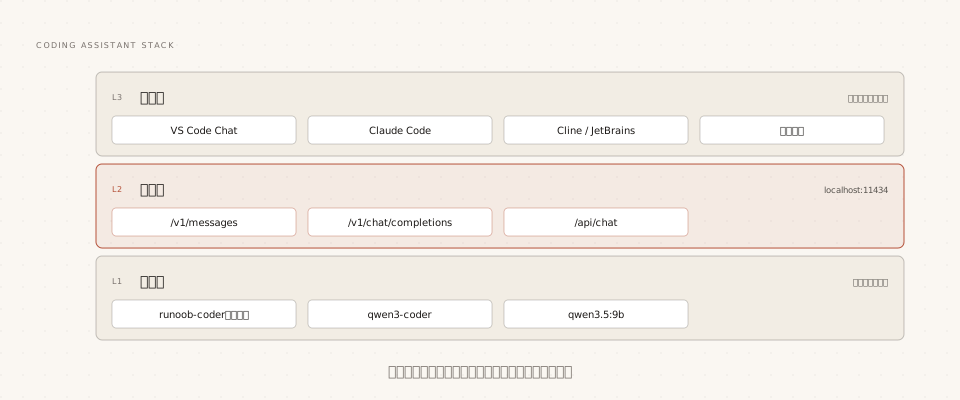
VS Code Chat Integration
After installing the official Ollama extension, select example-coder in the Chat model selector. No other configuration is needed.
Claude Code Integration
Example
ollama launch claude --model example-coder
# Manual method: point environment variables to local, and use the custom model name
export ANTHROPIC_AUTH_TOKEN=ollama
export ANTHROPIC_BASE_URL=http://localhost:11434
claude --model example-coder
After integration, Claude Code's file editing, command execution, and multi-round refactoring abilities are all driven by the local model. Before running long tasks, remember to confirm the context window has been set as described above.
Performance Comparison and Model Switching Strategy
Different tasks should use models of different sizes. Solidify the selection strategy to avoid debating every time:
| Task Type | Recommended Model | Reason |
|---|---|---|
| Function autocomplete, code explanation, writing unit tests | example-coder (local) | Fast, free, private |
| Cross-file refactoring, complex debugging | qwen3-coder or a cloud flagship | Requires stronger long-context understanding |
| Batch generation, scripted processing | Local small model + API | Zero-cost high volume |
The switching cost must be low enough for you to actually switch:
Example
/load qwen3-coder
# In VS Code, just click the model selector
# Specify with --model when starting Claude Code
Other ExtensionsA practical combined strategy: let the local small model handle 90% of daily requests, and switch to a large model or cloud model only when encountering truly tough problems. Ollama's multi-tag coexistence makes this "tiered" strategy completely free of switching costs.