GraphRAG Beginner Tutorial
GraphRAG is a structured, hierarchical retrieval-augmented generation (RAG) system open-sourced by Microsoft Research. Unlike traditional RAG, which uses pure text vector retrieval, GraphRAG first uses a large language model to extract entities and relationships from raw documents, constructs a knowledge graph, and then performs retrieval and question answering based on the graph structure.
This tutorial is designed for beginners with zero prior knowledge, guiding you through the complete workflow from installationdocument → knowledge graph → query Q&AThe model used isqwen-plus, and the Embedding uses Alibaba Cloud Tongyi'stext-embedding-v4。

What is GraphRAG
To understand GraphRAG, you first need to understand how it is better than traditional RAG.
Limitations of Traditional RAG
The workflow of traditional RAG (Baseline RAG) is: split documents into small chunks → generate vectors → when a question comes, use vector similarity to retrieve the most relevant chunks → feed them to the model to generate an answer.
This approach works well for "exact retrieval" type questions, but performs poorly in two scenarios:
- Cross-document relational reasoning: When the answer requires connecting information scattered across different documents, vector similarity cannot express this "relationship". For example, "What is the intersection between the CEO of Company A and the founder of Company B?"
- Global summary questions: When the question requires a macro-level summary of the entire corpus, a few text chunks cannot cover the whole picture. For example, "What are the most critical risk points in this batch of financial reports?"
How GraphRAG Solves These Two Problems
The core idea of GraphRAG is:Instead of directly retrieving text chunks, it first builds a knowledge graph and then retrieves based on the graph structure.。
The whole process is divided into two stages:
| Stage | What it does | What it outputs |
|---|---|---|
| Index | Use the LLM to read documents, extract entities (people, locations, organizations, etc.) and relationships, and build a knowledge graph; then use the Leiden algorithm to perform hierarchical clustering on the graph and generate a summary for each community. | Knowledge graph + community summaries + vector index |
| Query | When a user asks a question, different retrieval strategies are selected based on the question type, and graph data, community summaries, and original text chunks are all injected into the LLM context to generate an answer. | Structured answers with source references |
The indexing phase of GraphRAG requires calling a large number of LLM APIs, performing entity extraction and summarization on each text segment,Token consumption is far higher than traditional RAG. It is recommended that for first use, you first test the workflow with a small document (within a few thousand characters), and only process large-scale corpora after confirming it works correctly.
Comparison of Four Query Modes
| Query mode | Retrieval strategy | Suitable question types | Resource consumption |
|---|---|---|---|
| Global Search | Map-Reduce: traverse all community summaries | Global and summarization questions, such as "What is the core theme of these documents?" | High (concurrent multiple LLM calls) |
| Local Search | Starting from relevant entities, expand neighbors and associated texts | Questions about specific entities, such as "the main relationship network of a person" | Medium |
| DRIFT Search | Local Search + iterative follow-up guided by community information | Entity-related questions that require broad context, balancing depth and breadth | Medium-high |
| Basic Search | Standard vector similarity (same as traditional RAG) | Simple exact retrieval for comparison purposes | Low |
Environment Requirements
Before you begin, make sure your environment meets the following requirements.
| Dependencies | Version Requirements | Description |
|---|---|---|
| Python | 3.10 ~ 3.12 | Official support scope; 3.13 is not supported for now. |
| pip | Latest version | Recommended to firstpip install --upgrade pip |
| Alibaba Cloud Bailian API Key | — | Inbailian.console.aliyun.com/Apply |
| Disk Space | ≥ 2GB | Index artifacts (Parquet files, vector database) will take up a significant amount of space. |
Installation
GraphRAG is published on PyPI. It is recommended to install it in a Python virtual environment to avoid polluting the system environment.
Create a project directory and initialize a virtual environment
mkdir graphrag_demo
cd graphrag_demo
python -m venv .venv
You can also usethe uv commandto specify a Python version:uv venv --python 3.12
Activate the virtual environment
macOS / Linux:
source .venv/bin/activate
Windows:
.venv\Scripts\activate
Install GraphRAG
pip install graphrag
After installation completes, verify:
graphrag --help
It will output somegraphragcommand information. The output will look similar to:
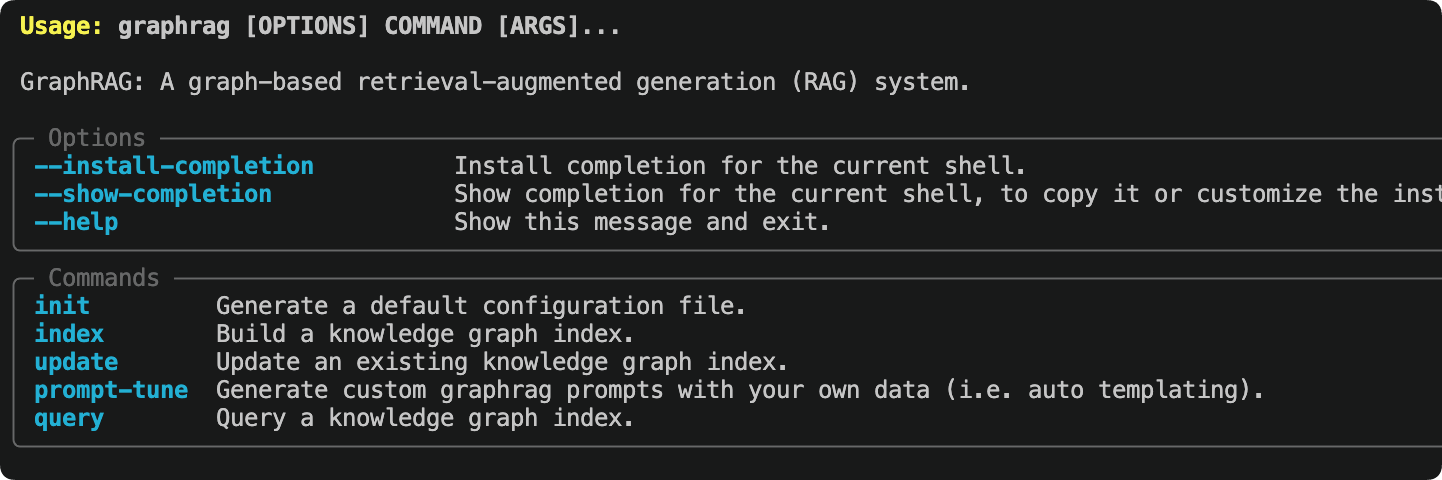
GraphRAG will automatically install dependencies such as LiteLLM, LanceDB, pandas, and numpy. The first installation may take a while (usually 1-3 minutes). Please be patient.
Initialize the workspace
Rungraphrag initcommand, GraphRAG will generate configuration files and the directory structure in the current directory.
graphrag init
It will prompt us to set the models. Just press Enter to accept the defaults; we can modify them later:
Specify the default chat model to use [gpt-4.1]:
Specify the default embedding model to use [text-embedding-3-large]:
During initialization, you will be prompted to enter the default Chat model and Embedding model. You can simply press Enter to skip for now; we will modify them manually later.settings.yaml。
After initialization is complete, the directory structure is as follows:
graphrag_demo/
├── .env                  # 存放 API Key 环境变量
├── settings.yaml         # 核心配置文件
├── input/                # 存放待处理的文本文件
├── output/               # 索引产物输出目录(自动生成)
└── prompts/              # Prompt 模板目录(自动生成)
After each minor version upgrade of GraphRAG, it is recommended to rerun
graphrag init --forceto refresh the configuration format; otherwise, errors may occur due to configuration structure changes. Note that this command will overwrite existingsettings.yamland prompts. It is recommended to back them up first.
Prepare test documents
GraphRAG supports.txt、.csv、.jsondocuments in the ... format. All files to be processed should be placed in theinput/directory.
We use the officially recommended test document—Charles Dickens' "A Christmas Carol"—downloaded directly from Project Gutenberg:
curl https://static.jyshare.com/download/pg24022.txt -o ./input/book.txt
If there is no network access, you can also create a Chinese test text yourself. The richer the content (including many characters, places, and event relationships), the more obvious GraphRAG's knowledge graph effect will be:
Place the file in theinputdirectory, with the filenamedemo.txt:
SpaceX 太空探索技术公司成立于 2002 年,由埃隆·马斯克(Elon Musk)在美国加利福尼亚州霍桑市创办。
公司目标是大幅降低太空运输成本,最终实现人类移民火星。

马斯克早年联合创立了 PayPal,2002 年以 15 亿美元出售给 eBay,随后将个人资产投入 SpaceX。
联合创始人中,汤姆·穆勒(Tom Mueller)担任推进系统首席设计师,主导了 Merlin 和 Raptor 发动机的研发。
格温·肖特维尔(Gwynne Shotwell)于 2002 年加入,2008 年起担任总裁兼 COO,负责公司日常运营和商业拓展。

2008 年,猎鹰 1 号(Falcon 1)在经历三次失败后首次成功入轨,成为首个由私营公司研制的液体轨道火箭。
2010 年,猎鹰 9 号(Falcon 9)首飞成功,同年龙飞船(Dragon)完成首次商业发射与回收。
2012 年,龙飞船成为首个对接国际空间站的商业航天器。

2015 年 12 月,猎鹰 9 号一级火箭首次实现陆地垂直回收,开创了火箭重复使用的新纪元。
此后 SpaceX 累计完成超过 200 次火箭回收,单枚助推器最高复用次数达到 20 次以上。

2020 年,载人龙飞船(Crew Dragon)将 NASA 宇航员送入国际空间站,标志着商业载人航天时代的开始。
Starlink 星链项目自 2019 年启动,截至 2024 年已在轨部署超过 5000 颗卫星,覆盖全球超过 60 个国家和地区。

Starship 星舰是 SpaceX 正在研发的超重型运载系统,由超重助推器(Super Heavy)和星舰飞船组成,
设计目标为完全可重复使用,近地轨道运力超过 100 吨,是 NASA 阿尔忒弥斯登月计划的指定着陆器。

竞争对手方面,SpaceX 主要面临来自蓝色起源(Blue Origin)和联合发射联盟(ULA)的压力。
蓝色起源由亚马逊创始人杰夫·贝索斯创立,专注亚轨道旅游和重型火箭 New Glenn 的研发。
ULA 由洛克希德·马丁和波音合资成立,长期承担美国军方卫星发射任务。

Configure qwen-plus and the Embedding model
This is the most critical step of the entire tutorial; you need to modify.envandsettings.yamltwo files.
Step 1: Configure the API Key
Open.envfile, and fill in your API Key:
Example
# Alibaba Cloud Bailian API Key
DASHSCOPE_API_KEY=sk-your-dashscope-api-key-here
Step 2: Modify settings.yaml
Opensettings.yaml, and replace the entire content with the following configuration.
GraphRAG 2.x uses LiteLLM to uniformly call various models,model_provider: openaiTogether withapi_baseyou can forward requests to any OpenAI-compatible interface:
completion_models:
  default_completion_model:
    model_provider: openai
    model: qwen-plus                              # 中文抽取稳定,成本低于 qwen-plus
    auth_method: api_key
    api_key: ${DASHSCOPE_API_KEY}
    api_base: https://dashscope.aliyuncs.com/compatible-mode/v1
    call_args:
      temperature: 0                              # 提高结构化稳定性
      max_tokens: 4096
    retry:
      type: exponential_backoff
      max_retries: 5
      base_delay: 2

embedding_models:
  default_embedding_model:
    model_provider: openai
    model: text-embedding-v4                      # 通义向量模型
    auth_method: api_key
    api_key: ${DASHSCOPE_API_KEY}
    api_base: https://dashscope.aliyuncs.com/compatible-mode/v1
    retry:
      type: exponential_backoff
      max_retries: 5

input:
  type: text

input_storage:
  type: file
  base_dir: input

chunking:
  type: tokens
  size: 600                                       # 中文推荐 500~800
  overlap: 100
  encoding_model: o200k_base

output_storage:
  type: file
  base_dir: output

reporting:
  type: file
  base_dir: logs

cache:
  type: json
  storage:
    type: file
    base_dir: cache

vector_store:
  type: lancedb
  db_uri: output/lancedb

embed_text:
  embedding_model_id: default_embedding_model    # 注意不要带逗号
  batch_size: 10                                 # 百炼 embedding 单次最多10条
  batch_max_tokens: 6000
  concurrency: 1                                 # 避免并发触发限流

extract_graph:
  completion_model_id: default_completion_model
  entity_types: []                               # 自动识别实体
  max_gleanings: 3                               # 提高关系补抽成功率

summarize_descriptions:
  completion_model_id: default_completion_model
  max_length: 500

cluster_graph:
  max_cluster_size: 20                           # 降低社区数量

extract_claims:
  enabled: false

community_reports:
  completion_model_id: default_completion_model
  max_length: 1500
  max_input_length: 4000                         # 防止生成阶段过慢

snapshots:
  graphml: true                                  # 导出图结构
  embeddings: false

local_search:
  completion_model_id: default_completion_model
  embedding_model_id: default_embedding_model
  top_k_entities: 10

global_search:
  completion_model_id: default_completion_model
  map_max_length: 500
  reduce_max_length: 1500
About Qwen's JSON output:GraphRAG requires the model to stably return JSON format during entity extraction. Qwen supports JSON mode; set
temperatureto 0 can further improve output stability and reduce the probability of parsing failures. If JSON parsing errors still occur, you can trycall_argsadding toresponse_format: {type: json_object}。
Start indexing
After configuration is complete, run the indexing command. GraphRAG will automatically readinput/all files in the directory, call qwen-plus for entity extraction, relation recognition, and summary generation, and finally build a complete knowledge graph.
graphrag index
You will see progress output similar to the following:
⠹ GraphRAG Indexer
├── Loading Input (text) - 1 files loaded
├── create_base_text_units
├── extract_graph
│   └── Entity Extraction: 100%|████████████| 12/12 [02:34<00:00]
├── summarize_descriptions
├── cluster_graph
├── community_reports
└── generate_text_embeddings
All workflows completed successfully.
After indexing is complete,output/a series of Parquet files will be generated in the directory:
| File | Content |
|---|---|
entities.parquet | All extracted entities (name, type, description, vector) |
relationships.parquet | Relations between entities (source entity, target entity, relation description, weight) |
communities.parquet | Communities generated by Leiden clustering (hierarchical structure) |
community_reports.parquet | Summary report for each community (core data for Global Search) |
text_units.parquet | Original text chunks (reference source for Local Search) |
lancedb/ | Vector database, storing vectors for various entities and text chunks |
Indexing time reference:For a Chinese document of a few thousand characters (about 10–20 text chunks), using qwen-plus takes approximately 3–10 minutes; for large document sets over 100,000 characters, it may take several hours. It is recommended to first run through the workflow with a small document, then process large-scale data.
Run queries
After indexing is complete, you can query the knowledge graph. GraphRAG provides two methods: CLI and Python API.
CLI queries
Global search (suitable for macro-level questions):
graphrag query "文档中涉及的主要组织和人物有哪些?它们之间有什么关系?"
Local search (suitable for questions about specific entities), add--method local:
graphrag query "SpaceX 公司的主要业务和合作伙伴有哪些?" --method local
DRIFT Search (balancing depth and breadth):
graphrag query "埃隆·马斯克的职业背景和主要贡献是什么?" --method drift
Basic vector search (compared with traditional RAG):
graphrag query "Starship 星舰的设计目标和能力是什么?" --method basic
Python API queries
Call GraphRAG queries in code, suitable for integration into applications.
Example
# Use GraphRAG Python API for queries
import asyncio
from graphrag.api import GraphRagConfig, search
async def run_query():
# Load configuration file (read settings.yaml from current directory)
config = GraphRagConfig.from_yaml("settings.yaml")
# ── Global Search Example ──────────────────────────────
print("=" * 60)
print("[Global Search] Global question")
print("=" * 60)
global_result = await search(
config=config,
query="What is the relationship network of the major companies and people mentioned in the documents?",
method="global", # Use Global Search
)
print(global_result.response)
print()
# ── Local Search Example ──────────────────────────────
print("=" * 60)
print("[Local Search] Question about a specific entity")
print("=" * 60)
local_result = await search(
config=config,
query="What is the background of SpaceX's founding team and its main products?",
method="local", # Use Local Search
)
print(local_result.response)
print()
# View retrieved source information (optional)
if hasattr(local_result, "context_data"):
entities = local_result.context_data.get("entities", [])
print(f"Number of relevant entities retrieved: {len(entities)}")
if __name__ == "__main__":
asyncio.run(run_query())
python query_demo.py
============================================================
【Global Search】全局性问题
============================================================
根据文档内容,主要涉及以下公司和人物关系网络:

**公司层面:**
- SpaceX 公司:主要角色,覆盖商业发射、载人航天、卫星互联网三大方向
- NASA:重要合作伙伴,阿尔忒弥斯登月计划 Starship 着陆器供应商
- 蓝色起源 / 联合发射联盟:主要竞争对手

**人物层面:**
- 马斯克(创始人):PayPal 联合创始人,SpaceX CEO 兼首席工程师
- 汤姆·穆勒(联合创始人):推进系统首席设计师,Merlin 和 Raptor 发动机之父
- 格温·肖特维尔:总裁兼 COO,负责公司商业运营

**关键关系:**
SpaceX 与 NASA 于 2020 年建立战略合作关系,
三家公司(SpaceX、蓝色起源、ULA)在商业航天发射市场形成竞争格局...

============================================================
【Local Search】针对特定实体的问题
============================================================
SpaceX 公司成立于 2002 年,创始团队包括:
- 马斯克:PayPal 联合创始人,SpaceX CEO 兼首席工程师,航天领域超二十年经验
- 汤姆·穆勒:推进系统首席设计师,主导 Merlin 和 Raptor 发动机研发

主要产品:
1. 猎鹰 9 号:全球首个实现垂直回收的轨道级火箭,已完成 200 次以上回收
2. Starship 星舰:超重型运载系统,近地轨道运力超 100 吨,完全可重复使用

检索到相关实体数量:12
Prompt auto-tuning
GraphRAG officially strongly recommends running automatic prompt tuning before processing your own data.
Automatic tuning will have the LLM read part of your documents and then generate entity extraction prompts customized for your data domain, resulting in higher-quality knowledge graph construction.
graphrag prompt-tune --config settings.yaml --root . --language Chinese
After tuning is complete,prompts/the Prompt files in the directory will be automatically updated. If your documents are in Chinese, add the--language Chineseparameter so that the generated Prompt also uses Chinese, improving Chinese entity extraction accuracy.
Prompt tuning itself also consumes LLM tokens (roughly equivalent to a quick indexing of a small number of documents). It is recommended to re-tune each time you change your dataset, rather than always using the default prompts.
Quick reference for common CLI commands
The following are the most commonly used commands in daily GraphRAG usage.
| Command | Description |
|---|---|
graphrag init | Initialize the workspace and generate.env、settings.yaml、input/ |
graphrag init --force | Force re-initialization (use after upgrading versions); will overwrite existing configuration |
graphrag index | Pairinput/Run the full indexing pipeline on the documents in the directory |
graphrag index --resume | Resume indexing from where it was interrupted (LLM calls are cached, so tokens are not consumed repeatedly) |
graphrag index --update | Incremental indexing; only processes newly added documents |
graphrag query "问题" | Global Search query (default mode) |
graphrag query "问题" --method local | Local Search query |
graphrag query "问题" --method drift | DRIFT Search query |
graphrag query "问题" --method basic | Basic Search (vector retrieval) |
graphrag prompt-tune | Auto-tune Prompt (recommended to run before processing new datasets) |
Complete settings.yaml field reference
Below, we providesettings.yamla detailed explanation of the most commonly used configuration items to facilitate further adjustments.
Model-related
| Field | Type | Description |
|---|---|---|
model_provider | string | Model provider; fill in when using an OpenAI-compatible interfaceopenai |
model | string | Model name; for Qwen, fill inqwen-plus 或 qwen-max |
api_key | string | API Key; recommended to use${ENV_VAR}environment variable references |
api_base | string | API endpoint; for Qwen, it ishttps://dashscope.aliyuncs.com/compatible-mode/v1 |
call_args.temperature | float | Generation temperature; recommended to set to 0 during indexing to improve stability |
call_args.max_tokens | int | Maximum number of tokens per generation |
retry.max_retries | int | Maximum number of retries when a request fails |
Chunking-related
| Field | Description | Recommended value |
|---|---|---|
chunking.size | Maximum number of tokens per text chunk | English: 1200~1500; Chinese: 600~1000 |
chunking.overlap | Number of overlapping tokens between adjacent chunks to avoid entities being truncated at boundaries | 50~150 |
chunking.type | tokens(chunk by token) orsentence(chunk by sentence) | Generally usetokens |
Entity extraction-related
| Field | Description | Recommendation |
|---|---|---|
extract_graph.entity_types | Tell the model the list of entity types to focus on extracting | Customize based on your business domain, such asperson, company, product, technology |
extract_graph.max_gleanings | Maximum number of follow-up questions per text chunk (follow-up questions can improve recall but consume more tokens) | Set to 1 when balancing cost, set to 2 when pursuing quality |
FAQ
What if indexing fails midway?
GraphRAG caches the results of each LLM call. After a failure, simply rerungraphrag indexThe text chunks that have already been successfully processed will be read from the cache and will not consume tokens repeatedly.
If you want to restart from a specific step, use--resumethe parameter:
graphrag index --resume
How to handle JSON parse errors?
The entity extraction phase requires the model to strictly return JSON format. IfJSONDecodeError, you can try the following methods:
- In
call_argsaddresponse_format: {type: json_object}(requires the model to support this parameter) - will
temperatureSet to 0 - will
max_gleaningsSet to 0 (reduce follow-up questions, lower error probability) - Run
graphrag prompt-tuneRe-optimize the Prompt to make the model more familiar with the output format
How to choose between Global Search and Local Search?
| Question type | Recommended mode | Example |
|---|---|---|
| Summarizing, global | Global Search | "What is the core theme of these documents?" "The full picture of the entire character relationship network" |
| For specific entities | Local Search | "Musk's career experience?" "Main technical characteristics of the Falcon 9 rocket" |
| Requires both depth and breadth | DRIFT Search | "Analysis of the relationship between a certain person and the surrounding ecosystem" |
| Simple precise lookup | Basic Search | "In which year was SpaceX founded?" |
How to control high token consumption?
- will
chunking.sizeIncrease appropriately (fewer text chunks = fewer LLM calls) - will
extract_graph.max_gleaningsSet to 0 or 1 - In
entity_typeskeep only the entity types most relevant to the business - Use a cheaper model during indexing, and switch to a more powerful model during query as needed
GraphRAG provides an "asymmetric model configuration" strategy: in
completion_modelsDefine multiple models in ..., use low-cost models during indexing, and use more capable models for critical queries during the query phase, finding a balance between cost and quality.
How to handle Chinese documents?
When handling Chinese documents, the following points need attention:
- Ensure
input.encoding: utf-8(UTF-8 by default already) - Decrease
chunking.size(Chinese characters have high information density; 600~1000 tokens suffice) - Run
graphrag prompt-tune --language ChineseGenerate Chinese Prompt entity_typesYou can appropriately add Chinese-specific types, such asgovernment_agency(government agencies),policy(policies)
Further reading
| Topic | Description | Link |
|---|---|---|
| Official full documentation | Contains detailed descriptions of all configuration items | microsoft.github.io/graphrag |
| Configuration reference | Full field description of settings.yaml | microsoft.github.io/graphrag/config/yaml/ |
| Model selection guide | How to integrate various LLMs (including LiteLLM usage) | microsoft.github.io/graphrag/config/models/ |
| Detailed explanation of the query engine | Principles and parameter tuning of the four query modes | microsoft.github.io/graphrag/query/overview/ |
| Prompt tuning guide | Complete description of automatic and manual Prompt tuning | microsoft.github.io/graphrag/prompt_tuning/overview/ |
| Visualization guide | Use official tools to visualize the knowledge graph | microsoft.github.io/graphrag/visualization_guide/ |
| GraphRAG paper | Original paper from Microsoft Research, to understand the underlying principles | arxiv.org/pdf/2404.16130 |