Large Model Multimodal
Multimodal large models allow AI to process multiple forms of information simultaneously, such as text, images, audio, and video, and are one of the most core development directions for large models today.
This article explains the concept, development process, internal principles, and typical capabilities of multimodality from scratch, and provides at the endBuild Your First Multimodal Application in 5 Minutesa runnable example.
1. What is Multimodal?
Ordinary large models usually can only process one type of information—textIf you give a traditional AI an image and ask it, "How many cats are in the image?", the model cannot do it without multimodal support.
But the real world is not composed of text; rather, it is made up of multiple types of sensory information:
| Sensory organ | Corresponding information |
|---|---|
| Eyes | Image |
| Ear | Sound |
| Mouth | Language |
| hand | Action |
| Video | Image + Time |
| Web page | Text + Image + Structure |
Therefore,MultimodalThis concept came into being.
To understand it in one sentence:
Multimodal = one model that simultaneously understands and generates multiple forms of information.
Let's look at two typical examples:
1. Input an image plus a question:"Is the food in this picture high in calories?"The model answers:"This is fried chicken and french fries, estimated at about 1,200 calories."
-
2. Input voice:"Help me summarize this meeting"The model outputs a text summary with action suggestions.
This ability to describe images and summarize audio is the most direct manifestation of multimodality.
2. What is a Modal?
Modality isthe representation form of information.。
Different modalities correspond to different inputs and outputs. The table below lists common modalities and their typical applications:
| Modality | Input example | Output example | Typical application |
|---|---|---|---|
| Text | Novels, chat logs | Answers, articles | Q&A, writing, translation |
| Image | Photos, screenshots | Image understanding, image generation | OCR, visual Q&A |
| Audio | Speech, music | Transcribe text, synthesize speech | Meeting summaries, voice assistants |
| Video | Video stream | Video analysis, timeline | Teaching summaries, content retrieval |
| Sensor | GPS, temperature | Control signal | Robotics, autonomous driving |
| Action | Mouse clicks, keyboard input | Execute actions | GUI Agent, automation |
The more modalities a model supports, the closer its capabilities are to humans, which is why all leading labs are upgrading text models to multimodal models.
3. Development Process of Multimodal Large Models
From processing only text to seeing, hearing, and outputting video, multimodal large models have gone through three clear stages.
Phase 1: Language Models (LLM)
In this stage, models take text as both input and output. Representative products include the OpenAI GPT series, Anthropic Claude, and Google Gemini.
They can write code, write articles, translate, and answer questions. They are highly capable, but have a fundamental limitation:They cannot see.。
Phase 2: Vision Language Models (VLM)
VLM adds the ability to 'see images' on top of an LLM. A typical use case is uploading a screenshot of a webpage and asking 'why is the layout wrong?' The model replies 'CSS conflict'.
Models at this stage begin to possess capabilities such as image understanding, OCR, and chart understanding.
Phase 3: Native Multimodal Models
Native multimodal models no longer treat 'image' and 'text' as two concatenated modules. Instead, from the very start of training, theyprocess images, audio, video, and text in a unified way.。
They possess complete capabilities: seeing, hearing, speaking, reasoning, and acting. This is also the mainstream direction in the industry today.
4. How Do Multimodal Models Work Internally?
The internal workings of multimodal models can be summarized in one sentence:Convert all data into a unified vector space.。
For example:
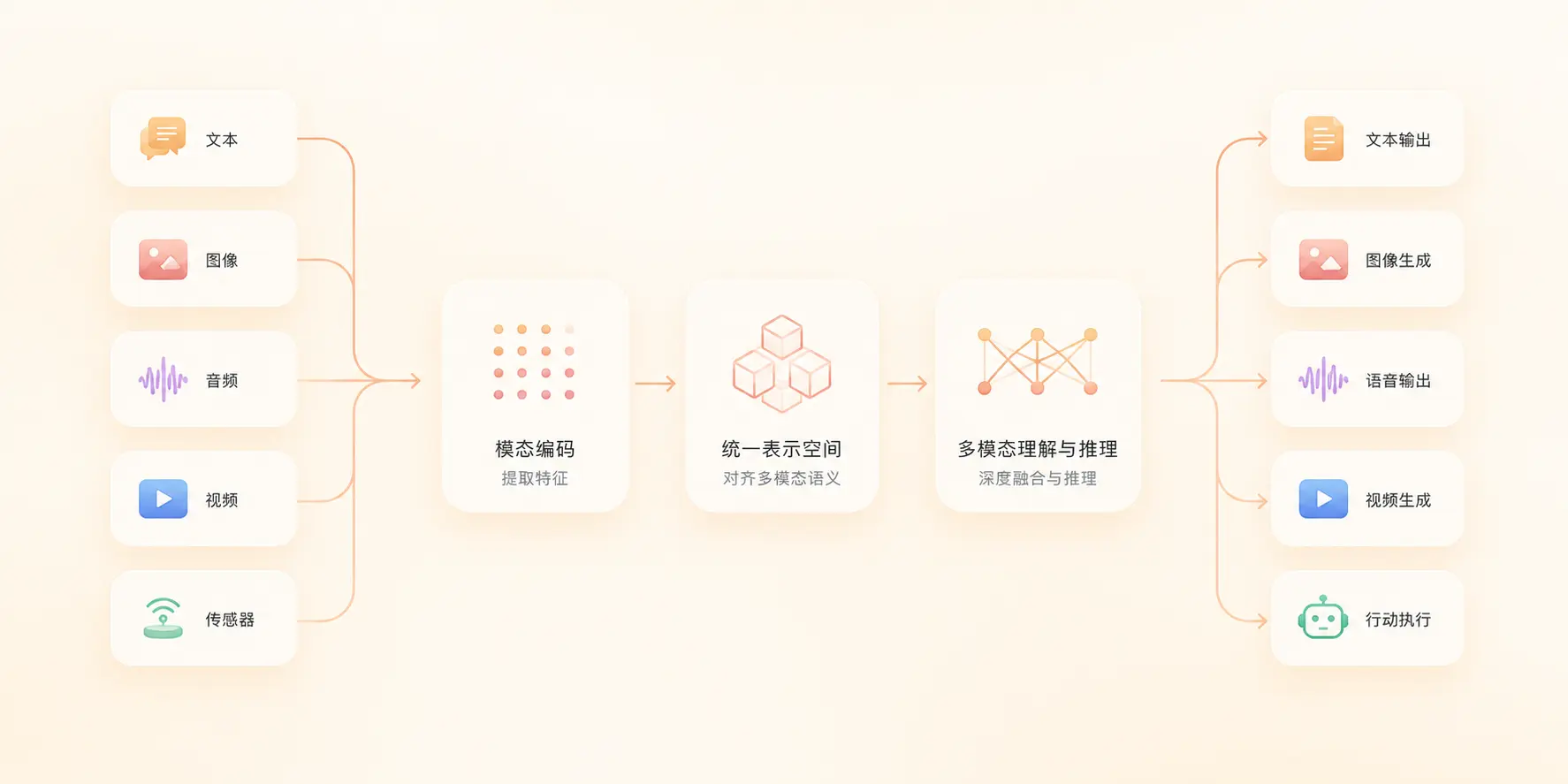
The three expressions "one只cat", "cat", and cat.png, although from different modalities, will land in nearby regions in the vector space after encoding.
The overall process is shown in the figure below:
The figure above shows the complete pipeline from input to output; let's break down each step below.
Step 1: Encoding
Different modalities must first be converted into numbers before the model can process them.
| Modality | Raw data | Encoded |
|---|---|---|
| Text | Hello | [2034, 789] a set of token ids |
| Image | Pixel matrix | Visual feature vector |
| Audio | Waveform | Spectral feature vector |
Step 2: Unified Semantic Space
The key step after encoding is to make "cat", "cat", and cat.png in the vector spaceclose to each other。
This is the essence of "cross-modal understanding": projecting the features of different modalities into the same space.
Step 3: Generating Output
After reasoning in the unified space, the model "restores" the results into different modalities on demand.
The output can be any one of: text, image, audio, and video.
For example: upload an image → describe it → then generate an introductory video; this is a complete multimodal generation chain.
5. Why Can Transformer Unify Multimodality?
There is only one core reason:Attention mechanism。
Transformer's core formula is Attention(Q, K, V), which means "the model decides for itself what to focus on."
For example: when a user asks "Who is playing basketball in the image?", the model will:
- First look at the image and identify all the people in it
- Identify the basketball in the image
- Determine the relationship between "who" and "basketball"
- Combine the context to output the answer
This ability to "autonomously decide where to focus" makes Transformer naturally suited for handling multimodal input:
| Input | What the model is focusing on |
|---|---|
| Text-only | Semantic relationships between sentences |
| Image + text | Correspondence between image regions and text descriptions |
| Video + text | Relationship between timeline segments and questions |
This is also why Attention has become a "standard feature" of almost all modern large models — it was inherently designed for cross-modality.
6. Typical Capabilities of Multimodal Models
Multimodal models have five typical capabilities; the figure below shows the relationships among them.
1. Image Understanding
Input a screenshot, and the model outputs page issues, UI analysis, or OCR results.
The most common scenario for programmers is: screenshot the error, let AI locate the problem.
2. Image Generation
Enter a text description like "Generate a futuristic city", and the model returns an AI image.
Typical applications: posters, covers, game assets, product sketches.
3. Speech Interaction
Speech as input, the model responds in real time, with capabilities covering ASR (speech-to-text), TTS (text-to-speech), and conversation.
4. Video Understanding
Upload an instructional video, and the model outputs a summary, timeline, and answerable key segments.
5. Agent
Enter "Help me make a PPT", and the model starts executing a complete action chain: search materials → generate outline → create slides → revise → export.
Agent is the ultimate form combining "see, hear, speak" with "hands-on execution".
7. Five Terms Beginners Must Understand
When reading multimodal-related documentation, the following terms will appear repeatedly; memorize them first:
| Term | Meaning | Example |
|---|---|---|
| Token | The smallest unit processed by the model; text is split by words | "Hello world" → [Hello][world] |
| Embedding | The process of converting information into numerical coordinates | "Cat" → [0.12, 0.78, 0.33, ...] |
| Context | The history and background information of the current conversation | User says "Apple" + "Context: phone" = iPhone, not the fruit |
| Attention | Determines which part of the input the model focuses on | When looking at an image, the model first looks at "person" then "basketball" |
| Inference | The process by which the model generates output based on input | After the user inputs a question, the model "thinks and answers" |
These five terms run through all large model documentation; build intuition first, then revisit details when needed.
8. Hands-on Experience: Build Your First Multimodal Application in 5 Minutes
Goal of this section: upload an image, AI outputs a text description.
The entire process requires no deep learning background; just knowing Python is enough.
8.1 Prepare the Project
First create a project multimodal-demo, and use the openai library to test:
Example
mkdir multimodal-demo
# Enter project directory
cd multimodal-demo
# Install the OpenAI official SDK (compatible with multiple multimodal models)
pip install openai
Inmultimodal-demoUpload an image in the directorycat-cartoon.webp, the image is as follows (you can right-click to save it for testing):

8.2 Write the Calling Code
This example usesArk's Coding Plan, and their doubao-seed-2.0-pro model supports multimodal processing.
Save the following code as test.py:
Example
import os
from io import BytesIO
from openai import OpenAI
from PIL import Image
# ==================== Ark Configuration ====================
ARK_API_KEY = "ark-xxxx" # Fill in your Key here
ARK_BASE_URL = "https://ark.cn-beijing.volces.com/api/coding/v3" # It is recommended to use the universal v3 API
MODEL_ENDPOINT = "doubao-seed-2.0-pro" # Model that supports multimodal
# Initialize the client
client = OpenAI(
api_key=ARK_API_KEY,
base_url=ARK_BASE_URL,
timeout=60
)
def prepare_image_base64(image_path: str, max_size: int = 1024) -> str:
"""
Read the local image, process the alpha channel, resize it, and convert it to a base64 string
"""
if not os.path.exists(image_path):
raise FileNotFoundError(f"Test image not found: {image_path}")
with Image.open(image_path) as img:
# 1. Process the RGBA transparent background
if img.mode == "RGBA":
background = Image.new("RGB", img.size, (255, 255, 255))
background.paste(img, mask=img.split()[-1])
img = background
elif img.mode != "RGB":
img = img.convert("RGB")
# 2. Scale proportionally (to prevent large images from blowing up Payload/Token)
img.thumbnail((max_size, max_size))
# 3. Convert to Base64
buf = BytesIO()
img.save(buf, format="JPEG", quality=85) # Compress the quality appropriately
b64 = base64.b64encode(buf.getvalue()).decode("utf-8")
return f"data:image/jpeg;base64,{b64}"
def multimodal_chat(img_path: str, prompt: str):
"""Multimodal conversation test"""
try:
print(f"Processing image: {img_path} ...")
img_b64 = prepare_image_base64(img_path)
print("Sending request to Volcano Engine Ark platform...")
res = client.chat.completions.create(
model=MODEL_ENDPOINT,
messages=[
{
"role": "user",
"content": [
{"type": "text", "text": prompt},
{"type": "image_url", "image_url": {"url": img_b64}}
]
}
],
temperature=0.7,
max_tokens=1024
)
print("\n" + "="*10 + " Recognition Result " + "="*10)
print(res.choices[0].message.content)
print("="*30)
return res
except FileNotFoundError as e:
print(f"[Error] {e}")
except Exception as e:
print(f"[API request failed] Please check whether the network or Endpoint/Key is correct. Error message:\n{e}")
return None
if __name__ == "__main__":
# Test configuration
image_file = "./cat-cartoon.webp"
question = "Describe the content of this image in detail, analyzing the main subject, colors, and scene"
# Simulate creating a temporary test image (if there is no corresponding image locally, for quick visual debug)
if not os.path.exists(image_file):
print(f"{image_file} not detected, generating a temporary test image...")
Image.new('RGB', (200, 200), color = (73, 109, 137)).save(image_file)
multimodal_chat(image_file, question)
Run Pyhton, the output is as follows:
在发送请求至火山引擎方舟平台...

========== 识别结果 ==========
这是一张**Q版萌系卡通风格的数字角色插画**,整体背景为纯净的纯白色,没有任何环境元素,所有视觉重心都集中在中心的小猫主体上,是典型的独立角色立绘/吉祥物设计。
---
### 一、画面主体详细描述
主体是一只端正坐姿的卡通幼橘猫,是经过萌化设计的家养橘白虎斑猫形象,整体气质乖巧天真、亲人友好:
1.  **比例与姿态**:采用萌系设计特有的大头短身比例,头部占整体高度的60%左右,
...
Open the browser console, and you'll see the model's textual description of the image. The whole pipeline is:
User uploads an image → Browser passes the image URL to the OpenAI SDK → Multimodal model understands the image → Returns a textual description → Prints to console.
8.3 Common Extensions
After completing the minimal runnable code above, you can continue to extend:
| What you want to do | How to modify |
|---|---|
| Change to uploading local files | After the user uploads an image, read it, convert it to base64, and then assign it toimage_file |
| Support continuous multi-turn dialogue | Append historical Q&A tomessagesarray |
| Switch to other vendors' models | Specify when constructing the OpenAI client.baseURL, such as Qwen, OpenAI, Anthropic compatible endpoints |
| Speech processing. | holdtype: "image_url"Change totype: "input_audio", and provide base64 audio. |
9. Learning Path (Recommended)
If you're new to large language models, the diagram below is a proven 6-week learning path.
10. What Will Happen in the Future?
Looking back on the evolution of software forms, a clear trend can be seen:
In the past: software = functionality.
Now: software = model.
Future: Software = Multimodal Intelligent Agents.
This means that in the future, users will only need to say one sentence, such as "make a website," and the model will automatically complete the entire process of design, coding, deployment, and operations.
Multimodality is not as simple as "adding an image-viewing function to the model."
What it really changes is:
Let computers begin to directly understand the real world.
This is exactly the most important paradigm shift in the current AI industry, and also the direction all developers should invest in.
Frequently Asked Questions
Which is better: multimodal models or regular LLMs?
It depends on the scenario: for plain-text writing, code generation, and translation, a regular LLM is more cost-effective; when you need to view images, listen to audio, or understand video, a multimodal model is the only choice.
Can multimodal models run locally?
Yes, but the cost is relatively high. Small-parameter VLMs (such as Qwen2-VL-7B) can run on consumer-grade GPUs with 16GB of VRAM; larger models usually require cloud GPUs or API calls.
Must the output of a multimodal model be text?
Not necessarily. Native multimodal models can output text, images, audio, and even video; pure VLMs usually output only text.
How to choose a multimodal API?
If you only need image understanding: OpenAI gpt-4o, Gemini 2.5 Flash, and Qwen2-VL are all cost-effective choices; if you need "see + listen + real-time voice", it is recommended to directly use the OpenAI Realtime API or Gemini Live.
Other extensions