AI Agent Q&A Example
In this chapter, we will build our first real AI Agent.
We'll start with a simple Q&A Agent and gradually add more features.
Project Structure Preparation
First, create the directoryexample-ai-agent:
mkdir example-ai-agent
Enter the directoryexample-ai-agent, and use the uv command to create a virtual environment:
cd example-ai-agent

# 创建名为 .venv 的虚拟环境(默认)
uv venv

# 激活环境(macOS/Linux)
source .venv/bin/activate

# 激活环境(Windows)
.venv\Scripts\activate
Use uv to create and activate a virtual environment. For more details, you can readthe uv tutorial。
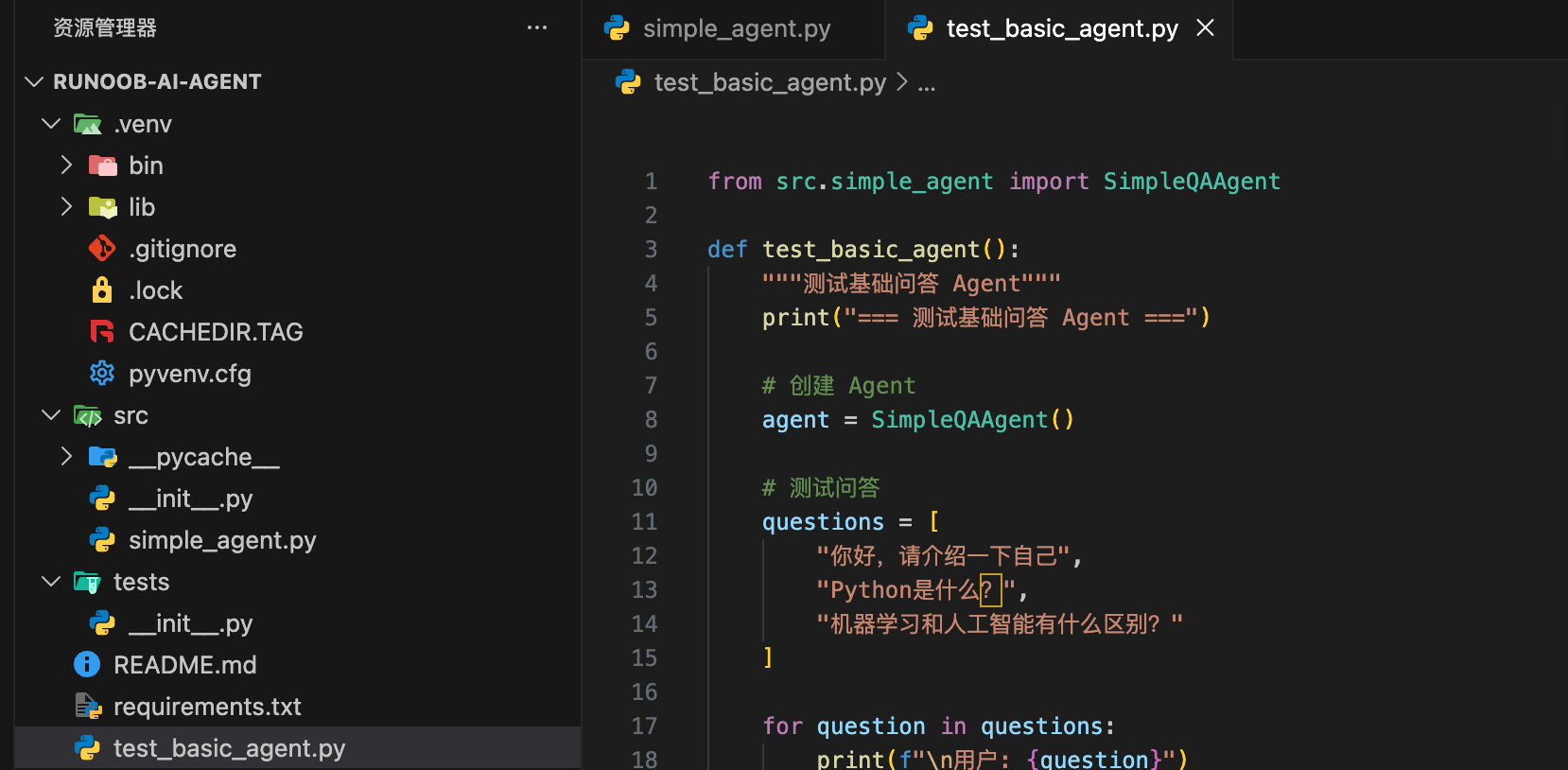
Create the project directory structure:
example-ai-agent/
├── .env
├── .gitignore
├── requirements.txt
├── test_basic_agent.py
├── README.md
├── src/
│   ├── __init__.py
│   └── simple_agent.py
└── tests/
    └── __init__.py
Apply for API Key on Alibaba Bailian
This chapter requires the search feature, so we use the Alibaba Qwen model because it has built-in search functionality.
The Tongyi Qianwen model on Alibaba Cloud Bailian supports OpenAI-compatible APIs. You only need to adjust the API Key, BASE_URL, and model name to migrate your existing OpenAI code to Alibaba Cloud Bailian.
- base_url: Replace with https://dashscope.aliyuncs.com/compatible-mode/v1
- api_key: Replace with your Alibaba Cloud Bailian API Key
- model: Replace with qwen3-max
Reference link:https://help.aliyun.com/zh/model-studio/compatibility-of-openai-with-dashscope
We need to activate the Alibaba Cloud Bailian model service and obtain an API-KEY.
First, use your Alibaba Cloud main account to access the Bailian Model Studio platform:https://bailian.console.aliyun.com/, then click Login in the top-right corner. After logging in, click the gear ⚙️ icon in the top-right corner, select API key, and copy it. If you don't have one, you can also create an API key:
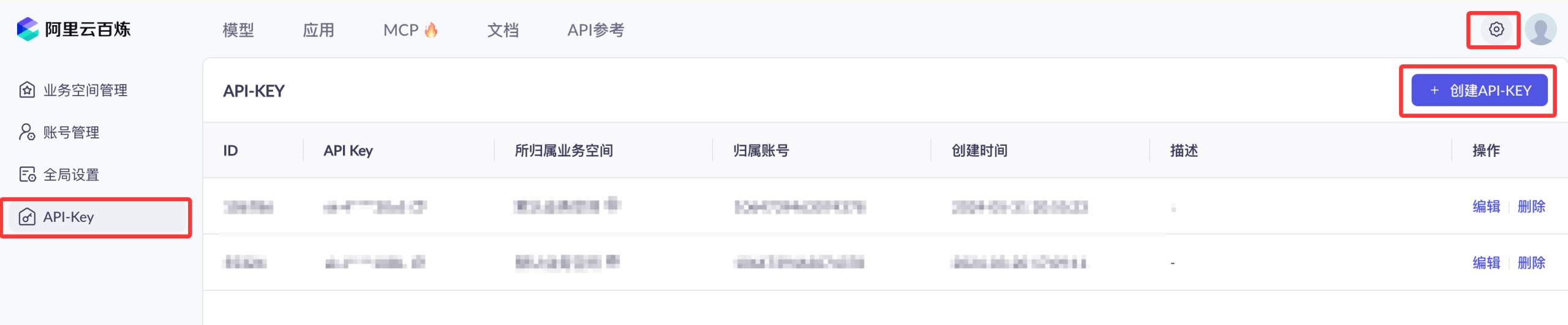

Activating Alibaba Cloud Bailian does not incur any fees. Charges only apply to model calls (after exceeding the free quota), model deployment, and model fine-tuning.
] APIs are now billed by token. Fortunately, the prices are quite affordable, so we can start by purchasing the cheapest package:Alibaba Cloud Bailian Large Model Service Platform。
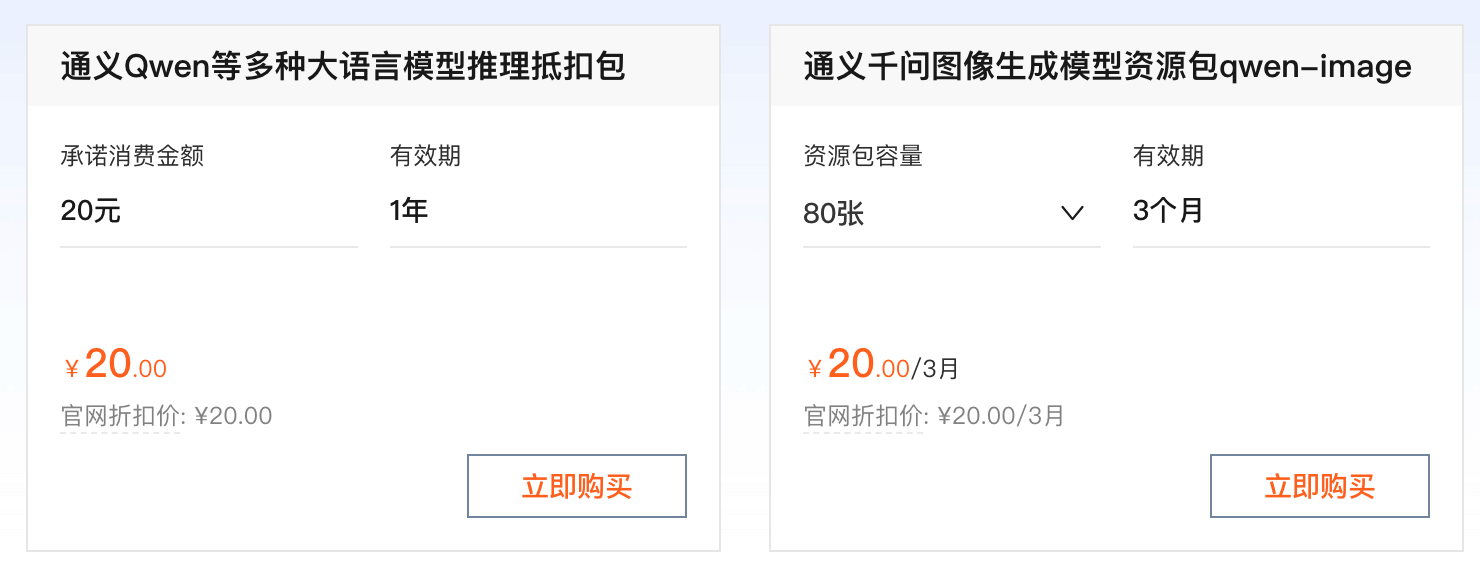
You can also directly use the Coding Plan package from Bailian and Ark:https://www.example.com/claude-code/coding-plan.html。
Create the basic Agent class:
Example
import os
from typing import List, Dict, Any
from openai import OpenAI
from dotenv import load_dotenv
# Load environment variables
load_dotenv()
class SimpleQAAgent:
"""Simple Q&A Agent"""
def __init__(self, model: str = "qwen3-max"): # Set default model to DeepSeek
"""
Initialize Agent
Args:
model: The model name to use, defaults to DeepSeek
"""
# api_key = os.getenv("OPENAI_API_KEY")
api_key = "sk-xxx" # Your API key
base_url = "https://dashscope.aliyuncs.com/compatible-mode/v1"
if not api_key:
raise ValueError("Please set the OPENAI_API_KEY environment variable")
self.client = OpenAI(
api_key = api_key,
base_url = base_url)
self.model = model
self.conversation_history: List[Dict[str, str]] = []
self.system_prompt = "You are a helpful AI assistant. Please answer user questions politely and accurately."
def add_to_history(self, role: str, content: str):
"""Add message to conversation history"""
self.conversation_history.append({
"role": role,
"content": content
})
# Keep history length within 10 turns (to prevent token overflow)
if len(self.conversation_history) > 10:
self.conversation_history = self.conversation_history[-10:]
def ask(self, question: str) -> str:
"""
Ask the Agent a question
Args:
question: The user's question
Returns:
The Agent's answer
"""
# Add user question to history
self.add_to_history("user", question)
# Prepare message list
messages = [
{"role": "system", "content": self.system_prompt}
]
messages.extend(self.conversation_history)
try:
# Call OpenAI API
response = self.client.chat.completions.create(
model=self.model,
messages=messages,
temperature=0.7,
max_tokens=500
)
# Extract answer
answer = response.choices[0].message.content
# Add assistant answer to history
self.add_to_history("assistant", answer)
return answer
except Exception as e:
error_msg = f"Error calling API: {str(e)}"
print(error_msg)
return error_msg
def clear_history(self):
"""Clear conversation history"""
self.conversation_history.clear()
Create a test script to test the basic Agent:
Example
from src.simple_agent import SimpleQAAgent
def test_basic_agent():
"""Test basic Q&A Agent"""
print("=== Test Basic Q&A Agent ===")
# Create Agent
agent = SimpleQAAgent()
# Test Q&A
questions = [
"Hello, please introduce yourself",
"What is Python?",
"What is the difference between machine learning and artificial intelligence?"
]
for question in questions:
print(f"\nUser: {question}")
answer = agent.ask(question)
print(f"Assistant: {answer}")
# Test conversation coherence
print("\n=== Test Conversation Coherence ===")
agent.clear_history()
# First round
q1 = "My favorite color is blue"
a1 = agent.ask(q1)
print(f"User: {q1}")
print(f"Assistant: {a1}")
# Second round (should remember the previous conversation)
q2 = "What color did I just say is my favorite?"
a2 = agent.ask(q2)
print(f"\nUser: {q2}")
print(f"Assistant: {a2}")
print("\nTest complete!")
if __name__ == "__main__":
test_basic_agent()
Run the test:
python test_basic_agent.py

=== 测试基础问答 Agent ===

User: 你好,请介绍一下自己
example
助理: 你好!我是通义千问(Qwen),是阿里巴巴集团自主研发的超大规模语言模型。我可以帮助你回答问题、创作文字,比如写故事、写公文、写邮件、写剧本、逻辑推理、编程等等,还能表达观点,玩游戏等。如果你有任何问题或需要帮助,随时告诉我!

User: Python是什么?
助理: 你好!Python 是一种**高级、解释型、通用的编程语言**,由荷兰程序员 **吉多·范罗苏姆(Guido van Rossum)** 于1991年首次发布。它的设计哲学强调代码的**可读性**和**简洁性**,语法清晰简洁,使得初学者也能快速上手。
...
This basic Agent has several obvious limitations:
- Can only answer from knowledge in the training data
- Cannot access real-time information
- Cannot perform calculations
- Cannot operate external systems
This is exactly why we need to add tools to the Agent.
Add Search Tool
Qwen has built-in search functionality, passingenable_search: trueparameters can enable the web search feature.
# 导入依赖与创建客户端...
completion = client.chat.completions.create(
    # 需使用支持联网搜索的模型
    model="qwen3-max",
    messages=[{"role": "user", "content": "杭州明天天气如何"}],
    # 由于 enable_search 非 OpenAI 标准参数,使用 Python SDK 需要通过 extra_body 传入(使用Node.js SDK 需作为顶层参数传入)
    extra_body={"enable_search": True}
)
Documentation:https://help.aliyun.com/zh/model-studio/web-search
Agent with Integrated Search Tool
Now we integrate the search tool into the Agent. Create the agent_with_search.py file in the src directory:
Example
import os
from openai import OpenAI
from dotenv import load_dotenv
load_dotenv()
class AgentWithSearch:
"""Agent based on Qwen's built-in web search capability"""
def __init__(self, model: str = "qwen3-max"):
api_key = "sk-xxx"
base_url = "https://dashscope.aliyuncs.com/compatible-mode/v1"
if not api_key:
raise ValueError("Please set the OPENAI_API_KEY environment variable (DashScope Key)")
self.client = OpenAI(
api_key=api_key,
base_url=base_url
)
self.model = model
self.system_prompt = """
You are a helpful AI assistant.
When the question involves real-time information, latest events, or content requiring fact-checking,
you can obtain the latest information through web search and state in your answers that the information comes from the internet.
"""
def ask(self, question: str) -> str:
messages = [
{"role": "system", "content": self.system_prompt},
{"role": "user", "content": question}
]
try:
response = self.client.chat.completions.create(
model=self.model,
messages=messages,
temperature=0.7,
max_tokens=800,
extra_body={
"enable_search": True
}
)
return response.choices[0].message.content
except Exception as e:
return f"Error: {repr(e)}"
def interactive_chat(self):
print("=== Qwen Web Search Agent ===")
print("Enter quit / exit to end the conversation")
while True:
question = input("\n"You: ").strip()
if question.lower() in {"quit", "exit"}:
break
print("Assistant:", self.ask(question))
Test Search Agent
Create the test_search_agent.py file in the root directory:
Example
from src.agent_with_search import AgentWithSearch
def test_search_agent():
agent = AgentWithSearch()
questions = [
"What's the weather like in Beijing today?",
"What is the latest technology news?",
"Where was the 2024 Olympics held?",
"What is Python?"
]
for q in questions:
print(f"\n"User: {q}")
print("Assistant:", agent.ask(q)[:300], "...")
if __name__ == "__main__":
test_search_agent()
Run the test:
python test_search_agent.py
User: 今天北京的天气怎么样?
助理: 今天是2026年2月7日,星期六。根据最新天气预报信息,北京今天的天气情况如下:

- **天气状况**:多云转晴
- **气温范围**:最低气温约 **-9℃**,最高气温约 **2℃**(部分区域如海淀区记录为 **-5℃ ~ 5℃**)
- **风向风力**:白天到夜间有 **东北风1级**,部分地区午后转为 **南风转西北风,小于3级**
- **空气质量**:**37(优)**
- **穿衣建议**:建议穿棉衣、冬大衣、皮夹克、厚呢外套、羽绒服等厚重保暖衣物,并佩戴手套、帽子等防寒配件
...
Other extensions