How AI Agents Work
Before we dive deep into AI Agents, let's first answer a fundamental question:Since we already have LLMs, why do we still need Agents?
Imagine you have a very knowledgeable friend—he has read a vast number of books and can answer almost any question, but since 2024 he no longer comes into contact with new information, has no phone, can't go online, can't order takeout for you, and can't check today's weather. This is what a large language model (LLM) is like—rich in knowledge, butknowledge is limited to the training data, and it cannot proactively obtain real-time information or perform concrete actions.
andAI AgentIt's like equipping this friend with: a phone that can access the internet, a calculator, a calendar... so that he can not only think, but alsotruly get things done. By combining LLMs with tools and memory, the AI Agent breaks through this limitation, achievingthe unity of thought and action。
The Three Core Components of an AI Agent
A typical AI Agent has three key parts working together. Let's continue using the analogy above to understand:
1. The Brain — Large Language Model (LLM)
- Role: The Agent's decision-making center and reasoning engine.
- Function: Understands the user's inputgoalandcontext, analyze the current situation, and then decide what to do next — whether to answer directly or call a tool? It is responsible for planning and decomposing complex tasks.
- Analogy: just like a company'sCEO or commander, responsible for strategic thinking, task planning, and issuing commands. It knows what to do, but needs tools to actually do it.
2. Tools - Executable Actions
- Role: the hands and feet of the Agent, an extension of its capabilities.
- Function: concrete functions or APIs that allow the Agent to interact with the external world. For example:
search_web(web search),execute_python_code(run code),read_file(read files),send_email(send emails), etc. - Analogy: like on an employee's deskvarious office software and devices, such as Excel, browsers, phones, and printers. The CEO (brain) issues commands, and employees (tools) execute them.
- Key understanding: Without tools, the LLM can only talk; with tools, the Agent can truly act.
3. Memory - Storage of Conversations and Experiences
- Role: Records the work process, ensuring task continuity.
- Function:
- Short-term memory: Preserves the history of the current conversation, allowing the Agent to remember what was said and done. Just like chatting with a friend, you don't need to reintroduce yourself in every sentence.
- Long-term memory: Can store more persistent information (e.g., user preferences, historical task results) for reference in future tasks. Just like having a user profile dedicated to you.
- Analogy: like an employee'swork notes and project files, avoiding repetitive work and allowing each task to continue based on previous experience.
💡 One-sentence summary: The brain thinks, tools act, and memory ensures continuity; all three are indispensable.
Types of AI Agents
Based on different design goals and complexity, AI Agents can be divided into several types:
| Agent Type | Characteristics | Typical Applications |
|---|---|---|
| Reactive Agent | Responds immediately based on current perception, without maintaining internal state. Like a customer service agent who only sees the present and doesn't remember the past. | Simple Q&A, game AI |
| Goal-based Agent | Plan actions around specific goals and evaluate whether the goals are achieved. Like an employee with KPIs, who knows what they are doing and which goal they are working toward. | Task assistants, automated workflows |
| Utility-based Agent | Use a "utility function" to score different possible actions and choose the optimal plan. Like a decision-maker who weighs pros and cons and pursues the optimal solution. | Resource optimization, path planning |
| Learning Agent | Can learn from experience and continuously optimize decision-making strategies. The more it is used, the smarter it gets, like an employee who diligently reviews their work. | Recommendation systems, personalized assistants |
| Multi-Agent System | Multiple Agents collaborate and divide work, each performing its own role. Like a well-divided team where each person handles a part. | Complex task decomposition, team collaboration |
Beginners only need to master the first two types first; they are the most common basic forms.
Workflow: The ReAct Loop
Having understood the composition of an Agent, the next question is: how does itwork?
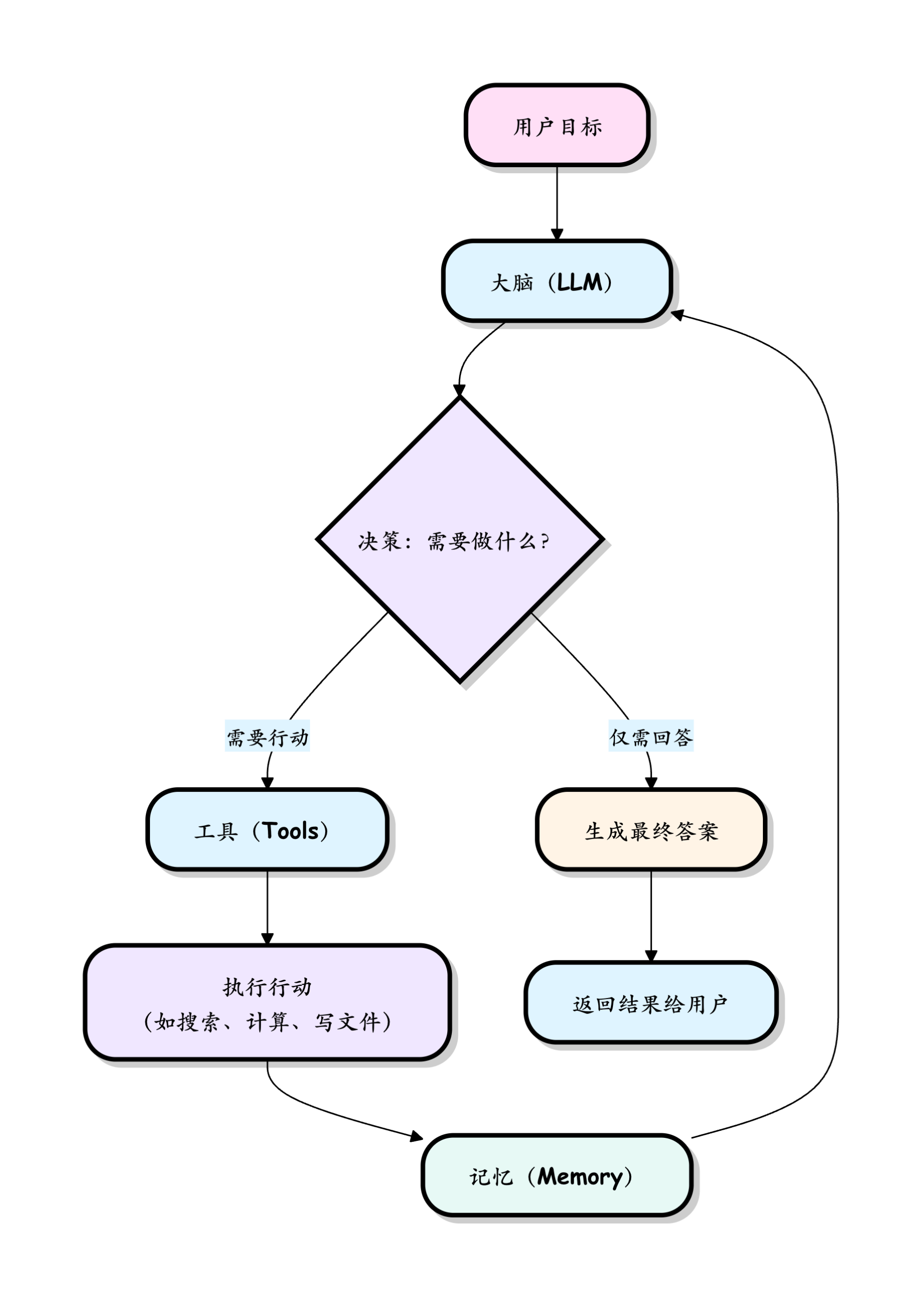
AI Agents typically follow a paradigm calledReAct = Reasoning + Acting, a classic thinking paradigm. As the name suggests, it isthink first, then act, then think, then act... This loop repeats continuously until the task is completed.
You can think of it as the way a careful, responsible new employee works when handed a task:"First, I'll think about how to do it → go look up some information → see what I found → think about the next step → continue acting...", rather than acting recklessly on a whim.
SVG visualization: ReAct loop flowchartUse a Complete Example to Walk Through This Loop
The user gives a command to the Agent:"Help me find an Italian restaurant in Beijing with a rating above 4.5, and tell me its address and signature dish."
Now let's follow the Agent's "thinking" step by step:
Step 1: Think/Reason
- The brain analyzes the goal: The Agent's brain (LLM) receives this task and first organizes in its mind:"This is an information retrieval task that requires two types of information: ① find a restaurant that matches the criteria; ② get the address and signature dish. I don't know anything right now, so I should search first."
- Generate an action instruction: The brain decides:"Call
search_webthe tool, with the keyword set to 'Italian restaurants in Beijing with a rating above 4.5'."
💡 Note: At this step, the Agent hasn't "done anything" yet; it is just "thinking". The value of the LLM is demonstrated here — being able to understand intent, break down tasks, and make plans.
Step 2: Act
- Call the tool: Based on the previous step's decision, the Agent actually calls
search_webthe tool, and passes in the keyword. - Tool execution: The search tool performs a search on the internet and returns a batch of raw search results (webpage titles, snippets, links, etc.).
💡 Note: The tool itself does not "think"; it simply executes faithfully. Thinking is the brain's job, execution is the tool's job — a clear division of labor.
Step 3: Observe
- Receive feedback: The Agent receives the search results returned by the tool and stores them inmemoryfor use in the next round of reasoning.
- Assume the results include several restaurants: Bottega Yiku (rating 4.7), Da Vittorio, Le Marche, etc.
Step 4: Think Again
- The brain re-analyzes: After seeing the search results, the brain continues reasoning:"OK, I found several candidate restaurants. But what the user wants is the address and signature dish, which are not in the search snippets. I need to further query the detailed information of Bottega Yiku."
- Generate a new instruction:"Call
get_restaurant_detailsthe tool to query the detailed information of 'Bottega Yiku'.
Step 5: Act Again → Observe Again (the loop continues)
- ThisThink → Act → Observeloop keeps repeating, and each round brings the Agent one step closer to the goal, until the brain determines that "I already have enough information to answer the user".
Step 6: Output the final answer (Final Answer)
- When the brain confirms the task is complete, it consolidates all the collected information (stored in memory) and generates a structured, human-friendly reply:
- "Found a restaurant that meets the requirements:Bottega Yiku(Rating 4.7). Address: No. XX, Sanlitun Road, Chaoyang District, Beijing. Signature dishes: Black truffle pizza, handmade tiramisu."
ThisThink → Act → Observe → Think again...cycle is the core driving mechanism for an AI Agent to autonomously complete complex tasks. It doesn't give an answer all at once, but like a human,proceeding step by step, thinking while acting.。
Implementing an AI Agent in Python
Theory is done; now let's look at the code. An AI Agent system usually consists of several core modules working together. Understanding this architecture helps us understand how it thinks and acts.

Let's break down each module and use simple Python code to demonstrate its responsibilities. Beginners don't need to dive into every line of code; the key is to understandwhat each module does。
1. Perception Module — The Agent's "Eyes and Ears"
The perception module is responsible for obtaining from theenvironmentthe information, i.e., "what input was received." The environment can be:
- Digital world: a piece of text, a web page, database records, data returned from an API.
- Physical world(via hardware): camera images, microphone audio, sensor data.
For the most common text-based Agent, perception is "receiving a sentence of user input."
Example
def perceive_from_environment():
"""
Perceive information from the environment.
In this example, the environment is the text entered by the user in the command line.
"""
user_input = input("Please enter your instruction or question:")
print(f"[Perception module] Received information: '{user_input}'")
return user_input # Pass the perceived content to the next module (decision module)
# Get the perceived information
current_observation = perceive_from_environment()
2. Decision Module (Brain) — The Agent's "Commander"
This is the core of the Agent, usuallyan AI model (such as a large language model, LLM)drives it. It receives the information from the perception module and is responsible for three things:
- Understand: What does this information mean? What does the user want?
- Reason: What should I do under the current circumstances?
- Plan: What tool should be called next (or in the next few steps), and what operation should be performed?
The following code uses the simplest "keyword matching" to simulate the decision-making process. In a real Agent, this step is completed by an LLM, which can handle far more complex semantic understanding.
Example
def make_decision(observation):
"""
Make simple decisions based on perceptual information.
Here, keyword matching is used to simulate; in practice, the LLM performs more complex reasoning.
"""
print(f"[Decision Module] Analyzing information: '{observation}'")
# Based on keywords in the user input, determine which tool to call
if "Weather" in observation:
decision = "Invoke weather query tool"
elif "Calculate" in observation:
decision = "Call calculator tool"
elif "End" in observation:
decision = "Execute termination action"
else:
decision = "Give a generic conversation response" # If no tool matches, directly respond in conversation
print(f[Decision Module] Decision result: {decision})
return decision # Pass the decision result to the action module
# Make decisions based on perception
current_decision = make_decision(current_observation)
3. Action Module — The Agent's "Executor"
The decision module outputs "thoughts" (what to do), while the action module is responsible for turning thoughts into "reality" (actually doing it). It executes specific operations to affect the external environment. Common actions include:
- Digital actions: Output answers on the screen, call a function, make an API request, write to a file.
- Physical actions(By controlling hardware): Control the movement of a robotic arm, make a speaker play sound.
Example
def execute_action(decision):
"""
Execute the instructions given by the decision module and return the execution result.
The execution result will be stored in memory for use in the next round of reasoning.
"""
print(f[Action Module] Executing: {decision})
if decision == "Invoke weather query tool":
# This can be replaced with a real weather API call
result = "Beijing: Sunny, 25°C."
elif decision == "Call calculator tool":
result = "1+1=2"
elif decision == "Execute termination action":
result = “Task ended.”
print(result)
exit() # End the entire program
else:
result = fI have understood your meaning: '{decision}'
print(f[Action Module] Action Result: {result})
return result # Return the result and enter the "observation" phase
# Execute the decision and get the result
action_result = execute_action(current_decision)
4. Memory Module — The Agent's "Work Notes"
Without memory, the Agent would be in an "amnesiac" state with every reply—forgetting what you said before, and forgetting what it itself has done. The memory module solves this problem, and it is divided into two types:
- Short-term memory / Conversation history: Records what was said in the current conversation, keeping the Agent coherent across multiple turns. Just like when you chat with a friend, you don't need to re-explain the background in every sentence.
- Long-term memory / Knowledge base: Proprietary knowledge stored via technologies such as vector databases (e.g., internal company documents, user preferences), used to enhance the model's capabilities. Beginners can temporarily ignore this part and just master short-term memory first.
In the complete example below, we use a Python list to simulate short-term memory.
5. Tool Module — The Agent's "Swiss Army Knife"
The model's own capabilities are limited (for example, it doesn't know real-time weather, can't do complex calculations, can't operate files). The tool module provides the Agent with a set of "external skills", greatly expanding its capability boundaries. A tool can be a Python function, a third-party API, or a complete external software.
Below is the simplest tool example:
Example
def calculator_tool(expression):
"""
Receives a math expression string and returns the calculation result.
This is a "tool"—waiting to be called on demand by the Agent's brain.
"""
try:
# Note: eval() has security risks in production environments; it is only used here for demonstration.
result = eval(expression)
return f"Calculation result: {expression} = {result}"
except Exception as e:
return f"Calculation error: {e}"
# Simulation: after the brain makes a decision, call this tool
tool_result = calculator_tool("3 + 5 * 2")
print(tool_result) # Output: Calculation result: 3 + 5 * 2 = 13
# Note: Python calculates multiplication and division before addition and subtraction, so it's 3 + 10 = 13, not 8 * 2 = 16
Hands-On Practice: Building a Simple Command-Line AI Agent
Above, we introduced each module separately. Now, let's put themtogetherto create a complete mini Agent capable of continuous conversation and tool calling.
Before running it, please go through this structure in your mind:
- User input →Perception → Decision(keyword matching) →Action(calling a tool or conversing) → output result →Memory(stored in history) → wait for the next round of input
Example
import random
# ==================== Tool Definitions ====================
def get_weather(city):
Tool 1: Simulated weather query (can be replaced with a real weather API in practice)
weather_options = [Clear, Cloudy, Light rain, Strong wind]
temperature = random.randint(15, 35)
return fThe weather in {city} is {random.choice(weather_options)}, with a temperature of {temperature}°C.
def simple_calculator(a, b, operator):
Tool 2: Simple Calculator
if operator == '+':
return f"{a} + {b} = {a + b}"
elif operator == '-':
return f"{a} - {b} = {a - b}"
else:
return This operation is not supported yet.
Memory (short-term)
Use a list to simulate conversation history, where each entry is a string.
conversation_history = []
# ==================== Agent main loop ====================
def run_simple_agent():
print("[Simple AI Agent started] Type 'exit' to end the conversation.")
print(Tip: You can ask about the weather (e.g., 'Beijing today's weather') or do calculations (e.g., 'calculate 1+1').\n")
while True:
# ---- Perception Stage: Obtain User Input ----
user_input = input(You:)
conversation_history.append(fUser: {user_input})
# Special instruction: exit
if user_input.lower() in [Exit, "exit", "quit"]:
print(Agent: Goodbye!)
break
# ---- Decision + Action Phase: Select tool or dialogue based on input ----
response = ""
if weather in user_input:
# Try to identify the city name from the input, default to Beijing.
city = Beijing
for c in [Beijing, Shanghai, Guangzhou, Shenzhen]:
if c in user_input:
city = c
break
Call weather tool
response = get_weather(city)
elif Calculate in user_input or "+" in user_input or "-" in user_input:
# Simple pattern matching, recognizing a few fixed calculation expressions.
if "1+1" in user_input:
response = simple_calculator(1, 1, '+')
elif "10-5" in user_input:
response = simple_calculator(10, 5, '-')
else:
response = Please try entering "calculate 1+1" or "calculate 10-5".
else:
# No matching tool found, falling back to normal conversation.
default_responses = [
I understand what you mean.,
This is an interesting topic!,
My current skills are limited, but you can try asking me about the weather or doing simple calculations.,
"Okay, please continue."
]
response = random.choice(default_responses)
# ---- Output + memory stage: print reply and store in history ----
print(f"Agent:{response}")
conversation_history.append(f"Agent:{response}")
After the conversation ends, print the full conversation history (simulating the content of short-term memory).
print("\n=== This conversation history (short-term memory content) ===)
for line in conversation_history:
print(line)
Start Agent
if __name__ == "__main__":
run_simple_agent()
Run this program and you will experience:
- One that cansustain multi-turn dialogueloop (perception module continuously running).
- Based on your input keywords (such as "weather", "calculation")automatically trigger different tools(action module).
- After the dialogue ends, you can see the completeconversation history(memory module).
💡 Think about it: If you want to make this Agent more powerful, you can try: ① Add more tools (such as checking exchange rates, translation); ② Replace the keyword matching in the decision module with real LLM API calls, and the Agent will be able to understand natural language!
Summary and Outlook
Through this article, you should have mastered the basic concepts of AI Agent:
- It is composed ofperception, decision (brain), action, memory, toolsA intelligent program made up of modules such as these;
- It usesReAct loop(think → act → observe → re-think) to autonomously pursue goals;
- The LLM is its brain, tools are its hands and feet, and memory keeps it coherent.
Remember the core in one sentence:LLM can only "talk", Agent can "do".
Suggested Next Steps for Learning
- Deep dive into Large Language Model (LLM) APIs: Learn how to call the APIs of models such as OpenAI GPT, DeepSeek, and Tongyi Qianwen, using them as the true brain of your Agent, replacing the crude keyword matching in our examples.
- Learn Agent development frameworks: ExploreLangChain、LlamaIndexorAutoGenand other mature frameworks. They encapsulate modules such as memory, tool chains, and task orchestration. Using them can achieve twice the result with half the effort and avoid reinventing the wheel.
- Connect to real tools: Try connecting your Agent to real APIs, such as databases, email systems, or weather services, to solve practical problems. This step will give you a brand new appreciation for the concept of "tools".
- Learn prompt engineering: How to write high-quality "instructions" for the LLM directly determines the performance level of the Agent's brain. This is a key skill that cannot be ignored when developing efficient Agents.
The world of AI Agents is vast and full of possibilities, from automated personal assistants to enterprise-grade intelligent solutions, it is becoming a new paradigm for human-computer interaction. We hope you use this article as a starting point to begin building your own intelligent agent.
Other extensions