CrewAI creates intelligent agents.
CrewAI is an open-source framework for multi-agent collaboration, specifically designed to orchestrate and coordinate multiple AI agents to work together.
CrewAI can break down a complex task into multiple roles, each responsible for a part, and complete it through process collaboration.
Comparative understanding:
- Single Agent: A large model, from start to finish.
- CrewAIProduct Manager + Engineer + Analyst + Editor, each doing their own job.
CrewAI is a tool for coordinating, managing, and framing AI Agents, built on LangChain and Pydantic, to facilitate role-playing, autonomous, and collaborative Agent teams.
- Crew: One consisting of multiple
AgentThe project team formed. - Agent (Member): : Individuals in the team, each has a clear
role(Role),goal(Target) andbackstory(background story). - Task: The specific work that needs to be completed by the team. One
CrewContains multiple ordered or parallelTask, and assign to appropriateAgent。 - Process: Defines the team's workflow, e.g., whether tasks are executed sequentially or concurrently.
In simple terms, crewAI provides a structured way to define who (Agent) does what (Task) under which process (Process), ultimately achieving team goals.
The flowchart below clearly shows how the core components in the crewAI framework work together:

The process begins with defining agents with specific roles and goals, then creating specific tasks for them.
Next, these agents and their tasks are organized into a crew, and a collaboration process is selected for the crew, such as sequential or parallel execution. Finally, the crew executes all tasks according to the defined process and produces the final result.
Environment setup and installation
Before we start building, we need to prepare the development environment.
Precondition
Python version requirements:
- Must: Python ≥ 3.10 and < 3.14
- You can type in the terminal
python --versionto check. If the version range is not met, there will be many problems later, and it is not recommended to tough it out.
CrewAI usesUVfor dependency and package management, with only one goal:
To make multi-agent projects more stable and not be brought down by environment issues.
UV introductory tutorial reference:UV - Python package and environment management tool。
API key:
crewAI itself does not provide AI models; it needs to connect to large language models such as OpenAI's GPT, Anthropic's Claude, and others.
Install crewAI
Open your terminal or command-line tool and use the pip command to install the crewAI package.
# 正常安装
pip install crewai
# 其他依赖
pip install langchain
pip install openai


# 如果安装慢,可以使用国内镜像安装
pip install crewai -i https://mirrors.aliyun.com/pypi/simple/
pip install langchain -i https://mirrors.aliyun.com/pypi/simple/
pip install openai -i https://mirrors.aliyun.com/pypi/simple/
If you wish to use some of crewAI's built-in advanced tools (such as web search), you can install additional dependencies:
# 正常安装
pip install 'crewai[tools]'

# 如果安装慢,可以使用国内镜像安装
pip install 'crewai[tools]' -i https://mirrors.aliyun.com/pypi/simple/
In China, we can use the DeepSeek large model for testing. If you don't have one yet, you need to first go tohttps://platform.deepseek.com/api_keysCreate an API key.
DeepSeek API documentation reference:https://api-docs.deepseek.com/zh-cn/。
After installation, create a new Python file, for examplemy_first_crew.py, and import the necessary libraries.
For third-party models (including DeepSeek), crewAI's LLM must go through LiteLLM at the bottom layer. Before use, we need to install:
pip install -U litellm
Instance
from crewai.llm import LLM
# =====================================================
# LLM configuration (DeepSeek | LiteLLM standard format)
# =====================================================
llm = LLM(
model="deepseek/deepseek-v4-flash", # Key: Must include the provider deepseek, then write the model name deepseek-v4-flash or deepseek-v4-pro
api_key="sk-xxxxx", # Set API key
api_base="https://api.deepseek.com/v1",
temperature=0.7,
)
# =====================================================
# Agents
# =====================================================
researcher = Agent(
role="Technical Researcher",
goal="Search for the latest, accurate, and verifiable technical materials, and provide code proof.",
backstory="Skilled at systematically analyzing technical issues, with an emphasis on facts and reproducibility.",
llm=llm,
verbose=True,
allow_delegation=False,
)
writer = Agent(
role="Technical Blog Writer",
goal="Organize research results into technical articles suitable for beginners to read.",
backstory="Skilled at breaking down complex concepts into clear steps and providing complete examples.",
llm=llm,
verbose=True,
allow_delegation=True,
)
# =====================================================
# Tasks
# =====================================================
research_task = Task(
description=(
"In-depth research: Use Python for automated data cleaning."\n"
"Key focus areas include: pandas, numpy, missing values, duplicate values, and inconsistent format issues."\n"
"Must provide complete, runnable code examples."
),
agent=researcher,
expected_output=(
"A research report that includes problem classification, solution code, and the complete cleaning process."
),
)
write_task = Task(
description=(
"Based on the research report, write an entry-level technical blog."\n"
"Title: \"Python Data Cleaning Beginner's Guide: Say Goodbye to Dirty Data with pandas\"."
),
agent=writer,
context=[research_task],
expected_output="A Markdown technical blog of no less than 800 words.",
)
# =====================================================
# Crew
# =====================================================
crew = Crew(
agents=[researcher, writer],
tasks=[research_task, write_task],
process=Process.sequential,
verbose=True,
)
# =====================================================
# Run
# =====================================================
if __name__ == "__main__":
result = crew.kickoff()
output = result.raw
with open("python_data_cleaning_blog.md", "w", encoding="utf-8") as f:
f.write(output)
Next, the task will start executing and output relevant information:
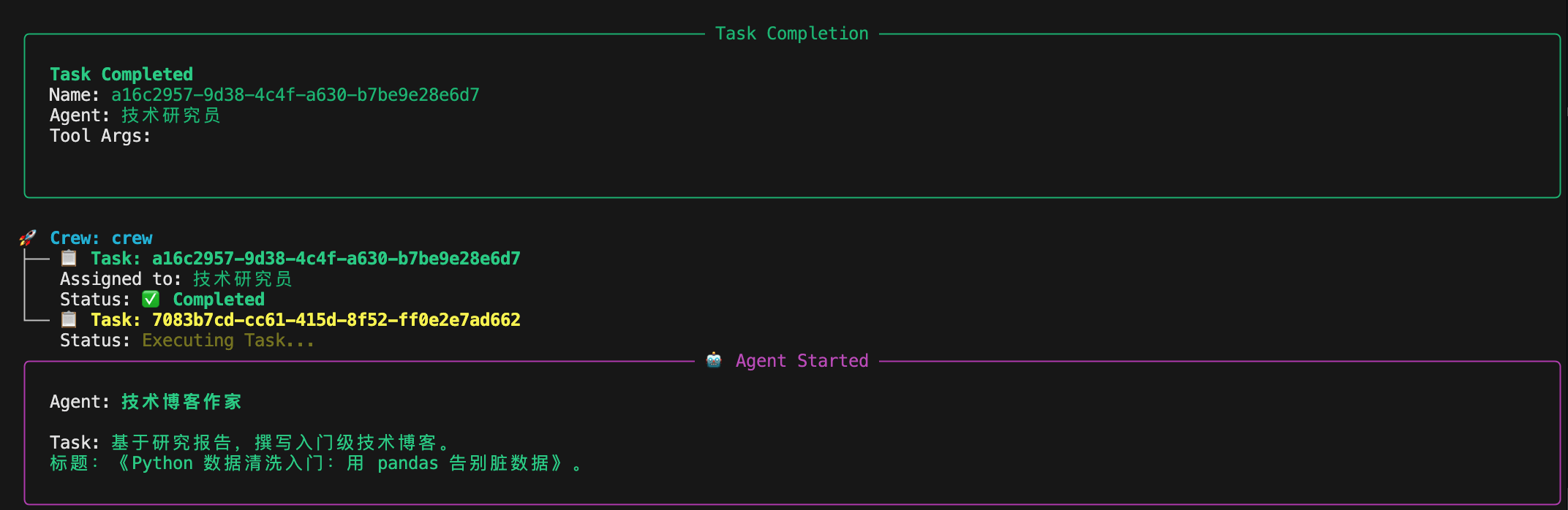
After completion, the output content will be written to the python_data_cleaning_blog.md file.
The following is an explanation of the related attributes in the code.
LLM (Model Layer) Key Attributes
| Attribute | Example Value | Purpose | Consequence of Error |
|---|---|---|---|
model |
deepseek/deepseek-v4-flash |
LiteLLM Canonical Syntax:Service Provider/Model Name |
Missingdeepseek/Will directly throw an errorLLM Provider NOT provided |
api_key |
sk-xxxxx |
Model Authentication | If empty or incorrect, directly 401 / LLM Failed |
api_base |
https://api.deepseek.com/v1 |
DeepSeek API Address | Depends on the specific model's address |
temperature |
0.7 |
Controls output randomness | Too high makes content diffuse; too low makes text rigid |
Agent (Intelligent Agent) Key Attributes
| Attribute | Purpose | Essence |
|---|---|---|
role |
Agent's "identity label" | Written into system prompt |
goal |
Current Agent's core objective | Determines the direction of the answer |
backstory |
Behavioral constraints and style | Stabilizes output quality |
llm |
Which model to use | Must be explicitly bound |
verbose |
Print execution process | Only affects logs |
allow_delegation |
Whether task delegation is allowed | Extremely easy to fall into pitfalls |
researcher
| Attribute | Value | Design intent |
|---|---|---|
allow_delegation |
False |
Prevent infinite task decomposition |
goal |
Find materials + provide code | Output is 'raw material' |
writer (writing)
| Attribute | Value | Risk |
|---|---|---|
allow_delegation |
True |
May trigger delegate to research again |
context |
[research_task] |
Already has input, actually no need to delegate again |
Conclusion
In a sequential pipeline, the writing Agentshould disable delegation, otherwise it is easy to fail on re-delegation.
Key attributes of Task
Task common fields:
| Attribute | Purpose | Key point |
|---|---|---|
description |
Actual task text sent to the LLM | The more specific, the more stable |
agent |
Who executes | Must be unique |
expected_output |
Result constraints | Not required, but strongly recommended |
context |
Dependent upstream tasks | Core of sequential execution |
research_task:
| Attribute | Description |
|---|---|
agent=researcher |
Bind researcher |
Nonecontext |
First-stage task |
| Output | Structured research content |
write_task:
| Attribute | Description |
|---|---|
context=[research_task] |
Force read research results |
agent=writer |
Only organize and express |
| Output | Final Markdown text |
Crew (Actuator) Key Attributes
| Attribute | Example value | Purpose | Error consequences |
|---|---|---|---|
agents |
[researcher, writer] |
All available Agents | If one is missing, an error is thrown directly. |
tasks |
[research_task, write_task] |
Execution queue | Order by list |
process |
Process.sequential |
Execution strategy | Parallel execution will break dependencies |
verbose |
True |
Log switch | Must be bool |
kickoff() and output structure
| Expression | Type | Purpose |
|---|---|---|
crew.kickoff() |
CrewOutput |
Execution result container |
result.raw |
str |
Final text output |
result.tasks_output |
list/dict | Each Task's output |
result.token_usage |
dict | Statistics |
crewai command
We can usecrewaicommand to generate the complete project structure:
crewai create crew <项目名>
For example, we create a project example-agent-test and run the following command:
crewai create crew example-agent-test
Next, the following content appears. You can first select the large model provider:
Creating folder example_agent_test...
Cache expired or not found. Fetching provider data from the web...
Downloading  [####################################]  1102019/56339
Select a provider to set up:
1. openai
2. anthropic
3. gemini
4. nvidia_nim
5. groq
6. huggingface
7. ollama
8. watson
9. bedrock
10. azure
11. cerebras
12. sambanova
13. other
q. Quit
In this chapter, we will choose DeepSeek. First enter 13 to select other, then you can scroll with the mouse to see DeepSeek is at 23. Just enter the number 23:
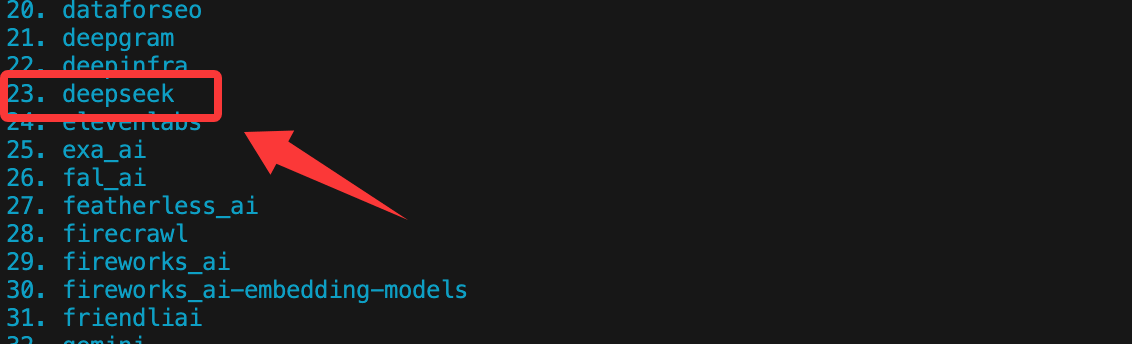
If you have API keys for other models, just select according to the number.
After completion, you can see the generated directory as follows:
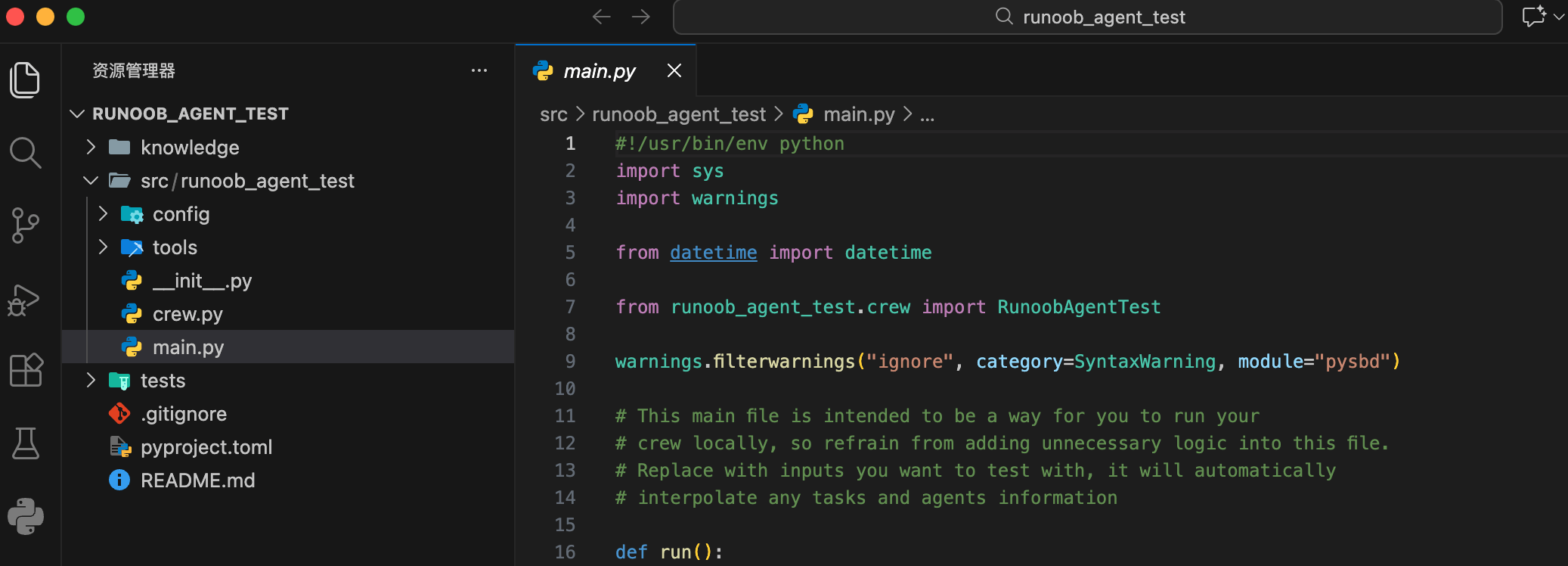
Project structure description:
my_project/
├── .env                # 环境变量(API Key)
├── pyproject.toml      # 项目依赖声明
├── README.md
└── src/
    └── my_project/
        ├── main.py     # 程序入口
        ├── crew.py     # Crew 与 Agent 的核心逻辑
        ├── tools/      # 自定义工具
        └── config/
            ├── agents.yaml  # Agent 定义
            └── tasks.yaml   # Task 定义
Run your Crew.
Enter the project root directory:
cd my_project
Lock and install dependencies:
crewai install
Run:
crewai run
Or directly:
python src/my_project/main.py
Configure API key
For security reasons, it is not recommended to write the API Key directly in the code; we can set it as an environment variable.
Set in code (for testing only):
import os
os.environ["OPENAI_API_KEY"] = "你的-openai-api-key-here"
Recommended way: use.envfile
In the project root directory, create a file named.envfile.
Write the following in the file:OPENAI_API_KEY=你的-openai-api-key-here
In Python code, usepython-dotenvpackage to load.
Installation command:
pip install python-dotenv
Next, load it in the code:
from dotenv import load_dotenv
load_dotenv() # 这会自动加载 .env 文件中的变量
# 现在 os.environ["OPENAI_API_KEY"] 就已经有了值
Core Components: Detailed Explanation and Practice
Now, let's create our AI team step by step, just like building a company. We will simulate a technical blog creation team.
Step 1: Define the Agent
Agentis your team member. When creating it, you need to define several key attributes:
| Parameter | Description | Example |
|---|---|---|
| role | The agent's role or position. | Senior Technical Writer |
| goal | The agent's ultimate goal. | Create accessible, practical technical tutorials |
| backstory | The role's backstory, used to shape its behavior and tone. | 你是一位拥有10年全栈开发经验的开发者,热爱分享,擅长将复杂概念简单化。 |
| llm | Specify the large language model used by the agent. | ChatOpenAI(model="gpt-4", temperature=0.7) |
| verbose | Set toTrueWhen set, it will output the agent's detailed thinking process. |
True(very useful when debugging) |
| allow_delegation | Whether to allow this agent to delegate tasks to other agents. | True |
Let's create two agents: oneresearcherand onewriter。
Example
llm = ChatOpenAI(model="gpt-3.5-turbo", temperature=0.7)
# Create the researcher agent
researcher = Agent(
role='Technical Researcher',
goal='Find the latest, most accurate, and most relevant technical information for the assigned topic.',
backstory='You are a focused and rigorous technical analyst, skilled at filtering out key points from massive amounts of information and verifying the reliability of sources.',
llm=llm, # Use the model defined above
verbose=True, # Output detailed logs
allow_delegation=False # Researcher does not need to delegate tasks
)
# Create writer agent
writer = Agent(
role='Technical Blog Writer',
goal='Write a well-structured, lively, and interesting technical blog article with complete code examples based on the materials provided by the researcher.',
backstory='You are a widely popular technical blogger with a friendly writing style and rigorous logic, especially skilled at explaining complex concepts through analogies and examples.',
llm=llm,
verbose=True,
allow_delegation=True # If the writer feels it necessary, they can delegate tasks (for example, go back and ask the researcher to supplement materials)
)
Step 2: Create Task
Taskis a specific work item that needs to be assigned toAgentto complete. Key attributes include:
| Parameters | Description | Example |
|---|---|---|
| description | A clear description of the task. | 研究 "Python异步编程asyncio" 在 2023 年后的核心应用场景和最佳实践。 |
| agent | Responsible for executing this taskAgentobject. |
researcher |
| expected_output | A detailed description of the task's deliverables. | 一份结构化的研究报告,包含概述、3-4个核心应用场景、2-3个代码片段示例以及总结。 |
We create one task for each of the researcher and the writer.
example
research_task = Task(
description=(
"Conduct in-depth research on the topic 'Automated Data Cleaning with Python'.\n"
"Focus on the latest usage of the pandas and numpy libraries (after 2023), common dirty data problems (such as missing values, duplicate values, inconsistent formats), and efficient cleaning workflows.\n"
"Please provide specific code snippets to illustrate each step."
),
agent=researcher, # Assign this task to the researcher
expected_output=(
"A complete research report in the following format:\n"
"1. Topic Overview\n"
"2. Classification of Common Data Problems (at least 3 categories)\n"
"3. pandas/numpy solutions for each type of problem (with code snippets)\n"
"4. A complete end-to-end cleaning workflow example\n"
"5. Summary and Recommendations"
)
)
# Create writing task
write_task = Task(
description=(
"Using the research report provided by the researcher, write a technical blog article for beginners.\n"
"The article title is: 'Python Data Cleaning for Beginners: Say Goodbye to Dirty Data with pandas'.\n"
"Article requirements: easy-to-understand language, progressive logic, include all key code snippets provided by the researcher and add detailed comments.\n"
"Finally, provide a complete, runnable example that demonstrates the entire process of cleaning a simulated dataset."
),
agent=writer, # Assign this task to the writer
expected_output=(
"A Markdown-format blog article of no less than 800 words.\n"
"Include an introduction, main body (with subsections), code blocks, and a summary.\n"
"A complete Python script containing simulated data and cleaning code must be attached at the end of the article."
),
# The context parameter is very important! It specifies the dependencies of this task, i.e., research_task needs to be completed first.
context=[research_task]
)
Note write_taskin thecontext=[research_task], which establishes dependencies between tasks, meaning the writer needs to wait until the researcher completes the task before starting work.
Step 3: Build the Team and Set Up Processes (Crew & Process)
Now, put theAgentandTaskassemble intoCrew, and define their workProcess。
Instance
blog_crew = Crew(
agents=[researcher, writer], # Which members make up the team
tasks=[research_task, write_task], # What tasks does the team have
process=Process.sequential, # Process type: sequential execution. The researcher finishes, then the writer works.
verbose=2 # Set the log verbosity during team execution (0=quiet, 1=basic, 2=verbose)
)
crewAI mainly supports two processes:
Process.sequential: Tasks are executed in order according to the list. Suitable for pipeline operations with strict dependencies.Process.hierarchical: Combined with a manager (Manager) Agent, which coordinates and assigns tasks. Suitable for more complex, dynamic collaboration scenarios.
Step 4: Execute the task and obtain results.
Everything is ready, launch your AI team!
Example
result = blog_crew.kickoff()
# Print the final result
print("###################### Final Results ######################")
print(result)
Run your Python script (python my_first_crew.py). Since we setverbose=Trueandverbose=2, you will see each Agent's thinking process and task execution logs in the terminal, and finally see the generated blog article.
Advanced Techniques: Equipping Agents with Tools
crewAI allowsAgentto call externalTool, such as searching the web, querying databases, performing calculations, etc.
The following example equips the researcher withweb searchandcalculationtools:
Example
# Initialize tools
# Note: SerperDevTool requires a separate API Key. Please register at https://serper.dev/ to obtain it.
search_tool = SerperDevTool(serper_api_key="your-serper-api-key")
calc_tool = CalculatorTool()
# Create a researcher equipped with tools
advanced_researcher = Agent(
role='Senior Technical Researcher',
goal='Search for the latest technology trends and perform quantitative analysis',
backstory='You are not only good at finding information, but also able to perform simple calculations and comparisons on data.',
tools=[search_tool, calc_tool], # Assign the tool list to the agent
llm=llm,
verbose=True
)
Create a task using tools.
analysis_task = Task(
description=(
Search and compare the Star growth numbers of 'FastAPI' and 'Django' on GitHub over the past year.\n"
Calculate the growth rates of both, and analyze possible reasons.
),
agent=advanced_researcher,
expected_output=A brief report containing specific data, calculation process, and cause analysis.
)