Hermes Agent
In recent years, the field of AI agents has developed rapidly, evolving from simple chatbots to agents that can actually do things, have persistent memory, and grow autonomously.
Hermes Agent is an autonomous AI agent framework open-sourced by Nous Research. As an autonomous AI agent that interacts through natural language, it can execute terminal commands, control a browser, read and write files, search the internet, generate images, and maintain memory across sessions.
- GitHub repository:https://github.com/nousresearch/hermes-agent
- Hermes Agent official website:https://hermes-agent.nousresearch.com/

The official definition is very straightforward:
The agent that grows with you.
一个会随着使用不断成长的 Agent。
It is an autonomous agent that becomes more capable the longer it runs.
The core philosophy of Hermes Agent is:Make AI a long-term always-on digital worker, not a disposable chatbot.
Hermes Agent is one of the few in the industryan AI Agent with a natively built-in learning loop, which can distill skills from execution experience, autonomously optimize capabilities, persist knowledge, retrieve historical conversations, and continuously refine the user cognitive model across sessions.
Differences from ordinary AI chat tools:
| Dimension | Ordinary AI chat (e.g., ChatGPT) | Hermes Agent |
|---|---|---|
| Memory | Each conversation starts from scratch | Persistent memory across sessions; understands you better the more you use it |
| Execution capability | Can only generate text | Can execute terminal commands, manipulate files, control browser |
| Runtime location | Cloud, data uploaded to the service provider | Local or your own server, data never leaves you |
| Extensibility | Closed ecosystem | Open skill standard (agentskills.io), MCP ecosystem |
| Access methods | Web | CLI + Telegram/Discord/Slack/WhatsApp, etc. |
| Model binding | Fixed model | Supports 300+ models, switch anytime, no lock-in |
Core features:
- Connect:Telegram, Discord, Slack, WhatsApp, Signal, Email, CLI—one Agent, unified memory, all platforms. A conversation started on Telegram can seamlessly continue in the terminal.
- Remember:Hermes learns your projects, automatically generates skills, and never forgets the problems it has solved. After each session, important information is written to persistent memory.
- Schedule:Set scheduled tasks in natural language—daily reports, backups, routine reviews, morning briefings—running unattended in the background.
- Delegate:Generate isolated sub-agents with independent conversation contexts, independent terminals, and Python RPC scripts, enabling parallel pipelines with zero context cost.
- Search & Multimodal:Web search, browser automation, visual understanding, image generation, text-to-speech, and multi-model reasoning—all built in.
Hermes Agent supports free switching between any major model, includingNous Portal, OpenRouter (200+ models), OpenAI, GLM, Kimi, MiniMaxetc., executehermes modelto switch instantly, no code changes, no vendor lock-in.
| Provider | Description | Setup method |
|---|---|---|
| Nous Portal | Subscription-based, zero configuration | viahermes modelOAuth login |
| OpenAI Codex | ChatGPT OAuth, uses Codex model | viahermes modelDevice code authentication |
| Anthropic | Use Claude model directly | Via Claude Code authentication or Anthropic API key |
| OpenRouter | Multi-provider routing | Enter your API key |
| DeepSeek | Direct DeepSeek API access | SetupDEEPSEEK_API_KEY |
| Hugging Face | Access 20+ open models via unified router | SettingsHF_TOKEN |
| Custom endpoint | VLLM, SGLang, Ollama, or any OpenAI-compatible API | Set base URL and API key |
Of course, buying something like the Coding Plan is still the most cost-effective, since it's a monthly subscription:
| Features | Capability description |
|---|---|
| Native terminal interaction | Full TUI interface, supporting multi-line editing, command completion, history recall, streaming output, etc. |
| Cross-platform access | A single gateway connecting CLI, Telegram, Discord, Slack, WhatsApp, and other platforms |
| Closed-loop learning system | Autonomous memory management, skill generation and optimization, cross-session recall, user modeling |
| Scheduled automation | Built-in Cron scheduler, supporting 7×24 automated tasks such as daily reports, backups, and audits |
| Parallel task processing | Supports parallel execution of sub-agents, multi-workflow splitting, and RPC tool calls |
| Multi-environment operation | Supports 6 backends including local, Docker, SSH, Daytona, Modal, etc. |
| Research-grade capabilities | Supports trajectory generation, reinforcement learning environments, and training data compression |
Overall Architecture
Overall workflow:

Architecture diagram:

| Module | Function | Example |
|---|---|---|
| Access layer (Clients) | Receives user requests | Web, App, API, Feishu |
| Input layer (Input) | Processes various input data | Text, images, PDF, Excel |
| Scheduler (Agent Orchestrator) | Understands tasks and breaks down execution workflows | Analyze requirements → Formulate plan |
| Capability layer (Capabilities) | Provides execution capabilities | Dialogue, retrieval, code execution |
| Memory layer (Memory) | Saves context and historical information | Session memory, long-term memory |
| Knowledge layer (Knowledge) | Provides knowledge retrieval capabilities | RAG, vector database |
| Model layer (Model Layer) | Provides reasoning capabilities | GPT, Claude, local models |
| Tool layer (Tools) | Calls external tools to complete tasks | Search, database, API |
| External Services | Integration with business systems | ERP, CRM, cloud services |
| Infrastructure layer (Infrastructure) | Support the operation of the system. | Permissions, Logs, Monitoring |
Quick Installation
The following installation commands apply to Linux, macOS, and WSL2 systems:
curl -fsSL https://hermes-agent.nousresearch.com/install.sh | bash
After installation is complete, reload the Shell:
bashsource ~/.bashrc   # 使用 bash
# 或
source ~/.zshrc    # 使用 zsh
Native Windows installation (PowerShell):
iex (irm https://hermes-agent.nousresearch.com/install.ps1)
Windows native support is still experimental; it is recommended to prioritize using WSL2.
macOS / Windows Desktop version (Desktop App):Go tohermes-agent.nousresearch.comDownload the desktop installer for your platform; the CLI and desktop app will be installed together.


Verify installation
hermes --version
Outputting the version number indicates successful installation.
The installer will automatically handle all dependencies:
- uvFast Python package manager
- Python 3.11— Install via uv, no sudo required.
- Node.js v22— For browser automation and WhatsApp bridging.
- ripgrepQuick file search
- ffmpegTTS audio format conversion
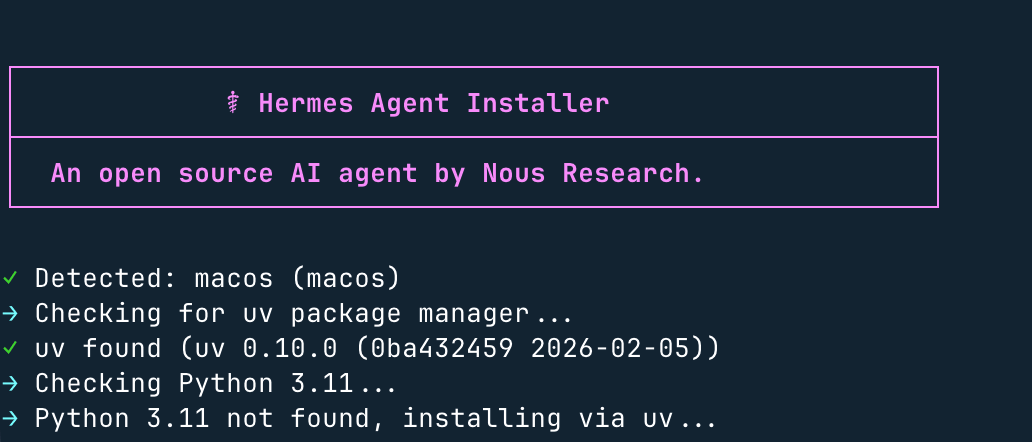
Windows System Instructions: : Native Windows environment is not supported. Please install WSL2 first, then run the above command in the WSL2 terminal.
If you have installed OpenClaw, you can also directly import the configuration:
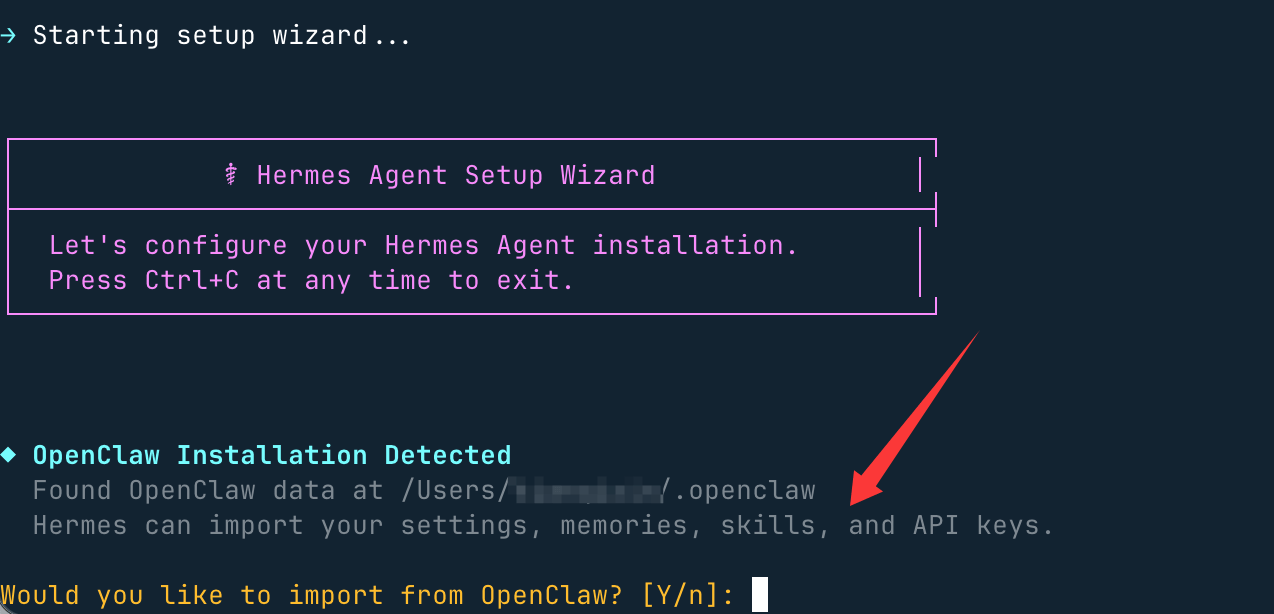
Here, choose not to import; input.n, enter model settings, select the first quick setting:

Next, we select the penultimate item, More providers:
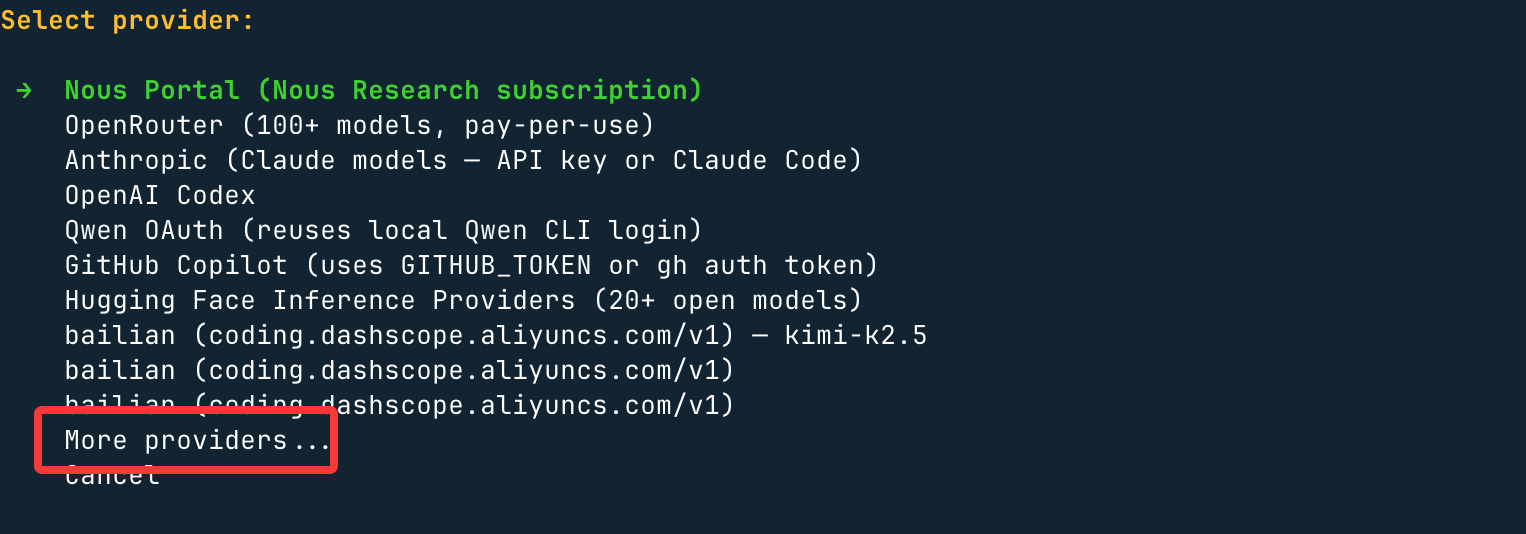
Here you can choose more domestic or international large models:
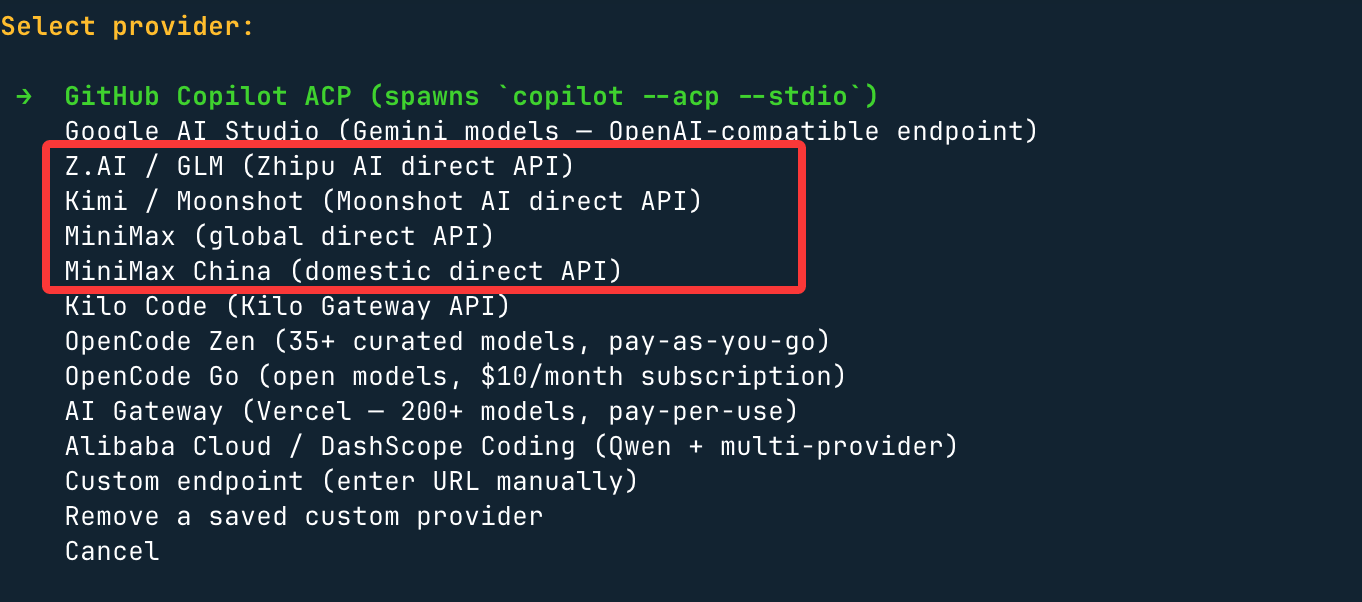
Next, we use.Byte Ark Coding Plan, so what was chosen isCustomer endpointThat is, the custom API address and API key.
Base URL configures the ByteDance Ark tool compatible with the OpenAI interface protocol:https://ark.cn-beijing.volces.com/api/coding/v3
Set the API key and supported large models, for exampleark-code-latest。
After installation, run the following command:
source ~/.bashrc    # 重载shell配置(若使用zsh,执行:source ~/.zshrc)
hermes              # 开启智能体对话!
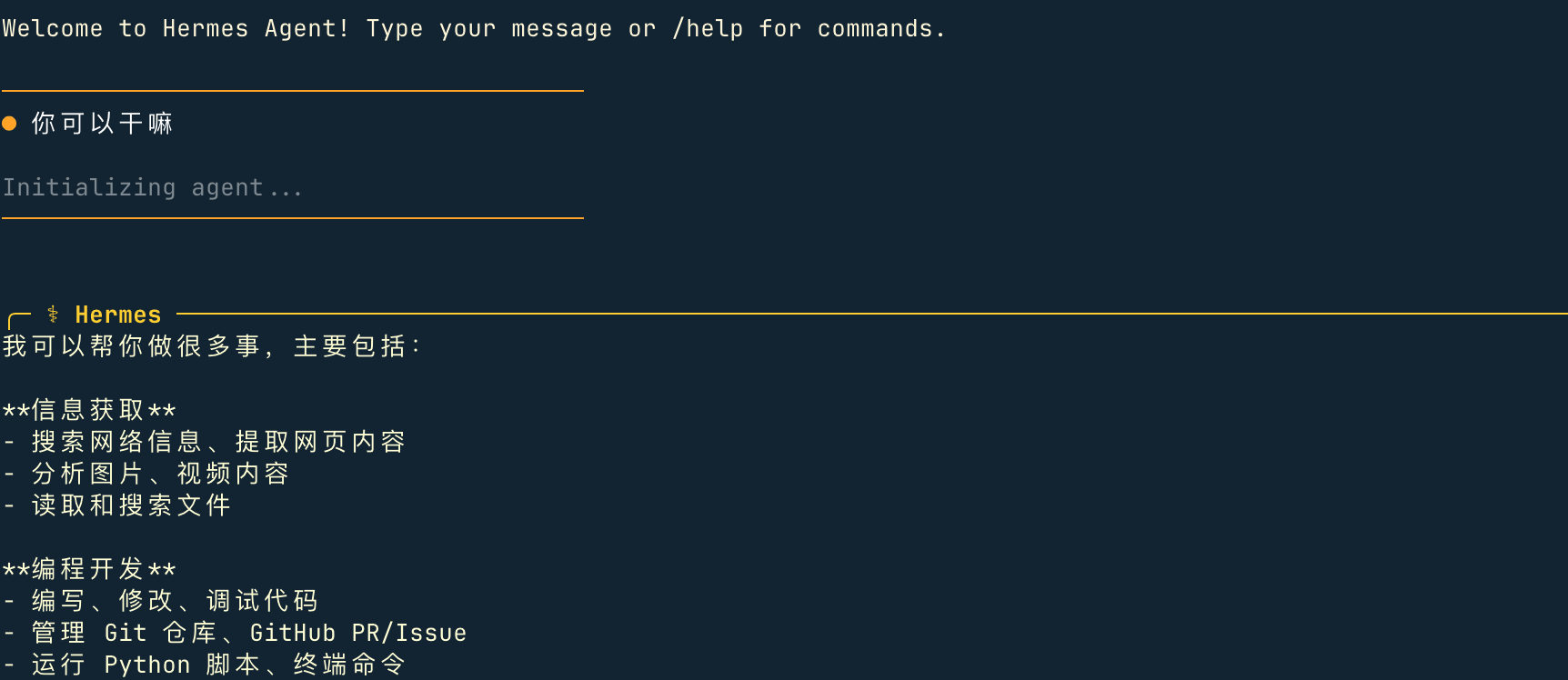
Quick Start
hermes              # 交互式命令行界面 — 开启对话
hermes model        # 选择大语言模型服务商与对应模型
hermes tools        # 配置启用的工具集
hermes config set   # 设置单项配置项
hermes gateway      # 启动消息网关(支持Telegram、Discord等平台)
hermes setup        # 运行全量配置向导(一站式完成所有配置)
hermes claw migrate # 从OpenClaw迁移数据(适用于原OpenClaw用户)
hermes update       # 更新至最新版本
hermes doctor       # 诊断运行环境与配置问题
Manual Installation
If you prefer full control over the installation process, follow these steps.
Step 1: Clone the repository
Use--recurse-submodulesto clone and fetch the required submodules:
git clone --recurse-submodules https://github.com/NousResearch/hermes-agent.git
cd hermes-agent
If you have already cloned but without submodules:
git submodule update --init --recursive
Step 2: Install uv and create a virtual environment
# 安装 uv(如果尚未安装)
curl -LsSf https://astral.sh/uv/install.sh | sh

# 创建 Python 3.11 的虚拟环境(uv 会在需要时下载,无需 sudo)
uv venv venv --python 3.11
hermes. The entry point has a hardcoded shebang pointing to the Python in the virtual environment, so it can be used after a global link.Step 3: Install Python dependencies
# 告诉 uv 要安装到哪个虚拟环境
export VIRTUAL_ENV="$(pwd)/venv"

# 安装所有扩展
uv pip install -e ".[all]"
If you only want the core agent (without Telegram/Discord/cron support):
uv pip install -e "."
Optional extension notes:
| Extension | Feature | Install command |
|---|---|---|
all |
Includes all of the following features | uv pip install -e ".[all]" |
messaging |
Telegram and Discord gateways | uv pip install -e ".[messaging]" |
cron |
Cron expression parsing for scheduled tasks | uv pip install -e ".[cron]" |
voice |
CLI microphone input and audio playback | uv pip install -e ".[voice]" |
mcp |
Model Context Protocol support | uv pip install -e ".[mcp]" |
honcho |
AI-native memory (Honcho integration) | uv pip install -e ".[honcho]" |
We can use them in combination:uv pip install -e ".[messaging,cron]"
Step 4: Create the configuration directory
# 创建目录结构
mkdir -p ~/.hermes/{cron,sessions,logs,memories,skills,pairing,hooks,image_cache,audio_cache,whatsapp/session}

# 复制示例配置文件
cp cli-config.yaml.example ~/.hermes/config.yaml

# 创建空的 .env 文件用于存储 API 密钥
touch ~/.hermes/.env
Step 5: Add API keys
Open~/.hermes/.envand add at least one LLM provider key:
# 必需 — 至少一个 LLM 提供商:
OPENROUTER_API_KEY=sk-or-v1-your-key-here

# 可选 — 启用其他工具:
FIRECRAWL_API_KEY=fc-your-key          # 网页搜索和抓取
FAL_KEY=your-fal-key                   # 图像生成(FLUX)
Or set it via the CLI:
hermes config set OPENROUTER_API_KEY sk-or-v1-your-key-here
Step 6: Add hermes to PATH
mkdir -p ~/.local/bin
ln -sf "$(pwd)/venv/bin/hermes" ~/.local/bin/hermes
If~/.local/binis not in PATH, please add it to your shell configuration:
# Bash
echo 'export PATH="$HOME/.local/bin:$PATH"' >> ~/.bashrc && source ~/.bashrc

# Zsh
echo 'export PATH="$HOME/.local/bin:$PATH"' >> ~/.zshrc && source ~/.zshrc
Step 7: Configure your provider
hermes model # 选择您的 LLM 提供商和模型
Step 8: Verify installation
hermes version    # 检查命令是否可用
hermes doctor     # 运行诊断以验证一切正常
hermes status     # 检查您的配置
hermes chat -q "Hello! What tools do you have available?"
Troubleshooting
| Problem | Solution |
|---|---|
hermes: command not found |
Reload the shell (source ~/.bashrc) or check PATH |
| API key not set | Runhermes modelto configure the provider, orhermes config set OPENROUTER_API_KEY your_key |
| Configuration lost after update | Runhermes config checkthenhermes config migrate |
For more diagnostic information, runhermes doctor— it will tell you what is missing and how to fix it.
Note:You can always, via
hermes modelSwitch providers—no code changes, no lock-in.
Message Gateway
The Hermes Agent Message Gateway lets you interact with the agent across multiple platforms—Telegram, Discord, Slack, WhatsApp, Signal, Email, Home Assistant, and more.
Send messages to 15+ platforms from a single gateway. Stay connected to Hermes wherever you are.
Supported Platforms
| Platform | Description | Status |
|---|---|---|
| Telegram | The most complete messaging platform integration | ✅ Supported |
| Discord | Supports servers and voice channels | ✅ Supported |
| Slack | Workspace integration | ✅ Supported |
| Via WhatsApp Web | ✅ Supported | |
| Signal | Private messaging app | ✅ Supported |
| Matrix | Decentralized communication | ✅ Supported |
| Mattermost | Self-hosted messaging | ✅ Supported |
| SMTP email | ✅ Supported | |
| SMS | SMS sending | ✅ Supported |
| DingTalk | DingTalk | ✅ Supported |
| Feishu | Feishu | ✅ Supported |
| WeCom | WeCom | ✅ Supported |
| BlueBubbles | macOS iMessage | ✅ Supported |
| Home Assistant | Smart Home | ✅ Supported |
| Webhooks | Custom HTTP Callback | ✅ Supported |
Setting Up the Messaging Platform
Interactive Setup:
hermes gateway setup
This launches an interactive configuration wizard that guides you through the setup of each platform.
Manual Configuration:
Or edit directly~/.hermes/config.yaml:
Telegram:
# 在 ~/.hermes/.env 中
TELEGRAM_BOT_TOKEN=your-bot-token

# config.yaml
gateway:
  adapters:
    telegram:
      enabled: true
Discord:
# 在 ~/.hermes/.env 中
DISCORD_BOT_TOKEN=your-discord-token

# config.yaml
gateway:
  adapters:
    discord:
      enabled: true
      allowed_channels:
        - "123456789"
Slack:
# 在 ~/.hermes/.env 中
SLACK_BOT_TOKEN=xoxb-your-token
SLACK_SIGNING_SECRET=your-signing-secret

# config.yaml
gateway:
  adapters:
    slack:
      enabled: true
WhatsApp:
# WhatsApp 需要浏览器自动化
# 首次设置需要扫描二维码

# config.yaml
gateway:
  adapters:
    whatsapp:
      enabled: true
      session_dir: ~/.hermes/whatsapp/session
Email (SMTP):
# 在 ~/.hermes/.env 中
SMTP_HOST=smtp.gmail.com
SMTP_PORT=587
[email protected]
SMTP_PASSWORD=your-app-password

# config.yaml
gateway:
  adapters:
    email:
      enabled: true
      from_email: [email protected]
Home Assistant:
# 在 ~/.hermes/.env 中
HA_URL=http://homeassistant.local:8123
HA_TOKEN=your-long-lived-access-token

# config.yaml
gateway:
  adapters:
    homeassistant:
      enabled: true
Starting the Gateway
Run in foreground:
hermes gateway
Run in background (recommended):
hermes gateway &
# 或使用 systemd
systemctl enable hermes-agent
systemctl start hermes-agent
Run with Docker:
docker run -d \
  --name hermes-gateway \
  -v ~/.hermes:/home/hermes/.hermes \
  ghcr.io/nousresearch/hermes-agent:latest \
  hermes gateway
Platform-Specific Configuration
Telegram:
- Create a new bot via @BotFather
- Get the bot token
- Configure and run Hermes
- Send a message to your bot in Telegram
/start
Discord:
- Create an application in the Discord Developer Portal
- Add the bot to a server
- Get bot token
- Configure and run Hermes
Slack:
- Create a new app in the Slack App Portal
- Add bot token scopes
- Install to workspace
- Configure and run Hermes
Send messages:
Usesend_messagetool to send messages through any configured channel:
send_message(
  platform="telegram",
  chat_id="123456789",
  message="Hello from Hermes!"
)
Or schedule automated messages via cron:
# 设置每日简报
hermes
❯ 每天早上9点检查 Hacker News 上的 AI 新闻,并通过 Telegram 给我发送摘要
Voice Support
Some platforms support voice interaction:
- Telegram: voice messages and voice calls
- Discord: voice channels and voice messages
- CLI: microphone input and TTS
For details on voice modes, see the Voice Mode Guide.
Security Considerations
- Do not commit API keys to source control
- Use environment variables or secure credential storage
- Limit users/channels allowed to interact with the agent
- Rotate API keys regularly
- Enable command approval on public platforms
Troubleshooting
| Issue | Solution |
|---|---|
| Bot is unresponsive | Check if the gateway is running |
| Permission errors | Verify bot token and permissions |
| Messages not sent | Check channel ID and configuration |
| Connection timeout | Check network and firewall settings |
Other extensionsTip:Use
hermes gateway --verboseto view detailed logs to debug issues.