First AI Agent
There are many types of AI Agent platforms, but the core purpose is the same: to upgrade models from answering questions to automatically executing tasks. Some focus on zero-code drag-and-drop, some emphasize engineering customization, and some specialize in process integration or multi-agent collaboration.
Usage scenarios at different levels are divided into three dimensions: construction speed, system integration, and depth of control.
| Core requirement |
Recommended tool |
Key advantages |
| Miaoda, generate an app with one sentence |
Miaoda official website |
0 code, generate requirements with one sentence, and generate the application |
| MonkeyCode, AI application development platform |
MonkeyCode official website |
Create tasks directly in the platform, let AI code, and use terminal, file management, and preview in the cloud development environment |
| QoderWork, desktop-level AI Agent |
QoderWork |
You state the requirement, it delivers the result. |
| Xiaoyunque, CapCut's AI video generation |
CapCut - Xiaoyunque |
ByteDance's self-developed Seedance 2.0 video model + Seedream 5.0 image model, paired with the Doubao large model for copy understanding. |
| Automated triggering and system integration |
n8n |
Wide integration coverage, self-hostable, can connect with common internal systems |
| Deep customization controllable by developers |
Dify / LangChain |
The former provides a complete open-source solution; the latter is suitable for building complex reasoning chains. |
| Multi-role collaboration and task decomposition |
AutoGen / CrewAI |
The former emphasizes dynamic collaboration; the latter drives processes with a clear role system. |
0 Generate application code
We can first use the simplest Miaoda to generate an application,
first visit the official website to registerMiaoda official website, after logging in, enter the application you want to generate in the input box.

Next, Miaoda starts generating a requirements document, which is quite detailed. Then we can click the Edit Document or Generate App button on the right, and it will directly start generating the application based on our requirements:
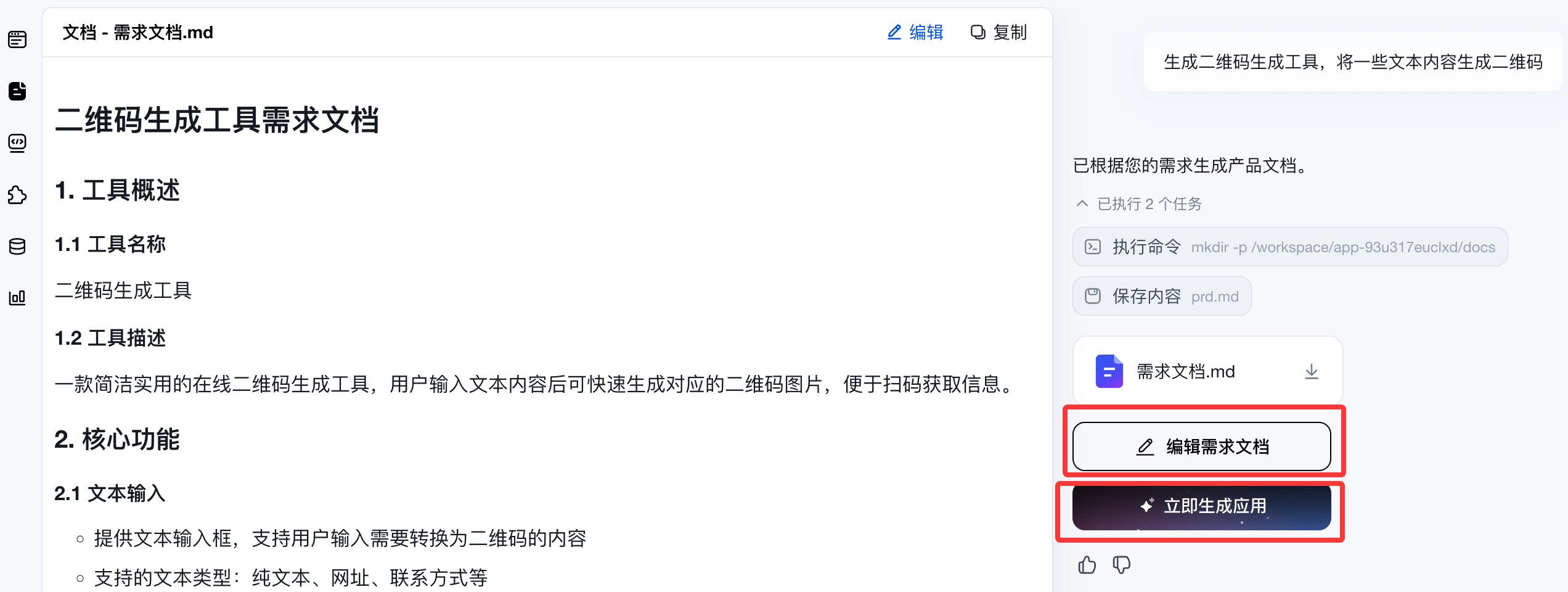
Next, it will start generating code. Throughout the entire process, you don't need to write a single line of code; it generates directly:
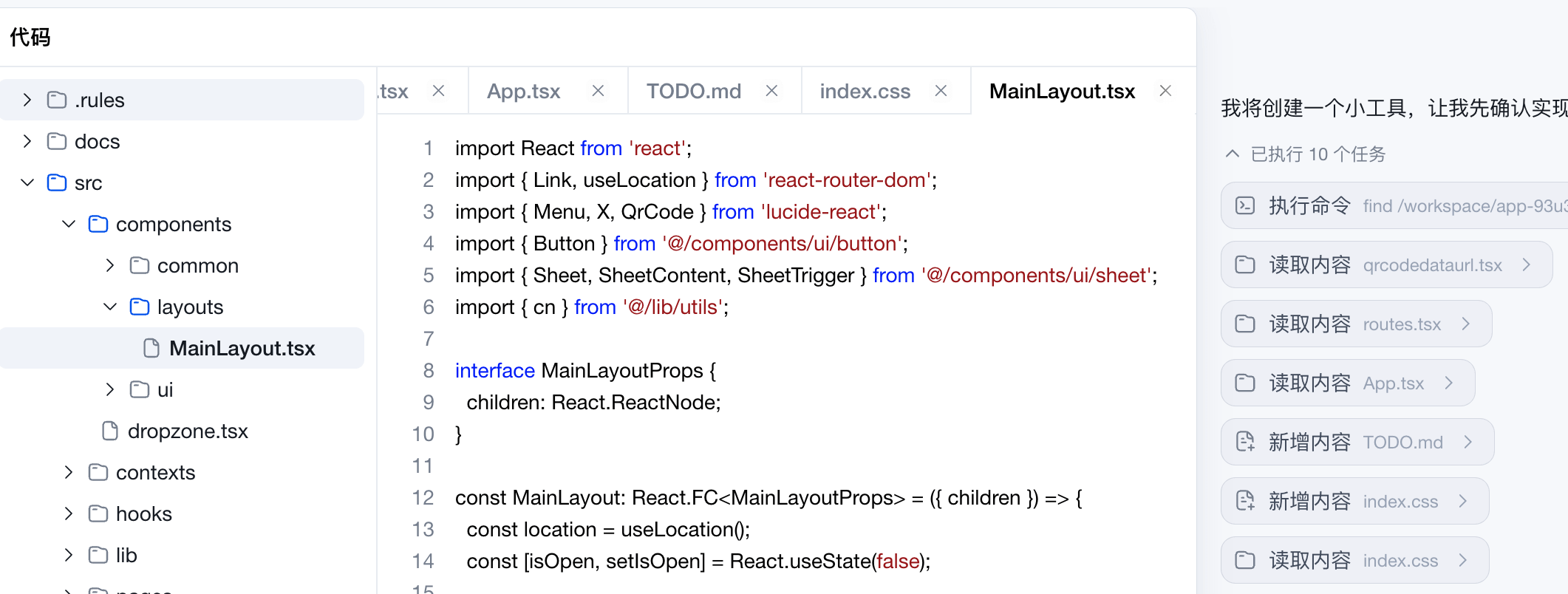
Take a look at the interface and usage effect, it's very easy to use:

In addition, the plugin section also provides support for other advanced features, such as video:

If you still don't know what to look at, you can also go to the App Plaza to see excellent products made by others:

<hr><h2>Desktop-Level Agent</h2>
<p>DuMate is Baidu's desktop-level AI office agent. It can operate files, read and write Excel, organize data, generate PPT, and operate browsers.</p>
<p>We only need to describe the task in natural language, and DuMate can complete the delivery end-to-end.</p>
<h3>Download and Installation</h3>
<p>DuMate supports the following operating systems:</p>
<table class="reference">
<thead>
<tr>
<th>Operating System</th>
<th>Chip Architecture</th>
<th>Description</th>
</tr>
</thead>
<tbody>
<tr>
<td>macOS</td>
<td>Apple Silicon (M-series chips)</td>
<td>Native support, better performance</td>
</tr>
<tr>
<td>Windows</td>
<td>X86</td>
<td>Traditional desktop support</td>
</tr>
</tbody>
</table><div style="
padding:14px 18px;
margin:16px 0;
border:1px solid #CFDBE8;
border-radius:12px;
background:linear-gradient(135deg,#F4F8FB,#EEF4FA);
color:#1f2937;
font-size:15px;
line-height:1.8;
display:flex;
align-items:flex-start;
gap:10px;
">
<i class="fa fa-leaf" style="
color:#4C7EAF;
font-size:16px;
margin-top:4px;
flex-shrink:0;
"></i>
<div>
<strong>
First, click to visit
<a href="https://www.dumate.cn/?track=aiwebsite_3"
target="_blank"
style="
color:#3B70A6;
text-decoration:none;
font-weight:700;
">
DuMate Official Website
</a>
to register a DuMate account,
</strong>
and the installer for your system will be downloaded.
</div>
</div>
<p>Double-click the installer and follow the prompts to complete the installation.</p>
<p><img decoding="async" src="../wp-content/uploads/2026/05/example_1779694866991.png"></p>
<h3>Log In to Your Account</h3>
<p>DuMate supports the following account login methods:</p>
<table class="reference">
<thead>
<tr>
<th>Login Method</th>
<th>Description</th>
</tr>
</thead>
<tbody>
<tr>
<td>Baidu Account</td>
<td>Use an existing Baidu account to log in directly</td>
</tr>
<tr>
<td>Baidu AI Cloud Account</td>
<td>Use a Baidu AI Cloud account to log in, suitable for enterprise users</td>
</tr>
<tr>
<td>Phone Number Registration</td>
<td>Unregistered users can register with a phone number in one step and then log in</td>
</tr>
</tbody>
</table>
<h3>New Task</h3>
<p>Click the "New Task" button at the top of the left sidebar to enter the main chat interface.</p>
<p><img decoding="async" src="../wp-content/uploads/2025/12/example1_8522f39.png"></p>
<h3>New Task</h3>
<p>You can designate a dedicated folder through "Set Workspace" as DuMate's independent working directory. The workspace follows a least-privilege mechanism, opening only the necessary access scope for AI tasks. Programs within the authorized directory have full operation permissions, specifically including:</p>
<ul>
<li>Read: View all file contents</li>
<li>Edit: Modify existing files</li>
<li>Create: Add new files and folders</li>
<li>Delete: Can perform file deletion operations, with a pop-up confirmation before the operation</li>
</ul>
<p><img decoding="async" src="../wp-content/uploads/2025/12/example2_8522f39.png"></p>
<p><img decoding="async" src="../wp-content/uploads/2025/12/example3_8522f39.png"></p>
<h3>Operation Process</h3>
<h4>Create a Task</h4>
<p>Enter the task content in the chat input box and press Enter to send and start the task. To attach local files, click the "+" button next to the input box to select the target file.<br>The platform is compatible with mainstream formats, supporting processing of Word, PPT, Excel, TXT, Markdown, images, videos, compressed files, and more.</p><p><img decoding="async" src="../wp-content/uploads/2025/12/example4_8522f39.png"></p>
<h4>Right Sidebar Functions</h4>
<ul>
<li><strong>Task Progress</strong>: Complex multi-step tasks automatically generate an execution checklist, allowing you to view pending items and running status in real time</li>
<li><strong>Task Files</strong>: Displays intermediate files and final outputs of the task. Some formats support online preview, and you can also open them with local programs</li>
<li><strong>Capabilities</strong>: Includes two types: tool connectors (Connectors) and functional skills (Skills), corresponding to runtime invocation tools and practical operation skills respectively</li>
</ul><p><img decoding="async" src="../wp-content/uploads/2025/12/example5_8522f39.png"></p>
<h4>Task Termination and Addition</h4>
<p>While a task is running, click the stop button at the bottom right of the input box to terminate the process.<br>If you directly enter a new requirement and send it, the system will automatically end the current task and switch to executing the new instruction.</p>
<p><img decoding="async" src="../wp-content/uploads/2025/12/example6_8522f39.png"></p>
<p><img decoding="async" src="../wp-content/uploads/2025/12/example7_8522f39.png"></p>
<h4>Deleting a Task</h4>
<p>Right-click the corresponding task in the left conversation list to complete the deletion.</p><p><img decoding="async" src="../wp-content/uploads/2025/12/example8_8522f39.png"></p>
<p><img decoding="async" src="../wp-content/uploads/2025/12/example9_8522f39.png"></p> Other extensions.