Python with Keyword
In Python programming, resource management is an important but often overlooked aspect.withThe keyword provides us with an elegant way to handle scenarios that require explicit resource release, such as file operations and database connections.
with is a keyword in Python used for the Context Management Protocol. It simplifies resource management code, especially for resources that need to be explicitly released or cleaned up (such as files, network connections, database connections, etc.).
Why do we need the with statement?
Problems with Traditional Resource Management
Let's first look at a typical file operation example:
Example
try:
content = file.read()
# Process the file content
finally:
file.close()
This approach has several problems:
- Easy to forget to close the resource: If there is no
try-finallyblock, you may forget to callclose() - Verbose code: Simple file operations require multiple lines of code
- Complex exception handling: Need to manually handle potential exceptions
Advantages of the with statement
withThe statement solves these problems through the Context Management Protocol:
- Automatic resource release: Ensures resources are properly closed after use
- Concise code: Reduces boilerplate code
- Exception safety: Even if an exception occurs in the code block, resources are properly released
- Strong readability: Clearly identifies the scope of the resource
Basic Syntax of the with statement
Basic Usage
withThe basic form of the statement is as follows:
Syntax Format
# Code block
expressionReturns an object that supports the context management protocolas variableis optional, used to assign the expression result to a variable- After the code block is executed, the cleanup method is automatically called
File Operation Example
The most commonwithapplication of the statement is file operations:
Example
content = file.read()
print(content)
# File has been automatically closed
This code is equivalent to the previoustry-finallyimplementation, but is more concise and clear.
How the with statement works
Context Management Protocol
withBehind the statement is Python's context management protocol, which requires the object to implement two methods:
__enter__(): Called when entering the context, the return value is assigned toasthe variable after__exit__(): Called when exiting the context, handles cleanup work
Execution Flow
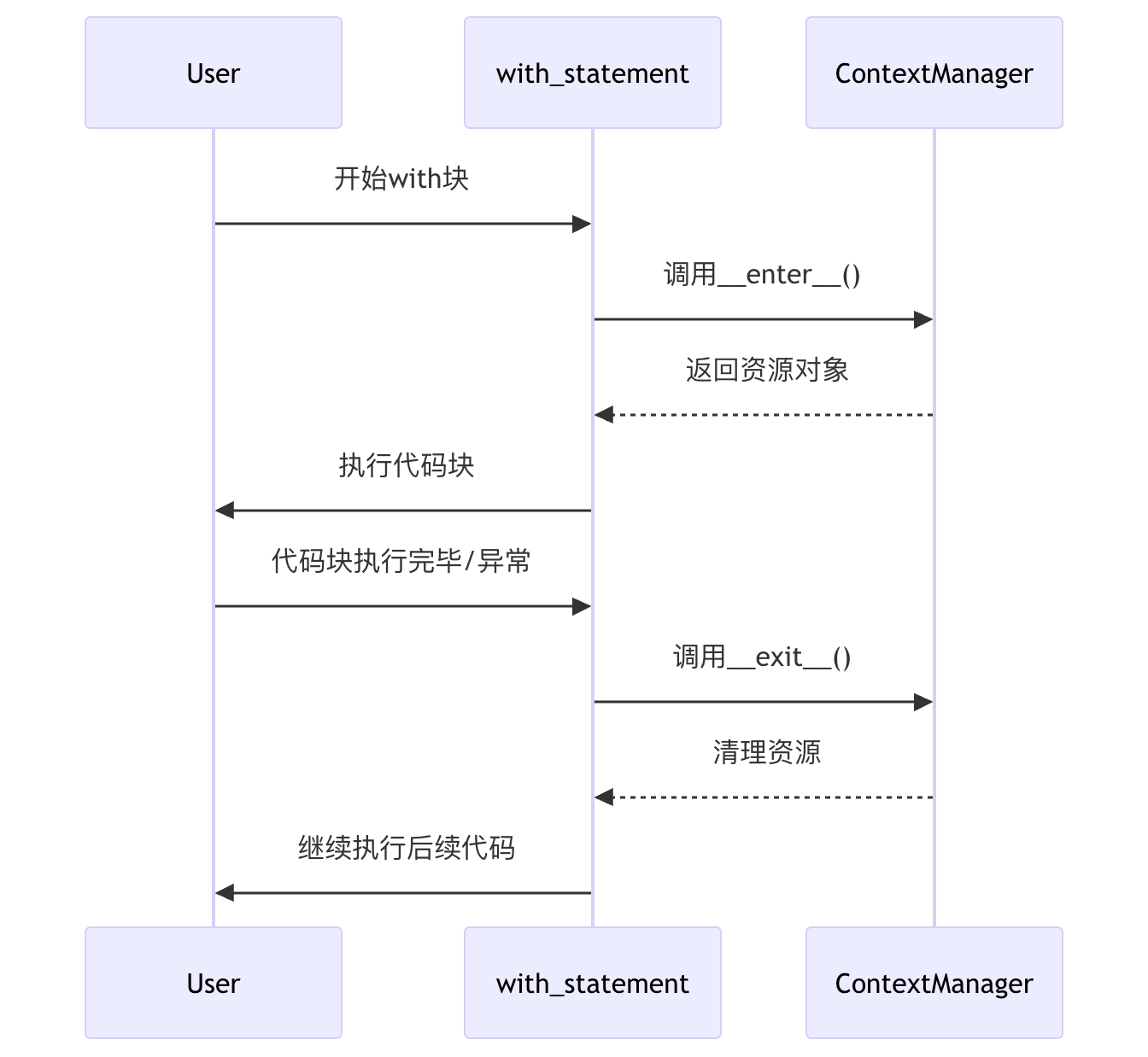
Exception Handling Mechanism
__exit__()The method receives three parameters:
exc_type: Exception typeexc_val: Exception valueexc_tb: Exception traceback information
If__exit__()returnsTrue, it means the exception has been handled and will not continue to propagate; if it returnsFalseorNone, the exception will continue to propagate outward.
Practical Application Scenarios
1. File Operations
Example
with open('input.txt', 'r') as infile, open('output.txt', 'w') as outfile:
content = infile.read()
outfile.write(content.upper())
2. Database Connections
Example
with sqlite3.connect('database.db') as conn:
cursor = conn.cursor()
cursor.execute('SELECT * FROM users')
results = cursor.fetchall()
# Connection automatically closed
3. Thread Locks
Example
lock = threading.Lock()
with lock:
# Critical section code
print("This code is thread-safe")
4. Temporarily Modifying System State
Example
with decimal.localcontext() as ctx:
ctx.prec = 42 # Temporarily set high precision
# Perform high-precision calculation
# Precision restored to original setting
Creating Custom Context Managers
Class Implementation
We can create a custom context manager by implementing__enter__and__exit__methods:
Example
def __enter__(self):
import time
self.start = time.time()
return self
def __exit__(self, exc_type, exc_val, exc_tb):
import time
self.end = time.time()
print(f"Time elapsed: {self.end - self.start:.2f} seconds")
return False
# Usage example
with Timer() as t:
# Perform some time-consuming operations
sum(range(1000000))
Using the contextlib Module
Python'scontextlibmodule provides a simpler way to create context managers:
Example
@contextmanager
def tag(name):
print(f"<{name}>")
yield
print(f"</{name}>")
# Usage example
with tag("h1"):
print("This is a title")
Output:
<h1>
这是一个标题
</h1>
Common Issues and Best Practices
Common Errors
1. Incorrectly believing that with is only for files:
Example
conn = sqlite3.connect('db.sqlite')
# Should use with statement
2. Ignoring the return value of __exit__:
Example
def __exit__(self, exc_type, exc_val, exc_tb):
# Forgetting to return True/False may cause exception handling to behave unexpectedly
pass
Best Practices
- Prioritize using with to manage resources: For resources such as files, network connections, and locks, always give priority to using
withstatement - Keep the context concise:
withThe code in the block should only contain operations related to the resource - Handle exceptions properly: In custom context managers, decide whether to suppress exceptions based on requirements
- Leverage multiple contexts: Python allows managing multiple resources in a single
withstatement
Summary Points
| Key Point | Description |
|---|---|
| Automatic Resource Management | withThe statement ensures resources are properly released |
| Context Protocol | Need to implement__enter__and__exit__methods |
| Exception Safety | Even if an exception occurs in the code block, resources will be released |
| Common Applications | File operations, database connections, thread locks, etc. |
| Custom Implementation | Can be done through classes orcontextlibto create custom context managers |
withThe statement is a powerful feature in Python. It not only simplifies code, but also improves program robustness. Masteringwiththe usage and principles of the statement will help you write more professional and reliable Python code.