Python3 Tuple
Python tuples are similar to lists, except that the elements of a tuple cannot be modified.
Tuples use parentheses( ), lists use square brackets[ ]。
Creating a tuple is simple: just add elements in parentheses, separated by commas.
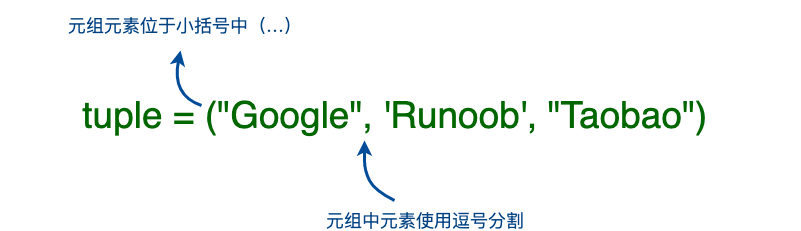
Example (Python 3.0+)
>>> tup2 = (1, 2, 3, 4, 5 )
>>> tup3 = "a", "b", "c", "d" # Parentheses are not needed either
>>> type(tup3)
<class 'tuple'>
Create an empty tuple
tup1 = ()
When a tuple contains only one element, you need to add a comma after the element,, otherwise the parentheses will be treated as an operator:
Example (Python 3.0+)
>>> type(tup1) # Without a comma, the type is integer
<class 'int'>
>>> tup1 = (50,)
>>> type(tup1) # With a comma, the type is tuple
<class 'tuple'>
Tuples are similar to strings in that indexing starts from 0, and they can be sliced, combined, etc.
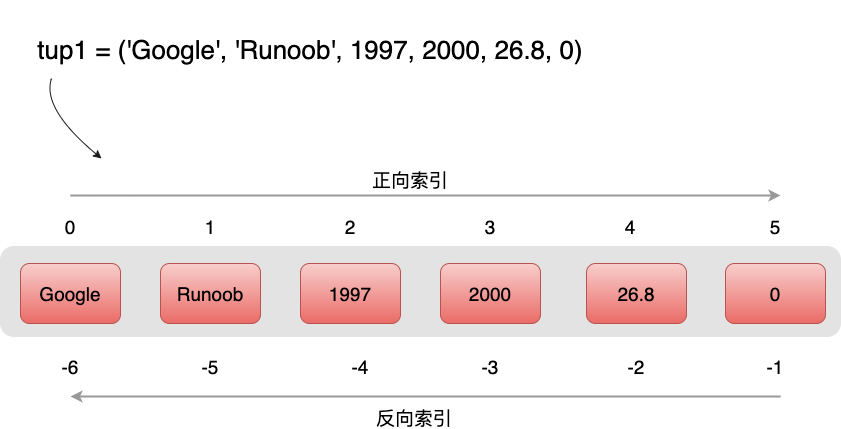
Accessing Tuples
Tuples can use index numbers to access values in the tuple, as in the following example:
Example (Python 3.0+)
The output of the above example is:
tup1[0]:  Google
tup2[1:5]:  (2, 3, 4, 5)
Modifying Tuples
The element values in a tuple are not allowed to be modified, but we can concatenate and combine tuples, as in the following example:
Example (Python 3.0+)
The output of the above example is:
(12, 34.56, 'abc', 'xyz')
Deleting Tuples
The element values in a tuple are not allowed to be deleted, but we can use the del statement to delete the entire tuple, as in the following example:
Example (Python 3.0+)
After the tuple in the above example is deleted, outputting the variable will cause an exception message. The output is as follows:
删除后的元组 tup :
Traceback (most recent call last):
  File "test.py", line 8, in <module>
    print (tup)
NameError: name 'tup' is not defined
Tuple Operators
Like strings, tuples can use the+、+=and*+ sign for operations. This means they can be combined and copied, and a new tuple will be generated after the operation.
| Python Expression | Result | Description |
|---|---|---|
len((1, 2, 3)) | 3 | Count the number of elements |
>>> a = (1, 2, 3) >>> b = (4, 5, 6) >>> c = a+b >>> c (1, 2, 3, 4, 5, 6) | (1, 2, 3, 4, 5, 6) | Concatenation; c is a new tuple containing all elements from a and b. |
>>> a = (1, 2, 3) >>> b = (4, 5, 6) >>> a += b >>> a (1, 2, 3, 4, 5, 6) | (1, 2, 3, 4, 5, 6) | Concatenation; a becomes a new tuple containing all elements from a and b. |
('Hi!',) * 4
| ('Hi!', 'Hi!', 'Hi!', 'Hi!') | Replication |
3 in (1, 2, 3) | True | Whether an element exists |
for x in (1, 2, 3):
print (x, end=" ") | 1 2 3 | Iteration |
Tuple Indexing and Slicing
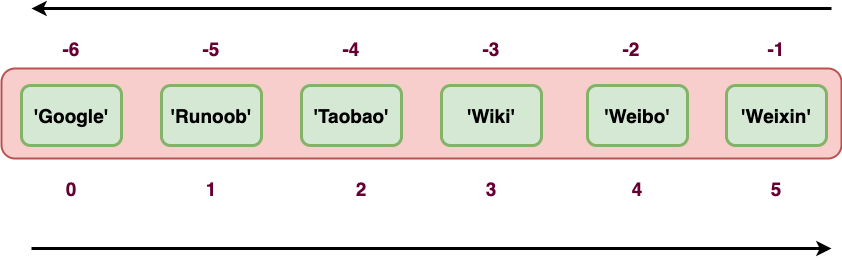
Because a tuple is also a sequence, we can access elements at specified positions in the tuple, and also slice a range of elements from indices, as shown below:
Tuple:
tup = ('Google', 'Example', 'Taobao', 'Wiki', 'Weibo','Weixin')
| Python Expression | Result | Description |
|---|---|---|
| tup[1] | 'Example' | Read the second element |
| tup[-2] | 'Weibo' | Read in reverse; read the second-to-last element |
| tup[1:] | ('Example', 'Taobao', 'Wiki', 'Weibo', 'Weixin') | Slicing: all elements starting from the second element |
| tup[1:4] | ('Example', 'Taobao', 'Wiki') | Slicing: from the second element to the fourth element (index 3) |
A running example is as follows:
Example
>>> tup[1]
'Example'
>>> tup[-2]
'Weibo'
>>> tup[1:]
('Example', 'Taobao', 'Wiki', 'Weibo', 'Weixin')
>>> tup[1:4]
('Example', 'Taobao', 'Wiki')
>>>
Tuple Built-in Functions
Python tuples include the following built-in functions
| Serial number | Method and description | Example |
|---|---|---|
| 1 | len(tuple) Count the number of elements in a tuple. |
>>> tuple1 = ('Google', 'Example', 'Taobao')
>>> len(tuple1)
3
>>>
|
| 2 | max(tuple) Return the maximum value of elements in a tuple. |
>>> tuple2 = ('5', '4', '8')
>>> max(tuple2)
'8'
>>>
|
| 3 | min(tuple) Return the minimum value of elements in a tuple. |
>>> tuple2 = ('5', '4', '8')
>>> min(tuple2)
'4'
>>>
|
| 4 | tuple(iterable) Convert an iterable series into a tuple. |
>>> list1= ['Google', 'Taobao', 'Example', 'Baidu']
>>> tuple1=tuple(list1)
>>> tuple1
('Google', 'Taobao', 'Example', 'Baidu')
|
About Tuples Being Immutable
The so-called immutability of a tuple means that the content in memory pointed to by the tuple is immutable.
>>> tup[0] = 'g' # Modifying elements is not supported
Traceback (most recent call last):
File "<stdin>", line 1, in <module>
TypeError: 'tuple' object does not support item assignment
>>> id(tup) # Check the memory address
4440687904
>>> tup = (1,2,3)
>>> id(tup)
4441088800 # The memory address is different
From the above example, it can be seen that the reassigned tuple tup is bound to a new object, not modifying the original object.
Other Extensions