Python3 Strings
Strings are the most commonly used data type in Python. We can use quotes ('or") to create strings.
Creating a string is simple, just assign a value to a variable. For example:
Python Accessing Values in Strings
Python does not support a single-character type; a single character is also used as a string in Python.
Python accesses substrings using square brackets[]to intercept strings. The syntax for string slicing is as follows:
variable[start index:end index]
Index values start with0as the starting value,-1is the starting position from the end.

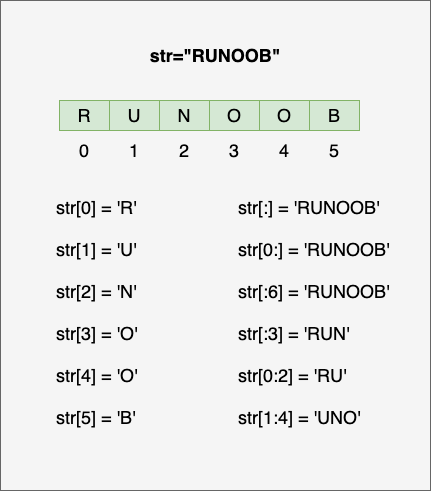
As in the example below:
Examples (Python 3.0+)
The execution result of the above example is:
var1[0]:  H
var2[1:5]:  unoo
Python String Update
You can intercept a part of a string and concatenate it with other fields, as in the example below:
Examples (Python 3.0+)
The execution result of the above example is:
已更新字符串 : Hello Example!
Python Escape Characters
When special characters are needed in characters, Python uses backslash\escape characters. As in the table below:
| Escape character | Description | Example |
|---|---|---|
| \ (at end of line) | Line continuation |
>>> print("line1 \
... line2 \
... line3")
line1 line2 line3
>>>
|
| \\ | Backslash symbol |
>>> print("\\")
\
|
| \' | Single quote |
>>> print('\'')
'
|
| \" | Double quote |
>>> print("\"")
"
|
| \a | Bell |
>>> print("\a")The computer makes a sound after execution. |
| \b | Backspace |
>>> print("Hello \b World!")
Hello World!
|
| \000 | Empty |
>>> print("\000")

>>>
|
| \n | Newline |
>>> print("\n")


>>>
|
| \v | Vertical tab |
>>> print("Hello \v World!")
Hello
       World!
>>>
|
| \t | Horizontal tab |
>>> print("Hello \t World!")
Hello      World!
>>>
|
| \r | Carriage return, moves\rthe content after it to the beginning of the string, and replaces the characters at the beginning one by one until the\rcontent after it is completely replaced. |
>>> print("Hello\rWorld!")
World!
>>> print('google example taobao\r123456')
123456 example taobao
|
| \f | Form feed |
>>> print("Hello \f World!")
Hello
       World!
>>>
|
| \yyy | Octal number, y represents characters from 0 to 7, for example: \012 represents newline. |
>>> print("\110\145\154\154\157\40\127\157\162\154\144\41")
Hello World!
|
| \xyy | Hexadecimal number, starting with \x, y represents a character, for example: \x0a represents newline. |
>>> print("\x48\x65\x6c\x6c\x6f\x20\x57\x6f\x72\x6c\x64\x21")
Hello World!
|
| \other | Other characters are output in normal format. |
Use\r to implement percentage progress:
Examples
for i in range(101): # Add progress bar graphics and percentage
bar = '[' + '=' * (i // 2) + ' ' * (50 - i // 2) + ']'
print(f"\r{bar} {i:3}%", end='', flush=True)
time.sleep(0.05)
print()
In the following example, we used different escape characters to demonstrate the effects of single quotes, newline, tab, backspace, form feed, ASCII, binary, octal and hexadecimal numbers:
Examples
print("Hello, world!\nHow are you?") # Output: Hello, world!
# How are you?
print("Hello, world!\tHow are you?") # Output: Hello, world! How are you?
print("Hello,\b world!") # Output: Hello world!
print("Hello,\f world!") # Output:
# Hello,
# world!
print("The ASCII value of A is:", ord('A')) # Output: The ASCII value of A is: 65
print("\x41 is the ASCII code of A) # Output: A is the ASCII code of A
decimal_number = 42
binary_number = bin(decimal_number) # Convert decimal to binary
print('Converted to binary:', binary_number) # Converted to binary: 0b101010
octal_number = oct(decimal_number) # Convert decimal to octal
print('Converted to octal:', octal_number) # Converted to octal: 0o52
hexadecimal_number = hex(decimal_number) # Convert decimal to hexadecimal
print('Converted to hexadecimal:', hexadecimal_number) # Converted to hexadecimal: 0x2a
Python String Operators
In the table below, the variable a in examples has the string value "Hello", and variable b has the value "Python":
| Operator | Description | Example |
|---|---|---|
| + | String concatenation | a + b output: HelloPython |
| * | Repeat output string | a*2 output: HelloHello |
| [] | Get characters in a string by index | ae |
| [ : ] | Intercept a part of a string, following theleft-closed and right-openrule; str[0:2] does not include the 3rd character. | a[1:4] outputell |
| in | Membership operator - returns True if the string contains the given character | 'H' in aOutput result True |
| not in | Membership operator - returns True if the string does not contain the given character | 'M' not in aOutput result True |
| r/R | Raw string - Raw strings: all strings are used directly according to their literal meaning, without escaping special or non-printable characters. Raw strings have almost the same syntax as ordinary strings except for adding the letterr(case-insensitive) before the first quote of the string. | print( r'\n' ) print( R'\n' ) |
| % | Format string | Please see the next section. |
Examples (Python 3.0+)
The output result of the above example is:
a + b 输出结果: HelloPython
a * 2 输出结果: HelloHello
a[1] 输出结果: e
a[1:4] 输出结果: ell
H 在变量 a 中
M 不在变量 a 中
\n
\n
Python String Formatting
Python supports formatted string output. Although this may involve very complex expressions, the most basic usage is inserting a value into a string with the string format specifier %s.
In Python, string formatting uses the same syntax as the sprintf function in C.
Examples (Python 3.0+)
The output result of the above example is:
我叫 小明 今年 10 岁!
Python string formatting symbols:
| Symbol | Description |
|---|---|
| %c | Format character and its ASCII code |
| %s | Format string |
| %d | Format integer |
| %u | Format unsigned integer |
| %o | Format unsigned octal number |
| %x | Format unsigned hexadecimal number |
| %X | Format unsigned hexadecimal number (uppercase) |
| %f | Format floating-point numbers, can specify precision after the decimal point |
| %e | Format floating-point numbers using scientific notation |
| %E | Works the same as %e, formats floating-point numbers using scientific notation |
| %g | Shorthand for %f and %e |
| %G | Shorthand for %f and %E |
| %p | Format variable address with hexadecimal number |
Formatting operator auxiliary directives:
| Symbol | Function |
|---|---|
| * | Define width or decimal point precision |
| - | Used for left alignment |
| + | Display plus sign ( + ) before positive numbers |
| <sp> | Display a space before positive numbers |
| # | Display '0' before octal numbers, and '0x' or '0X' before hexadecimal numbers (depending on whether 'x' or 'X' is used) |
| 0 | Pad the displayed number with '0' instead of the default space |
| % | '%%' outputs a single '%' |
| (var) | Mapped variable (dictionary argument) |
| m.n. | m is the minimum total width to display, n is the number of digits after the decimal point (if available) |
Starting from Python 2.6, a new function for formatting strings was addedstr.format(), which enhances the functionality of string formatting.
Python Triple Quotes
Python triple quotes allow a string to span multiple lines; the string can contain newlines, tabs, and other special characters. An example is as follows:
Examples (Python 3.0+)
The output of the above example is:
这是一个多行字符串的实例
多行字符串可以使用制表符
TAB (    )。
也可以使用换行符 [
 ]。
Triple quotes free programmers from the quagmire of quotes and special strings, keeping a small block of string in a so-called WYSIWYG (What You See Is What You Get) format from start to finish.
A typical use case is when you need a block of HTML or SQL. At this point, using string concatenation and special string escaping would be very cumbersome.
f-string
f-string was added in Python 3.6 and later versions. It is called a literal formatted string and is a new syntax for formatting strings.
Previously, we were used to using the percent sign (%):
Examples
>>> 'Hello %s' % name
'Hello Example'
f-stringThe formatted string starts withffollowed by the string. Expressions in the string are wrapped in curly braces {}. It will replace them with the computed value of the variable or expression. Example:
Examples
>>> f'Hello {name}' # Replace variable
'Hello Example'
>>> f'{1+2}' # Use expression
'3'
>>> w = {'name': 'Example', 'url': 'www.example.com'}
>>> f'{w["name"]}: {w["url"]}'
'Example: www.example.com'
Using this method is clearly simpler; you no longer need to decide whether to use %s or %d.
In Python 3.8 and later, you can use=the symbol to concatenate the operation expression and its result:
Examples
>>> print(f'{x+1}') # Python 3.6
2
>>> x = 1
>>> print(f'{x+1=}') # Python 3.8
x+1=2
Unicode Strings
In Python 2, ordinary strings are stored as 8-bit ASCII codes, while Unicode strings are stored as 16-bit Unicode strings, which can represent more character sets. The syntax used is to add a prefix before the stringu。
In Python 3, all strings are Unicode strings.
Python Built-in String Functions
Python's commonly used built-in string methods are as follows:
| No. | Method and description |
|---|---|
| 1 | capitalize() |
| 2 | Returns a centered string of a specified width. fillchar is the filling character, defaulting to a space. |
| 3 | count(str, beg= 0,end=len(string)) Returns the number of times str appears in string. If beg or end is specified, returns the number of times str appears in the specified range. |
| 4 | bytes.decode(encoding="utf-8", errors="strict") There is no decode method in Python 3, but we can use the bytes object's decode() method to decode a given bytes object. This bytes object can be encoded and returned by str.encode(). |
| 5 | encode(encoding='UTF-8',errors='strict') Encodes the string in the encoding format specified by encoding. If an error occurs, a ValueError exception is raised by default, unless errors is specified as 'ignore' or 'replace'. |
| 6 | endswith(suffix, beg=0, end=len(string)) |
| 7 | Converts tab symbols in the string to spaces. The default number of spaces for a tab symbol is 8. |
| 8 | find(str, beg=0, end=len(string)) Detects whether str is contained in the string. If the range beg and end is specified, checks whether it is contained in the specified range. If contained, returns the starting index value; otherwise, returns -1. |
| 9 | index(str, beg=0, end=len(string)) Same as the find() method, except that it raises an exception if str is not in the string. |
| 10 | Checks whether the string consists of letters and numbers, i.e., all characters in the string are letters or digits. If the string has at least one character and all characters are letters or digits, returns True; otherwise, returns False. |
| 11 | Returns True if the string has at least one character and all characters are letters or Chinese characters; otherwise, returns False. |
| 12 | Returns True if the string contains only digits; otherwise, returns False. |
| 13 | Returns True if the string contains at least one case-sensitive character and all these (case-sensitive) characters are lowercase; otherwise, returns False. |
| 14 | Returns True if the string contains only numeric characters; otherwise, returns False. |
| 15 | Returns True if the string contains only whitespace; otherwise, returns False. |
| 16 | Returns True if the string is titlecased (see title()); otherwise, returns False. |
| 17 | Returns True if the string contains at least one case-sensitive character and all these (case-sensitive) characters are uppercase; otherwise, returns False. |
| 18 | Uses the specified string as a separator to merge all elements (their string representations) in seq into a new string. |
| 19 | Returns the length of the string. |
| 20 | Returns a new string with the original string left-aligned and padded with fillchar to the length width. fillchar defaults to a space. |
| 21 | Converts all uppercase characters in the string to lowercase. |
| 22 | Trims the spaces or specified characters on the left side of the string. |
| 23 | Creates a conversion table for character mapping. In the simplest call form with two parameters, the first parameter is a string representing the characters to be converted, and the second parameter is also a string representing the conversion target. |
| 24 | Returns the largest letter in the string str. |
| 25 | Returns the smallest letter in the string str. |
| 26 | Replaces old in the string with new. If max is specified, the replacement does not exceed max times. |
| 27 | rfind(str, beg=0,end=len(string)) Similar to the find() function, but searches from the right. |
| 28 | rindex( str, beg=0, end=len(string)) Similar to index(), but starts from the right. |
| 29 | Returns a new string with the original string right-aligned and padded with fillchar (default space) to the length width. |
| 30 | Removes spaces or specified characters at the end of the string. |
| 31 | split(str="", num=string.count(str)) Splits the string using str as the delimiter. If num has a specified value, only num+1 substrings are extracted. |
| 32 | Splits by lines ('\r', '\r\n', '\n') and returns a list containing each line as an element. If the parameter keepends is False, newline characters are not included; if True, newline characters are preserved. |
| 33 | startswith(substr, beg=0,end=len(string)) Checks whether the string starts with the specified substring substr. If so, returns True; otherwise, returns False. If beg and end are specified, checks within the specified range. |
| 34 | Performs lstrip() and rstrip() on the string. |
| 35 | Converts uppercase to lowercase and lowercase to uppercase in the string. |
| 36 | Returns a "titlecased" string, meaning all words start with an uppercase letter and the remaining letters are lowercase (see istitle()). |
| 37 | translate(table, deletechars="") Converts characters of the string according to the table given by table (containing 256 characters). Characters to be filtered out are placed in the deletechars parameter. |
| 38 | Converts lowercase letters in the string to uppercase. |
| 39 | Returns a string of length width with the original string right-aligned and padded with 0 at the front. |
| 40 | Checks whether the string contains only decimal characters. If so, returns true; otherwise, returns false. |