Python MySQL - mysql-connector Driver
MySQL is the most popular relational database management system. If you are not familiar with MySQL, you can read ourMySQL tutorial.
This chapter introduces usingmysql-connectorto connect to and use MySQL,mysql-connectorYesMySQLthe officially provided driver.
We can use thepipcommand to installmysql-connector:
python -m pip install mysql-connector
Use the following code to test whether mysql-connector was installed successfully:
demo_mysql_test.py:
Execute the above code. If no errors occur, the installation was successful.
NoteNote:If your MySQL is version 8.0, the password plugin authentication method has changed. The early version used mysql_native_password, and version 8.0 uses caching_sha2_password, so some changes need to be made:
First modify the my.ini configuration:
[mysqld]
default_authentication_plugin=mysql_native_password
Then execute the following commands under MySQL to change the password:
ALTER USER 'root'@'localhost' IDENTIFIED WITH mysql_native_password BY '新密码';For more content, you can refer to:Python MySQL 8.0 Connection Problem。
Creating a Database Connection
You can use the following code to connect to the database:
demo_mysql_test.py:
Creating a Database
To create a database, use the "CREATE DATABASE" statement. The following creates a database named example_db:
demo_mysql_test.py:
Before creating a database, we can also use the "SHOW DATABASES" statement to check whether the database exists:
demo_mysql_test.py:
Output the list of all databases:
Alternatively, we can connect directly to the database. If the database does not exist, an error message will be output:
demo_mysql_test.py:
Creating a Data Table
To create a data table, use the"CREATE TABLE"statement. Before creating a data table, you need to ensure that the database already exists. The following creates asitesdata table:
demo_mysql_test.py:
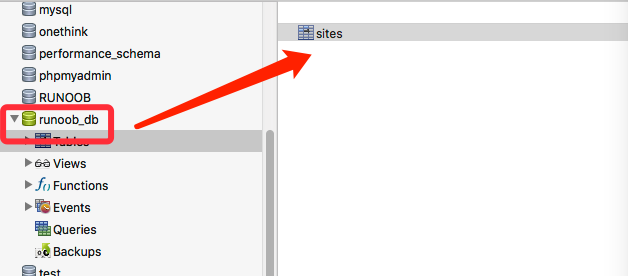
demo_mysql_test.py:
Primary Key Setup
When creating a table, we generally set a primary key (PRIMARY KEY). We can use the"INT AUTO_INCREMENT PRIMARY KEY"statement to create a primary key. The primary key starts at 1 and increments step by step.
If our table has already been created, we need to useALTER TABLEto add a primary key to the table:
demo_mysql_test.py:
Add a primary key to the sites table.
If you have not yet created the sites table, you can directly use the following code to create it.
demo_mysql_test.py:
Create a primary key for the table.
Insert Data
To insert data, use the"INSERT INTO"statement:
demo_mysql_test.py:
Insert a record into the sites table.
Execute the code, and the output result is:
1 记录插入成功
Batch Insert
For batch insertion, use theexecutemany()method. The second parameter of this method is a list of tuples, containing the data we want to insert:
demo_mysql_test.py:
Insert multiple records into the sites table.
Execute the code, and the output result is:
4 记录插入成功。
After executing the above code, we can look at the records in the data table:
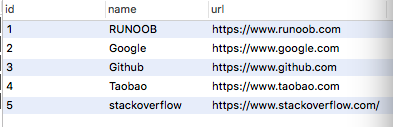
If we want to get the ID of the record after inserting the data, we can use the following code:
demo_mysql_test.py:
Execute the code, and the output result is:
1 条记录已插入, ID: 6
Query Data
To query data, use theSELECTstatement:
demo_mysql_test.py:
Execute the code, and the output result is:
(1, 'EXAMPLE', 'https://www.example.com')
(2, 'Google', 'https://www.google.com')
(3, 'Github', 'https://www.github.com')
(4, 'Taobao', 'https://www.taobao.com')
(5, 'stackoverflow', 'https://www.stackoverflow.com/')
(6, 'Zhihu', 'https://www.zhihu.com')
You can also read data from specified fields:
demo_mysql_test.py:
Execute the code, and the output result is:
('EXAMPLE', 'https://www.example.com')
('Google', 'https://www.google.com')
('Github', 'https://www.github.com')
('Taobao', 'https://www.taobao.com')
('stackoverflow', 'https://www.stackoverflow.com/')
('Zhihu', 'https://www.zhihu.com')
If we only want to read one record, we can use thefetchone()method:
demo_mysql_test.py:
Execute the code, and the output result is:
(1, 'EXAMPLE', 'https://www.example.com')
WHERE Condition Statement
If we want to read data with specified conditions, we can use thewherestatement:
demo_mysql_test.py
Read records where the name field is EXAMPLE:
Execute the code, and the output result is:
(1, 'EXAMPLE', 'https://www.example.com')
You can also use wildcards%:
demo_mysql_test.py
Execute the code, and the output result is:
(1, 'EXAMPLE', 'https://www.example.com')
(2, 'Google', 'https://www.google.com')
To prevent SQL injection attacks in database queries, we can use%splaceholder to escape the query conditions:
demo_mysql_test.py
Sorting
Query results can be sorted using theORDER BYstatement. The default sorting method is ascending order, with the keywordASC. If you want to set descending order, you can set the keywordDESC。
demo_mysql_test.py
Sort in ascending order by the letters of the name field:
Execute the code, and the output result is:
(3, 'Github', 'https://www.github.com')
(2, 'Google', 'https://www.google.com')
(1, 'EXAMPLE', 'https://www.example.com')
(5, 'stackoverflow', 'https://www.stackoverflow.com/')
(4, 'Taobao', 'https://www.taobao.com')
(6, 'Zhihu', 'https://www.zhihu.com')
Example of descending order sorting:
demo_mysql_test.py
Sort in descending order by the letters of the name field:
Execute the code, and the output result is:
(6, 'Zhihu', 'https://www.zhihu.com')
(4, 'Taobao', 'https://www.taobao.com')
(5, 'stackoverflow', 'https://www.stackoverflow.com/')
(1, 'EXAMPLE', 'https://www.example.com')
(2, 'Google', 'https://www.google.com')
(3, 'Github', 'https://www.github.com')
Limit
If we want to set the amount of data to query, we can use the"LIMIT"statement to specify
demo_mysql_test.py
Read the first 3 records:
Execute the code, and the output result is:
(1, 'EXAMPLE', 'https://www.example.com')
(2, 'Google', 'https://www.google.com')
(3, 'Github', 'https://www.github.com')
You can also specify the starting position. The keyword used isOFFSET:
demo_mysql_test.py
Read the first 3 records starting from the second record:
Execute the code, and the output result is:
(2, 'Google', 'https://www.google.com')
(3, 'Github', 'https://www.github.com')
(4, 'Taobao', 'https://www.taobao.com')
Delete Record
To delete records, use the"DELETE FROM"statement:
demo_mysql_test.py
Delete records where name is stackoverflow:
Execute the code, and the output result is:
1 条记录删除
Note:Use the DELETE statement with caution. Make sure the WHERE condition is specified in the DELETE statement, otherwise all data in the table will be deleted.
To prevent SQL injection attacks in database queries, we can use%splaceholder to escape the conditions of the DELETE statement:
demo_mysql_test.py
Execute the code, and the output result is:
1 条记录删除
Update Table Data
To update a data table, use the"UPDATE"statement:
demo_mysql_test.py
Change the field data with name Zhihu to ZH:
Execute the code, and the output result is:
1 条记录被修改
Note:Make sure the UPDATE statement specifies a WHERE condition, otherwise all data in the table will be updated.
To prevent SQL injection attacks in database queries, we can use the %s placeholder to escape the conditions of the UPDATE statement:
demo_mysql_test.py
Execute the code, and the output result is:
1 条记录被修改
Delete Table
To delete a table, use the"DROP TABLE"statement.IF EXISTSThe keyword is used to determine whether the table exists, and it is only deleted if it exists: