Python urllib
The Python urllib library is used to operate on web URLs and scrape web content.
This article mainly introduces Python3's urllib.
The urllib package contains the following modules:
- urllib.request- Open and read URLs.
- urllib.error- Contains exceptions raised by urllib.request.
- urllib.parse- Parse URLs.
- urllib.robotparser- Parse robots.txt files.

urllib.request
urllib.request defines some functions and classes for opening URLs, including authorization verification, redirects, browser cookies, etc.
urllib.request can simulate a browser's request initiation process.
We can use the urlopen method of urllib.request to open a URL, the syntax is as follows:
urllib.request.urlopen(url, data=None, [timeout, ]*, cafile=None, capath=None, cadefault=False, context=None)
- url: url address.
- data: Other data objects sent to the server, default is None.
- timeout: Set access timeout.
- cafile and capath: cafile is the CA certificate, capath is the path to the CA certificate, required for HTTPS.
- cadefault: Deprecated.
- context: ssl.SSLContext type, used to specify SSL settings.
Example is as follows:
Example
myURL = urlopen("https://www.example.com/")
print(myURL.read())
The above code uses urlopen to open a URL, then uses the read() function to get the HTML source code of the webpage.
read() reads the entire webpage content; we can specify the length to read:
Example
myURL = urlopen("https://www.example.com/")
print(myURL.read(300))
In addition to the read() function, it also includes the following two functions for reading webpage content:
-
readline()- Read one line of the file
from urllib.request import urlopen myURL = urlopen("https://www.example.com/") print(myURL.readline()) #读取一行内容 -
readlines()- Read all content of the file, it assigns the read content to a list variable.
from urllib.request import urlopen

myURL = urlopen("https://www.example.com/")
lines = myURL.readlines()
for line in lines:
    print(line)
When scraping webpages, we often need to determine whether the webpage can be accessed normally. Here we can use the getcode() function to get the webpage status code. Returning 200 means the webpage is normal, returning 404 means the webpage does not exist:
Example
myURL1 = urllib.request.urlopen("https://www.example.com/")
print(myURL1.getcode()) # 200
try:
myURL2 = urllib.request.urlopen("https://www.example.com/no.html")
except urllib.error.HTTPError as e:
if e.code == 404:
print(404) # 404
For more webpage status codes, refer to:https://www.example.com/http/http-status-codes.html。
If you want to save the scraped webpage locally, you can usePython3 File write() methodfunction:
Example
myURL = urlopen("https://www.example.com/")
f = open("example_urllib_test.html", "wb")
content = myURL.read() # Read webpage content
f.write(content)
f.close()
After executing the above code, a example_urllib_test.html file will be generated locally, containing the content of the https://www.example.com/ webpage.
For more Python File handling, refer to:https://www.example.com/python3/python3-file-methods.html
。URL encoding and decoding can useurllib.request.quote()andurllib.request.unquote()methods:
Example
encode_url = urllib.request.quote("https://www.example.com/") # Encoding
print(encode_url)
unencode_url = urllib.request.unquote(encode_url) # Decoding
print(unencode_url)
The output result is:
https%3A//www.example.com/
https://www.example.com/
Simulate Headers
When scraping webpages, we generally need to simulate headers (webpage header information). At this time, we need to use the urllib.request.Request class:
class urllib.request.Request(url, data=None, headers={}, origin_req_host=None, unverifiable=False, method=None)
- url: url address.
- data: Other data objects sent to the server, default is None.
- headers: HTTP request header information, in dictionary format.
- origin_req_host: The host address of the request, IP or domain name.
- unverifiable: This parameter is rarely used. It is used to set whether the webpage requires verification. Default is False.
- method: Request method, such as GET, POST, DELETE, PUT, etc.
Example - py3_urllib_test.py file code
import urllib.parse
url = 'https://www.example.com/?s=' # Example Tutorial search page
keyword = 'Python Tutorial'
key_code = urllib.request.quote(keyword) # Encode the request
url_all = url+key_code
header = {
'User-Agent':'Mozilla/5.0 (X11; Fedora; Linux x86_64) AppleWebKit/537.36 (KHTML, like Gecko) Chrome/58.0.3029.110 Safari/537.36'
} # Header information
request = urllib.request.Request(url_all,headers=header)
reponse = urllib.request.urlopen(request).read()
fh = open("./urllib_test_example_search.html","wb") # Write the file to the current directory
fh.write(reponse)
fh.close()
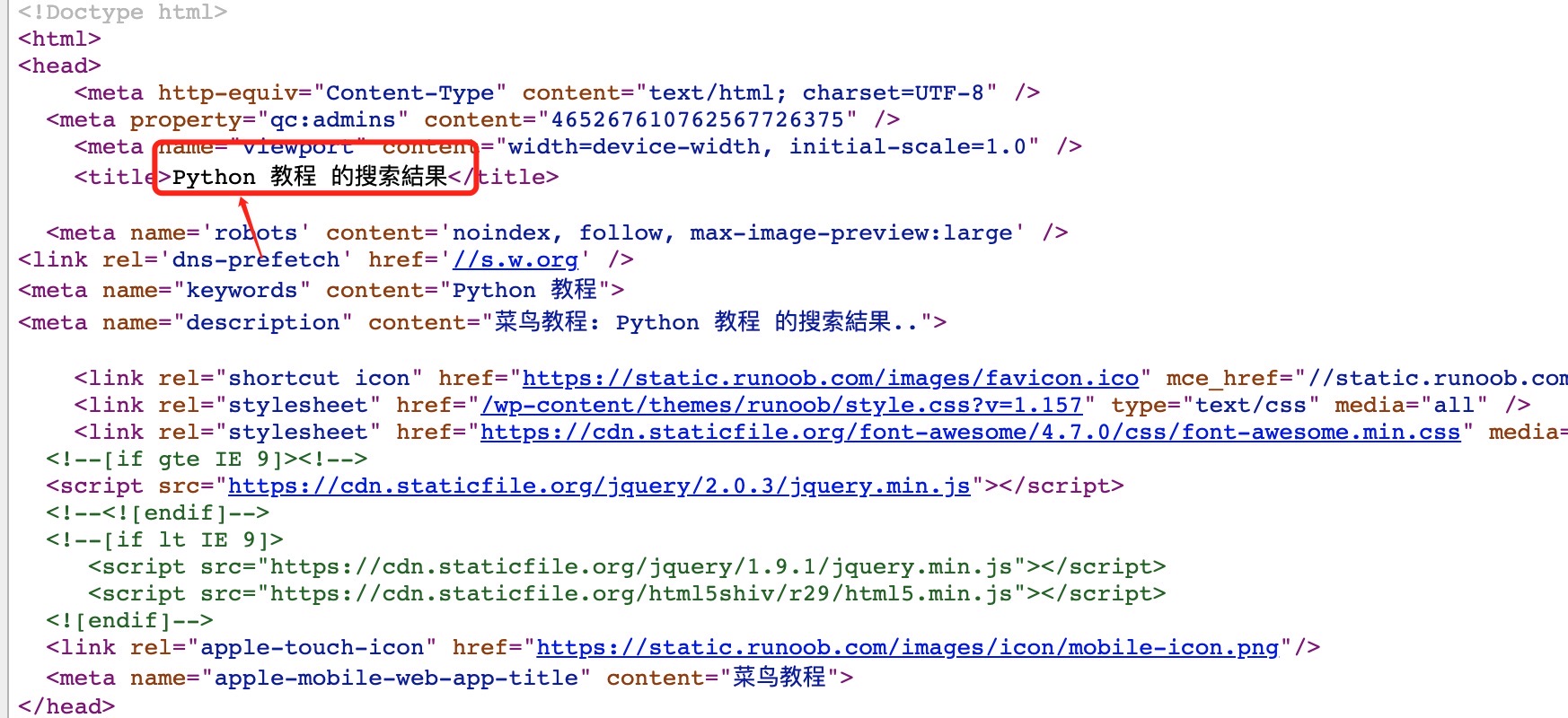
After executing the above Python code, an urllib_test_example_search.html file will be generated in the current directory. Open the urllib_test_example_search.html file (you can open it with a browser), the content is as follows:
For form POST data transmission, let's first create a form. The code is as follows. Here I use PHP code to get the form data:
Example - py3_urllib_test.php file code:
<html>
<head>
<meta charset="utf-8">
<title>Example Tutorial (example.com) urllib POST Test</title>
</head>
<body>
<form action="" method="post" name="myForm">
Name: <input type="text" name="name"><br>
Tag: <input type="text" name="tag"><br>
<input type="submit" value="Submit">
</form>
<hr>
<?php
//Use PHP to get the data submitted by the form, you can replace it with other languages
if(isset($_POST['name']) && $_POST['tag'] ) {
echo $_POST["name"] . ', ' . $_POST['tag'];
}
?>
</body>
</html>
Example
import urllib.parse
url = 'https://www.example.com/try/py3/py3_urllib_test.php' # Submit to the form page
data = {'name':'EXAMPLE', 'tag' : 'Rookie Tutorial'} # Submit data
header = {
'User-Agent':'Mozilla/5.0 (X11; Fedora; Linux x86_64) AppleWebKit/537.36 (KHTML, like Gecko) Chrome/58.0.3029.110 Safari/537.36'
} # Header information
data = urllib.parse.urlencode(data).encode('utf8') # Encode the parameters, use urllib.parse.urldecode for decoding
request=urllib.request.Request(url, data, header) # Request processing
reponse=urllib.request.urlopen(request).read() # Read result
fh = open("./urllib_test_post_example.html","wb") # Write the file to the current directory
fh.write(reponse)
fh.close()
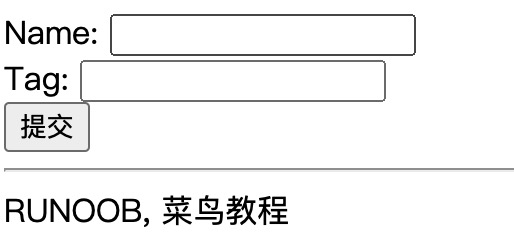
Executing the above code will submit form data to the py3_urllib_test.php file, and write the output result to the urllib_test_post_example.html file.
Open the urllib_test_post_example.html file (you can open it with a browser), the displayed result is as follows:
urllib.error
The urllib.error module defines exception classes for exceptions raised by urllib.request, and the base exception class is URLError.
urllib.error contains two exception classes, URLError and HTTPError.
URLError is a subclass of OSError, used to handle exceptions (or derived exceptions) that the program raises when encountering problems. The attribute reason it contains is the cause of the exception.
HTTPError is a subclass of URLError, used to handle special HTTP errors such as authentication requests. The attributes it contains are:codecode: the HTTP status code,reasonreason: the cause of the exception,headersheaders: the HTTP response headers of the specific HTTP request that caused the HTTPError.
Scrape a non-existent webpage and handle exceptions:
Example
import urllib.error
myURL1 = urllib.request.urlopen("https://www.example.com/")
print(myURL1.getcode()) # 200
try:
myURL2 = urllib.request.urlopen("https://www.example.com/no.html")
except urllib.error.HTTPError as e:
if e.code == 404:
print(404) # 404
urllib.parse
urllib.parse is used to parse URLs, the format is as follows:
urllib.parse.urlparse(urlstring, scheme='', allow_fragments=True)
urlstring is the string url address, scheme is the protocol type,
If the allow_fragments parameter is false, fragment identifiers cannot be recognized. Instead, they are parsed as part of the path, parameters, or query components, and fragment is set to an empty string in the return value.
Example
o = urlparse("https://www.example.com/?s=python+%E6%95%99%E7%A8%8B")
print(o)
The output result of the above example is:
ParseResult(scheme='https', netloc='www.example.com', path='/', params='', query='s=python+%E6%95%99%E7%A8%8B', fragment='')
From the result, it can be seen that the content is a tuple containing 6 strings: protocol, location, path, parameters, query, and fragment.
We can directly read the protocol content:
Example
o = urlparse("https://www.example.com/?s=python+%E6%95%99%E7%A8%8B")
print(o.scheme)
The output result of the above example is:
https
The complete content is as follows:
Attribute |
Index |
Value |
Value (if not present) |
|---|---|---|---|
|
0 |
URL protocol |
schemeParameters |
|
1 |
Network location part |
Empty string |
|
2 |
Hierarchical path |
Empty string |
|
3 |
Parameters of the last path element |
Empty string |
|
4 |
Query component |
Empty string |
|
5 |
Fragment identifier |
Empty string |
|
Username |
|
|
|
Password |
|
|
|
Hostname (lowercase) |
|
|
|
Port number as an integer (if present) |
|
urllib.robotparser
urllib.robotparser is used to parse robots.txt files.
robots.txt (all lowercase) is a robots protocol stored in the root directory of a website. It is usually used to tell search engines the crawling rules for the website.
urllib.robotparser provides the RobotFileParser class, the syntax is as follows:
class urllib.robotparser.RobotFileParser(url='')
This class provides methods that can read and parse robots.txt files:
-
set_url(url) - Sets the URL of the robots.txt file.
-
read() - Reads the robots.txt URL and feeds it to the parser.
-
parse(lines) - Parses the lines parameter.
-
can_fetch(useragent, url) - Returns True if the useragent is allowed to fetch the url according to the rules in the parsed robots.txt file.
-
mtime() - Returns the time the robots.txt file was last fetched. This is useful for long-running web crawlers that need to periodically check for robots.txt updates.
-
modified() - Sets the time the robots.txt file was last fetched to the current time.
-
crawl_delay(useragent) - Returns the Crawl-delay parameter from robots.txt for the specified useragent. Returns None if this parameter does not exist, does not apply to the specified useragent, or if the robots.txt entry for this parameter has a syntax error.
-
request_rate(useragent) - Returns the content of the Request-rate parameter from robots.txt as a named tuple RequestRate(requests, seconds). Returns None if this parameter does not exist, does not apply to the specified useragent, or if the robots.txt entry for this parameter has a syntax error.
-
site_maps() - Returns the content of the Sitemap parameter from robots.txt as a list(). Returns None if this parameter does not exist or if the robots.txt entry for this parameter has a syntax error.
Example
>>> rp = urllib.robotparser.RobotFileParser()
>>> rp.set_url("http://www.musi-cal.com/robots.txt")
>>> rp.read()
>>> rrate = rp.request_rate("*")
>>> rrate.requests
3
>>> rrate.seconds
20
>>> rp.crawl_delay("*")
6
>>> rp.can_fetch("*", "http://www.musi-cal.com/cgi-bin/search?city=San+Francisco")
False
>>> rp.can_fetch("*", "http://www.musi-cal.com/")
True