Python Scrapy Library
Scrapy is a powerful Python web scraping framework specifically designed for crawling web pages and extracting information.
Scrapy is often used in applications such as data mining, information processing, or storing historical data.
Scrapy has many built-in useful features, such as handling requests, tracking state, handling errors, managing request rate limits, etc., making it very suitable for efficient, distributed web crawling.
Unlike simple web scraping libraries (such asrequestsandBeautifulSoup), Scrapy is a full-featured web scraping framework with a high degree of scalability and flexibility, suitable for complex and large-scale web scraping tasks.
Scrapy Official Website:https://scrapy.org/。
Scrapy Features and Introduction:https://www.example.com/w3cnote/scrapy-detail.html。
Scrapy Architecture Diagram (green line is data flow):
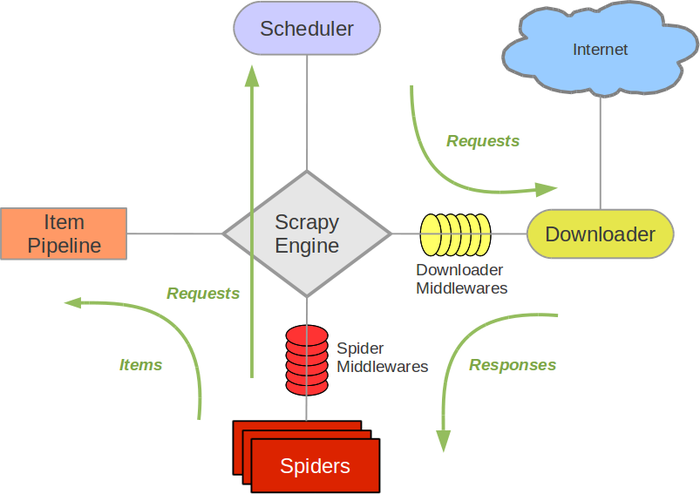
Scrapy's work is based on the following core components:
- Spider: Spider class, used to define how to extract data from web pages and how to follow links on web pages.
- Item: Used to define and store the scraped data. It is equivalent to a data model.
- Pipeline: Used to process the scraped data, commonly used for cleaning, storing data, and other operations.
- Middleware: Used to handle requests and responses, can be used to set proxies, handle cookies, user agents, etc.
- Settings: Used to configure various settings of the Scrapy project, such as request delay, number of concurrent requests, etc.
Installing Scrapy
Before using Scrapy, you need to install it first. We use pip to install:
pip install scrapy
Scrapy Project Structure
A Scrapy project is a structured directory containing multiple folders and modules, designed to help you organize your spider code.
Scrapy uses command-line tools to create and manage spider projects. You can use the following command to create a new Scrapy project:
scrapy startproject myproject
This will create a project named myproject, with a project structure roughly as follows:
myproject/
    scrapy.cfg            # 项目的配置文件
    myproject/            # 项目源代码文件夹
        __init__.py
        items.py          # 定义抓取的数据结构
        middlewares.py    # 定义中间件
        pipelines.py      # 定义数据处理管道
        settings.py       # 项目的设置文件
        spiders/           # 存放爬虫代码的文件夹
            __init__.py
            myspider.py   # 自定义的爬虫代码
Writing a Simple Scrapy Spider
The following is a basic Scrapy spider example that shows how to scrape data from web pages.
We create a spider project:
scrapy startproject example_test_spiders
Execute the above command; if successful, it will output:
templates/project', created in:/Users/Example/example-test/example_test_spiders

You can start your first spider with:
    cd example_test_spiders
    scrapy genspider example example.com
The generated project structure is as follows:
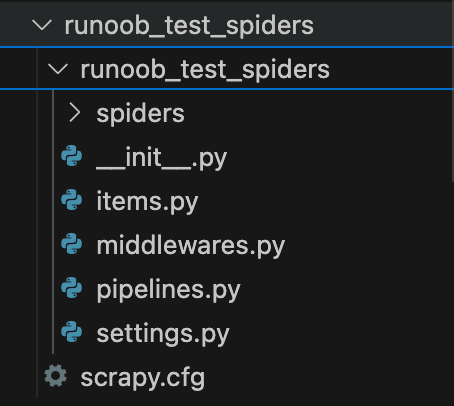
Then enter that directory:
cd example_test_spiders
Next, use thescrapy genspidercommand to create a spider:
scrapy genspider douban_spider movie.douban.com
The directory structure is as follows:
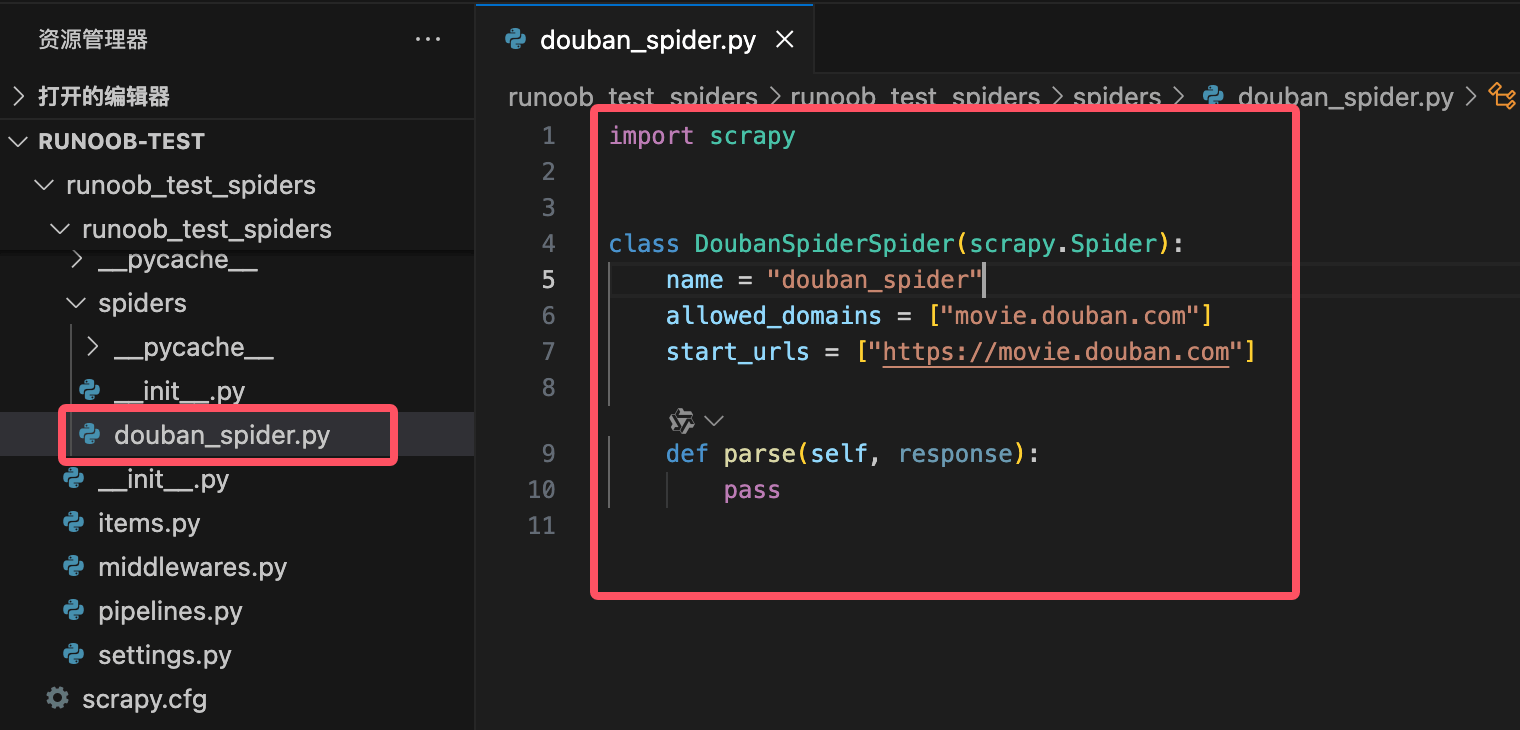
A file named douban_spider.py is generated in the example_test_spiders directory, with the code as follows:
Example
class DoubanSpiderSpider(scrapy.Spider):
name = "douban_spider"
allowed_domains = ["movie.douban.com"]
start_urls = ["https://movie.douban.com"]
def parse(self, response):
pass
Code explanation:
name: Defines the name of the spider; it must be unique.allowed_domains: Restricts the spider's access domain, preventing the spider from crawling pages on other domains.start_urls: Defines the spider's starting pages; the spider will start crawling from these pages.parse:parseThe method is the core part of each spider, used to process responses and extract data. It receives aresponseobject, representing the page content returned by the server.
Write the Spider Code
Before writing spider code, we need to note a few points:
- Websites such as Douban may detect spider behavior; it is recommended to set USER_AGENT and DOWNLOAD_DELAY to simulate normal user behavior.
- When scraping data, please comply with the target website's robots.txt file rules to avoid putting too much pressure on the server.
- If you crawl too frequently, you may trigger an IP ban.
Modify settings.py Configuration
Add the following configuration in settings.py to simulate browser requests and bypass anti-scraping mechanisms:
# 设置 User-Agent
USER_AGENT = 'Mozilla/5.0 (Windows NT 10.0; Win64; x64) AppleWebKit/537.36 (KHTML, like Gecko) Chrome/91.0.4472.124 Safari/537.36'

# 不遵守 robots.txt 规则
ROBOTSTXT_OBEY = False

# 设置下载延迟,避免过快请求
DOWNLOAD_DELAY = 2

# 启用自动限速扩展
AUTOTHROTTLE_ENABLED = True
AUTOTHROTTLE_START_DELAY = 2
AUTOTHROTTLE_MAX_DELAY = 5
In the spider code, add custom request headers (such as User-Agent and Referer) to further simulate browser behavior.
Open the douban_spider.py file and modify its contents as follows:
Example
class DoubanSpider(scrapy.Spider):
name = "douban_spider"
start_urls = [
'https://movie.douban.com/top250',
]
def start_requests(self):
headers = {
'User-Agent': 'Mozilla/5.0 (Windows NT 10.0; Win64; x64) AppleWebKit/537.36 (KHTML, like Gecko) Chrome/91.0.4472.124 Safari/537.36',
'Referer': 'https://movie.douban.com/',
}
for url in self.start_urls:
yield scrapy.Request(url, headers=headers, callback=self.parse)
def parse(self, response):
for movie in response.css('div.item'):
yield {
'title': movie.css('span.title::text').get(),
'rating': movie.css('span.rating_num::text').get(),
'quote': movie.css('span.inq::text').get(),
}
# Handle pagination
next_page = response.css('span.next a::attr(href)').get()
if next_page is not None:
yield response.follow(next_page, callback=self.parse)
Code analysis:
name = "douban_spider": Defines the name of the spider.start_urls: Defines the initial URL the spider starts crawling from (the Douban Movie Top 250 page).parsemethod:Uses CSS selectors to extract the title, rating, and introduction of each movie.
span.title::text: Extracts the movie title.span.rating_num::text: Extracts the movie rating.span.inq::text: Extracts the movie introduction.
Pagination handling:
Use
span.next a::attr(href)to extract the next page link.If the next page exists, use
response.followto continue crawling.
Run the following command in the command line to start the spider:
scrapy crawl douban_spider -o douban_movies.csv
This will start the spider and save the extracted data to the douban_movies.csv file.
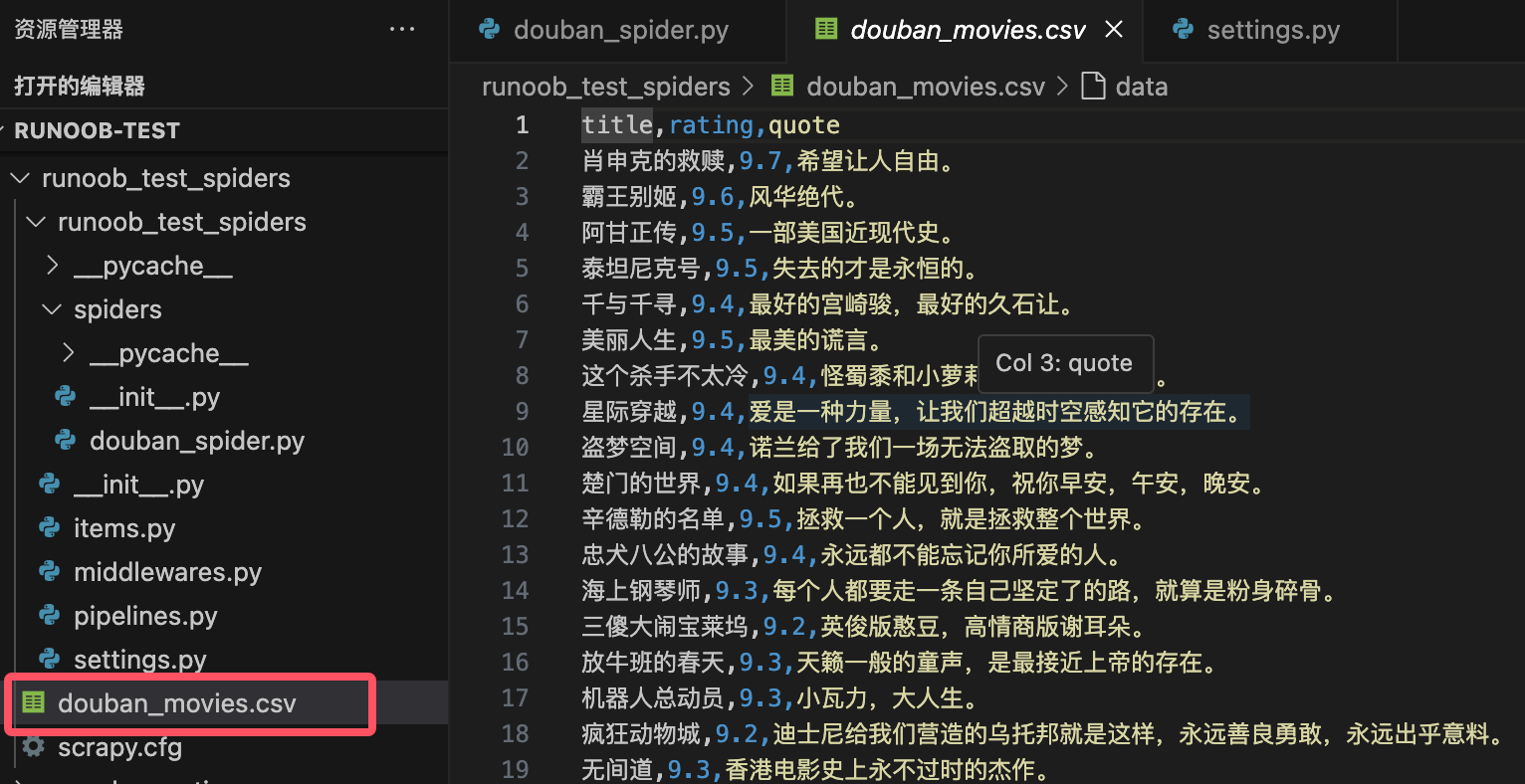
Note: The above content is for learning purposes only. When scraping data, please comply with the target website's robots.txt file rules.
Common Methods
1. Spider Methods
| Method Name | Description | Example |
|---|---|---|
start_requests() |
Generate the initial request; you can customize request headers, request methods, etc. | yield scrapy.Request(url, callback=self.parse) |
parse(response) |
Process the response and extract data; it is the core method of the spider. | yield {'title': response.css('h1::text').get()} |
follow(url, callback) |
Automatically handle relative URLs and generate new requests for pagination or link navigation. | yield response.follow(next_page, callback=self.parse) |
closed(reason) |
Called when the spider closes, used to clean up resources or record logs. | def closed(self, reason): print('Spider closed:', reason) |
log(message) |
Log information. | self.log('This is a log message') |
2. Data Extraction Methods
| Method Name | Description | Example |
|---|---|---|
response.css(selector) |
Use CSS selectors to extract data. | title = response.css('h1::text').get() |
response.xpath(selector) |
Use XPath selectors to extract data. | title = response.xpath('//h1/text()').get() |
get() |
fromSelectorListExtract the first matching result (string) from |
title = response.css('h1::text').get() |
getall() |
fromSelectorListExtract all matching results (list) from |
titles = response.css('h1::text').getall() |
attrib |
Extract attributes of the current node. | link = response.css('a::attr(href)').get() |
3. Request and Response Methods
| Method Name | Description | Example |
|---|---|---|
scrapy.Request(url, callback, method, headers, meta) |
Create a new request. | yield scrapy.Request(url, callback=self.parse, headers=headers) |
response.url |
Get the URL of the current response. | current_url = response.url |
response.status |
Get the status code of the response. | if response.status == 200: print('Success') |
response.meta |
Get the extra data passed in the request. | value = response.meta.get('key') |
response.headers |
Get the headers of the response. | content_type = response.headers.get('Content-Type') |
4. Middleware and Pipeline Methods
| Method Name | Description | Example |
|---|---|---|
process_request(request, spider) |
Process the request before it is sent (downloader middleware). | request.headers['User-Agent'] = 'Mozilla/5.0' |
process_response(request, response, spider) |
Process the response after it is returned (downloader middleware). | if response.status == 403: return request.replace(dont_filter=True) |
process_item(item, spider) |
Process the extracted data (pipeline). | if item['price'] < 0: raise DropItem('Invalid price') |
open_spider(spider) |
Called when the spider starts (pipeline). | def open_spider(self, spider): self.file = open('items.json', 'w') |
close_spider(spider) |
Called when the spider closes (pipeline). | def close_spider(self, spider): self.file.close() |
5. Tools and Extension Methods
| Method Name | Description | Example |
|---|---|---|
scrapy shell |
Start the interactive Shell for debugging and testing selectors. | scrapy shell 'http://example.com' |
scrapy crawl <spider_name> |
Run the specified spider. | scrapy crawl myspider -o output.json |
scrapy check |
Check the correctness of the spider code. | scrapy check |
scrapy fetch |
Download the content of the specified URL. | scrapy fetch 'http://example.com' |
scrapy view |
View the page downloaded by Scrapy in a browser. | scrapy view 'http://example.com' |
6. Common Settings (forsettings.py)
| Setting Item | Description | Example |
|---|---|---|
USER_AGENT |
Set the User-Agent in the request header. | USER_AGENT = 'Mozilla/5.0' |
ROBOTSTXT_OBEY |
Whether to obeyrobots.txtrules. |
ROBOTSTXT_OBEY = False |
DOWNLOAD_DELAY |
Set download delay to avoid making requests too quickly. | DOWNLOAD_DELAY = 2 |
CONCURRENT_REQUESTS |
Set the number of concurrent requests. | CONCURRENT_REQUESTS = 16 |
ITEM_PIPELINES |
Enable pipelines. | ITEM_PIPELINES = {'myproject.pipelines.MyPipeline': 300} |
AUTOTHROTTLE_ENABLED |
Enable the auto-throttle extension. | AUTOTHROTTLE_ENABLED = True |
7. Other Common Methods
| Method Name | Description | Example |
|---|---|---|
response.follow_all(links, callback) |
Process links in batches and generate requests. | yield from response.follow_all(links, callback=self.parse) |
response.json() |
Parse the response content into JSON format. | data = response.json() |
response.text |
Get the text content of the response. | html = response.text |
response.selector |
Get the response content'sSelectorobject. |
title = response.selector.css('h1::text').get() |
The table above lists the commonly used methods in Scrapy and their functions. These methods cover various aspects of crawler development, including request generation, data extraction, middleware processing, pipeline operations, etc. By mastering these methods, you can efficiently write and manage Scrapy crawlers. For more detailed features, please refer toScrapy official documentation。
Method Usage Examples
1. start_requests()
start_requests()The method is the entry point of a Scrapy crawler, used to generate initial requests. Usually, the start URL of the crawler is defined in this method.
Example
class MySpider(scrapy.Spider):
name = 'myspider'
def start_requests(self):
urls = [
'http://example.com/page1',
'http://example.com/page2',
]
for url in urls:
yield scrapy.Request(url=url, callback=self.parse)
2. parse()
parse()The method is the default response handling method, used to parse responses and extract data or generate new requests.
Example
# Extract page title
title = response.css('title::text').get()
yield {
'title': title
}
3. parse_item()
parse_item()The method is used to parse the response of a single item (Item), usually to extract structured data.
Example
item = {}
item['name'] = response.css('div.name::text').get()
item['price'] = response.css('div.price::text').get()
yield item
4. follow()
follow()The method is used to generate new requests and automatically handle responses, usually for link tracking.
Example
for link in response.css('a::attr(href)'):
yield response.follow(link, self.parse_item)
5. yield
yieldThe keyword is used to generate requests or items (Item), and pass them to the Scrapy engine for processing.
Example
yield {
'title': response.css('title::text').get()
}
6. Item
ItemThe class is used to define data structures, usually for storing data extracted from web pages.
Example
class MyItem(scrapy.Item):
name = scrapy.Field()
price = scrapy.Field()
7. ItemLoader
ItemLoaderThe class is used to load and populate Item objects, simplifying the data extraction and processing workflow.
Example
from myproject.items import MyItem
def parse(self, response):
loader = ItemLoader(item=MyItem(), response=response)
loader.add_css('name', 'div.name::text')
loader.add_css('price', 'div.price::text')
yield loader.load_item()
8. Request
RequestThe class is used to generate HTTP request objects, usually for defining request URLs, callback methods, etc.
Example
def parse(self, response):
yield scrapy.Request(url='http://example.com/page3', callback=self.parse_item)
9. Response
ResponseThe class represents an HTTP response object, containing information such as HTML content and status code returned from the server.
Example
print(response.status) # Print response status code
print(response.body) # Print response content
10. Selector
SelectorThe class is used to extract data from HTML or XML documents, supporting XPath and CSS selectors.
Example
title = response.xpath('//title/text()').get()
yield {
'title': title
}
11. CrawlSpider
CrawlSpiderIt is a special Spider class used to handle complex crawling rules and link tracking.
Example
from scrapy.linkextractors import LinkExtractor
class MyCrawlSpider(CrawlSpider):
name = 'mycrawlspider'
allowed_domains = ['example.com']
start_urls = ['http://example.com']
rules = (
Rule(LinkExtractor(allow=('page/\d+',)), callback='parse_item'),
)
def parse_item(self, response):
yield {
'title': response.css('title::text').get()
}
12. LinkExtractor
LinkExtractorThe class is used to extract links from responses, usually for automatically tracking links in pages.
Example
def parse(self, response):
extractor = LinkExtractor(allow=('page/\d+',))
links = extractor.extract_links(response)
for link in links:
yield scrapy.Request(link.url, callback=self.parse_item)
13. Pipeline
PipelineThe class is used to process scraped data, usually for data cleaning, storage, and other operations.
Example
def process_item(self, item, spider):
# Process item data
return item
14. Middleware
MiddlewareThe class is used for middleware processing of requests and responses, usually for modifying request headers, handling exceptions, etc.
Example
def process_request(self, request, spider):
# Modify request headers
request.headers['User-Agent'] = 'MyCustomUserAgent'
return None