Python3 Functions
A function is an organized, reusable code block used to implement a single, or related, functionality.
Functions improve the modularity of applications and the reuse rate of code. You already know that Python provides many built-in functions, such as print(). But you can also create your own functions, which are called user-defined functions.
Define a Function
You can define a function with the functionality you want. Here are the simple rules:
- The function code block starts with thedefkeyword, followed by the function identifier name and parentheses.()。
- Any input parameters and arguments must be placed inside the parentheses; the parentheses can be used to define parameters.
- The first statement of a function can optionally be a docstring — used to store the function description.
- The function body starts with a colon:and is indented.
- return [expression]Ends the function, optionally returning a value to the caller. A return without an expression is equivalent to returning None.
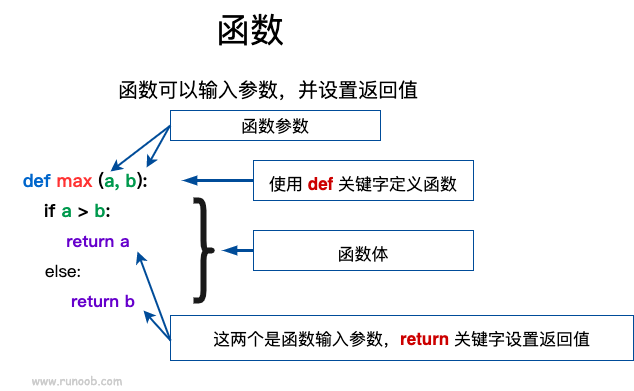
Syntax
Python defines functions using the def keyword, with the general format as follows:
def 函数名(参数列表):
    函数体
By default, parameter values and parameter names are matched in the order defined in the function declaration.
Example
Let's use a function to output "Hello World!":
def hello() :
print("Hello World!")
hello()
A more complex application: adding parameter variables to the function:
Example (Python 3.0+)
Compare two numbers and return the larger one:
The output of the above example is:
5
Example (Python 3.0+)
Function to calculate area:
The output of the above example is:
Welcome Example
width = 4  height = 5  area = 20
Function Call
Defining a function: gives the function a name, specifies the parameters included in the function, and the code block structure.
After the basic structure of this function is complete, you can execute it by calling it from another function, or directly from the Python command prompt.
The following example calls theprintme()function:
Example (Python 3.0+)
The output of the above example is:
I want to call a user-defined function! Call the same function again.
Parameter Passing
In Python, types belong to objects; objects have different types, and variables have no type:
a=[1,2,3]

a="Example"
In the above code,[1,2,3]is of List type,"Example"is of String type, while variable a has no type. It is merely a reference to an object (a pointer), and can point to either a List type object or a String type object.
Mutable and Immutable Objects
In Python, strings, tuples, and numbers are immutable objects, while list, dict, etc. are mutable objects.
Immutable types:Variable assignmenta=5then assign againa=10Here, a new int value object 10 is actually generated, then a is made to point to it, and 5 is discarded. This is not changing the value of a; it is equivalent to newly creating a.
Mutable types:Variable assignmentla=[1,2,3,4]then assign againla[2]=5This changes the value of the third element of list la; la itself is not moved, only some of its internal values are modified.
Parameter passing of Python functions:
Immutable types:Similar to C++ pass-by-value, such as integers, strings, tuples. For example, fun(a) passes only the value of a, without affecting the object a itself. If the value of a is modified inside fun(a), a new object for a is generated.
Mutable types:Similar to C++ pass-by-reference, such as lists, dictionaries. For example, fun(la) truly passes la; after modification, la outside fun is also affected.
In Python, everything is an object. Strictly speaking, we cannot say pass-by-value or pass-by-reference; we should say passing immutable objects and passing mutable objects.
Python example of passing immutable objects
By using theid()function to check memory address changes:
Example (Python 3.0+)
The output of the above example is:
4379369136
4379369136
4379369424
It can be seen that before and after the function call, the formal parameter and the actual parameter point to the same object (the object id is the same). After modifying the formal parameter inside the function, the formal parameter points to a different id.
Example of passing a mutable object
If a mutable object's parameter is modified inside a function, then in the function that called this function, the original parameter is also changed. For example:
Example (Python 3.0+)
The object passed to the function and the object to which new content is appended at the end use the same reference. Therefore, the output is as follows:
函数内取值:  [10, 20, 30, [1, 2, 3, 4]]
函数外取值:  [10, 20, 30, [1, 2, 3, 4]]
Parameters
The following are the formal parameter types that can be used when calling a function:
- Required Parameters
- Keyword Arguments
- Default Parameters
- Variable-length Parameters
Required Parameters
Required parameters must be passed to the function in the correct order. The number at call time must be the same as at declaration time.
To call the printme() function, you must pass one parameter; otherwise, a syntax error will occur:
Example (Python 3.0+)
The output of the above example is:
Traceback (most recent call last):
  File "test.py", line 10, in <module>
    printme()
TypeError: printme() missing 1 required positional argument: 'str'
Keyword Arguments
Keyword arguments are closely related to function calls. Function calls use keyword arguments to determine the passed parameter values.
Using keyword arguments allows the order of parameters in a function call to be inconsistent with the declaration, because the Python interpreter can match parameter values by parameter name.
The following example uses parameter names when calling the function printme():
Example (Python 3.0+)
The output of the above example is:
Example
The following example demonstrates that the use of function parameters does not require a specified order:
Example (Python 3.0+)
The output of the above example is:
名字:  example
年龄:  50
Default Parameters
When calling a function, if no argument is passed, the default parameter is used. In the following example, if no age argument is passed, the default value is used:
Example (Python 3.0+)
Output of the above example:
名字:  example
年龄:  50
------------------------
名字:  example
年龄:  35
Variable-length Parameters
You may need a function that can handle more arguments than those declared initially. These arguments are called variable-length parameters. Unlike the two types of parameters mentioned above, they are not named when declared. The basic syntax is as follows:
def functionname([formal_args,] *var_args_tuple ):
   "函数_文档字符串"
   function_suite
   return [expression]
With an asterisk added*parameters are imported as a tuple, storing all unnamed variable parameters.
Example (Python 3.0+)
Output of the above example:
输出:
70
(60, 50)
If no arguments are specified when calling the function, it is an empty tuple. We can also pass no unnamed variables to the function. As in the following example:
Example (Python 3.0+)
Output of the above example:
输出:
10
输出:
70
60
50
There is also the case where parameters have two asterisks**The basic syntax is as follows:
def functionname([formal_args,] **var_args_dict ):
   "函数_文档字符串"
   function_suite
   return [expression]
With two asterisks added**parameters are imported as a dictionary.
Example (Python 3.0+)
Output of the above example:
输出:
1
{'a': 2, 'b': 3}
When declaring a function, an asterisk in the parameters*can appear alone, for example:
def f(a,b,*,c):
    return a+b+c
If the asterisk appears alone*, then the asterisk*parameters after it must be passed by keyword:
>>> def f(a,b,*,c):
...     return a+b+c
...
>>> f(1,2,3)   # 报错
Traceback (most recent call last):
  File "<stdin>", line 1, in <module>
TypeError: f() takes 2 positional arguments but 3 were given
>>> f(1,2,c=3) # 正常
6
>>>
Anonymous Functions
Python useslambdato create anonymous functions.
The so-called anonymous means no longer usingdefthe standard form of a def statement to define a function.
- lambdais just an expression, and the function body isdefmuch simpler than def.
- The body of a lambda is an expression, not a block of code. Only limited logic can be encapsulated in a lambda expression.
- Lambda functions have their own namespace and cannot access parameters outside their own argument list or in the global namespace.
- Although a lambda function looks like it can only be written in one line, it is not equivalent to an inline function in C or C++. The purpose of inline functions is to avoid occupying stack memory when calling small functions, thereby reducing the overhead of function calls and improving the execution speed of code.
Syntax
The syntax of a lambda function contains only one statement, as follows:
lambda [arg1 [,arg2,.....argn]]:expression
Set parameter a plus 10:
Example
Output of the above example:
15
The following example sets an anonymous function with two parameters:
Example (Python 3.0+)
Output of the above example:
相加后的值为 :  30
相加后的值为 :  40
We can encapsulate an anonymous function inside a function, so that the same code can be used to create multiple anonymous functions.
The following example encapsulates an anonymous function in the myfunc function, creating different anonymous functions by passing different parameters:
Example
Output of the above example:
22
33
For more anonymous functions, you can also refer to:Python lambda (anonymous functions)
return Statement
return [expression]The statement is used to exit a function and selectively return an expression to the caller. A return statement without an argument returns None. The previous examples did not demonstrate how to return a value; the following example demonstrates the usage of the return statement:
Example (Python 3.0+)
Output of the above example:
函数内 :  30
函数外 :  30
Positional-Only Parameters
Python 3.8 adds a function parameter syntax / to indicate that function parameters must use specified positional parameters and cannot use keyword arguments.
In the following example, parameters a and b must be specified as positional arguments, c or d can be positional or keyword parameters, and e and f are required to be keyword parameters:def f(a, b, /, c, d, *, e, f):
print(a, b, c, d, e, f)
The following usage is correct:
f(10, 20, 30, d=40, e=50, f=60)
The following usage will cause an error:
f(10, b=20, c=30, d=40, e=50, f=60)   # b 不能使用关键字参数的形式
f(10, 20, 30, 40, 50, f=60)           # e 必须使用关键字参数的形式
Other extensions