Bootstrap Tab Plugin
Tabs inBootstrap Navigationhave already been introduced in the chapter.
Usage
You can enable the tabs in the following two ways:
-
Via data attributes:You can add data-toggle="tab"or data-toggle="pill"to the anchor text link.
Addnav andnav-tabsclass to the ul.
<ul class="nav nav-tabs">
   <li><a href="../index.html" data-toggle="tab">Home</a></li>
...
</ul>
Via JavaScript:You can enable tabs via JavaScript:
$('#myTab a').click(function (e) {
  e.preventDefault()
  $(this).tab('show')
})
The following are examples of activating each tab in different ways:
// 通过名称选取选项卡
$('#myTab a[href="../index.html"]').tab('show')

// 选取第一个选项卡
$('#myTab a:first').tab('show')

// 选取最后一个选项卡
$('#myTab a:last').tab('show')

// 选择第三个选项卡 (0-第一个选项)
$('#myTab li:eq(2) a').tab('show')
Fade Effect
If you need to set a fade effect for the tabs, you need to add .fadeto each .tab-paneafter. The first tab must add .inclass, as in the following example:
<div class="tab-content">
  <div class="tab-pane fade in active" id="home">...</div>
  <div class="tab-pane fade" id="svn">...</div>
  <div class="tab-pane fade" id="ios">...</div>
  <div class="tab-pane fade" id="java">...</div>
</div>
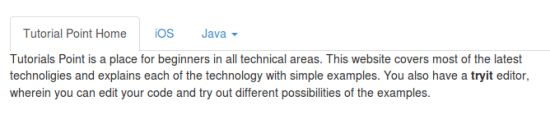
The following example shows tabs using data attributes and their fade effect:
<ul id="myTab" class="nav nav-tabs">
   <li class="active">
      <a href="../index.html" data-toggle="tab">
         Tutorial Point Home
      </a>
   </li>
   <li><a href="../index.html" data-toggle="tab">iOS</a></li>
   <li class="dropdown">
      <a href="../index.html" id="myTabDrop1" class="dropdown-toggle"
         data-toggle="dropdown">Java
         <b class="caret"></b>
      </a>
      <ul class="dropdown-menu" role="menu" aria-labelledby="myTabDrop1">
         <li><a href="../index.html" tabindex="-1" data-toggle="tab">jmeter</a></li>
         <li><a href="../index.html" tabindex="-1" data-toggle="tab">ejb</a></li>
      </ul>
   </li>
</ul>
<div id="myTabContent" class="tab-content">
   <div class="tab-pane fade in active" id="home">
      <p>Tutorials Point is a place for beginners in all technical areas.
         This website covers most of the latest technoligies and explains
         each of the technology with simple examples. You also have a
         <b>tryit</b> editor, wherein you can edit your code and
         try out different possibilities of the examples.</p>
   </div>
   <div class="tab-pane fade" id="ios">
      <p>iOS is a mobile operating system developed and distributed by Apple
         Inc. Originally released in 2007 for the iPhone, iPod Touch, and
         Apple TV. iOS is derived from OS X, with which it shares the
         Darwin foundation. iOS is Apple's mobile version of the
         OS X operating system used on Apple computers.</p>
   </div>
   <div class="tab-pane fade" id="jmeter">
      <p>jMeter is an Open Source testing software. It is 100% pure
      Java application for load and performance testing.</p>
   </div>
   <div class="tab-pane fade" id="ejb">
      <p>Enterprise Java Beans (EJB) is a development architecture
         for building highly scalable and robust enterprise level
         applications to be deployed on J2EE compliant
         Application Server such as JBOSS, Web Logic etc.
      </p>
   </div>
</div>
Methods
$().tab:This method can activate the tab element and the content container. The tab needs to use a data-target or an href that points to a container node in the DOM.
<ul class="nav nav-tabs" id="myTab">
  <li class="active"><a href="../index.html" data-toggle="tab">Home</a></li>
  .....
</ul>
<div class="tab-content">
  <div class="tab-pane active" id="home">...</div>
  .....
</div>
<script>
  $(function () {
    $('#myTab a:last').tab('show')
  })
</script>
The following example demonstrates the method of using the tab plugin. .tab. In the example, the second tab iOS is activated.
<ul id="myTab" class="nav nav-tabs">
   <li class="active"><a href="../index.html" data-toggle="tab">
      Tutorial Point Home</a>
   </li>
   <li><a href="../index.html" data-toggle="tab">iOS</a></li>
   <li class="dropdown">
      <a href="../index.html" id="myTabDrop1" class="dropdown-toggle"
         data-toggle="dropdown">Java <b class="caret"></b>
      </a>
      <ul class="dropdown-menu" role="menu" aria-labelledby="myTabDrop1">
         <li><a href="../index.html" tabindex="-1" data-toggle="tab">
            jmeter</a>
         </li>
         <li><a href="../index.html" tabindex="-1" data-toggle="tab">
            ejb</a>
         </li>
      </ul>
   </li>
</ul>
<div id="myTabContent" class="tab-content">
   <div class="tab-pane fade in active" id="home">
      <p>Tutorials Point is a place for beginners in all technical areas.
         This website covers most of the latest technoligies and explains
         each of the technology with simple examples. You also have a
         <b>tryit</b> editor, wherein you can edit your code and
         try out different possibilities of the examples.</p>
   </div>
   <div class="tab-pane fade" id="ios">
      <p>iOS is a mobile operating system developed and distributed by Apple
         Inc. Originally released in 2007 for the iPhone, iPod Touch, and
         Apple TV. iOS is derived from OS X, with which it shares the
         Darwin foundation. iOS is Apple's mobile version of the
         OS X operating system used on Apple computers.</p>
   </div>
   <div class="tab-pane fade" id="jmeter">
      <p>jMeter is an Open Source testing software. It is 100% pure
      Java application for load and performance testing.</p>
   </div>
   <div class="tab-pane fade" id="ejb">
      <p>Enterprise Java Beans (EJB) is a development architecture
         for building highly scalable and robust enterprise level
         applications to be deployed on J2EE compliant
         Application Server such as JBOSS, Web Logic etc.
      </p>
   </div>
</div>
<script>
   $(function () {
      $('#myTab li:eq(1) a').tab('show');
   });
</script>
Events
The following table lists the events of the tab plugin. These events can be used as hooks in functions.
| Event | Description | Example |
|---|---|---|
| show.bs.tab | This event can be triggered on the tab, and needs to be before the tab is shown. Useevent.targetandevent.relatedTargetevent on the target active tab and the previous tab, respectively. |
$('a[data-toggle="tab"]').on('show.bs.tab', function (e) {
  e.target // 激活选项卡
  e.relatedTarget // 前一个选项卡
})
|
| shown.bs.tab | This event is triggered before the tab is shown. Useevent.targetandevent.relatedTargetevent on the target active tab and the previous tab, respectively. |
$('a[data-toggle="tab"]').on('shown.bs.tab', function (e) {
  e.target // 激活选项卡
  e.relatedTarget // 前一个选项卡
})
|
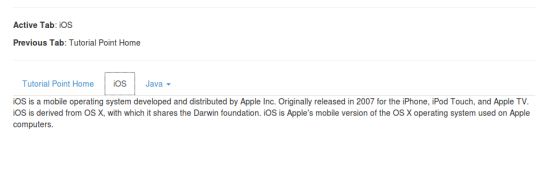
The following example demonstrates the use of plugin events. In the example, the currently and previously visited tabs will be displayed:
<hr>
   <p class="active-tab"><strong>Active Tab</strong>: <span></span></p>
   <p class="previous-tab"><strong>Previous Tab</strong>: <span></span></p>
<hr>
<ul id="myTab" class="nav nav-tabs">
   <li class="active"><a href="../index.html" data-toggle="tab">
      Tutorial Point Home</a></li>
   <li><a href="../index.html" data-toggle="tab">iOS</a></li>
   <li class="dropdown">
      <a href="../index.html" id="myTabDrop1" class="dropdown-toggle"
         data-toggle="dropdown">
         Java <b class="caret"></b></a>
      <ul class="dropdown-menu" role="menu" aria-labelledby="myTabDrop1">
         <li><a href="../index.html" tabindex="-1" data-toggle="tab">jmeter</a></li>
         <li><a href="../index.html" tabindex="-1" data-toggle="tab">ejb</a></li>
      </ul>
   </li>
</ul>
<div id="myTabContent" class="tab-content">
   <div class="tab-pane fade in active" id="home">
      <p>Tutorials Point is a place for beginners in all technical areas.
         This website covers most of the latest technoligies and explains
         each of the technology with simple examples. You also have a
         <b>tryit</b> editor, wherein you can edit your code and
         try out different possibilities of the examples.</p>
   </div>
   <div class="tab-pane fade" id="ios">
      <p>iOS is a mobile operating system developed and distributed by Apple
         Inc. Originally released in 2007 for the iPhone, iPod Touch, and
         Apple TV. iOS is derived from OS X, with which it shares the
         Darwin foundation. iOS is Apple's mobile version of the
         OS X operating system used on Apple computers.</p>
   </div>
   <div class="tab-pane fade" id="jmeter">
      <p>jMeter is an Open Source testing software. It is 100% pure
      Java application for load and performance testing.</p>
   </div>
   <div class="tab-pane fade" id="ejb">
      <p>Enterprise Java Beans (EJB) is a development architecture
         for building highly scalable and robust enterprise level
         applications to be deployed on J2EE compliant
         Application Server such as JBOSS, Web Logic etc.
      </p>
   </div>
</div>
<script>
   $(function(){
      $('a[data-toggle="tab"]').on('shown.bs.tab', function (e) {
      // 获取已激活选项卡的名称
      var activeTab = $(e.target).text();
      // 获取先前选项卡的名称
      var previousTab = $(e.relatedTarget).text();
      $(".active-tab span").html(activeTab);
      $(".previous-tab span").html(previousTab);
   });
});
</script>