Bootstrap Scrollspy Plugin
The Scrollspy plugin, i.e., the auto-updating navigation plugin, automatically updates the corresponding navigation target based on the scrollbar position. Its basic implementation is to add to the navigation bar based on the scrollbar position as you scroll..active class。
If you want to reference this plugin's functionality separately, then you need to referencescrollspy.js. Or, asBootstrap Plugins Overviewmentioned in the chapter, you can referencebootstrap.jsor the compressed version ofbootstrap.min.js。
Usage
You can add Scrollspy behavior to the top navigation:
Example
The following example demonstrates using the Scrollspy plugin via data attributes:
Example
<nav id="navbar-example" class="navbar navbar-default navbar-static" role="navigation">
<div class="container-fluid">
<div class="navbar-header">
<button class="navbar-toggle" type="button" data-toggle="collapse"
data-target=".bs-js-navbar-scrollspy">
<span class="sr-only">Toggle navigation</span>
<span class="icon-bar"></span>
<span class="icon-bar"></span>
<span class="icon-bar"></span>
</button>
<a class="navbar-brand" href="#">Tutorial Name</a>
</div>
<div class="collapse navbar-collapse bs-js-navbar-scrollspy">
<ul class="nav navbar-nav">
<li><a href="#ios">iOS</a></li>
<li><a href="#svn">SVN</a></li>
<li class="dropdown">
<a href="#" id="navbarDrop1" class="dropdown-toggle"
data-toggle="dropdown">Java
<b class="caret"></b>
</a>
<ul class="dropdown-menu" role="menu"
aria-labelledby="navbarDrop1">
<li><a href="#jmeter" tabindex="-1">jmeter</a></li>
<li><a href="#ejb" tabindex="-1">ejb</a></li>
<li class="divider"></li>
<li><a href="#spring" tabindex="-1">spring</a></li>
</ul>
</li>
</ul>
</div>
</div>
</nav>
<div data-spy="scroll" data-target="#navbar-example" data-offset="0"
style="height:200px;overflow:auto; position: relative;">
<h4 id="ios">iOS</h4>
<p>iOS is a mobile operating system developed and released by Apple Inc. It was first released in 2007 with the original iPhone, iPod Touch, and Apple TV. iOS is derived from OS X, with which they share the Darwin foundation. OS X is used on Apple computers, and iOS is Apple's mobile version.</p>
<h4 id="svn">SVN</h4>
<p>Apache Subversion, often abbreviated as SVN, is an open-source version control system software. Subversion was created by CollabNet in 2000. However, it has now developed into a project of the Apache Software Foundation, and therefore has a rich community of developers and users.</p>
<h4 id="jmeter">jMeter</h4>
<p>jMeter is an open-source testing software. It is a 100% pure Java application used for load and performance testing.</p>
<h4 id="ejb">EJB</h4>
<p>Enterprise Java Beans (EJB) is a development architecture for creating highly scalable and powerful enterprise-level applications, deployed on J2EE compatible application servers (such as JBOSS, Web Logic, etc.).</p>
<h4 id="spring">Spring</h4>
<p>The Spring Framework is an open-source Java platform that provides comprehensive infrastructure support for rapidly developing powerful Java applications.</p>
<p>The Spring Framework was originally written by Rod Johnson and first released under the Apache 2.0 license in June 2003.</p>
</div>
Try it »
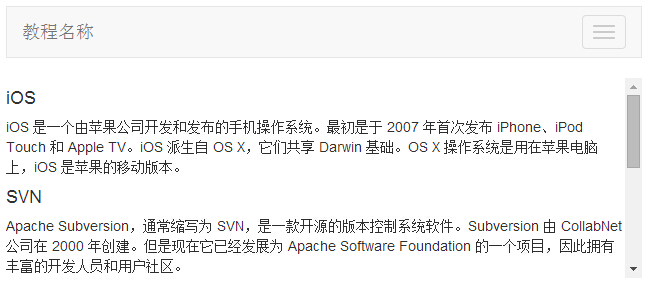
The result is shown below:
Options
They can be passed via data attributes or JavaScript. The table below lists these options:
| Option Name | Type/Default Value | Data Attribute Name | Description |
|---|
| offset | number
Default value: 10 | data-offset | The number of pixels to offset from the top when calculating the scroll position. |
Methods
.scrollspy('refresh'): When calling the scrollspy method via JavaScript, you need to call
.refreshthe method to update the DOM. This is very useful when any element in the DOM changes (i.e., you added or removed some elements). The following is the syntax for using this method.
$('[data-spy="scroll"]').each(function () {
  var $spy = $(this).scrollspy('refresh')
})
Example
The following example demonstrates.scrollspy('refresh')the usage of the method:
Example
<nav id="myScrollspy" class="navbar navbar-default navbar-static" role="navigation">
<div class="container-fluid">
<div class="navbar-header">
<button class="navbar-toggle" type="button" data-toggle="collapse"
data-target=".bs-js-navbar-scrollspy">
<span class="sr-only">Toggle navigation</span>
<span class="icon-bar"></span>
<span class="icon-bar"></span>
<span class="icon-bar"></span>
</button>
<a class="navbar-brand" href="#">Tutorial Name</a>
</div>
<div class="collapse navbar-collapse bs-js-navbar-scrollspy">
<ul class="nav navbar-nav">
<li class="active"><a href="#ios">iOS</a></li>
<li><a href="#svn">SVN</a></li>
<li class="dropdown">
<a href="#" id="navbarDrop1" class="dropdown-toggle"
data-toggle="dropdown">Java
<b class="caret"></b>
</a>
<ul class="dropdown-menu" role="menu"
aria-labelledby="navbarDrop1">
<li><a href="#jmeter" tabindex="-1">jmeter</a></li>
<li><a href="#ejb" tabindex="-1">ejb</a></li>
<li class="divider"></li>
<li><a href="#spring" tabindex="-1">spring</a></li>
</ul>
</li>
</ul>
</div>
</div>
</nav>
<div data-spy="scroll" data-target="#myScrollspy" data-offset="0"
style="height:200px;overflow:auto; position: relative;">
<div class="section">
<h4 id="ios">iOS<small><a href="#" onclick="removeSection(this);">
×Delete this section</a></small>
</h4>
<p>iOS is a mobile operating system developed and released by Apple Inc. It was initially released in 2007 for iPhone, iPod Touch, and Apple TV. iOS is derived from OS X, and they share the Darwin foundation. OS X is used on Apple computers, while iOS is Apple's mobile version.</p>
</div>
<div class="section">
<h4 id="svn">SVN<small></small></h4>
<p>Apache Subversion, often abbreviated as SVN, is an open-source version control system software. Subversion was created by CollabNet in 2000. But now it has developed into a project of the Apache Software Foundation, thus having a rich community of developers and users.</p>
</div>
<div class="section">
<h4 id="jmeter">jMeter<small><a href="#" onclick="removeSection(this);">
×Delete this section</a></small>
</h4>
<p>jMeter is an open-source testing software. It is a 100% pure Java application used for load and performance testing.</p>
</div>
<div class="section">
<h4 id="ejb">EJB</h4>
<p>Enterprise Java Beans (EJB) is a development architecture for creating highly scalable and powerful enterprise-level applications, deployed on J2EE with compatible application servers (such as JBOSS, Web Logic, etc.).</p>
</div>
<div class="section">
<h4 id="spring">Spring</h4>
<p>The Spring framework is an open-source Java platform that provides complete infrastructure support for quickly developing powerful Java applications.</p>
<p>The Spring framework was originally written by Rod Johnson and first released under the Apache 2.0 license in June 2003.</p>
</div>
</div>
<script>
$(function(){
removeSection = function(e) {
$(e).parents(".section").remove();
$('[data-spy="scroll"]').each(function () {
var $spy = $(this).scrollspy('refresh')
});
}
$("#myScrollspy").scrollspy();
});
</script>
Try it Yourself »
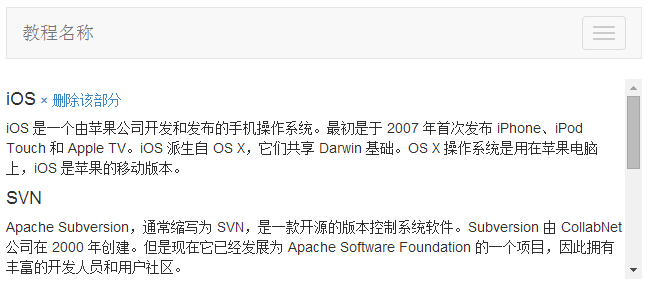
The result is as follows:
Events
The following table lists the events used in scroll listening. These events can be used as hooks in functions.
| Events | Description | Example |
|---|
| activate.bs.scrollspy | This event is triggered whenever a new item is activated by scroll listening. |
$('#myScrollspy').on('activate.bs.scrollspy', function () {
  // 执行一些动作...
})
|
Example
The following example demonstratesactivate.bs.scrollspyusage of the event:
Example
<nav id="myScrollspy" class="navbar navbar-default navbar-static" role="navigation">
<div class="container-fluid">
<div class="navbar-header">
<button class="navbar-toggle" type="button" data-toggle="collapse"
data-target=".bs-js-navbar-scrollspy">
<span class="sr-only">Toggle navigation</span>
<span class="icon-bar"></span>
<span class="icon-bar"></span>
<span class="icon-bar"></span>
</button>
<a class="navbar-brand" href="#">Tutorial Name</a>
</div>
<div class="collapse navbar-collapse bs-js-navbar-scrollspy">
<ul class="nav navbar-nav">
<li class="active"><a href="#ios">iOS</a></li>
<li><a href="#svn">SVN</a></li>
<li class="dropdown">
<a href="#" id="navbarDrop1" class="dropdown-toggle"
data-toggle="dropdown">
Java <b class="caret"></b>
</a>
<ul class="dropdown-menu" role="menu"
aria-labelledby="navbarDrop1">
<li><a href="#jmeter" tabindex="-1">jmeter</a></li>
<li><a href="#ejb" tabindex="-1">ejb</a></li>
<li class="divider"></li>
<li><a href="#spring" tabindex="-1">spring</a></li>
</ul>
</li>
</ul>
</div>
</div>
</nav>
<div data-spy="scroll" data-target="#myScrollspy" data-offset="0"
style="height:200px;overflow:auto; position: relative;">
<div class="section">
<h4 id="ios">iOS<small><a href="#" onclick="removeSection(this);">
×Delete this section</a></small>
</h4>
<p>iOS is a mobile operating system developed and released by Apple Inc. It was initially released in 2007 for iPhone, iPod Touch, and Apple TV. iOS is derived from OS X, and they share the Darwin foundation. OS X is used on Apple computers, while iOS is Apple's mobile version.</p>
</div>
<div class="section">
<h4 id="svn">SVN<small></small></h4>
<p>Apache Subversion, often abbreviated as SVN, is an open-source version control system software. Subversion was created by CollabNet in 2000. But now it has developed into a project of the Apache Software Foundation, thus having a rich community of developers and users.</p>
</div>
<div class="section">
<h4 id="jmeter">jMeter<small><a href="#" onclick="removeSection(this);">
×Delete this section</a></small>
</h4>
<p>jMeter is an open-source testing software. It is a 100% pure Java application used for load and performance testing.</p>
</div>
<div class="section">
<h4 id="ejb">EJB</h4>
<p>Enterprise Java Beans (EJB) is a development architecture for creating highly scalable and powerful enterprise-level applications, deployed on J2EE with compatible application servers (such as JBOSS, Web Logic, etc.).</p>
</div>
<div class="section">
<h4 id="spring">Spring</h4>
<p>The Spring framework is an open-source Java platform that provides complete infrastructure support for quickly developing powerful Java applications.</p>
<p>The Spring framework was originally written by Rod Johnson and first released under the Apache 2.0 license in June 2003.</p>
</div>
</div>
<span id="activeitem" style="color:red;"></span>
<script>$(function(){
removeSection = function(e) {
$(e).parents(".section").remove();
$('[data-spy="scroll"]').each(function () {
var $spy = $(this).scrollspy('refresh')
});
}
$("#myScrollspy").scrollspy();
$('#myScrollspy').on('activate.bs.scrollspy', function () {
var currentItem = $(".nav li.active > a").text();
$("#activeitem").html("Currently you are viewing - " + currentItem);
})
});</script>
Try it Yourself »
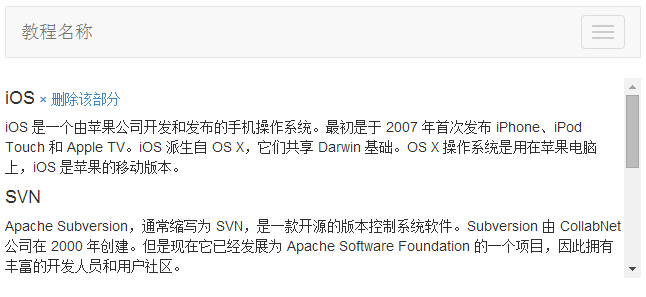
The result is as follows:
More Examples
Creating Horizontal Scrollspy
The following example demonstrates how to create a horizontal scrollspy:
Example
<!-- The navbar:
used to jump to a section in the scrollable area -->
<nav
class="navbar navbar-inverse navbar-fixed-top">
...
<ul class="nav
navbar-nav">
<li><a href="#section1">Section 1</a></li>
...
</nav>
<!-- The scrollable area -->
<div data-spy="scroll"
data-target=".navbar" data-offset="12">
<!-- Section 1
-->
<div id="section1">
<h1>Section 1</h1>
<p>Try to scroll this page and look at
the navigation bar while scrolling!</p>
</div>
...
</div>
Try it Yourself »
How to Create a Vertical Scrollspy
The following example demonstrates how to create a vertical scrollspy:
Example
<body data-spy="scroll" data-target="#myScrollspy" data-offset="20">
<div class="container">
<div class="row">
<nav class="col-sm-3" id="myScrollspy">
<ul class="nav nav-pills nav-stacked">
<li><a href="#section1">Section 1</a></li>
...
</ul>
</nav>
<div
class="col-sm-9">
<div id="section1">
<h1>Section 1</h1>
<p>Try to
scroll this page and look at the navigation list while scrolling!</p>
</div>
...
</div>
</div>
</div>
</body>
Try it Yourself »
Other Extensions