Bootstrap Environment Setup
Installing Bootstrap is very easy. This chapter will explain how to download and install Bootstrap, discuss the Bootstrap file structure, and demonstrate its usage with an example.
Download Bootstrap
You canhttp://getbootstrap.com/download the latest version of Bootstrap from here. When you click this link, you will see the following webpage:
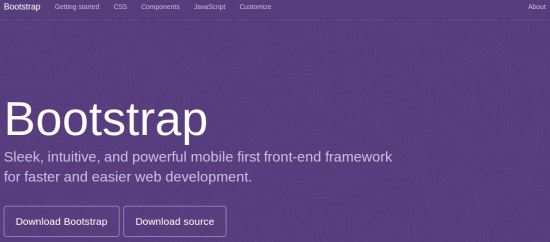
You will see two buttons:
- Download Bootstrap: Download Bootstrap. Click this button to download the precompiled compressed versions of Bootstrap CSS, JavaScript, and fonts. It does not include documentation or original source code files.
- Download Source: Download source code. Click this button, you can directly obtain the latest Bootstrap LESS and JavaScript source code from from.
If you are using uncompiled source code, you need to compile the LESS files to generate reusable CSS files. For compiling LESS files, Bootstrap officially supports onlyRecess, which is Twitter's based onless.jsCSS preprocessor.
For a better understanding and easier use, we will use the precompiled version of Bootstrap in this tutorial.
Since the files are compiled and compressed, you do not need to include these separate files every time during independent feature development.
At the time of writing this tutorial, the latest version (Bootstrap 3) was used.
File Structure
Precompiled Bootstrap
When you download the compiled version of Bootstrap and unzip the ZIP file, you will see the following file/directory structure:
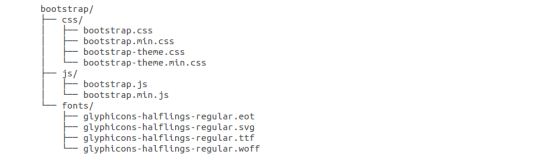
As shown in the figure above, you can see the compiled CSS and JS (bootstrap.*), as well as the compiled and minified CSS and JS (bootstrap.min.*). It also includes the Glyphicons fonts, which are an optional Bootstrap theme.
Bootstrap Source Code
If you download the Bootstrap source code, the file structure will be as follows:
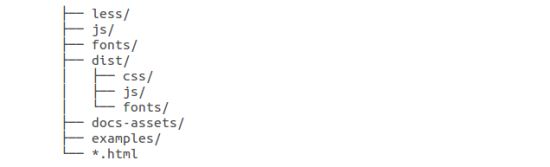
- less/、js/andfonts/The files under are the source code for Bootstrap CSS, JS, and icon fonts.
- dist/The folder contains the files and folders listed in the precompiled download section above.
- docs-assets/、examples/and all the*.htmlfiles are the Bootstrap documentation.
HTML Template
A basic HTML template using Bootstrap is shown below:
Example
Here, you can see that thejquery.js、bootstrap.min.jsandbootstrap.min.cssfile is included to turn a regular HTML file into a template that uses Bootstrap.
Details about each element in the above code snippet will be explained in detail in theBootstrap CSS Overviewchapter.
Example
Now let's try using Bootstrap to output "Hello, world!":
Staticfile CDN Recommendation
For domestic users, the libraries on Staticfile CDN are recommended:
In addition, you can also use the following CDN services:
- Recommended for international use:https://cdnjs.com/