Coding Plan
There are many large model providers on the market now. Overseas ones include Anthropic, OpenAI, Grok, Gemini, etc., but accessing overseas services is currently inconvenient. Domestic ones include DeepSeek, Qwen, ZLM, MiniMax, etc.
When using Claude Code to write code, the most expensive part is tokens. Overseas access is inconvenient and also expensive. Domestic providers now offer monthly subscription plans. If you use it long-term, it's recommended to buy a monthly plan for cost-effectiveness.
Many vendors have launched Coding Plans, a subscription service designed specifically for AI programming tools. It integrates top large models such as Qwen, GLM, Kimi, and MiniMax, and is compatible with mainstream AI programming assistants (such as Cursor, Claude Code, OpenClaw, etc.). It uses a fixed monthly fee model, with costs far lower than pay-as-you-go APIs, and completely eliminates the risk of account arrears.
Core advantages of Coding Plan:
- One-click access to top models: No need to call the Bailian API yourself; directly use the strongest models in familiar programming tools.
- Extremely low cost: Fixed monthly fee (Lite ¥40/month, Pro ¥200/month), limited-time first-month discount for only ¥7.9 / ¥39.9.
- Safe and worry-free: Direct API access is prohibited; limited to interactive programming tools to avoid abuse and ban risks.
- Image understanding support: qwen3.5-plus and kimi-k2.5 support uploading screenshots/design images to directly generate code.
Coding Plan supports the following tools: Cursor, Claude Code, OpenClaw, OpenCode, Cline (VS Code extension), Kilo Code / Kilo CLI, Qwen Code, Codex, etc.
Subscribe to Ark Coding Plan
Visit ArkCoding Plan Promotions, subscribe to a plan as needed. The Lite version is sufficient for low usage; for very high usage, the Pro version can be used.
Coding Plan/Agent PlanFirst two months at 75% off
Promotion period: 2026.06.08 - 2026.08.07
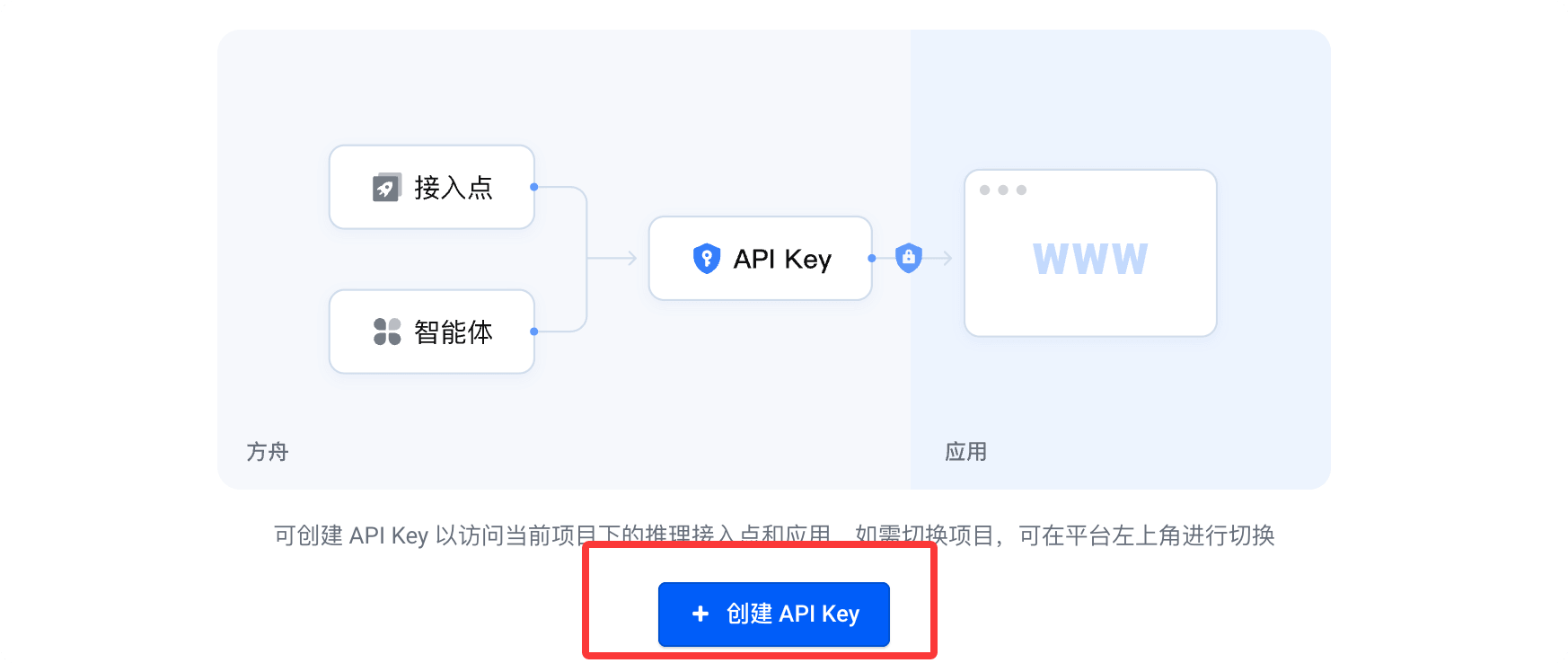
After successful purchase, clickCreate your API Key:
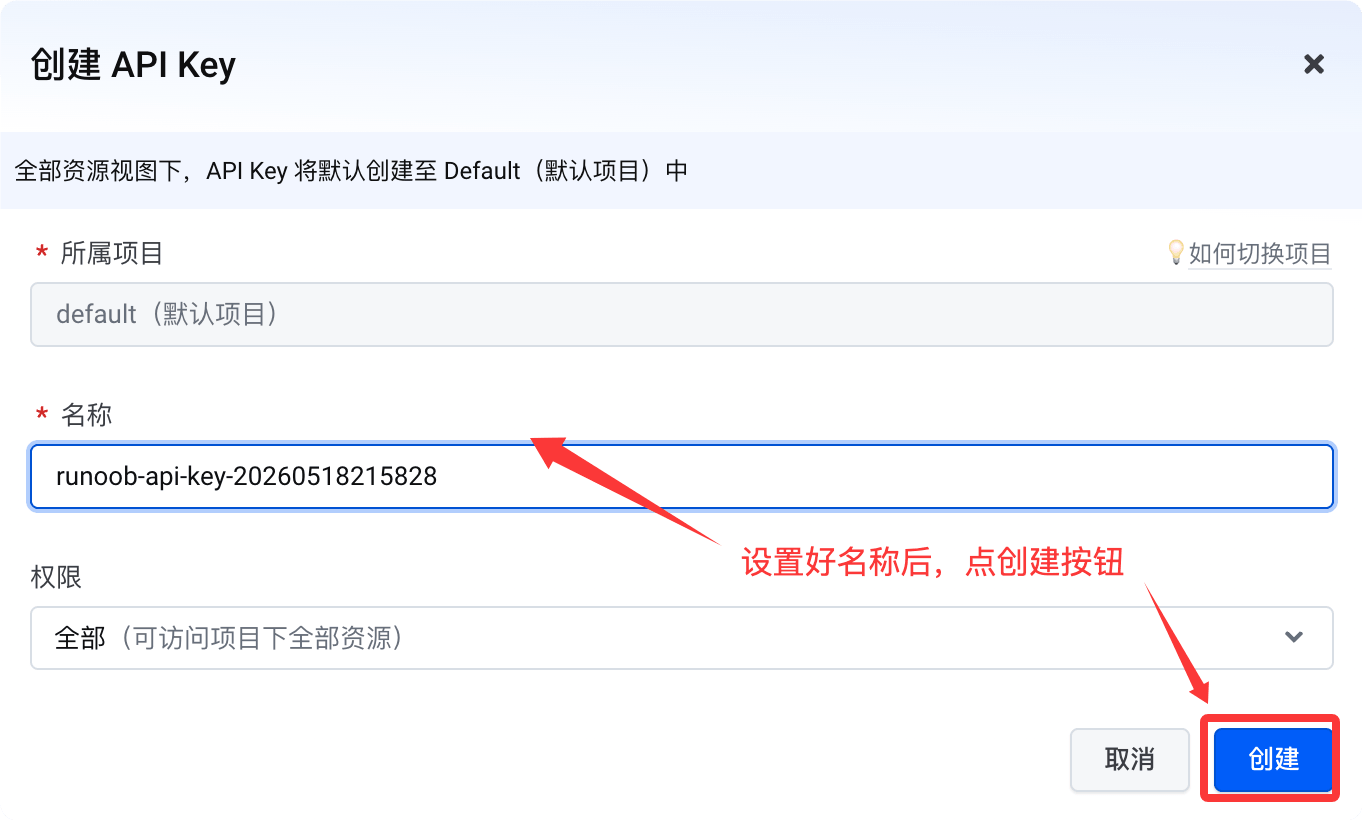
Then click the Create button:
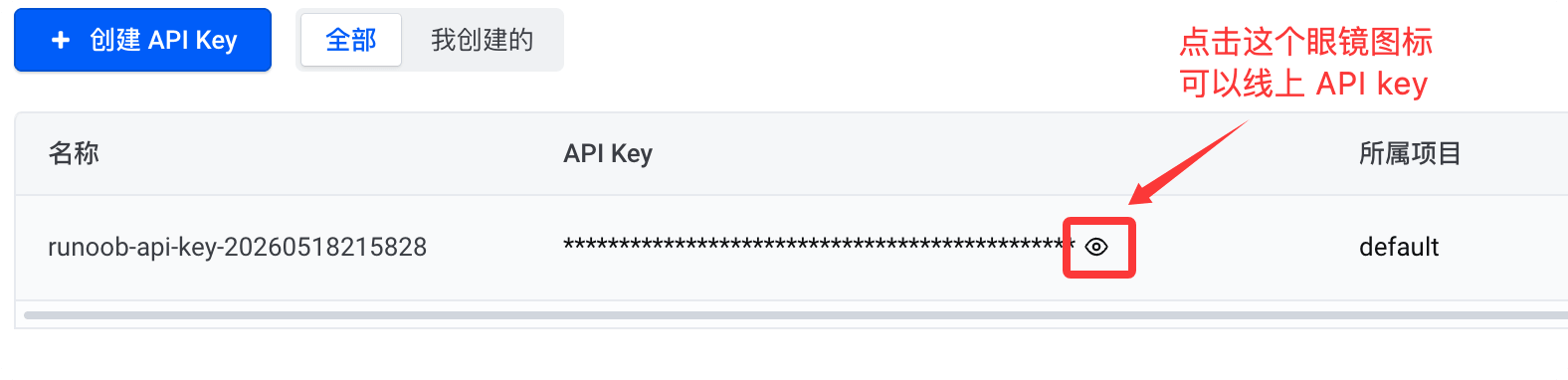
Click the small eye icon below to view the API key. When you need to use it, just copy it:
Ark Coding Planis an AI coding subscription service for developers that boosts efficient development. Its core advantages are as follows:
- Rich model selection: Supports mainstream large language models and embedding models, covering popular series such as Doubao, DeepSeek, Kimi, GLM, and MiniMax.
- Broad tool compatibility: Compatible with mainstream AI coding tools such as Claude Code, Cursor, Cline, OpenCode, Codex CLI, etc.
- Shared quota: Multiple tools share the plan quota, allowing flexible switching to suit different development scenarios.
- Flexible plans: Offers multiple tiers such as Lite / Pro to meet needs from light to intensive development.
- Stable and highly availableMulti-tenant isolation and resource scheduling guarantee stable and smooth performance even during peak hours.
The Base URL configured for different tools varies depending on the compatible protocol:
- Tools compatible with the Anthropic API protocol:https://ark.cn-beijing.volces.com/api/coding
- Tools compatible with the OpenAI API protocol:https://ark.cn-beijing.volces.com/api/coding/v3
Note:Do not use https://ark.cn-beijing.volces.com/api/v3: this Base URL will not consume your Coding Plan quota, but will incur additional charges.
Configure Claude Code
After completing the Claude Code installation, you also need to configure the following information:
- ANTHROPIC_BASE_URL:
https://ark.cn-beijing.volces.com/api/coding - ANTHROPIC_AUTH_TOKEN:Get your API Key
-
ANTHROPIC_MODEL: Supports two configuration methods
- Configure a specific model name (e.g.,
kimi-k2.5), allowing real-time model switching - Configure
ark-code-latest, switch models through the console
- Configure a specific model name (e.g.,
The specific models include: doubao-seed-2.0-code, doubao-seed-2.0-pro, doubao-seed-2.0-lite, doubao-seed-code, minimax-m2.7, glm-5.1, deepseek-v4-pro, kimi-k2.6.
Configure settings.json
Edit or createsettings.jsonfile with the following content:
{
  "env": {
    "ANTHROPIC_AUTH_TOKEN": "<ARK_API_KEY>",
    "ANTHROPIC_BASE_URL": "https://ark.cn-beijing.volces.com/api/coding",
    "ANTHROPIC_MODEL": "<Model_Name>"
  }
}
Please replace the following:
<ARK_API_KEY>: Replace with your API Key<Model_Name>: Replace with the desired model name, for examplekimi-k2.5
settings.json file path:
- MacOS / Linux:
~/.claude/settings.json - Windows:
C:\Users\<用户名>\.claude\settings.json
Configure .claude.json:
Edit or create.claude.jsonfile and add the following content:
{
  "hasCompletedOnboarding": true
}
.claude.json file path:
- MacOS / Linux:
~/.claude.json - Windows:
C:\Users\<用户名>\.claude.json
The following is the configuration for DeepSeek V4:ANTHROPIC_AUTH_TOKENReplace with your own API key:
{
  "env": {
    "ANTHROPIC_BASE_URL": "https://ark.cn-beijing.volces.com/api/coding",
    "ANTHROPIC_AUTH_TOKEN": "<ARK_API_KEY>",
    "API_TIMEOUT_MS": "3000000",
    "ANTHROPIC_MODEL": "deepseek-v4-pro[1m]",
    "ANTHROPIC_DEFAULT_SONNET_MODEL": "deepseek-v4-pro[1m]",
    "ANTHROPIC_DEFAULT_OPUS_MODEL": "deepseek-v4-pro[1m]",
    "ANTHROPIC_DEFAULT_HAIKU_MODEL": "deepseek-v4-flash",
    "CLAUDE_CODE_EXPERIMENTAL_AGENT_TEAMS": "1",
    "ENABLE_TOOL_SEARCH": "true"
  },
  "effortLevel": "max"
}
For details on using the Ark Coding Plan configuration with Claude Code + CC Switch, see:https://www.example.com/claude-code/volcengine-coding-plan.html
For other configuration documentation, refer to:https://www.volcengine.com/docs/82379/1928262
Subscribe to Alibaba Coding Plan
The Coding Plan is basically too hard to grab, and it is also being discontinued. Alibaba has now switched to Token Plan. See:Alibaba Cloud Bailian Token Plan
- OpenAI compatible:https://token-plan.cn-beijing.maas.aliyuncs.com/compatible-mode/v1
- Anthropic compatible:https://token-plan.cn-beijing.maas.aliyuncs.com/apps/anthropic
You need to purchase the Bailian Coding Plan package first:Bailian Coding Plan activity page
If your usage is very high, you can use the Pro version. It is 5 times the Lite version and supports the same models (it is currently very popular; the Lite version needs to be grabbed starting at 9:30):

After purchasing the Coding Plan package, you can go to theCoding Planpage to get the Coding Plan exclusive API Key (format: sk-sp-xxxxx).
Afterwards, you need to configure one of the following Base URLs in your AI tool (varies by tool):
- Anthropic compatible protocol:https://coding.dashscope.aliyuncs.com/apps/anthropic
- OpenAI compatible protocol (usable with OpenClaw):https://coding.dashscope.aliyuncs.com/v1
More popular applications also have corresponding documentation:

Note:The Coding Plan exclusive API Key and Base URL are not interchangeable with Bailian's pay-as-you-go API Key (sk-xxxxx) and Base URL (https://dashscope.aliyuncs.com/xxxxxx). Do not mix them.
If you cannot grab one, you can directly purchase a resource package, which is more cost-effective:https://cn.aliyun.com/benefit?from_alibabacloud=&userCode=i5mn5r7m

Claude Code Configuration
After completing the Claude Code installation, configure the following information:
- ANTHROPIC_BASE_URL:https://ark.cn-beijing.volces.com/api/coding
- ANTHROPIC_AUTH_TOKEN:Get API Key
- ANTHROPIC_MODEL: Supports two methods: configuring Model Name (doubao-seed-2.0-code, doubao-seed-2.0-pro, doubao-seed-2.0-lite, doubao-seed-code, minimax-m2.5, glm-4.7, deepseek-v3.2, kimi-k2.5), or configuring ark-code-latest (switch models in the console).
Configuration steps are as follows:
Edit or create the settings.json file. The configuration information that needs to be modified is as follows:
- <ARK_API_KEY>: Replace with your own API Key
- <Model_Name>: Update to the model information to be used, such as kimi-k2.5. See model configuration for supported model information.
Different systems have different configuration file paths, as follows:
- MacOS & Linux:~/.claude/settings.json
- Windows: C:\Users\<username>\.claude\settings.json
{
    "env": {
        "ANTHROPIC_AUTH_TOKEN": "<ARK_API_KEY>",
        "ANTHROPIC_BASE_URL": "https://ark.cn-beijing.volces.com/api/coding",
        "ANTHROPIC_MODEL": "<Model_Name>"
    }
}
Edit or add the .claude.json file, and change or add the hasCompletedOnboarding field value to true.
Different systems have different configuration file paths, as follows:
- MacOS & Linux:~/.claude.json
- Windows: C:\Users\<username>\.claude.json
{
  "hasCompletedOnboarding": true
}
After saving the configuration file, execute subsequent commands in a new terminal window.
Configure Coding Plan in Claude Code
To connect Bailian Coding Plan in Claude Code, configure the following information:
- ANTHROPIC_BASE_URL: Set tohttps://coding.dashscope.aliyuncs.com/apps/anthropic。
- ANTHROPIC_AUTH_TOKEN: Set toCoding PlanDedicated API Key.
- ANTHROPIC_MODEL: Set to a model supported by Coding Plan: qwen3.5-plus (supports image understanding), kimi-k2.5 (supports image understanding), glm-5, MiniMax-M2.5.
macOS/Linux
Create and open the configuration file~/.claude/settings.json。
~Represents the user home directory. If the.claudedirectory does not exist, create it first. You can execute the following in the terminalmkdir -p ~/.claudeto create it.
vim ~/.claude/settings.json
Edit the configuration file and replace YOUR_API_KEY with the Coding Plan dedicated API Key.
{
    "env": {
        "ANTHROPIC_AUTH_TOKEN": "YOUR_API_KEY",
        "ANTHROPIC_BASE_URL": "https://coding.dashscope.aliyuncs.com/apps/anthropic",
        "ANTHROPIC_MODEL": "qwen3.5-plus"
    }
}
Save the configuration file, then open a new terminal for it to take effect.
Edit or add the ~/.claude.json file, set the value of the hasCompletedOnboarding field to true, and save the file.
{
  "hasCompletedOnboarding": true
}
hasCompletedOnboarding is a top-level field; do not nest it under other fields.
This step avoids the error "Unable to connect to Anthropic services" when starting Claude Code.
Windows
Create and open the configuration fileC:\Users\YourUsername\.claude\settings.json。
1. CMD command method
Create directory:
if not exist "%USERPROFILE%\.claude" mkdir "%USERPROFILE%\.claude"
Create and open file:
notepad "%USERPROFILE%\.claude\settings.json"
Edit the configuration file and replace YOUR_API_KEY with the Coding Plan dedicated API Key.
{
    "env": {
        "ANTHROPIC_AUTH_TOKEN": "YOUR_API_KEY",
        "ANTHROPIC_BASE_URL": "https://coding.dashscope.aliyuncs.com/apps/anthropic",
        "ANTHROPIC_MODEL": "qwen3.5-plus"
    }
}
Save the configuration file, then open a new terminal for it to take effect.
Edit or add the C:\Users\YourUsername\.claude.json file, set the value of the hasCompletedOnboarding field to true, and save the file.
{
  "hasCompletedOnboarding": true
}
2. PowerShell command method
Create directory:
mkdir -Force $HOME\.claude
Create and open file:
notepad $HOME\.claude\settings.json
Edit the configuration file and replace YOUR_API_KEY with the Coding Plan dedicated API Key.
{
    "env": {
        "ANTHROPIC_AUTH_TOKEN": "YOUR_API_KEY",
        "ANTHROPIC_BASE_URL": "https://coding.dashscope.aliyuncs.com/apps/anthropic",
        "ANTHROPIC_MODEL": "qwen3.5-plus"
    }
}
Save the configuration file, then open a new terminal for it to take effect.
Edit or add the C:\Users\YourUsername\.claude.json file, set the value of the hasCompletedOnboarding field to true, and save the file.
{
  "hasCompletedOnboarding": true
}
Using Claude Code
Open the terminal, enter the project directory, and run the following command to start Claude Code:
cd path/to/your_project
claude
After startup, you need to authorize Claude Code to execute files.

Enter /status to confirm whether the model, Base URL, and API Key are configured correctly.

Chat in Claude Code.

Switch Models
| Switching method | Operation description | Example |
|---|---|---|
| Switch at startup | Execute in the terminalclaude --model <模型名称>Specify a model and start Claude Code |
claude --model qwen3-coder-next |
| Switch during a session | Enter the command in the dialog box/model <模型名称>to switch models |
/model qwen3-coder-next |
Common Commands Summary
| Command | Description | Example |
|---|---|---|
/init |
Generate a CLAUDE.md file in the project root directory to define project-level instructions and context. | /init |
/status |
View current model, API Key, Base URL, and other configuration status | /status |
/model <模型名称> |
Switch model | /model qwen3-coder-next |
/clear |
Clear conversation history and start a new conversation | /clear |
/plan |
Enter planning mode to only analyze and discuss solutions without modifying code | /plan |
/compact |
Compress conversation history to free up context window space | /compact |
/config |
Open configuration menu to set language, theme, etc. | /config |
Other extensionsFor more content, refer to:https://help.aliyun.com/zh/model-studio/coding-plan-quickstart