TensorFlow Model Conversion and Optimization
In machine learning project development, model conversion and optimization are important steps before deployment.
TensorFlow provides a variety of tools and techniques to help developers convert trained models into formats suitable for different deployment environments, and optimize them to improve performance.
Why Model Conversion and Optimization are Needed?
- Deployment requirements: The trained model needs to adapt to different platforms (mobile, embedded devices, servers, etc.)
- Performance improvement: Optimization can reduce model size, lower latency, and improve inference speed
- Resource constraints: Mobile devices and edge computing devices typically have strict memory and computational resource limitations
- Cross-platform compatibility: Ensure the model can run on different hardware architectures and operating systems
Main Conversion and Optimization Techniques
| Technology Type | Main Tools | Applicable Scenarios |
|---|---|---|
| Model Format Conversion | tf.saved_model, TFLiteConverter |
Cross-platform deployment |
| Quantization | TFLiteConverter |
Reduce model size and improve inference speed |
| Pruning | tfmot |
Reduce the number of parameters |
| Hardware acceleration | TensorRT, Core ML | Specific hardware optimization |
Model Format Conversion
SavedModel Format
SavedModel is TensorFlow's standard model saving format, containing the complete model architecture, weights, and computation graph.
Example
# Save as SavedModel
model.save('my_model', save_format='tf')
# Load SavedModel
loaded_model = tf.keras.models.load_model('my_model')
Key features:
- Contains the model's computation graph and variables
- Supports signature definitions (input/output specifications)
- Cross-platform compatible (supports TensorFlow Serving)
TensorFlow Lite Conversion
TensorFlow Lite is a lightweight solution for mobile and embedded devices.
Example
converter = tf.lite.TFLiteConverter.from_saved_model('my_model')
tflite_model = converter.convert()
# Save the converted model
with open('model.tflite', 'wb') as f:
f.write(tflite_model)
Conversion options:
optimizations: Set optimization level (default, size optimization, latency optimization)target_spec: Specify target device characteristicsrepresentative_dataset: Dataset used for quantization calibration
Model Optimization Techniques
Quantization
Quantization reduces model size and improves inference speed by lowering numerical precision.
Example
converter = tf.lite.TFLiteConverter.from_saved_model('my_model')
converter.optimizations = [tf.lite.Optimize.DEFAULT]
tflite_quant_model = converter.convert()
Comparison of quantization types:
| Quantization Type | Weight Precision | Activation Precision | Size Reduction | Accuracy Loss |
|---|---|---|---|---|
| No quantization | FP32 | FP32 | 0% | None |
| Dynamic range | INT8 | FP32 | ~75% | small |
| Full integer | INT8 | INT8 | ~75% | Medium |
| FP16 | FP16 | FP16 | ~50% | Very small |
Pruning
Pruning reduces model parameters by removing unimportant neural connections.
Example
# Define pruning parameters
prune_params = {
'pruning_schedule': tfmot.sparsity.keras.PolynomialDecay(
initial_sparsity=0.50,
final_sparsity=0.90,
begin_step=0,
end_step=1000
)
}
# Apply pruning
model = tf.keras.Sequential([...]) # Your model
model_for_pruning = tfmot.sparsity.keras.prune_low_magnitude(model, **prune_params)
# Train the pruned model
model_for_pruning.compile(...)
model_for_pruning.fit(...)
# Remove the pruning wrapper
model_for_export = tfmot.sparsity.keras.strip_pruning(model_for_pruning)
Hardware-Specific Optimization
TensorRT Optimization (NVIDIA GPU)
Example
from tensorflow.python.compiler.tensorrt import trt_convert as trt
converter = trt.TrtGraphConverterV2(
input_saved_model_dir='my_model',
precision_mode=trt.TrtPrecisionMode.FP16
)
converter.convert()
converter.save('trt_optimized_model')
Core ML Conversion (Apple Devices)
Example
# Convert from SavedModel
mlmodel = ct.convert('my_model')
# Save Core ML model
mlmodel.save('model.mlmodel')
Best Practices and Common Issues
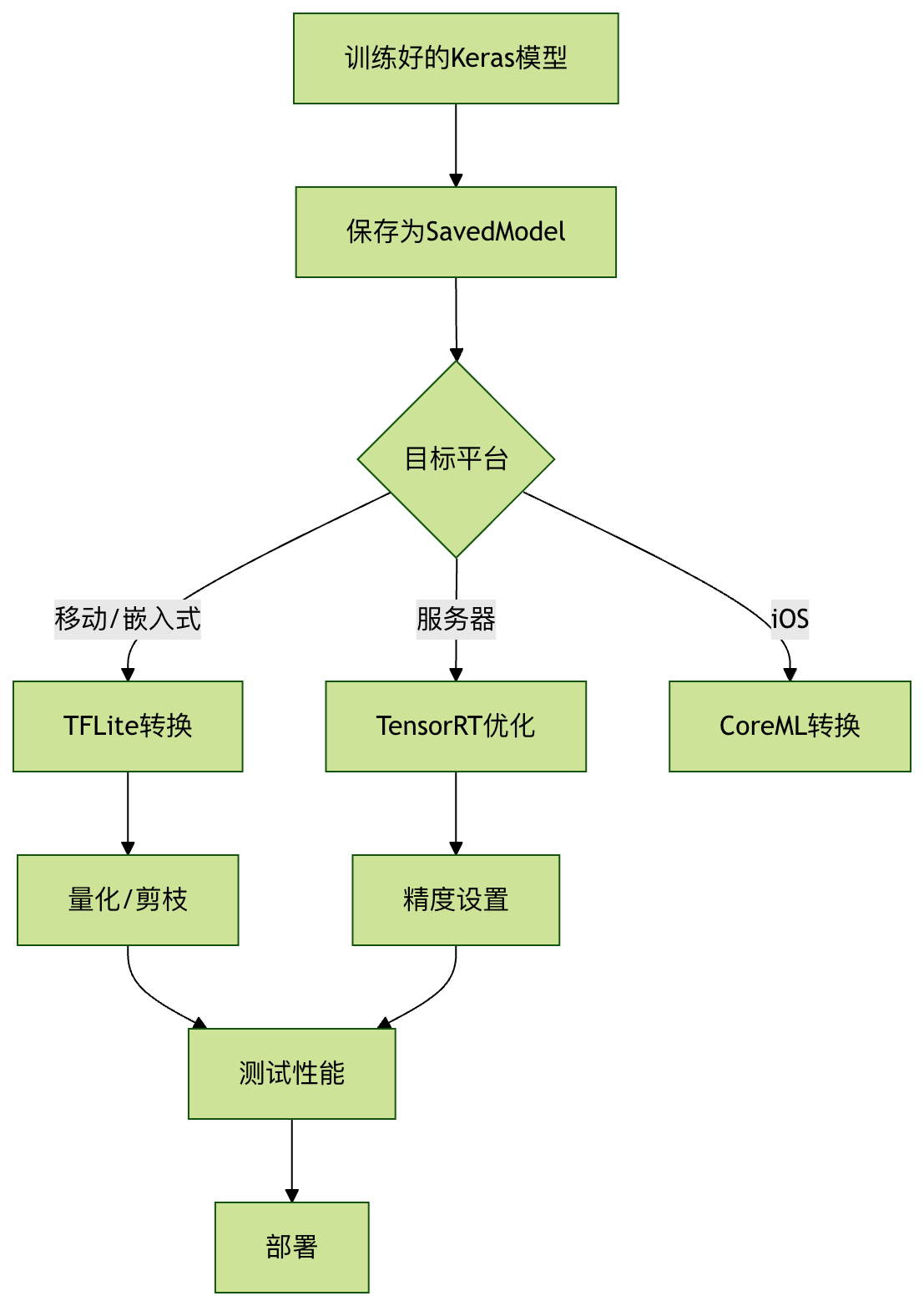
Conversion and Optimization Workflow
Troubleshooting Common Issues
Accuracy drops too much
- Try mixed quantization (keep some layers in FP32)
- Use quantization-aware training (QAT)
Converted model cannot run
- Check operation compatibility (some operations may not be supported by the target platform)
- Update TensorFlow and converter versions
Performance improvement is not obvious
- Make sure the optimization options are set correctly
- Consider whether the model architecture itself is suitable for the target hardware