TensorFlow Image Data Processing
What is Image Data
Image data is a two-dimensional matrix (grayscale image) or three-dimensional tensor (color image) composed of pixels. In TensorFlow, images are typically represented as:
- Grayscale image: [height, width] or [height, width, 1]
- Color image: [height, width, 3] (RGB channels)
Why is Image Processing Needed
- Data normalization: unify image size and value range
- Data augmentation: increase diversity of training samples through transformations
- Feature extraction: highlight key information in images
- Preprocessing: prepare appropriate data format for model input
TensorFlow Image Processing Core API
tf.image Module
A collection of APIs specifically for image processing provided by TensorFlow:
Example
from tensorflow import image as tf_image
Common function categories:
| Function Category | Example of Main Methods |
|---|---|
| Color Adjustment | adjust_brightness, adjust_contrast |
| Geometric Transformation | flip, rotate, crop_to_bounding_box |
| Image Composition | blend, draw_bounding_boxes |
| Format Conversion | encode_jpeg, decode_image |
| Statistical Operations | total_variation, per_image_standardization |
Detailed Explanation of Image Preprocessing Techniques
Normalization Processing
Normalize pixel values to a fixed range (usually [0,1] or [-1,1]):
Example
"""Normalize uint8 image to [0,1] range"""
image = tf.cast(image, tf.float32) # Convert to float32
return image / 255.0 # Divide by maximum value
# Usage example
image = tf.random.uniform([256,256,3], 0, 255, dtype=tf.uint8)
normalized_image = normalize(image)
Data Augmentation Techniques
Increase data diversity through random transformations:
Example
"""Image processing pipeline applying random augmentation"""
# Random left-right flip
image = tf_image.random_flip_left_right(image)
# Random brightness adjustment
image = tf_image.random_brightness(image, max_delta=0.2)
# Random contrast adjustment
image = tf_image.random_contrast(image, lower=0.8, upper=1.2)
# Random rotation (-15° to +15°)
angle = tf.random.uniform([], -15, 15) * (3.1415/180)
image = tf_image.rotate(image, angle)
return image, label
Image Loading and Batching Process
Complete Processing Pipeline
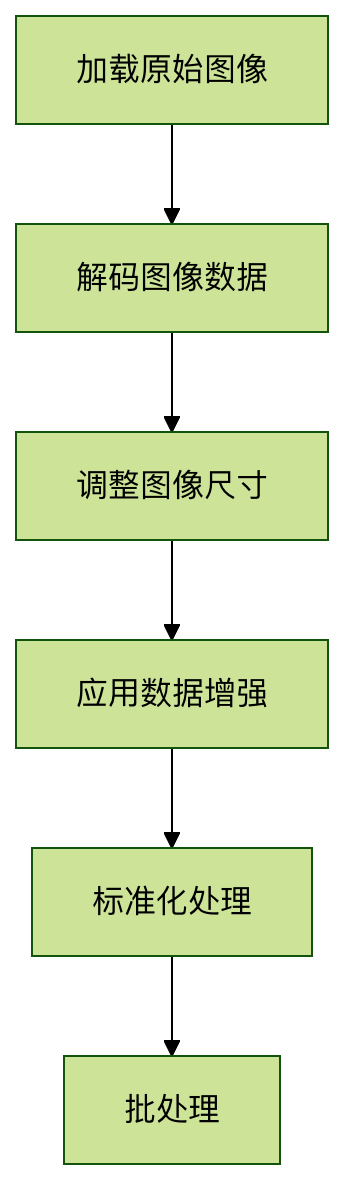
Actual Code Implementation
Example
"""Build image preprocessing pipeline"""
# Define preprocessing function
def _preprocess(image, label):
# Decode JPEG image
image = tf_image.decode_jpeg(image, channels=3)
# Resize to uniform size
image = tf_image.resize(image, [224, 224])
# Apply data augmentation during training
if is_training:
image = augment_image(image)
# Normalization processing
image = normalize(image)
return image, label
# Apply preprocessing and create batches
dataset = dataset.map(_preprocess, num_parallel_calls=tf.data.AUTOTUNE)
dataset = dataset.batch(batch_size)
dataset = dataset.prefetch(tf.data.AUTOTUNE)
return dataset
Advanced Image Processing Techniques
Using Keras Preprocessing Layers
TensorFlow 2.x provides more advanced preprocessing APIs:
Example
# Create preprocessing model
augmenter = tf.keras.Sequential([
preprocessing.RandomFlip("horizontal"),
preprocessing.RandomRotation(0.1),
preprocessing.RandomZoom(0.1),
preprocessing.Rescaling(1./255) # Normalization
])
# Use in model
model = tf.keras.Sequential([
augmenter, # Data augmentation layers
tf.keras.layers.Conv2D(32, 3, activation='relu'),
# Other layers...
])
Custom Image Processing Layers
Implement custom preprocessing operations:
Example
def __init__(self, contrast_range=[0.5, 1.5], **kwargs):
super().__init__(**kwargs)
self.contrast_range = contrast_range
def call(self, images, training=None):
if not training:
return images
# Random contrast adjustment
contrast_factor = tf.random.uniform(
[], self.contrast_range[0], self.contrast_range[1])
images = tf.image.adjust_contrast(images, contrast_factor)
# Random saturation adjustment
images = tf.image.random_saturation(images, 0.5, 1.5)
return images
Practical Exercises
Exercise 1: Image Normalization Comparison
Load a test image, apply the following normalization methods respectively, and visualize the results:
- Divide by 255 ([0,1] range)
- ImageNet mean-standard deviation normalization (mean=[0.485,0.456,0.406], std=[0.229,0.224,0.225])
- Custom normalization (e.g., scale to [-1,1] range)
Exercise 2: Observing Data Augmentation Effects
Select an image, apply different combinations of augmentation techniques (flip + rotation + color adjustment), generate 10 augmented versions and display them in an array to observe the augmentation effects.
Exercise 3: Complete Preprocessing Pipeline
Build a complete image preprocessing pipeline, including the following steps:
- Load images from TFRecord
- Decode images
- Random crop to 256x256
- Random horizontal flip
- Normalize to [-1,1] range
- Create a dataset with batch size 32
Frequently Asked Questions
Q1: How to handle images of different sizes?
A: Usetf.image.resizeto unify sizes, or usetf.image.resize_with_crop_or_padto crop/pad while maintaining aspect ratio.
Q2: Should image processing be done on CPU or GPU?
A: It is usually recommended to perform image preprocessing on the CPU, usingtf.data.Dataset.mapofnum_parallel_callsparameter for parallel processing.
Q3: How to avoid information loss caused by data augmentation?
A: Set augmentation parameter ranges reasonably. For critical tasks (such as medical images), use geometric transformations cautiously and prioritize color space transformations.
Q4: Best practices for processing very large images?
A: Consider usingtf.image.extract_patchesto split large images into small patches, or use progressive loading techniques.