TensorFlow Model Training
TensorFlow provides a complete set of tools for building and training neural network models.
Model training is the process of automatically adjusting model parameters through data to gain predictive capability.
Core Elements of Model Training
- Data: training set, validation set, and test set
- Model architecture: the layer structure and connection methods of the neural network
- Loss function: a metric that measures the difference between model predictions and true values
- Optimizer: an algorithm for adjusting model parameters
- Evaluation metrics: standards for measuring model performance
Training Workflow
1. Data Preparation
Example
from tensorflow.keras import datasets
# Load the dataset (using MNIST as an example) # Data preprocessing # Convert to TensorFlow Dataset
(train_images, train_labels), (test_images, test_labels) = datasets.mnist.load_data()
2. Model Construction
train_images = train_images.reshape((60000, 28, 28, 1)).astype('float32') / 255
test_images = test_images.reshape((10000, 28, 28, 1)).astype('float32') / 255
Example
train_dataset = tf.data.Dataset.from_tensor_slices((train_images, train_labels))
train_dataset = train_dataset.shuffle(10000).batch(64)
2. Model Construction
Example
Example
model = models.Sequential([
layers.Conv2D(32, (3, 3), activation='relu', input_shape=(28, 28, 1)),
layers.MaxPooling2D((2, 2)),
layers.Conv2D(64, (3, 3), activation='relu'),
layers.MaxPooling2D((2, 2)),
layers.Conv2D(64, (3, 3), activation='relu'),
layers.Flatten(),
layers.Dense(64, activation='relu'),
layers.Dense(10, activation='softmax')
])
Compilation Parameter Description
model.summary()
3. Model Compilation
Example
loss='sparse_categorical_crossentropy',
metrics=['accuracy'])
Description
| 'adam', 'sgd', 'rmsprop', etc. | Optimizer algorithm selection | 'mse', 'categorical_crossentropy', etc. |
|---|---|---|
| optimizer | Loss function type | ['accuracy'], ['mse'], etc. |
| loss | List of evaluation metrics | 4. Model Training |
| metrics | Example | Main parameters of the fit() method |
4. Model Training
Example
epochs=10,
validation_data=(test_images, test_labels))
Description
| Input data | Training data | Target data |
|---|---|---|
| x | Label data | Integer |
| y | Number of epochs | Integer |
| epochs | Batch size | Tuple |
| batch_size | Validation dataset | List |
| validation_data | Callback list | Visualizing the Training Process |
| callbacks | Training Curves | Example |
Visualizing the Training Process
Training Curves
Example
Custom Training Loop
plt.plot(history.history['accuracy'], label='Training Accuracy')
plt.plot(history.history['val_accuracy'], label='Validation Accuracy')
plt.xlabel('Epoch')
plt.ylabel('Accuracy')
plt.legend()
plt.show()
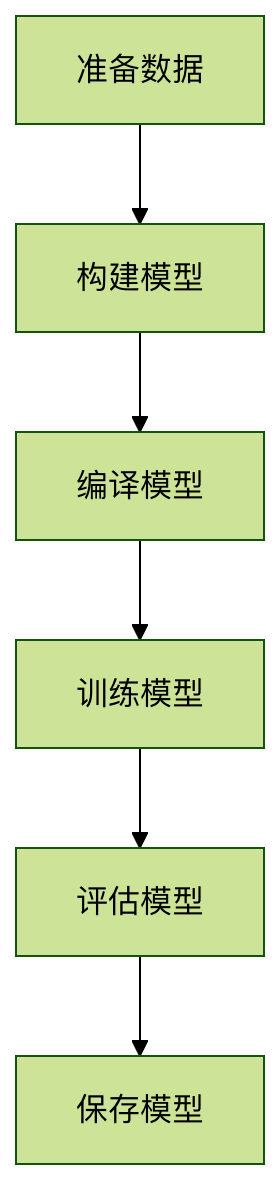
Training Flowchart
Advanced Training Techniques
Custom Training Loop
Example
loss_fn = tf.keras.losses.SparseCategoricalCrossentropy()
optimizer = tf.keras.optimizers.Adam()
Common Problems and Solutions
@tf.function
def train_step(images, labels):
with tf.GradientTape() as tape:
predictions = model(images)
loss = loss_fn(labels, predictions)
gradients = tape.gradient(loss, model.trainable_variables)
optimizer.apply_gradients(zip(gradients, model.trainable_variables))
return loss
Training Troubleshooting Table
for epoch in range(10):
for images, labels in train_dataset:
loss = train_step(images, labels)
print(f'Epoch {epoch}, Loss: {loss.numpy()}')
Using Callbacks
Example
Solution
callbacks = [
ModelCheckpoint('best_model.h5', save_best_only=True),
EarlyStopping(patience=3, monitor='val_loss')
]
Loss not decreasing
model.fit(train_dataset,
epochs=20,
validation_data=(test_images, test_labels),
callbacks=callbacks)
Common Problems and Solutions
Training Troubleshooting Table
| Accuracy fluctuates greatly | Batch size is inappropriate | Adjust batch_size |
|---|---|---|
| Overfitting | Model is too complex | Add regularization or Dropout |
| Slow training speed | Hardware limitations | Use GPU acceleration or reduce model size |
| Performance Optimization Tips | Data pipeline optimization | Example |
| # Use prefetch and cache to speed up data loading | Mixed precision training | Example |
Performance Optimization Tips
Example:
Example
Exercise 1: Basic Training
train_dataset = train_dataset.cache().prefetch(buffer_size=tf.data.AUTOTUNE)
Use the Fashion MNIST dataset, build a CNN model and complete training. Requirements::
Example
policy = tf.keras.mixed_precision.Policy('mixed_float16')
tf.keras.mixed_precision.set_global_policy(policy)
Train for 10 epochs:
Example
strategy = tf.distribute.MirroredStrategy()
with strategy.scope():
model = create_model()
model.compile(...)
Practice Exercises
Exercise 1: Basic Training
Add EarlyStopping callback
- Implement learning rate decay
- Use ModelCheckpoint to save the best model
- Exercise 3: Custom Training
Exercise 2: Advanced Techniques
Through this article, you should have mastered the core workflow and key techniques of TensorFlow model training. In practical applications, you need to adjust the training strategy based on the specific problem and data characteristics. It is recommended to start with a simple model, gradually increase complexity, and find the best training configuration through experiments.
- Other Extensions
- AI thinking...
- TensorFlow Text Data Processing
Exercise 3: Custom Training
Note List
Click me to share notes
<p style="font-size:14px;">The note must be an extension of this article!</p><br> <p style="font-size:12px;"><a href="../tougao.html" target="_blank">Article submission, click here</a></p> <p style="font-size:14px;"><a href="../w3cnote/example-user-test-intro.html" target="_blank">How to get registration invitation code</a></p> <h3 class="text-muted"><i class="fa fa-info-circle" aria-hidden="true"></i> You must <a href=";.html" class="example-pop">log in</a> before sharing notes!</h3> <p><a href="../w3cnote/example-user-test-intro.html" target="_blank">How to get registration invitation code</a></p>