Node.js Stream
Node.js Stream is an abstract interface for handling streaming data, widely used in scenarios such as file operations and network communication.
A major advantage of streaming data processing is that data can be processed during transmission without waiting for the entire data to be loaded, allowing Node.js to efficiently handle large amounts of data without consuming excessive memory.
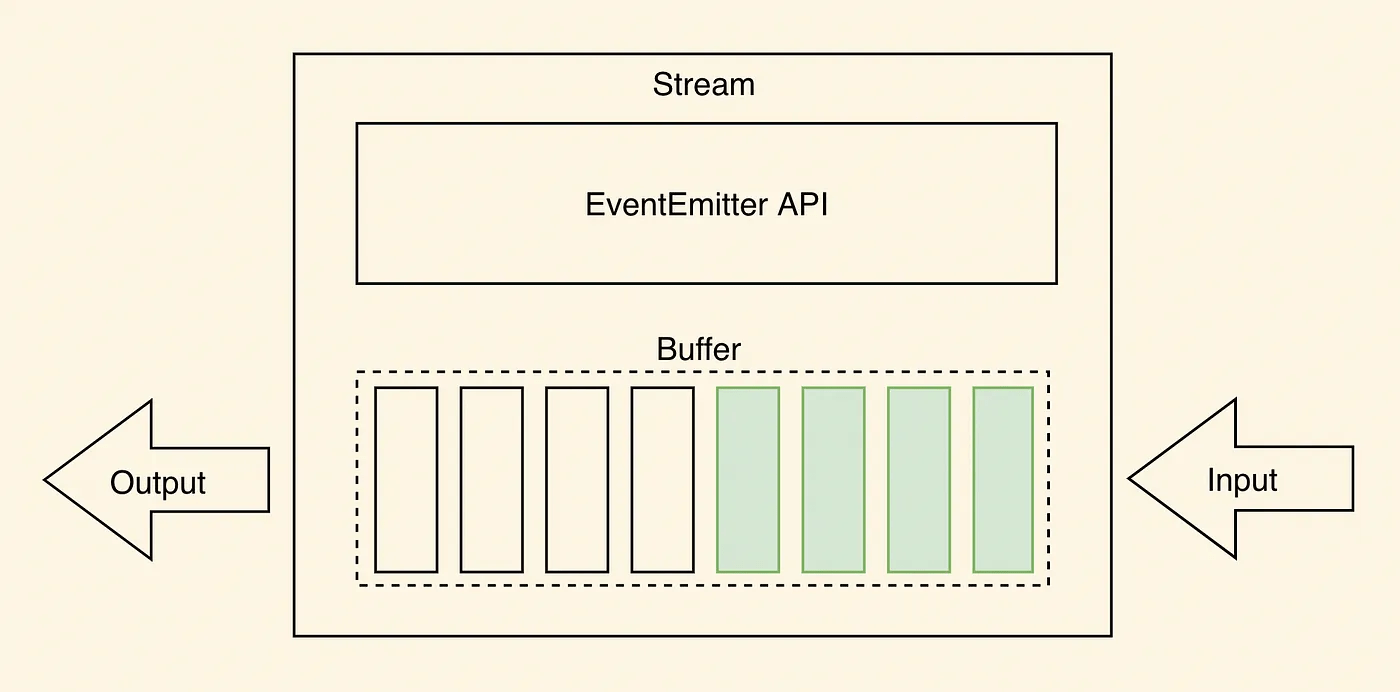
Stream is an abstract interface, and many objects in Node implement this interface. For example, the request object for an HTTP server request is a Stream, as is stdout (standard output).
Node.js Stream is a way of handling data flows. It allows you to process data in a streaming manner instead of loading all data into memory at once. This is very useful for handling large amounts of data or achieving efficient data transfer.
In Node.js, there are four types of streams:
Readable- Readable operations.
Writable- Writable operations.
Duplex- Readable and writable operations.
Transform- Operations that write data, then read the result.
All Stream objects are instances of EventEmitter. Common events include:
data- Triggered when data is available to read.
end- Triggered when there is no more data to read.
error- Triggered when an error occurs during receiving or writing.
finish- Triggered when all data has been written to the underlying system.
This tutorial will introduce common stream operations.
Reading Data from a Stream
Common readable streams include file read streams and network request response streams.
Create an input.txt file with the following content:
Example官网地址:www.example.com
Create a main.js file with the following code:
Example
var data = '';
// Create a readable stream
var readerStream = fs.createReadStream('input.txt');
// Set encoding to utf8.
readerStream.setEncoding('UTF8');
// Handle stream events --> data, end, and error
readerStream.on('data', function(chunk) {
data += chunk;
});
readerStream.on('end',function(){
console.log(data);
});
readerStream.on('error', function(err){
console.log(err.stack);
});
console.log("Program execution completed");
The execution result of the above code is as follows:
程序执行完毕
Example官网地址:www.example.com
Writable Stream
A writable stream is used to write data to a destination. Common writable streams include file write streams and network request sending streams.
Create a main.js file with the following code:
Example
var data = 'Example official website address: www.example.com';
// Create a writable stream, writing to the file output.txt
var writerStream = fs.createWriteStream('output.txt');
// Write data using utf8 encoding
writerStream.write(data,'UTF8');
// Mark the end of the file
writerStream.end();
// Handle stream events --> finish, error
writerStream.on('finish', function() {
console.log("Write completed.");
});
writerStream.on('error', function(err){
console.log(err.stack);
});
console.log("Program execution completed");
The above program writes the data in the data variable to the output.txt file. The execution result of the code is as follows:
$ node main.js
程序执行完毕
写入完成。
View the content of the output.txt file:
$ cat output.txt
Example官网地址:www.example.com
Duplex Stream
A duplex stream has both readable and writable capabilities.
A typical duplex stream is a TCP socket.
Example
// Create a TCP server
const server = net.createServer((socket) => {
console.log('Client connected.');
// Read client data
socket.on('data', (data) => {
console.log('Received data:', data.toString());
});
// Send data to the client
socket.write('Hello, Client!\n');
// Listen for the close event
socket.on('end', () => {
console.log('Client disconnected.');
});
});
server.listen(3000, () => {
console.log('Server listening on port 3000.');
});
Transform Stream
A transform stream is a special type of duplex stream that can modify or transform data. Common transform streams include compression and decompression streams.
Example
const fs = require('fs');
// Create a readable stream
const readableStream = fs.createReadStream('example.txt');
// Create a transform stream (compression)
const gzip = zlib.createGzip();
// Create a writable stream
const writableStream = fs.createWriteStream('example.txt.gz');
// Pipe the readable stream to the transform stream, then pipe to the writable stream
readableStream.pipe(gzip).pipe(writableStream);
// Listen for the completion event
writableStream.on('finish', () => {
console.log('File compressed successfully.');
});
Pipe Stream
A pipe provides a mechanism for connecting an output stream to an input stream.
Usually we use it to get data from one stream and pass the data to another stream.
As shown in the image above, we compare files to barrels filled with water, and the water is the content of the files. We use a pipe to connect the two barrels so that water flows from one barrel to another, which gradually realizes the copying process of large files.
In the following example, we read the content of one file and write the content to another file.
Set the content of the input.txt file as follows:
Example官网地址:www.example.com
管道流操作实例
Create a main.js file with the following code:
Example
// Create a readable stream
var readerStream = fs.createReadStream('input.txt');
// Create a writable stream
var writerStream = fs.createWriteStream('output.txt');
// Pipe read and write operations
// Read the content of input.txt and write the content to output.txt
readerStream.pipe(writerStream);
console.log("Program execution completed");
The execution result of the code is as follows:
$ node main.js
程序执行完毕
View the content of the output.txt file:
$ cat output.txt
Example官网地址:www.example.com
管道流操作实例
Chained Stream
Chaining is a mechanism for connecting an output stream to another stream and creating a chain of multiple stream operations.
Chained streams are generally used for pipe operations.
Next, we will use pipes and chaining to compress and decompress files.
Create a compress.js file with the following code:
Example
var zlib = require('zlib');
// Compress input.txt into input.txt.gz
fs.createReadStream('input.txt')
.pipe(zlib.createGzip())
.pipe(fs.createWriteStream('input.txt.gz'));
console.log("File compression completed.");
The execution result of the code is as follows:
$ node compress.js
文件压缩完成。
After performing the above operations, we can see that a compressed file input.txt.gz has been generated in the current directory.
Next, let's decompress this file. Create a decompress.js file with the following code:
Example
var zlib = require('zlib');
// Decompress input.txt.gz into input.txt
fs.createReadStream('input.txt.gz')
.pipe(zlib.createGunzip())
.pipe(fs.createWriteStream('input.txt'));
console.log("File decompression completed.");
The execution result of the code is as follows:
$ node decompress.js
文件解压完成。
Pause and Resume
A readable stream can pause and resume reading data.
Example
const readableStream = fs.createReadStream('example.txt', 'utf8');
readableStream.on('data', (chunk) => {
console.log('Received chunk:', chunk);
readableStream.pause(); // Pause reading
setTimeout(() => {
readableStream.resume(); // Resume reading
}, 1000);
});
Destroy
You can destroy a stream to release resources.
Example
const readableStream = fs.createReadStream('example.txt', 'utf8');
readableStream.on('data', (chunk) => {
console.log('Received chunk:', chunk);
readableStream.destroy(); // Destroy the stream
});