Node.js Basic Concepts
Node.js is a JavaScript runtime environment built on the Chrome V8 JavaScript engine. In simple terms, Node.js allows JavaScript to run on the server side, not just inside browsers.
Core Features of Node.js
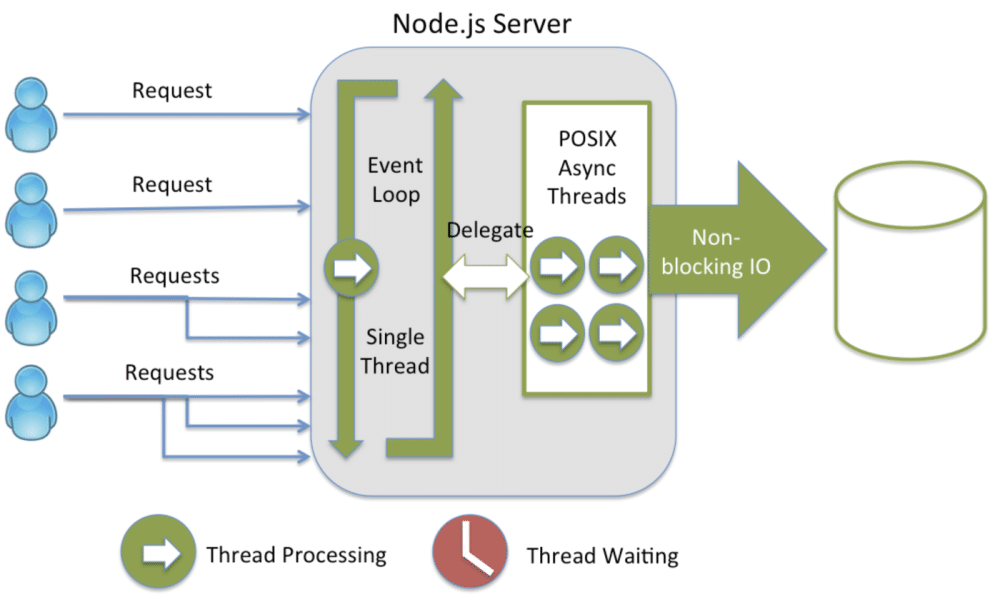
1. Single-threaded event loop
- Node.js uses a single-threaded event loop model
- Handles concurrent requests through event-driven mechanisms and callback functions
- Avoids the thread-switching overhead of traditional multi-threaded programming
2. Non-blocking I/O
- All I/O operations (file reading/writing, network requests, etc.) are asynchronous
- When waiting for an I/O operation to complete, the program is not blocked and can continue handling other tasks
- Greatly improves application throughput
3. Cross-platform
- Supports multiple operating systems such as Windows, macOS, and Linux
- Write once, run anywhere
4. Rich ecosystem
- npm (Node Package Manager) has millions of open-source packages
- Active developer community
Differences from Traditional Server-Side Technologies
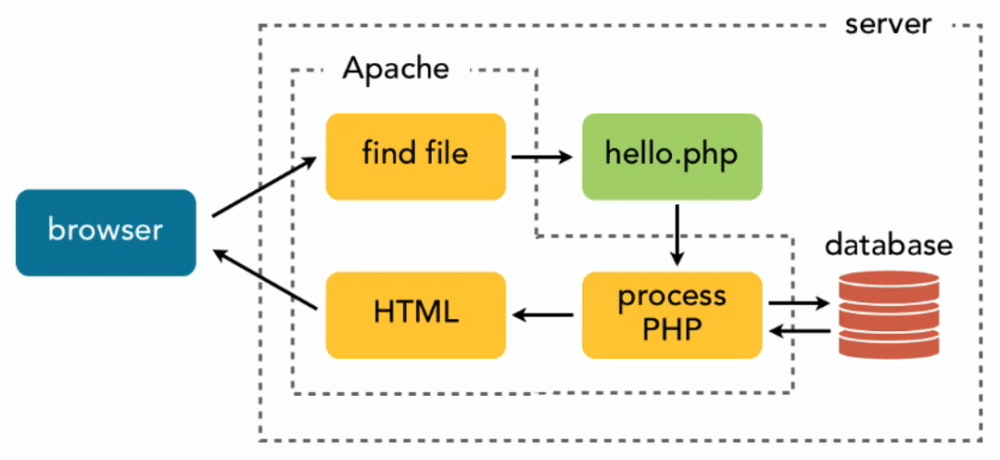
1. Traditional server-side technologies (e.g., Apache + PHP):
请求1 → 创建线程1 → 处理请求 → 返回响应 → 销毁线程1
请求2 → 创建线程2 → 处理请求 → 返回响应 → 销毁线程2
请求3 → 创建线程3 → 处理请求 → 返回响应 → 销毁线程3
2. How Node.js handles requests:
请求1 → 事件循环 → 处理请求 → 返回响应
请求2 → 事件循环 → 处理请求 → 返回响应  (复用同一线程)
请求3 → 事件循环 → 处理请求 → 返回响应
| Feature | Traditional multi-threaded model | Node.js single-threaded model |
|---|---|---|
| Memory usage | Each thread occupies about 2MB | Single-threaded, low memory usage |
| Concurrency handling | The number of threads limits concurrency | Event loop handles high concurrency |
| Context switching | Frequent thread-switching overhead | No thread-switching overhead |
| Programming complexity | Requires handling thread synchronization | Avoids lock and thread-synchronization issues |
| Suitable scenarios | CPU-intensive tasks | I/O-intensive tasks |
Application Scenarios of Node.js
1. Suitable Application Scenarios
Web applications
- RESTful API services
- Backend services for single-page applications (SPA)
- Real-time web applications
Real-time applications
- Chat applications
- Online games
- Collaboration tools (e.g., online document editing)
Microservices architecture
- Lightweight microservices
- API gateways
- Inter-service communication
Tools and command-line applications
- Build tools (e.g., Webpack, Gulp)
- Scaffolding tools
- Automation scripts
Internet of Things (IoT) applications
- Device data collection
- Sensor data processing
2. Unsuitable Application Scenarios
CPU-intensive tasks
- Image/video processing
- Complex mathematical calculations
- Big data analysis
Applications requiring heavy computation
- Machine learning training
- Scientific computing
- Cryptocurrency mining
Event-Driven and Non-Blocking I/O Model
Example of traditional blocking I/O model:
Example
// Each readFileSync "stalls" the program, waiting for the file read to finish before continuing
const data1 = readFileSync('file1.txt'); // The program pauses here, waiting for the read to complete
const data2 = readFileSync('file2.txt'); // After data1 is read, it pauses again to wait
const data3 = readFileSync('file3.txt'); // After data2 is read, it pauses again to wait
console.log('All files read'); // This line is executed only after all three files have been read
// Total time = time to read file1 + time to read file2 + time to read file3
Example of Node.js non-blocking I/O model:
Example
const fs = require('fs');
// The three file-reading operations are initiated almost simultaneously; the program does not wait for any of them to complete
fs.readFile('file1.txt', (err, data1) => {
// This callback function will be automatically invoked after file1.txt is read
console.log('File 1 read complete');
});
fs.readFile('file2.txt', (err, data2) => {
// This callback function will be automatically invoked after file2.txt is read
console.log('File 2 read complete');
});
fs.readFile('file3.txt', (err, data3) => {
// This callback function will be automatically invoked after file3.txt is read
console.log('File 3 read complete');
});
// Note: This line of code will execute first! Because the three file-reading operations above are asynchronous,
// After issuing the read requests, the program immediately continues, without waiting for the file reads to complete
console.log('Program continues executing without waiting for file reads');
// Example of actual output order:
// Program continues executing without waiting for file reads ← printed first
// File 2 read complete ← whichever file finishes first is printed first, order is not fixed
// File 1 read complete
// File 3 read complete
// Total time ≈ the time of the slowest among the three files (concurrent execution, not sequential accumulation)
Event loop mechanism:
The event loop is the core mechanism by which Node.js implements non-blocking I/O. It runs continuously, constantly checking for pending tasks, thereby achieving the effect of "single-threaded concurrency":
- Call Stack: Executes synchronous code. Function calls are pushed onto the stack and popped off after execution.
- Event Queue: Stores callbacks from completed asynchronous operations, to be executed in sequence when the call stack is empty.
- Event Loop: Continuously monitors the call stack and event queue. Once the call stack is empty, it takes a callback from the event queue and places it on the call stack for execution.
The event loop processes the following phases in a fixed order:
┌───────────────────────────┐
┌─>│           timers          │  ← 执行 setTimeout、setInterval 的到期回调
│  └─────────────┬─────────────┘
│  ┌─────────────┴─────────────┐
│  │     pending callbacks     │  ← 执行上一轮循环中延迟的 I/O 回调(如某些系统错误回调)
│  └─────────────┬─────────────┘
│  ┌─────────────┴─────────────┐
│  │       idle, prepare       │  ← Node.js 内部使用,开发者一般不需要关心
│  └─────────────┬─────────────┘
│  ┌─────────────┴─────────────┐
│  │           poll            │  ← 核心阶段:获取新的 I/O 事件并执行其回调(如文件读取、网络请求完成)
│  └─────────────┬─────────────┘
│  ┌─────────────┴─────────────┐
│  │           check           │  ← 执行 setImmediate 的回调(在 poll 阶段之后立即执行)
│  └─────────────┬─────────────┘
│  ┌─────────────┴─────────────┐
└──┤      close callbacks      │  ← 执行关闭事件的回调,如 socket.on('close', ...)
   └───────────────────────────┘
For beginners, the most important thing to remember is:Synchronous code always executes first. Asynchronous callbacks (such as handling file-read completion) are executed only after the call stack is cleared.
JavaScript Runtime Environment
Introduction to the V8 Engine
V8 is a high-performance JavaScript engine developed by Google and is a core component of the Chrome browser.
Node.js uses the V8 engine to execute JavaScript code.
Features of the V8 engine:
Just-in-Time compilation (JIT)
- Compiles JavaScript code directly into machine code
- No intermediate bytecode required, resulting in higher execution efficiency
Garbage collection
- Automatic memory management; developers do not need to manually free memory
- Uses a generational garbage collection algorithm, dividing memory into the young generation and the old generation for separate management, improving collection efficiency
Optimization techniques
- Inline Caching: caches the results of object property lookups to avoid repeated lookups
- Hidden Classes: Staticize the object structure of dynamic languages to speed up property access
- Dynamic Optimization: Analyze hot code at runtime and perform targeted optimization
Browser JavaScript vs Node.js JavaScript
Although both use the JavaScript language, differences in the runtime environment lead to some important distinctions:
Similarities:
- Both use the same JavaScript syntax
- Both support ES6+ features
- Both use the V8 engine (Chrome browser)
Differences:
| Feature | Browser JavaScript | Node.js JavaScript |
|---|---|---|
| Global object | window |
global |
| Module system | ES6 modules, AMD | CommonJS, ES6 modules |
| File system access | Not accessible (for security restrictions) | Full access |
| Network requests | XMLHttpRequest, Fetch | http, https modules |
| DOM manipulation | Supported (manipulating page elements) | Not supported (no pages on the server side) |
| Process control | Not supported | Supported (can read environment variables, exit the process, etc.) |
Browser environment example:
Example
console.log(window); // Browser global object, contains all browser APIs
document.getElementById('app'); // Get a page element by ID (not available in Node.js)
localStorage.setItem('key', 'value'); // Browser local storage (not available in Node.js)
Node.js environment example:
Example
console.log(global); // Node.js global object (corresponding to window in the browser)
const fs = require('fs'); // Import the built-in file system module (not available in the browser)
fs.readFile('data.txt', 'utf8', callback); // Read a local file on the server (not available in the browser)
Differences in Global Objects
Global object in the browser:
Example
console.log(this === window); // true, the top-level this is the window object
var globalVar = 'hello';
console.log(window.globalVar); // 'hello', variables declared with var become properties of window
Global object in Node.js:
Example
// Note: In Node.js, each file is an independent module, and this inside a module is not equal to global
console.log(this === global); // false (in module scope, this points to module.exports)
var globalVar = 'hello';
console.log(global.globalVar); // undefined, variables inside a module are not automatically attached to global
// Module scope in Node.js
console.log(this); // {} empty object, i.e., the initial value of module.exports
console.log(module.exports === this); // true, this inside a module points to module.exports
Node.js-specific global variables:
Example
console.log(__filename); // Absolute path of the current module file, e.g., /home/user/project/app.js
console.log(process); // Process object, can read command-line arguments (process.argv), environment variables (process.env), etc.
console.log(Buffer); // Constructor for handling binary data, commonly used for file reading/writing and network communication
Advantages and Limitations of Node.js
Detailed Advantages
1. High concurrency processing capability
A traditional multi-threaded server needs about 20GB of memory to handle 10,000 concurrent connections (about 2MB per thread), while Node.js requires very little memory to handle the same number of connections.
Example
const http = require('http');
const server = http.createServer((req, res) => {
// Simulate an asynchronous operation (such as querying a database), returning a response after 100ms
// During these 100ms, the event loop can continue processing other requests without being blocked
setTimeout(() => {
res.writeHead(200, {'Content-Type': 'text/plain'});
res.end('Hello World\n');
}, 100);
});
server.listen(3000, () => {
console.log('Server running at http://localhost:3000/');
});
// Thanks to non-blocking I/O and the event loop mechanism, this server can handle thousands of requests simultaneously without blocking
2. Rapid development
A unified JavaScript language stack (both frontend and backend use JavaScript) makes frontend and backend development more efficient. Developers only need to master one language to write both frontend and backend code, and can share code logic between the two sides:
Example
function validateEmail(email) {
const regex = /^[^\s@]+@[^\s@]+\.[^\s@]+$/;
return regex.test(email);
}
// Frontend usage (running in the browser): when a user submits a form, validate it on the frontend first to avoid sending invalid requests to the server
if (validateEmail(userInput)) {
// Validation passes, send to the server
}
// Backend usage (running in Node.js): the server validates again to prevent direct API requests that bypass the frontend
if (validateEmail(req.body.email)) {
// Validation passes, save to the database
}
3. Advantages of a unified language stack
- Code reuse: frontend and backend can share utility functions, data validation logic, constant definitions, etc.
- Team efficiency: developers can handle both frontend and backend development at the same time, reducing communication costs
- Simplified technology stack: only need to master the JavaScript language, reducing learning costs and technical complexity
4. Rich npm ecosystem
# npm 提供了数百万个开源包,几乎任何功能都能找到现成的库
npm search express     # 搜索名为 express 的包
npm install express    # 安装 express 包到当前项目
npm update            # 更新当前项目中所有包到最新兼容版本
Analysis of Limitations
1. Performance issues with CPU-intensive tasks
Example
// fibonacciSync is a pure computation task that keeps occupying the CPU, during which the event loop cannot handle other requests
function fibonacciSync(n) {
if (n < 2) return n;
return fibonacciSync(n - 1) + fibonacciSync(n - 2);
}
// This will block the entire application for several seconds, during which all requests cannot be responded to
console.log(fibonacciSync(40));
// Solution: use Worker Threads to run CPU-intensive tasks in separate threads,
// so the event loop of the main thread will not be blocked
const { Worker, isMainThread, parentPort, workerData } = require('worker_threads');
if (isMainThread) {
// Main thread: create a Worker and pass the argument { n: 40 } to it
// The Worker will execute the current file in a separate thread (__filename refers to the current file path)
const worker = new Worker(__filename, {
workerData: { n: 40 }
});
// Listen for messages sent by the Worker (the computation result)
worker.on('message', (result) => {
console.log('Result:', result); // After the Worker completes the computation, the main thread receives the result here
});
} else {
// Worker thread: get parameters passed from the main thread via workerData, execute the computation, then send the result
const result = fibonacciSync(workerData.n);
parentPort.postMessage(result); // Send the result back to the main thread
}
2. Callback hell problem
Example
fs.readFile('file1.txt', (err, data1) => {
if (err) throw err;
fs.readFile('file2.txt', (err, data2) => { // First level of nesting
if (err) throw err;
fs.readFile('file3.txt', (err, data3) => { // Second level of nesting
if (err) throw err;
// In real projects, this nesting can be a dozen or more levels deep, seriously affecting code maintainability
console.log('All files read successfully');
});
});
});
// Modern solution: use Promise + async/await to make asynchronous code as intuitive as synchronous code
const fsPromises = require('fs').promises;
async function readFiles() {
try {
// await will wait for each file to be read, but the entire function does not block the event loop
// Note: this reads sequentially; to read multiple files concurrently, use Promise.all()
const data1 = await fsPromises.readFile('file1.txt');
const data2 = await fsPromises.readFile('file2.txt');
const data3 = await fsPromises.readFile('file3.txt');
console.log('All files read successfully');
} catch (err) {
// try/catch can uniformly handle all asynchronous errors, without needing to check separately in each callback
console.error('Failed to read files:', err);
}
}
3. Fragility of single-threading
Example
// Unlike multi-threading, a single unhandled error in a single-threaded environment will stop the entire service
setTimeout(() => {
throw new Error('Uncaught exception'); // This will crash the entire application, and all requests will be unresponsive
}, 1000);
// Solution: register a global exception handler to log errors and exit gracefully before the application crashes
process.on('uncaughtException', (err) => {
console.error('Uncaught exception:', err);
// Here you should first log the error, then exit, to avoid silent crashes that make problems hard to diagnose
process.exit(1); // Exit code 1 indicates abnormal exit
});
process.on('unhandledRejection', (reason, promise) => {
// Triggered when a Promise is rejected but has no .catch() handler
console.error('Unhandled Promise rejection:', reason);
process.exit(1);
});
Analysis of Suitable Scenarios
1. RESTful API service
Example
// First, you need to install express: npm install express
const express = require('express');
const app = express();
app.use(express.json()); // Middleware: Automatically parse JSON data in the request body
// GET request: Get the user list (corresponds to HTTP method GET, path /api/users)
app.get('/api/users', (req, res) => {
const users = [
{ id: 1, name: 'Zhang San' },
{ id: 2, name: 'Li Si' }
];
res.json(users); // Return data in JSON format
});
// POST request: Create a new user (the client sends user information in the request body)
app.post('/api/users', (req, res) => {
const newUser = req.body; // Get the JSON data sent by the client
// In real projects, user information is usually saved to a database here
res.status(201).json({ message: 'User created successfully', user: newUser });
});
// PUT request: Update specified user information (:id is a route parameter, e.g., /api/users/1 means updating the user with ID 1)
app.put('/api/users/:id', (req, res) => {
const { id } = req.params; // Get the user ID from the path
const updatedData = req.body; // Get the update content from the request body
res.json({ message:`User ${id}updated successfully`, data: updatedData });
});
// DELETE request: Delete the specified user
app.delete('/api/users/:id', (req, res) => {
const { id } = req.params;
res.json({ message:`User ${id}deleted successfully`});
});
app.listen(3000, () => {
console.log('API server running at http://localhost:3000/');
});
2. Real-Time Applications
Example
// First, you need to install: npm install socket.io
const io = require('socket.io')(server);
// Listen for client connection events, triggered each time a new user connects
io.on('connection', (socket) => {
// Listen for the 'chat message' event sent by the currently connected client
socket.on('chat message', (msg) => {
io.emit('chat message', msg); // Broadcast the message to all online clients (including the sender)
});
});
3. Middleware and Proxy Services
Example
// Forward /api/xxx requests from the frontend to the real backend API server, hiding the real address, commonly used to solve CORS issues
// First, you need to install: npm install http-proxy-middleware
const httpProxy = require('http-proxy-middleware');
const proxy = httpProxy({
target: 'http://api.example.com', // Real backend API server address
changeOrigin: true, // Change the Host in the request header to the target address
pathRewrite: {
'^/api': '' // Remove the /api prefix from the path before forwarding, e.g., /api/users → /users
}
});