Node.js async/await
In Node.js,async/awaitis syntactic sugar for handling asynchronous operations.
async/awaitIt is based on Promise, but makes asynchronous code look more like synchronous code, greatly improving code readability and maintainability.
asynckeyword is used to declare a function as asynchronous, andawaitkeyword is used to wait for a Promise to resolve or reject.
Usingasync/awaitcan avoid callback hell and make error handling more intuitive.
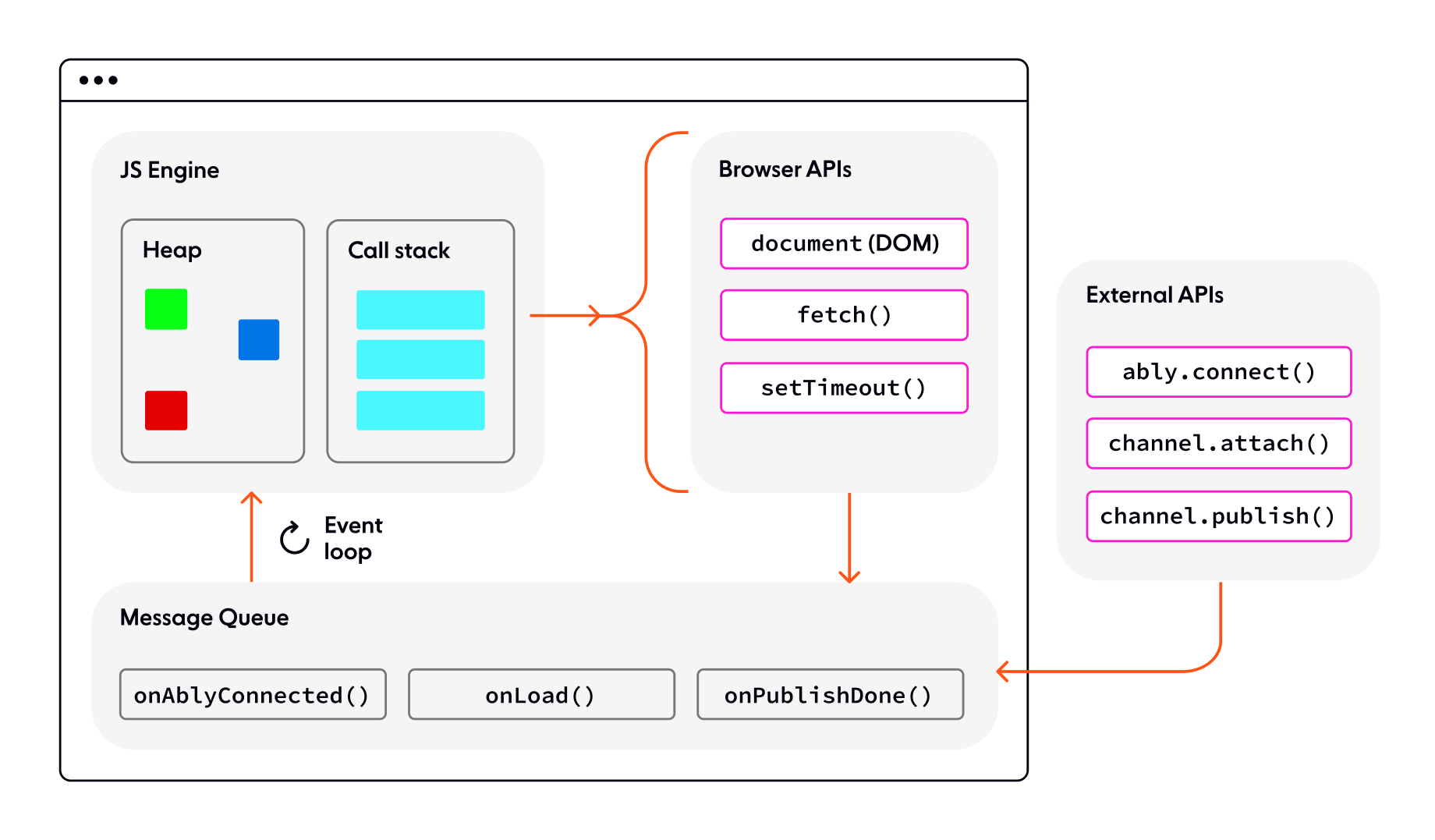
JavaScript is single-threaded. When encountering asynchronous tasks (such as setTimeout or network requests), it hands them to the browser API, and upon completion, places the callback into the message queue.
The event loop constantly checks whether the call stack is empty. If it is, it takes a callback from the queue and pushes it onto the call stack for execution. This prevents blocking the main thread while processing asynchronous results in order.
Basic Syntax
async functions
Any function can be made asynchronous by adding theasynckeyword:
return "Hello World";
}
asyncAn async function always returns a Promise. If the return value is not a Promise, it is automatically wrapped into a Promise.
await expressions
awaitcan only be usedasyncinside an async function. It pauses the function's execution, waits for the Promise to resolve, then continues execution and returns the result:
const response = await fetch('https://api.example.com/data');
const data = await response.json();
return data;
}
Error Handling
try/catch approach
Handlingasync/awaitThe most common way to handle errors is to usetry/catch:
Example
try {
const response = await fetch('https://api.example.com/user');
const user = await response.json();
return user;
} catch (error) {
console.error('Error fetching user:', error);
throw error; // Optionally rethrow the error
}
}
Handling Promises Directly
You can also directly handle the returned Promise:
Example
.then(user => console.log(user))
.catch(error => console.error(error));
Practical Examples
Running Multiple Asynchronous Operations in Parallel
UsePromise.allwithasync/awaitto execute multiple asynchronous operations in parallel:
Example
try {
const requests = urls.map(url => fetch(url));
const responses = await Promise.all(requests);
const data = await Promise.all(responses.map(r => r.json()));
return data;
} catch (error) {
console.error('Error fetching data:', error);
throw error;
}
}
Database Operation Example
Example
try {
const user = await User.findById(userId);
const posts = await Post.find({ userId });
return { user, posts };
} catch (error) {
console.error('Database error:', error);
throw error;
}
}
Best Practices
- Always handle errors: Don't ignore
awaiterrors that may be thrown; usetry/catchor.catch()to handle - Avoid unnecessary await: If you don't need to wait for the result, you can return the Promise directly
- Use parallelism wisely: Multiple independent asynchronous operations should be executed in parallel (use
Promise.all) - Keep code clear: Avoid excessively deep
async/awaitnesting; extract functions when necessary - Watch out for performance impact: Each
awaitpauses function execution; pay special attention in loops
Common Questions
The Relationship between async/await and Promise
async/awaitis syntactic sugar built on top of Promise. Anyasyncfunction returns a Promise, and anyawaitcan be followed by a Promise.
Why does my async function return undefined?
This may be because you forgot to useawaitbeforereturn, or the function exits before the Promise resolves.
Can I use await at the top level?
In ES modules (files ending with.mjsorpackage.jsonMedium"type": "module"), you can useawaitdirectly at the top level. In CommonJS modules, you need to wrap it in anasyncfunction.
Example
const data = await fetchData();
console.log(data);