Node.js Module System
The Node.js module system is one of its core features, allowing developers to organize code into small, reusable units called modules.
A module is an independent file that encapsulates specific functionality and can be imported and used in other files.
The Node.js module system is an important foundation for building Node.js applications, enabling developers to split code into reusable, maintainable pieces.
Each module is a separate JavaScript file containing a set of related functions, objects, or variables. In this way, Node.js provides a structured approach to managing large applications, making code clearer and easier to maintain.
Every file in Node.js can act as a module and is in an independent scope by default.
The module system follows the CommonJS specification, but also supports ES modules.
Module Types
Node.js supports the following types of modules:
- Built-in modules: Modules that come with Node.js, such as
fs、http、pathetc. - User-defined modules: Modules created by developers.
- Third-party modules: Modules installed via npm, such as
express、lodashetc.
Importing Built-in Modules
Built-in modules are modules that come with Node.js and are already included in the environment when Node.js is installed, so no additional installation is needed. Common built-in modules include fs, http, path, os, crypto, etc.
To import a built-in module, you only need to use therequire()function and pass in the module name. For example, to import the file system modulefs、path、http, you can do this:
// 导入文件系统模块
const fs = require('fs');

// 导入路径模块
const path = require('path');

// 导入 HTTP 模块
const http = require('http');
Here, fs is a string representing the name of the module to load. Node.js automatically recognizes it as a built-in module and loads the corresponding functionality.
Example
console.log('Operating System:', os.platform());
console.log('Total Memory:', os.totalmem());
Importing Third-party Modules
Third-party modules are modules published by developers or the open-source community and can be installed into a project via npm (Node Package Manager). Common third-party modules include express, lodash, axios, etc.
Once third-party modules are installed, they are placed in the project's node_modules directory. To import a third-party module, also use therequire()function, but pass in the module name. For example, to import the express framework, you can do this:
// 导入第三方模块 express
const express = require('express');
Before importing a third-party module, make sure you have installed it via npm. For example, installing express can be done with the following command:
npm install express
Install the third-party module lodash and import it for testing:
Example
const array = [1, 2, 3, 4];
const reversedArray = lodash.reverse(array.slice()); // Use lodash to reverse the array
console.log('Reversed Array:', reversedArray);
Custom Module Export and Import (CommonJS Modules)
1. Exporting modules:Usemodule.exportsorexportsto export functions, objects, or variables.
2. Importing modules:Userequire()to import modules.
Importing Modules
In Node.js, importing a module is very simple. Below, we create amain.jsfile and import the hello module. The code is as follows:
main.js file code:
hello.world();
In the above example, the coderequire('./hello')imports thehello.jsfile in the current directory (./is the current directory, and the default extension for Node.js files is.js)。
Node.js provides two objects, exports and require. exports is the public interface of a module, and require is used to obtain the interface of a module from outside, i.e., the exports object of the module being required.
Next, let's create the hello.js file. The code is as follows:
hello.js file code:
console.log('Hello World');
}
In the above example, hello.js uses the exports object to make world the module's access interface. In main.js, byrequire('./hello')loading this module, we can then directly access theexportsobject's member functions in hello.js.
Sometimes we just want to encapsulate an object in a module. The format is as follows:
module.exports = function() {
  // ...
}
For example:
hello.js file code:
function Hello() {
var name;
this.setName = function(thyName) {
name = thyName;
};
this.sayHello = function() {
console.log('Hello ' + name);
};
};
module.exports = Hello;
In this way, you can directly obtain this object:
main.js file code:
var Hello = require('./hello');
hello = new Hello();
hello.setName('BYVoid');
hello.sayHello();
The only change in the module interface is usingmodule.exports = Helloinstead ofexports.world = function(){}. When the module is referenced externally, its interface object is the Hello object to be exported itself, rather than the original exports.
The difference between module.exports and exports:
module.exportsis the real reference to the exported object.exportsYesmodule.exportsis a shortcut for it. You cannot directly assignexports = ..., otherwise the reference will be broken.
Custom Module Export and Import (ES Modules)
ES modules useimportandexport, which is the modern JavaScript module specification.
- ES modules use the
importandexportkeyword, and the file extension needs to be set to.mjs, or inpackage.jsondeclare"type": "module"。 - ES modules support static imports (
import ... from ...) and dynamic imports (import())。
Example
export function greet(name) {
return `Hello, ${name}!`;
}
// main.mjs
import { greet } from './myModule.mjs';
console.log(greet('Bob')); // Output: Hello, Bob!
Path Resolution for Loading Modules
1. Core modules:Such as http and fs, which are included when Node.js is installed and can be loaded directly.
const http = require('http');2. Local file modules:Load using relative or absolute paths; you need to specify./or/。
const myModule = require('./myModule');3. Third-party modules:Located in thenode_modulesdirectory; you only need to enter the module name to load them.
const express = require('express');
Module Caching
Module caching mechanism:Node.js caches loaded modules to improve performance. When require() is called again for the same module, the cached module is returned directly instead of being reloaded.
Refreshing the cache:To reload a module, you can delete the cache:
delete require.cache[require.resolve('./myModule')];
Circular Dependencies
When two or more modules import each other, it is called circular dependency. Node.js can handle simple circular dependencies, but it may cause objects exported by some modules to be not fully initialized.
Example
const b = require('./b');
console.log('a.js:', b.message);
module.exports = { message: 'Hello from a' };
// b.js
const a = require('./a');
console.log('b.js:', a.message);
module.exports = { message: 'Hello from b' };
// main.js
require('./a');
The output shows that when b.js imports a.js, since a.js has not fully executed, a.message is undefined.
Module Wrapping and Scope
Node.js wraps each module in a function, giving each module an independent scope. Example:
// Node.js 内部将模块包装为类似这样的函数:
(function(exports, require, module, __filename, __dirname) {
  // 模块代码在这里
});
This means variables defined in a module will not pollute the global scope.
Where Are Server-side Modules Placed?
Perhaps you have noticed that we have already used modules in our code. Like this:
var http = require("http");

...

http.createServer(...);
Node.js comes with a module calledhttpWe require it in our code and assign the return value to a local variable.
This turns our local variable into an object that has all the public methods provided by the http module.
The file lookup strategy in Node.js's require method is as follows:
Because there are 4 types of modules in Node.js (native modules and 3 types of file modules), even though the require method is extremely simple, the internal loading is quite complex, and the loading priorities differ. As shown in the following diagram:
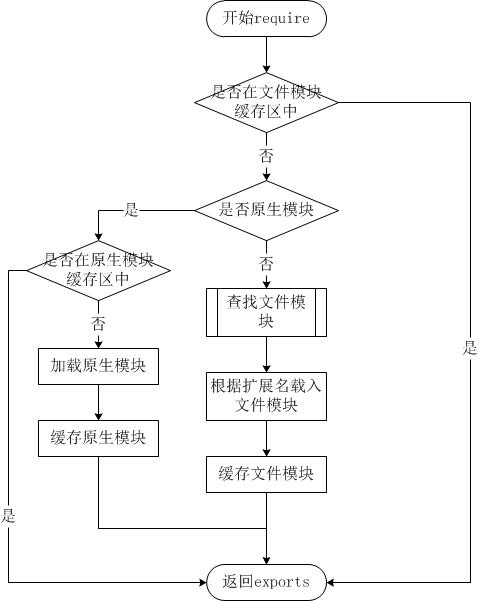
Loading from the File Module Cache
Although native modules and file modules have different priorities, they both first load existing modules from the file module cache.
Loading from Native Modules
Native modules have priority second only to the file module cache. After the require method resolves the file name, it first checks whether the module is in the native module list. Taking the http module as an example, even if an http/http.js/http.node/http.json file exists in the directory, require("http") will not load from these files, but from the native module.
Native modules also have a cache area, which is also loaded from the cache first. If the cache has not been loaded, the native module's loading method is called to load and execute it.
Loading from Files
When a file module is not in the cache and is not a native module, Node.js parses the parameters passed to the require method and loads the actual file from the file system. The wrapping and compilation details during the loading process were introduced in the previous section. Here, we will describe in detail the process of finding file modules, among which there are also some details worth knowing.
The require method accepts the following types of parameter passing:
- http, fs, path, etc., native modules.
- ./mod or ../mod, file modules with relative paths.
- /pathtomodule/mod, file modules with absolute paths.
- mod, a file module that is not a native module.
Execution order of the require(X) statement executed under path Y:
1. 如果 X 是内置模块
   a. 返回内置模块
   b. 停止执行
2. 如果 X 以 '/' 开头
   a. 设置 Y 为文件根路径
3. 如果 X 以 './' 或 '/' or '../' 开头
   a. LOAD_AS_FILE(Y + X)
   b. LOAD_AS_DIRECTORY(Y + X)
4. LOAD_NODE_MODULES(X, dirname(Y))
5. 抛出异常 "not found"

LOAD_AS_FILE(X)
1. 如果 X 是一个文件, 将 X 作为 JavaScript 文本载入并停止执行。
2. 如果 X.js 是一个文件, 将 X.js 作为 JavaScript 文本载入并停止执行。
3. 如果 X.json 是一个文件, 解析 X.json 为 JavaScript 对象并停止执行。
4. 如果 X.node 是一个文件, 将 X.node 作为二进制插件载入并停止执行。

LOAD_INDEX(X)
1. 如果 X/index.js 是一个文件,  将 X/index.js 作为 JavaScript 文本载入并停止执行。
2. 如果 X/index.json 是一个文件, 解析 X/index.json 为 JavaScript 对象并停止执行。
3. 如果 X/index.node 是一个文件,  将 X/index.node 作为二进制插件载入并停止执行。

LOAD_AS_DIRECTORY(X)
1. 如果 X/package.json 是一个文件,
   a. 解析 X/package.json, 并查找 "main" 字段。
   b. let M = X + (json main 字段)
   c. LOAD_AS_FILE(M)
   d. LOAD_INDEX(M)
2. LOAD_INDEX(X)

LOAD_NODE_MODULES(X, START)
1. let DIRS=NODE_MODULES_PATHS(START)
2. for each DIR in DIRS:
   a. LOAD_AS_FILE(DIR/X)
   b. LOAD_AS_DIRECTORY(DIR/X)

NODE_MODULES_PATHS(START)
1. let PARTS = path split(START)
2. let I = count of PARTS - 1
3. let DIRS = []
4. while I >= 0,
   a. if PARTS[I] = "node_modules" CONTINUE
   b. DIR = path join(PARTS[0 .. I] + "node_modules")
   c. DIRS = DIRS + DIR
   d. let I = I - 1
5. return DIRS
Other extensionsUsage of exports and module.exports
If you want to expose properties or methods externally, useexportsThat's all. To expose an object (similar to a class, containing many properties and methods), usemodule.exports。