pnpm Usage Guide
As a Node.js developer, you have definitely heard of
npmandyarn, they are powerful tools for managing project dependencies. But have you ever encounterednode_modulesthe frustration of enormous folders, slow installation speeds, or disk space being quickly filled up? This is the problem pnpm can solve.
pnpmis a fast, disk-space-saving Node.js package manager. It stores packages using content addressing, with all versions of dependencies stored centrally in one location on the system, then linked into projects via hard links, avoiding duplicate installations.
pnpm's slogan isFast, disk space efficient package manager(Fast, disk space efficient package manager). Not only is it extremely fast, but its unique linking mechanism also saves you a significant amount of disk space and bandwidth.
Installing pnpm
There are several ways to install pnpm; you can choose based on your preference and system environment.
Method 1: Install via npm (recommended for all users)
This is the most universal and simplest method. Open your terminal (Windows users can use PowerShell or CMD) and run the following command:
npm install -g pnpm
This command will install pnpm into your global environment via npm.
Verify whether the installation succeeded: After installation, run the following command to check the version. If the version number displays normally, the installation was successful.
pnpm --version
Output similar to: 8.15.0
Method 2: Install via standalone script
For macOS or Linux users, you can install using the following script:
# macOS/Linux
curl -fsSL https://get.pnpm.io/install.sh | sh -

# Windows (PowerShell)
iwr https://get.pnpm.io/install.ps1 -useb | iex
Using pnpm
Now that you've learned how to install it, let's start actually using pnpm. Its command design is very intuitive; if you are familiar with npm, you can switch almost seamlessly.
Initialize a new project
Similar tonpm init, pnpm can be used to initialize a project and createpackage.jsonfile.
# 交互式地回答问题,创建 package.json
pnpm init

# 快速创建一个带有默认值的 package.json
pnpm init -y
Runpnpm init -yAfterwards, you will get a very basicpackage.jsonfile:
Example
"name": "your-project-name",
"version": "1.0.0",
"description": "",
"main": "index.js",
"scripts": {
"test": "echo \"Error: no test specified\" && exit 1"
},
"keywords": [],
"author": "",
"license": "ISC"
}
Install dependencies
pnpm's install command ispnpm add <package-name>, equivalent tonpm install <package-name>。
# 安装所有依赖
pnpm install

# 添加依赖包
pnpm add <package-name>

# 添加开发依赖
pnpm add -D <package-name>

# 添加全局包
pnpm add -g <package-name>

# 安装指定版本
pnpm add <package-name>@<version>
Update dependencies
# 更新所有依赖
pnpm update

# 更新指定包
pnpm update <package-name>

# 更新到最新版本(忽略 package.json 中的版本范围)
pnpm update --latest
Remove dependencies
pnpm remove <package-name>
Run scripts
# 运行 package.json 中定义的脚本
pnpm run <script-name>
# 一些常见的简写
pnpm start
pnpm test
pnpm build
npm to pnpm command comparison table
| npm command | pnpm command |
|---|---|
npm install |
pnpm install |
npm install <pkg> |
pnpm add <pkg> |
npm install <pkg> --save-dev |
pnpm add -D <pkg> |
npm install <pkg> --global |
pnpm add -g <pkg> |
npm update |
pnpm update |
npm uninstall <pkg> |
pnpm remove <pkg> |
npm run <script> |
pnpm run <script> |
npx <command> |
pnpm dlx <command> |
npm list |
pnpm list |
npm outdated |
pnpm outdated |
npm audit |
pnpm audit |
Configuration file
pnpm supports configuration through.npmrcfile.
Creating this file in the project root directory allows you to customize pnpm's behavior.
Common configuration examples
# 设置国内镜像源(淘宝)
registry=https://registry.npmmirror.com

# 自动安装 peer dependencies
auto-install-peers=true

# 严格模式
strict-peer-dependencies=true

# shamefully-hoist(提升依赖,兼容某些工具)
shamefully-hoist=true

# 指定 node_modules 目录结构
node-linker=hoisted

# 设置存储目录
store-dir=~/.pnpm-store
View current configuration
pnpm config list
Set configuration options:
pnpm config set <key> <value>
Workspace
pnpm has built-in powerful monorepo support.
Define a workspace by creating a pnpm-workspace.yaml file in the project root directory.
Configuration example:
packages:
  - 'packages/*'
  - 'apps/*'
<p>  - '!**/test/**'
Project structure example:
my-monorepo/
├── pnpm-workspace.yaml
├── package.json
├── packages/
│   ├── package-a/
│   │   └── package.json
│   └── package-b/
│       └── package.json
└── apps/
    └── web-app/
        └── package.json
Workspace commands
# 在所有工作区包中安装依赖
pnpm install

# 在指定工作区执行命令
pnpm --filter <package-name> <command>

# 在所有工作区执行命令
pnpm -r <command>

# 递归运行脚本
pnpm -r run build

# 为工作区添加依赖
pnpm --filter <package-name> add <dependency>

# 添加工作区内部依赖
pnpm --filter package-a add package-b@workspace:*
Workspace protocol
When referencing other packages within the workspace, use the workspace: protocol:
json{
  "dependencies": {
    "package-a": "workspace:*",
    "package-b": "workspace:^1.0.0"
  }
}
Advanced features
pnpm exec and pnpm dlx
# 执行本地安装的包
pnpm exec <command>

# 执行远程包(类似 npx)
pnpm dlx create-react-app my-app

# 使用特定版本
pnpm dlx create-react-app@latest my-app
View the dependency tree
# 查看依赖树
pnpm list

# 指定深度
pnpm list --depth 2

# 只显示生产依赖
pnpm list --prod

# 查看全局包
pnpm list -g
View outdated dependencies
pnpm outdated
Audit dependency security
pnpm audit

# 自动修复安全问题
pnpm audit --fix
Clean cache
# 清理未使用的包
pnpm store prune

# 查看存储位置
pnpm store path

# 查看存储状态
pnpm store status
Import lockfile
When migrating from other package managers:
# 从 package-lock.json 导入
pnpm import

# 从 yarn.lock 导入
pnpm import
Patch packages
When you need to temporarily modify a dependency package:
# 创建补丁
pnpm patch <package-name>@<version>

# 应用补丁后提交
pnpm patch-commit <path>
What is pnpm? What are its core advantages?
Before diving deeper into usage, we first need to understand pnpm's core philosophy and the changes it brings.
pnpm (Performant npm)is a Node.js package manager that is backward compatible with npm, meaning the vast majority ofnpmcommands inpnpmcan be used directly.
pnpm's design goal is to solve the bottlenecks of traditional package managers (such as npm and yarn) in disk space and installation speed.
Problems with traditional package managers
Imagine you are working on 10 different frontend projects in your company, and each project depends on[email protected]. Using npm or yarn, thislodashpackage will be fully downloaded and stored 10 times, in 10 differentnode_modulesfolders on your computer. This causes a huge waste of disk space.
pnpm's revolutionary approach: content-addressable storage and hard links
pnpm uses a clever approach:
- Global store: When you install a package, pnpm stores its contents ina global, single-version repository(usually located at
~/.pnpm-store)。 - Hard links: In your project's
node_modulesin, pnpm does not copy the complete files of the package, but createshard links. You can think of a hard link as an "advanced shortcut"; it shares the same disk data as the original file. - Symlink organization: To maintain
node_modulesflat structure (to facilitaterequirestatements), pnpm creates a sophisticated set ofsymbolic links(soft links) to organize the dependency tree.
Through this mechanism,no matter how many projects depend on the same package, only one copy of the package is saved on the physical disk.. This brings immediate benefits:
- Saves a large amount of disk space: For developers with multiple projects, the savings are extremely significant.
- Extremely fast installation speed: On subsequent installations, if the package already exists in the global store, pnpm only needs to create links, which is orders of magnitude faster than downloading and extracting.
- Improved security:
node_modulesThe package files in it are read-only (because they are hard links), which avoids the risk of project scripts accidentally modifying dependency package contents and ensures dependency determinism.
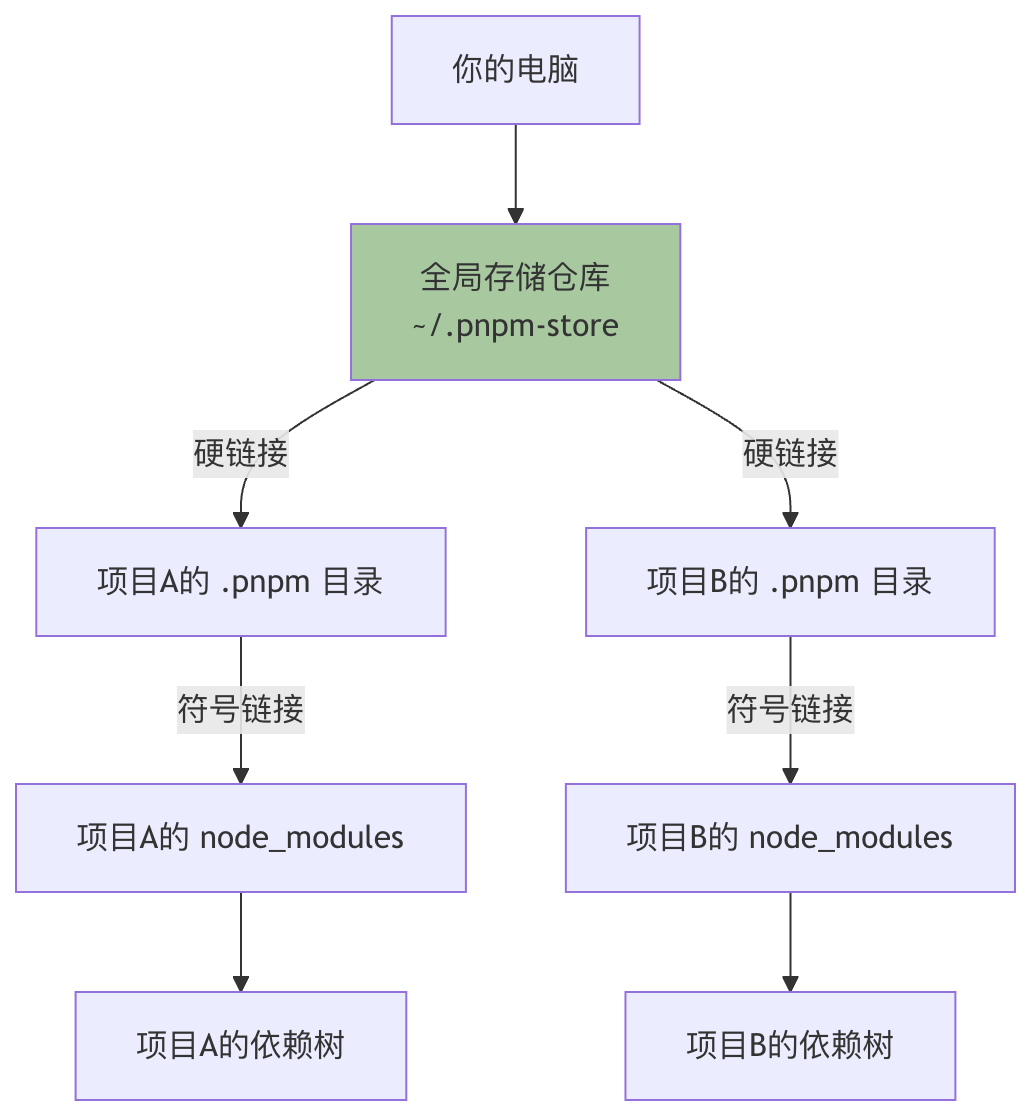
The figure above clearly shows pnpm's core workflow: all projects share the same package file in the global store through hard links, and then in their respectivenode_modulesdirectories, the dependency structure is built through symbolic links.
| Feature comparison | npm (v7+) / yarn | pnpm |
|---|---|---|
| Disk space usage | Dependencies for each project are stored independently, taking up a large amount of space. | All projects share asingle copy, with extremely low space usage. |
| Installation speed | Slower; requires downloading, extracting, and building the dependency tree. | Extremely fast, especially for subsequent installations, which mainly involve creating links. |
node_modulesStructure |
Flat or semi-flat, which may lead to dependency hoisting and phantom dependency issues. | Strictnon-flat structure, accurately simulating dependency relationships and eliminating phantom dependencies. |
| Monorepo support | Supported via Workspaces, but with performance bottlenecks. | Native, efficientWorkspaces support; performance is its strength. |
| Package management model | Copies files to the project during installation. | Link model (hard links + symbolic links). |
| Security | Dependencies can be modified by project scripts. | Dependency files are read-only hard links, providing higher security. |
Official resources:
Other Extensions