<sql:update> Tag
 JSP Standard Tag Library
The <sql:update> tag is used to execute a SQL statement that returns no value, such as SQL INSERT, UPDATE, and DELETE statements.
Syntax Format
<sql:update var="<string>" scope="<string>" sql="<string>" dataSource="<string>"/>
Attributes
The <sql:update> tag has the following attributes:
| Attribute | Description | Required | Default Value |
|---|---|---|---|
| sql | The SQL command to be executed (does not return a ResultSet object) | no | Body |
| dataSource | The database connection to use (overrides the default value) | no | Default database |
| var | The variable used to store the number of affected rows | no | None |
| scope | The scope of the var attribute | no | Page |
Program Example
First, you need to create an Employees table in the TEST database, then add a few records to the table. The specific steps are as follows:
Step 1:
Open CMD, change the directory to the installation directory:
C:\>
C:\>cd Program Files\MySQL\bin
C:\Program Files\MySQL\bin>
Step 2:
Log in to the database:
C:\Program Files\MySQL\bin>mysql -u root -p
Enter password: ********
mysql>
Step 3:
Create the Employees table in the TEST database:
mysql> use TEST;
mysql> create table Employees
    (
     id int not null,
     age int not null,
     first varchar (255),
     last varchar (255)
    );
Query OK, 0 rows affected (0.08 sec)
mysql>
Create Data Records:
Finally, create a few records in the Employees table:
mysql> INSERT INTO Employees VALUES (100, 18, 'Zara', 'Ali');
Query OK, 1 row affected (0.05 sec)

mysql> INSERT INTO Employees VALUES (101, 25, 'Mahnaz', 'Fatma');
Query OK, 1 row affected (0.00 sec)

mysql> INSERT INTO Employees VALUES (102, 30, 'Zaid', 'Khan');
Query OK, 1 row affected (0.00 sec)

mysql> INSERT INTO Employees VALUES (103, 28, 'Sumit', 'Mittal');
Query OK, 1 row affected (0.00 sec)

mysql>
Now, write a JSP file and use the <sql:update> tag to execute an SQL INSERT statement:
<%@ page language="java" contentType="text/html; charset=UTF-8"
    pageEncoding="UTF-8"%>
<%@ page import="java.io.*,java.util.*,java.sql.*"%>
<%@ page import="javax.servlet.http.*,javax.servlet.*" %>
<%@ taglib uri="http://java.sun.com/jsp/jstl/core" prefix="c"%>
<%@ taglib uri="http://java.sun.com/jsp/jstl/sql" prefix="sql"%>

<html>
<head>
<title>JSTL sql:update 标签</title>
</head>
<body>

<sql:setDataSource var="snapshot" driver="com.mysql.jdbc.Driver"
     url="jdbc:mysql://localhost/TEST"
     user="root"  password="pass123"/>

<sql:update dataSource="${snapshot}" var="count">
   INSERT INTO Employees VALUES (104, 2, 'Nuha', 'Ali');
</sql:update>

<sql:query dataSource="${snapshot}" var="result">
   SELECT * from Employees;
</sql:query>

<table border="1" width="100%">
<tr>
<th>Emp ID</th>
<th>First Name</th>
<th>Last Name</th>
<th>Age</th>
</tr>
<c:forEach var="row" items="${result.rows}">
<tr>
<td><c:out value="${row.id}"/></td>
<td><c:out value="${row.first}"/></td>
<td><c:out value="${row.last}"/></td>
<td><c:out value="${row.age}"/></td>
</tr>
</c:forEach>
</table>

</body>
</html>
The result is as follows:
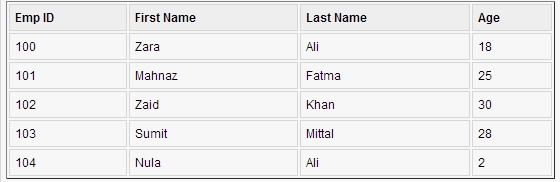
The usage of SQL UPDATE and DELETE statements is similar to the INSERT statement.
In sql:update, if you need to use variables, you can usesql:param。
<sql:update dataSource="${snapshot}" var="count">
  DELETE FROM Employees WHERE Id = ?
  <sql:param value="${empId}" />
</sql:update>
Other Extensions