JSP Hit Counter
Sometimes we need to know how many times a page has been visited. In this case, we need to add a page counter to the page. The page visit count is usually incremented when the user first loads the page.
To implement a counter, you can use the application implicit object and the related methods getAttribute() and setAttribute().
This object represents the entire lifecycle of a JSP page. It is created when the JSP page is initialized and destroyed when the JSP page calls jspDestroy().
The following is the syntax for creating a variable in the application:
application.setAttribute(String Key, Object Value);
You can use the above methods to set a counter variable and update its value. The method to read the variable is as follows:
application.getAttribute(String Key);
Each time the page is accessed, you can read the current value of the counter, increment it by 1, and then reset it. The new value will be displayed on the page when the next user visits.
Demo
This example will show how to use JSP to count the total number of visits to a specific page. If you want to count the total hits for all pages on your website, you must place this code on all JSP pages.
<%@ page language="java" contentType="text/html; charset=UTF-8"
    pageEncoding="UTF-8"%>
<%@ page import="java.io.*,java.util.*" %>
<html>
<html>
<head>
<title>访问量统计</title>
</head>
<body>
<%
    Integer hitsCount =
      (Integer)application.getAttribute("hitCounter");
    if( hitsCount ==null || hitsCount == 0 ){
       /* 第一次访问 */
       out.println("欢迎访问Example!");
       hitsCount = 1;
    }else{
       /* 返回访问值 */
       out.println("欢迎再次访问Example!");
       hitsCount += 1;
    }
    application.setAttribute("hitCounter", hitsCount);
%>

<p>页面访问量为: <%= hitsCount%></p>


</body>
</html>
Now we place the above code in the main.jsp file and visithttp://localhost:8080/testjsp/main.jspfile. You will see that the page generates a counter. Every time we refresh the page, the counter will change (increased by 1 with each refresh).
You can also access it from different browsers, and the counter will increase by 1 after each visit. As shown below: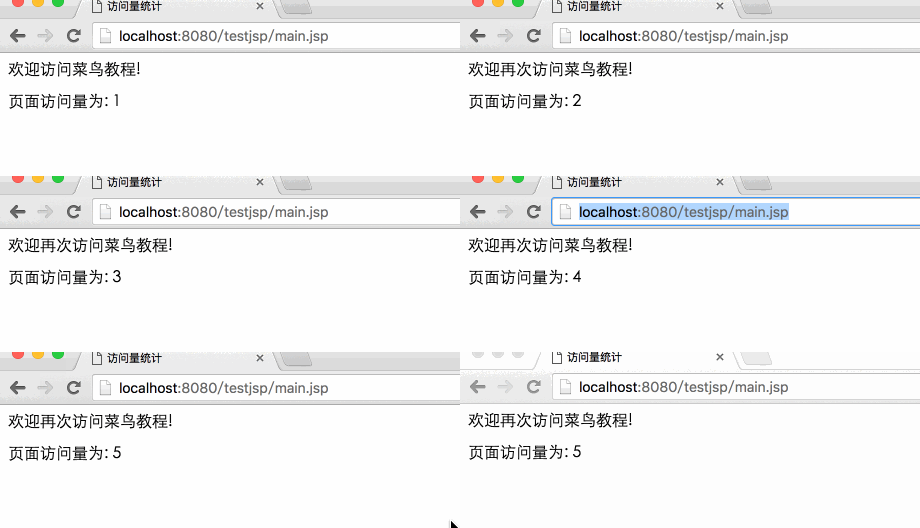
Reset Counter
With the above method, the counter will be reset to 0 after the web server restarts, meaning all previously saved data will disappear. You can use the following methods to solve this problem:
- Define a data table count in the database to count webpage visits, with a field hitcount whose default value is 0, and write the statistical data into the data table.
- On each visit, we read the hitcount field from the table.
- Increment hitcount by 1 on each visit.
- Display the new hitcount value on the page as the page visit count.
- If you need to count visits for each page, you can use the above logic to add the code to all pages.