JSP Form Processing
When we browse web pages, we often need to submit information to the server and let the backend program process it. In the browser, GET and POST methods are used to submit data to the server.
GET Method
The GET method appends the request's encoded information after the URL, separating the URL and the encoded information with a "?" sign. As shown below:
http://www.example.com/hello?key1=value1&key2=value2
The GET method is the browser's default method for passing parameters. It is recommended not to use the GET method for sensitive information such as passwords.
When using GET, there is a limit on the size of transmitted data (note that it is not a limit on the number of parameters), with a maximum of 1024 bytes.
POST Method
Some sensitive information, such as passwords, can be passed via the POST method; POST data submission is implicit.
POST submitted data is not visible, while GET passes data through the URL (you can look at your browser's address bar).
JSP uses getParameter() to obtain the passed parameters, and the getInputStream() method is used to handle requests from the client's binary data stream.
JSP Reading Form Data
getParameter():Use the request.getParameter() method to obtain the values of form parameters.
getParameterValues():Obtain data of types such as checkbox (same name but multiple values). Receive array variables, e.g., checkbox type.
getParameterNames():This method can obtain the names of all variables, and it returns an Enumeration.
getInputStream():Call this method to read binary data streams from the client.
Example of Using GET Method with URL
The following is a simple URL that uses the GET method to pass parameters in the URL:
http://localhost:8080/testjsp/main.jsp?name=Example&url=http://ww.example.com
testjsp is the project address.
The following is the JSP program in the main.jsp file used to process form data submitted by the client. We use the getParameter() method to get the submitted data:
<%@ page language="java" contentType="text/html; charset=UTF-8"
    pageEncoding="UTF-8"%>
<%@ page import="java.io.*,java.util.*" %>
<!DOCTYPE html>
<html>
<head>
<meta charset="utf-8">
<title>Example(example.com)</title>
</head>
<body>
<h1>使用 GET 方法读取数据</h1>
<ul>
<li><p><b>站点名:</b>
   <%= request.getParameter("name")%>
</p></li>
<li><p><b>网址:</b>
   <%= request.getParameter("url")%>
</p></li>
</ul>
</body>
</html>
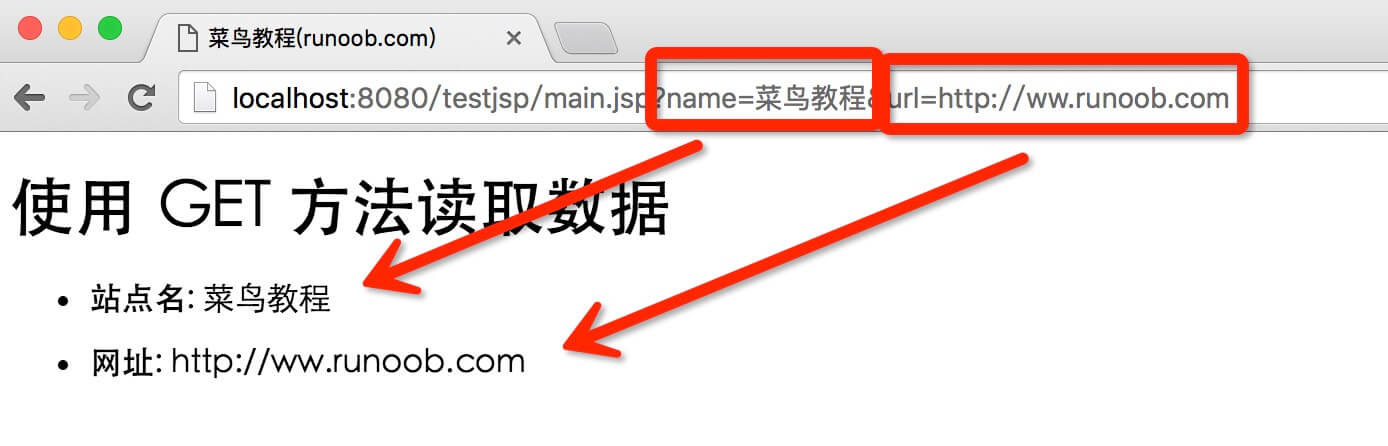
Next, we access it through a browserhttp://localhost:8080/testjsp/main.jsp?name=Example&url=http://ww.example.comThe output result is as follows:
Example of Using GET Method with Form
The following is a simple HTML form that submits client data via the GET method tomain.jspin the file:
<!DOCTYPE html>
<html>
<head>
<meta charset="utf-8">
<title>Example(example.com)</title>
</head>
<body>

<form action="main.jsp" method="GET">
站点名: <input type="text" name="name">
<br />
网址: <input type="text" name="url" />
<input type="submit" value="提交" />
</form>

</body>
</html>
Save the above HTML code to the test.htm file. Place the file in the WebContent directory of the current JSP project (same directory as main.jsp).
By accessinghttp://localhost:8080/testjsp/test.htmlSubmit form data to the main.jsp file, the demo Gif is shown below:
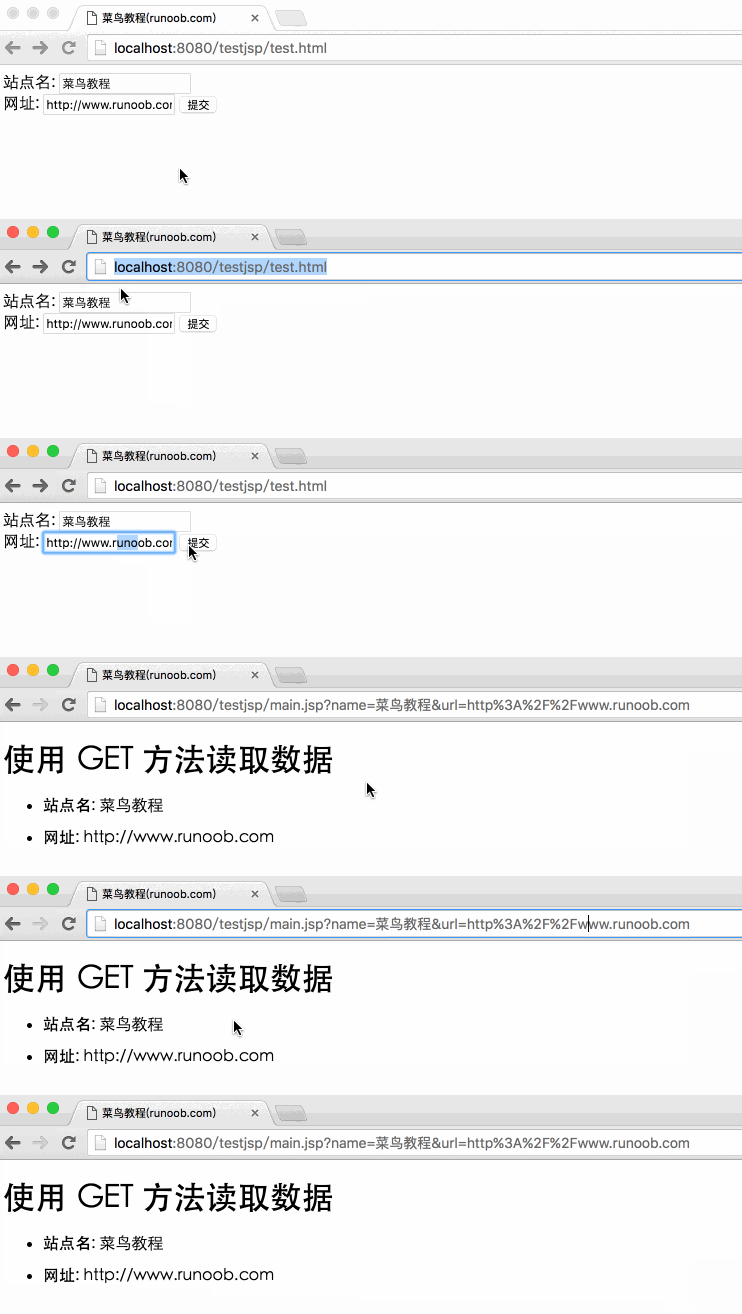
Fill in information in the "Site Name" and "URL" form fields, and click the "Submit" button, it will output the result.
Example of Using POST Method with Form
Next, let's use the POST method to pass form data. Modify the code in main.jsp and Hello.htm files, as shown below:
main.jsp file code:
<%@ page language="java" contentType="text/html; charset=UTF-8"
    pageEncoding="UTF-8"%>
<%@ page import="java.io.*,java.util.*" %>
<!DOCTYPE html>
<html>
<head>
<meta charset="utf-8">
<title>Example(example.com)</title>
</head>
<body>
<h1>使用 POST 方法读取数据</h1>
<ul>
<li><p><b>站点名:</b>
<%
// 解决中文乱码的问题
String name = new String((request.getParameter("name")).getBytes("ISO-8859-1"),"UTF-8");
%>
   <%=name%>
</p></li>
<li><p><b>网址:</b>
   <%= request.getParameter("url")%>
</p></li>
</ul>
</body>
</html>
In the code, we usenew String((request.getParameter("name")).getBytes("ISO-8859-1"),"UTF-8")to convert encoding to prevent garbled Chinese characters.
The following is the modified code of test.htm:
<!DOCTYPE html>
<html>
<head>
<meta charset="utf-8">
<title>Example(example.com)</title>
</head>
<body>

<form action="main.jsp" method="POST">
站点名: <input type="text" name="name">
<br />
网址: <input type="text" name="url" />
<input type="submit" value="提交" />
</form>

</body>
</html>
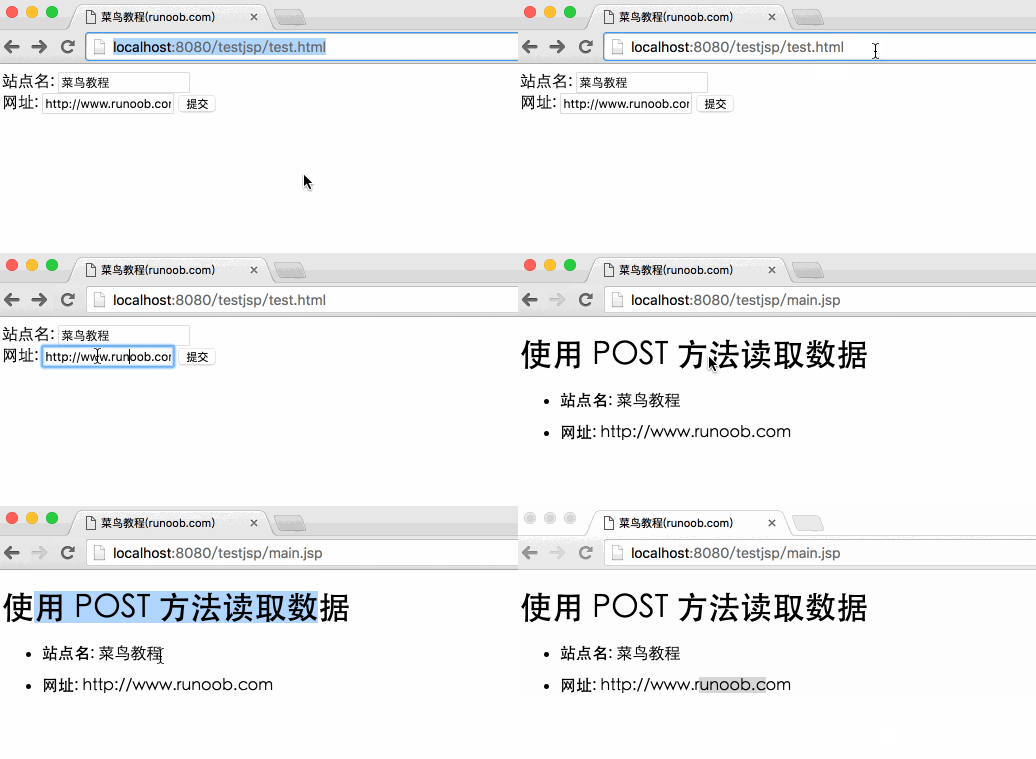
By accessinghttp://localhost:8080/testjsp/test.htmlSubmit form data to the main.jsp file, the demo Gif is shown below:
Passing Checkbox Data to JSP Program
The checkbox can pass one or even multiple data items.
The following is a simple HTML code, and save the code in the test.htm file:
<!DOCTYPE html>
<html>
<head>
<meta charset="utf-8">
<title>Example(example.com)</title>
</head>
<body>

<form action="main.jsp" method="POST" target="_blank">
<input type="checkbox" name="google" checked="checked" /> Google
<input type="checkbox" name="example"  /> Example
<input type="checkbox" name="taobao" checked="checked" /> 淘宝
<input type="submit" value="选择网站" />
</form>

</body>
</html>
Accessing the above code in a browser is shown as follows:
The following is the main.jsp file code for processing checkbox data:
<%@ page language="java" contentType="text/html; charset=UTF-8"
    pageEncoding="UTF-8"%>
<%@ page import="java.io.*,java.util.*" %>
<!DOCTYPE html>
<html>
<head>
<meta charset="utf-8">
<title>Example(example.com)</title>
</head>
<body>
<h1>从复选框中读取数据</h1>
<ul>
<li><p><b>Google 是否选中:</b>
   <%= request.getParameter("google")%>
</p></li>
<li><p><b>Example是否选中:</b>
   <%= request.getParameter("example")%>
</p></li>
<li><p><b>淘宝是否选中:</b>
   <%= request.getParameter("taobao")%>
</p></li>
</ul>
</body>
</html>
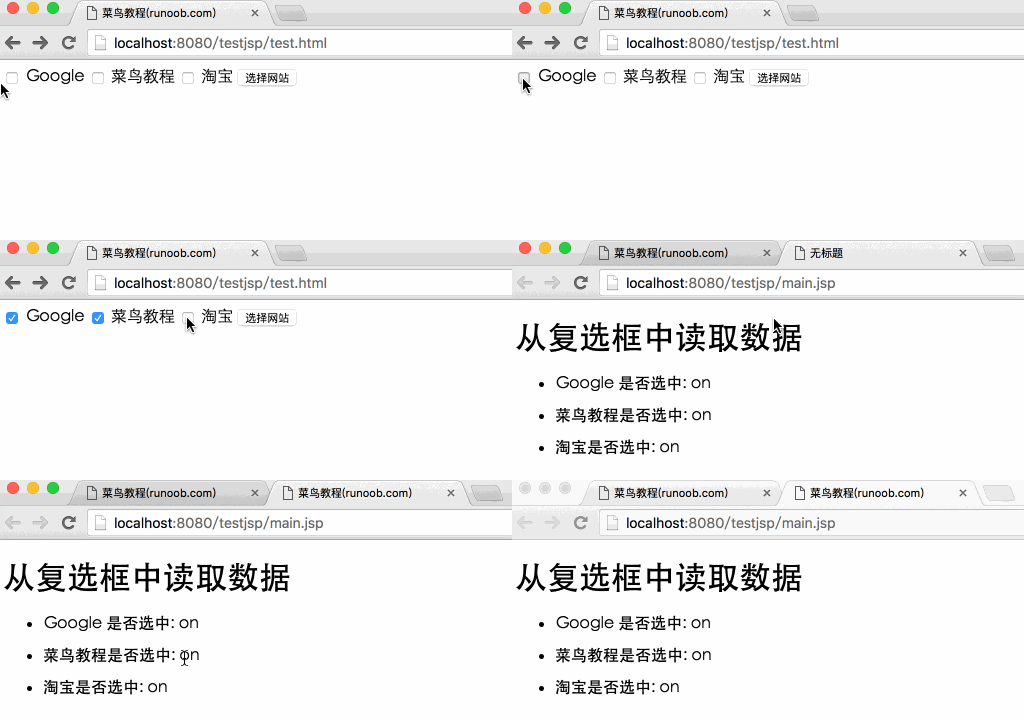
By accessinghttp://localhost:8080/testjsp/test.htmlSubmit form data to the main.jsp file, the demo Gif is shown below:
Reading All Form Parameters
Below we will useHttpServletRequestofgetParameterNames()to read all form parameters. This method can obtain the names of all variables, and it returns an enumeration.
Once we have an Enumeration, we can call the hasMoreElements() method to determine if there are more elements, and use the nextElement() method to get the name of each parameter.
<%@ page language="java" contentType="text/html; charset=UTF-8"
    pageEncoding="UTF-8"%>
<%@ page import="java.io.*,java.util.*" %>
<!DOCTYPE html>
<html>
<head>
<meta charset="utf-8">
<title>Example(example.com)</title>
</head>
<body>
<h1>读取所有表单参数</h1>
<table width="100%" border="1" align="center">
<tr bgcolor="#949494">
<th>参数名</th><th>参数值</th>
</tr>
<%
   Enumeration paramNames = request.getParameterNames();

   while(paramNames.hasMoreElements()) {
      String paramName = (String)paramNames.nextElement();
      out.print("<tr><td>" + paramName + "</td>\n");
      String paramValue = request.getParameter(paramName);
      out.println("<td> " + paramValue + "</td></tr>\n");
   }
%>
</table>
</body>
</html>
The following is the content of the test.htm file:
<!DOCTYPE html>
<html>
<head>
<meta charset="utf-8">
<title>Example(example.com)</title>
</head>
<body>

<form action="main.jsp" method="POST" target="_blank">
<input type="checkbox" name="google" checked="checked" /> Google
<input type="checkbox" name="example"  /> Example
<input type="checkbox" name="taobao" checked="checked" />
                                                淘宝
<input type="submit" value="选择网站" />
</form>

</body>
</html>
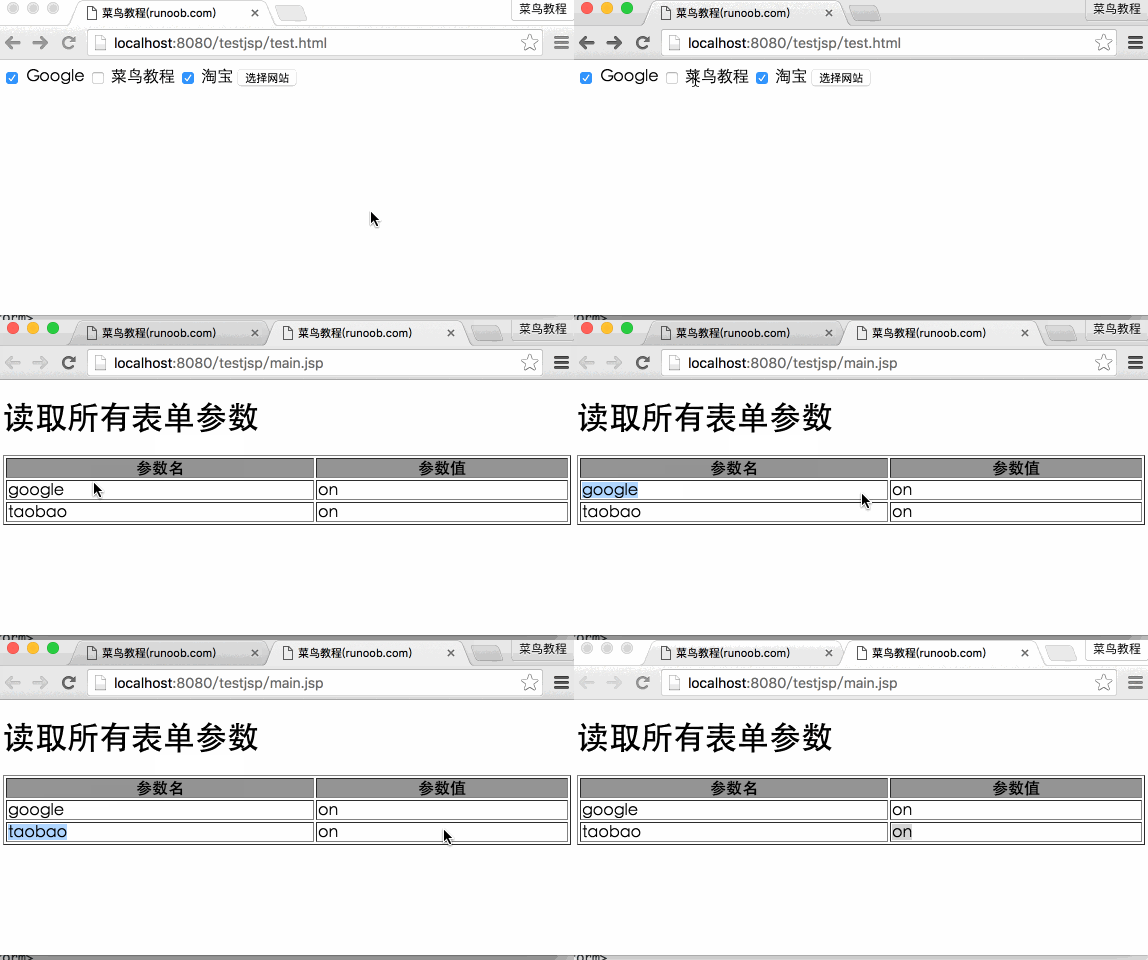
Now we submit data by accessing the test.htm file through a browser, and the output result is as follows:
By accessinghttp://localhost:8080/testjsp/test.htmlSubmit form data to the main.jsp file, the demo Gif is shown below:
You can try using the above JSP code to read other objects, such as text boxes, radio buttons, drop-down boxes, and other forms of data.
Other Extensions