JSP JavaBean
JavaBean is a special Java class written in the Java language and conforming to the JavaBean API specification.
The following are the unique features of JavaBean compared to other Java classes:
- Provide a default no-argument constructor.
- It needs to be serialized and implement the Serializable interface.
- It may have a series of readable and writable properties.
- It may have a series of getter orsettermethods.
JavaBean Properties
The properties of a JavaBean object should be accessible. A property can be any legal Java data type, including custom Java classes.
A JavaBean object's properties can be read-write, read-only, or write-only. The properties of a JavaBean object are accessed through two methods provided in the JavaBean implementation class:
| Method | Description |
|---|---|
| getPropertyName() | For example, if the property name is myName, then this method should be written as getMyName() to read the property. This method is also called an accessor. |
| setPropertyName() | For example, if the property name is myName, then this method should be written as setMyName() to write the property. This method is also called a mutator. |
A read-only property only provides the getPropertyName() method, and a write-only property only provides the setPropertyName() method.
JavaBean Program Example
Here is the StudentBean.java file:
package com.example;

public class StudentsBean implements java.io.Serializable
{
   private String firstName = null;
   private String lastName = null;
   private int age = 0;

   public StudentsBean() {
   }
   public String getFirstName(){
      return firstName;
   }
   public String getLastName(){
      return lastName;
   }
   public int getAge(){
      return age;
   }

   public void setFirstName(String firstName){
      this.firstName = firstName;
   }
   public void setLastName(String lastName){
      this.lastName = lastName;
   }
   public void setAge(int age) {
      this.age = age;
   }
}
Compile the StudentBean.java file (will be used in the last example):
$ javac StudentsBean.java
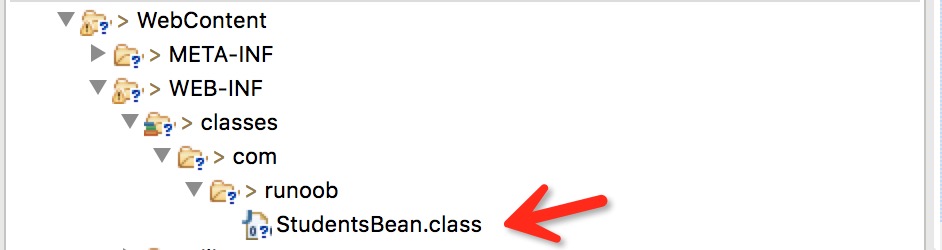
After compilation, obtainStudentBean.classthe file, and copy it to<JSP project>/WebContent/WEB-INF/classes/com/example, as shown in the figure below:
Accessing JavaBean
The <jsp:useBean> tag can declare a JavaBean in JSP and then use it. After declaration, the JavaBean object becomes a script variable and can be accessed through script elements or other custom tags. The syntax format of the <jsp:useBean> tag is as follows:
<jsp:useBean id="bean 的名字" scope="bean 的作用域" typeSpec/>
Here, depending on the specific situation, the value of scope can be page, request, session, or application. The id value can be arbitrary as long as it is not the same as the id values in other <jsp:useBean> tags in the same JSP file.
Here is a simple usage example of the <jsp:useBean> tag:
<%@ page language="java" contentType="text/html; charset=UTF-8"
    pageEncoding="UTF-8"%>
<html>
<head>
<title>useBean 实例</title>
</head>
<body>

<jsp:useBean id="date" class="java.util.Date" />
<p>日期为:<%= date %>

</body>
</html>
It will produce the following result:
日期为:Tue Jun 28 15:22:24 CST 2016
Accessing the Properties of a JavaBean Object
In<jsp:useBean>In the tag body, use<jsp:getProperty/>the tag to callgettermethod, use<jsp:setProperty/>the tag to callsettermethod, the syntax format is as follows:
<jsp:useBean id="id" class="bean 编译的类" scope="bean 作用域">
   <jsp:setProperty name="bean 的 id" property="属性名"
                    value="value"/>
   <jsp:getProperty name="bean 的 id" property="属性名"/>
   ...........
</jsp:useBean>
The name attribute refers to the Bean's id attribute. The property attribute refers to the getter or setter method you want to call.
Here is a simple example of property access using the above syntax:
<%@ page language="java" contentType="text/html; charset=UTF-8"
    pageEncoding="UTF-8"%>
<html>
<head>
<title>get 和 set 属性实例</title>
</head>
<body>

<jsp:useBean id="students"
                    class="com.example.StudentsBean">
   <jsp:setProperty name="students" property="firstName"
                    value="小强"/>
   <jsp:setProperty name="students" property="lastName"
                    value="王"/>
   <jsp:setProperty name="students" property="age"
                    value="10"/>
</jsp:useBean>

<p>学生名字:
   <jsp:getProperty name="students" property="firstName"/>
</p>
<p>学生姓氏:
   <jsp:getProperty name="students" property="lastName"/>
</p>
<p>学生年龄:
   <jsp:getProperty name="students" property="age"/>
</p>

</body>
</html>
Access the above JSP, and the running result is as follows:
学生名字: 小强

学生姓氏: 王

学生年龄: 10
Other Extensions