JSP Filters
Filters in JSP and Servlet are both Java classes.
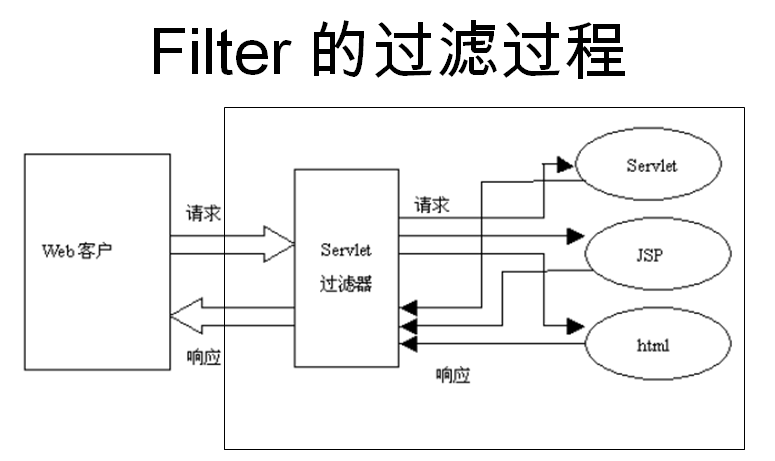
Filters can dynamically intercept requests and responses to transform or use the information contained in the requests or responses.
You can attach one or more filters to a Servlet or a group of Servlets. Filters can also be attached to JavaServer Pages (JSP) files and HTML pages.
Filters are Java classes that can be used in Servlet programming to achieve the following purposes:
- Intercept client requests before they access backend resources.
- Process server responses before they are sent back to the client.
Various types of filters suggested by the specification:
- Authentication Filters.
- Data Compression Filters.
- Encryption Filters.
- Filters that trigger resource access events.
- Image Conversion Filters.
- Logging and Auditing Filters.
- MIME-TYPE Chain Filters.
- Tokenizing Filters.
- XSL/T Filters, which transform XML content.
Filters are declared with XML tags in the Web deployment descriptor (web.xml), and then mapped to a Servlet name or URL pattern in your application's deployment descriptor.
When the Web container starts a Web application, it creates an instance for every filter you declared in the deployment descriptor.
The execution order of Filters is consistent with the configuration order in the web.xml configuration file; generally, Filters are configured before all Servlets.
Servlet Filter Methods
A filter is a Java class that implements the javax.servlet.Filter interface. The javax.servlet.Filter interface defines three methods:
| Serial No. | Method & Description |
|---|---|
| 1 | public void doFilter (ServletRequest, ServletResponse, FilterChain) This method performs the actual filtering operation. When a client request matches the URL set for the filter, the Servlet container will first call the filter's doFilter method. FilterChain is used to access subsequent filters. |
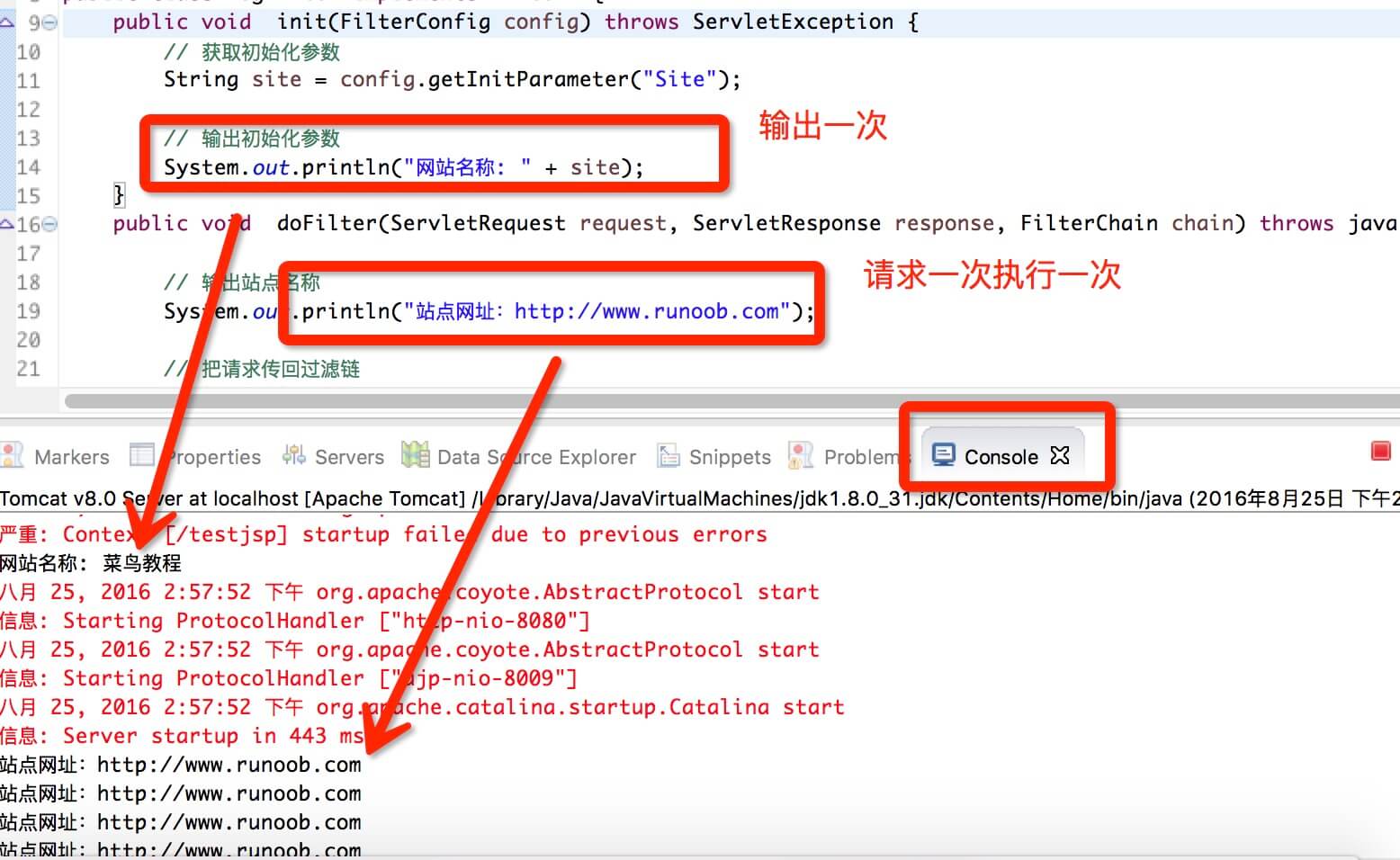
| 2 | public void init(FilterConfig filterConfig) When the web application starts, the web server will create an instance object of the Filter and call its init method to read the web.xml configuration and complete the object's initialization, thereby preparing for intercepting subsequent user requests (the filter object is created only once, and the init method is executed only once). Through the parameters of the init method, developers can obtain the FilterConfig object representing the current filter configuration information. |
| 3 | public void destroy() The Servlet container calls this method before destroying the filter instance, and in this method, releases the resources occupied by the Servlet filter. |
FilterConfig Usage
The init method of Filter provides a FilterConfig object.
For example, the web.xml file is configured as follows:
<filter>
    <filter-name>LogFilter</filter-name>
    <filter-class>com.example.test.LogFilter</filter-class>
    <init-param>
        <param-name>Site</param-name>
        <param-value>Example</param-value>
    </init-param>
    </filter>
Use the FilterConfig object in the init method to obtain parameters:
public void  init(FilterConfig config) throws ServletException {
    // 获取初始化参数
    String site = config.getInitParameter("Site");
    // 输出初始化参数
    System.out.println("网站名称: " + site);
}
JSP Filter Example
The following is an example of a Servlet filter that will output the website name and address. This example gives you a basic understanding of Servlet filters; you can use the same concept to write more complex filter applications:
//导入必需的 java 库
import javax.servlet.*;
import java.util.*;

//实现 Filter 类
public class LogFilter implements Filter  {
    public void  init(FilterConfig config) throws ServletException {
        // 获取初始化参数
        String site = config.getInitParameter("Site");

        // 输出初始化参数
        System.out.println("网站名称: " + site);
    }
    public void  doFilter(ServletRequest request, ServletResponse response, FilterChain chain) throws java.io.IOException, ServletException {

        // 输出站点名称
        System.out.println("站点网址:http://www.example.com");

        // 把请求传回过滤链
        chain.doFilter(request,response);
    }
    public void destroy( ){
        /* 在 Filter 实例被 Web 容器从服务移除之前调用 */
    }
}
The DisplayHeader.java file code is as follows:
//导入必需的 java 库
import java.io.IOException;
import java.io.PrintWriter;
import java.util.Enumeration;

import javax.servlet.ServletException;
import javax.servlet.annotation.WebServlet;
import javax.servlet.http.HttpServlet;
import javax.servlet.http.HttpServletRequest;
import javax.servlet.http.HttpServletResponse;

@WebServlet("/DisplayHeader")

//扩展 HttpServlet 类
public class DisplayHeader extends HttpServlet {

    // 处理 GET 方法请求的方法
    public void doGet(HttpServletRequest request, HttpServletResponse response) throws ServletException, IOException
    {
        // 设置响应内容类型
        response.setContentType("text/html;charset=UTF-8");

        PrintWriter out = response.getWriter();
        String title = "HTTP Header 请求实例 - Example实例";
        String docType =
            "<!DOCTYPE html> \n";
            out.println(docType +
            "<html>\n" +
            "<head><meta charset=\"utf-8\"><title>" + title + "</title></head>\n"+
            "<body bgcolor=\"#F0F0F0\">\n" +
            "<h1 align=\"center\">" + title + "</h1>\n" +
            "<table width=\"100%\" border=\"1\" align=\"center\">\n" +
            "<tr bgcolor=\"#949494\">\n" +
            "<th>Header 名称</th><th>Header 值</th>\n"+
            "</tr>\n");

        Enumeration headerNames = request.getHeaderNames();

        while(headerNames.hasMoreElements()) {
            String paramName = (String)headerNames.nextElement();
            out.print("<tr><td>" + paramName + "</td>\n");
            String paramValue = request.getHeader(paramName);
            out.println("<td> " + paramValue + "</td></tr>\n");
        }
        out.println("</table>\n</body></html>");
    }
    // 处理 POST 方法请求的方法
    public void doPost(HttpServletRequest request, HttpServletResponse response) throws ServletException, IOException {
        doGet(request, response);
    }
}
Servlet Filter Mapping in Web.xml
Defining a filter and then mapping it to a URL or Servlet is roughly the same as defining a Servlet and then mapping it to a URL pattern. In the deployment descriptor fileweb.xmlcreate the following entries for the filter tag:
<?xml version="1.0" encoding="UTF-8"?>
<web-app>
<filter>
  <filter-name>LogFilter</filter-name>
  <filter-class>com.example.test.LogFilter</filter-class>
  <init-param>
    <param-name>Site</param-name>
    <param-value>Example</param-value>
  </init-param>
</filter>
<filter-mapping>
  <filter-name>LogFilter</filter-name>
  <url-pattern>/*</url-pattern>
</filter-mapping>
<servlet>
  <!-- 类名 -->
  <servlet-name>DisplayHeader</servlet-name>
  <!-- 所在的包 -->
  <servlet-class>com.example.test.DisplayHeader</servlet-class>
</servlet>
<servlet-mapping>
  <servlet-name>DisplayHeader</servlet-name>
  <!-- 访问的网址 -->
  <url-pattern>/TomcatTest/DisplayHeader</url-pattern>
</servlet-mapping>
</web-app>
The above filter applies to all Servlets because we specified in the configuration/*. If you only want to apply the filter to a few Servlets, you can specify a specific Servlet path.
Now try to call any Servlet in the usual way, and you will see the logs generated in the Web server. You can also use a Log4J logger to record the above logs to a separate file.
Next, we visit this example addresshttp://localhost:8080/TomcatTest/DisplayHeader, and then check the output in the console, as shown below:
Using Multiple Filters
Web applications can define several different filters for specific purposes. Suppose you define two filtersAuthenFilterandLogFilter. You need to create a different mapping as described below; the rest of the processing is roughly the same as explained above:
<filter>
   <filter-name>LogFilter</filter-name>
   <filter-class>com.example.test.LogFilter</filter-class>
   <init-param>
      <param-name>test-param</param-name>
      <param-value>Initialization Paramter</param-value>
   </init-param>
</filter>

<filter>
   <filter-name>AuthenFilter</filter-name>
   <filter-class>com.example.test.AuthenFilter</filter-class>
   <init-param>
      <param-name>test-param</param-name>
      <param-value>Initialization Paramter</param-value>
   </init-param>
</filter>

<filter-mapping>
   <filter-name>LogFilter</filter-name>
   <url-pattern>/*</url-pattern>
</filter-mapping>

<filter-mapping>
   <filter-name>AuthenFilter</filter-name>
   <url-pattern>/*</url-pattern>
</filter-mapping>
Application Order of Filters
The order of the filter-mapping elements in web.xml determines the order in which the Web container applies filters to Servlets. To reverse the order of the filters, you simply need to reverse the filter-mapping elements in the web.xml file.
For example, the above example will apply LogFilter first, and then AuthenFilter, but the following example will reverse this order:
<filter-mapping>
   <filter-name>AuthenFilter</filter-name>
   <url-pattern>/*</url-pattern>
</filter-mapping>

<filter-mapping>
   <filter-name>LogFilter</filter-name>
   <url-pattern>/*</url-pattern>
</filter-mapping>
Explanation of web.xml Configuration Elements
<filter>Specifies a filter.<filter-name>Used to specify a name for the filter; the content of this element cannot be empty.<filter-class>The element is used to specify the fully qualified class name of the filter.<init-param>The element is used to specify initialization parameters for the filter; its child elements<param-name>specify the parameter name,<param-value>specify the parameter value.- In the filter, you can use
FilterConfigthe interface object to access initialization parameters.
<filter-mapping>The element is used to set the resources that a Filter is responsible for intercepting. The resources intercepted by a Filter can be specified in two ways: the Servlet name and the request path for resource access.<filter-name>The child element is used to set the registration name of the filter. This value must be<filter>the name of the filter declared in the element.<url-pattern>Sets the request path intercepted by the filter (the URL pattern associated with the filter).
<servlet-name>Specifies the name of the Servlet intercepted by the filter.<dispatcher>Specifies how the resource intercepted by the filter is invoked by the Servlet container; it can beREQUEST,INCLUDE,FORWARDandERRORone of the following; default isREQUEST. Users can set multiple<dispatcher>child elements to specify that the Filter intercepts multiple invocation modes of the resource.<dispatcher>The values that can be set for the child element and their meaningsREQUEST: When the user directly accesses the page, the Web container will invoke the filter. If the target resource is accessed through the include() or forward() method of RequestDispatcher, the filter will not be invoked.INCLUDE: If the target resource is accessed through the include() method of RequestDispatcher, the filter will be invoked. Apart from this, the filter will not be invoked.FORWARD: If the target resource is accessed through the forward() method of RequestDispatcher, the filter will be invoked. Apart from this, the filter will not be invoked.ERROR: If the target resource is invoked through the declarative exception handling mechanism, the filter will be invoked. Apart from this, the filter will not be invoked.