JSP HTTP Status Codes
HTTP requests and HTTP responses have similar formats, both with the following structure:
- Start with a status line + CRLF (carriage return line feed)
- Zero or more header lines + CRLF
- An empty line, e.g., CRLF
- An optional message body such as file, query data, query output
For example, a server response header looks like the following:
HTTP/1.1 200 OK
Content-Type: text/html
Header2: ...
...
HeaderN: ...
  (Blank Line)
<!doctype ...>
<html>
<head>...</head>
<body>
...
</body>
</html>
The status line contains the HTTP version, a status code, and a short message corresponding to the status code.
The following table lists HTTP status codes that may be returned from the server and their associated messages:
| Status Code | Message | Description |
|---|---|---|
| 100 | Continue | Only part of the request has been received by the server, but as long as it has not been rejected, the client should continue with the request. |
| 101 | Switching Protocols | Server switching protocols |
| 200 | OK | Request confirmed |
| 201 | Created | The request was complete, and a new resource is created |
| 202 | Accepted | The request has been accepted, but processing has not been completed |
| 203 | Non-authoritative Information | |
| 204 | No Content | |
| 205 | Reset Content | |
| 206 | Partial Content | |
| 300 | Multiple Choices | A list of hyperlinks, the user can select a hyperlink and access it, supporting up to 5 hyperlinks |
| 301 | Moved Permanently | The requested page has been moved to a new URL |
| 302 | Found | The requested page has temporarily moved to a new URL |
| 303 | See Other | The requested page can be found at a different URL |
| 304 | Not Modified | |
| 305 | Use Proxy | |
| 306 | Unused | This status code is no longer used, but the status code is reserved |
| 307 | Temporary Redirect | The requested page has temporarily moved to a new URL |
| 400 | Bad Request | The server could not understand the request |
| 401 | Unauthorized | The requested page requires a username and password |
| 402 | Payment Required | This status code cannot be used currently |
| 403 | Forbidden | Access to the requested page is forbidden |
| 404 | Not Found | The server could not find the requested page |
| 405 | Method Not Allowed | The method specified in the request is not allowed |
| 406 | Not Acceptable | The server can only create a response that the client cannot accept |
| 407 | Proxy Authentication Required | A proxy server must be authenticated before the request can be serviced |
| 408 | Request Timeout | The request time exceeded the server's waiting time, and the connection was closed |
| 409 | Conflict | There are contradictions in the request |
| 410 | Gone | The requested page is no longer available |
| 411 | Length Required | "Content-Length" is not defined, and the server refuses to accept the request |
| 412 | Precondition Failed | The request's precondition was evaluated as false by the server |
| 413 | Request Entity Too Large | The server refused to accept the request because the request entity is too large |
| 414 | Request-url Too Long | The server refused to accept the request because the URL is too long. This often occurs when a large amount of query information is attached when converting a "POST" request to a "GET" request |
| 415 | Unsupported Media Type | The server refused to accept the request because the media type is not supported |
| 417 | Expectation Failed | |
| 500 | Internal Server Error | The request was incomplete; the server encountered an unexpected condition |
| 501 | Not Implemented | The request was incomplete; the server does not provide the required functionality |
| 502 | Bad Gateway | The request was incomplete; the server received an invalid response from the upstream server |
| 503 | Service Unavailable | The request was incomplete; the server is temporarily restarting or shutting down |
| 504 | Gateway Timeout | Gateway timeout |
| 505 | HTTP Version Not Supported | The server does not support the specified HTTP version |
Methods to Set HTTP Status Codes
The following table lists the methods used to set status codes in the HttpServletResponse class:
| S.N. | Method & Description |
|---|---|
| 1 | public void setStatus ( int statusCode )This method can set any status code. If your response contains a special status code and a document, make sure to call the setStatus method before returning any content with PrintWriter. |
| 2 | public void sendRedirect(String url)This method generates a 302 response and also generates aLocationheader telling the URL of a new document |
| 3 | public void sendError(int code, String message)This method inserts a status code (usually 404) and a short message into an HTML document automatically and sends it back to the client |
HTTP Status Code Program Example
The following example will send a 407 error code to the browser, and then the browser will tell you "Need authentication!!!".
<html>
<head>
<title>Setting HTTP Status Code</title>
</head>
<body>
<%
   // 设置错误代码,并说明原因
   response.sendError(407, "Need authentication!!!" );
%>
</body>
</html>
Access the above JSP page and you will get the following result:
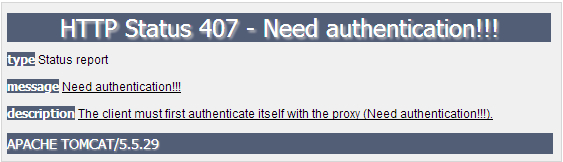
You can also try using other status codes to see if you get any unexpected results.
Other extensions