JSP Connect to Database
This tutorial assumes that you already understand how JDBC applications work. Before you start learning JSP database access, please visitJava MySQL Connectionto set up the relevant drivers and configuration.
Note:
You can download the jar package provided by this site:
MySQL 5 version:mysql-connector-java-5.1.39-bin.jar
MySQL 8 version:mysql-connector-java-8.0.19.jar
After downloading, copy mysql-connector-java-<corresponding version>-bin.jar to the lib directory under tomcat.
Database connections for MySQL 8.0 and above are different:
1、com.mysql.jdbc.DriverReplace withcom.mysql.cj.jdbc.Driver。
MySQL 8.0 and above do not require an SSL connection; it needs to be explicitly disabled.
Finally, you also need to set CST.
The way to load the driver and connect to the database is as follows:
<sql:setDataSource var="snapshot" driver="com.mysql.cj.jdbc.Driver"
     url="jdbc:mysql://localhost:3306/EXAMPLE?useSSL=false&serverTimezone=UTC&useUnicode=true&characterEncoding=utf-8
     user="root"  password="12345"/>
Starting from the basic concepts, let's create a simple table and add a few records to it.
Create Test Data
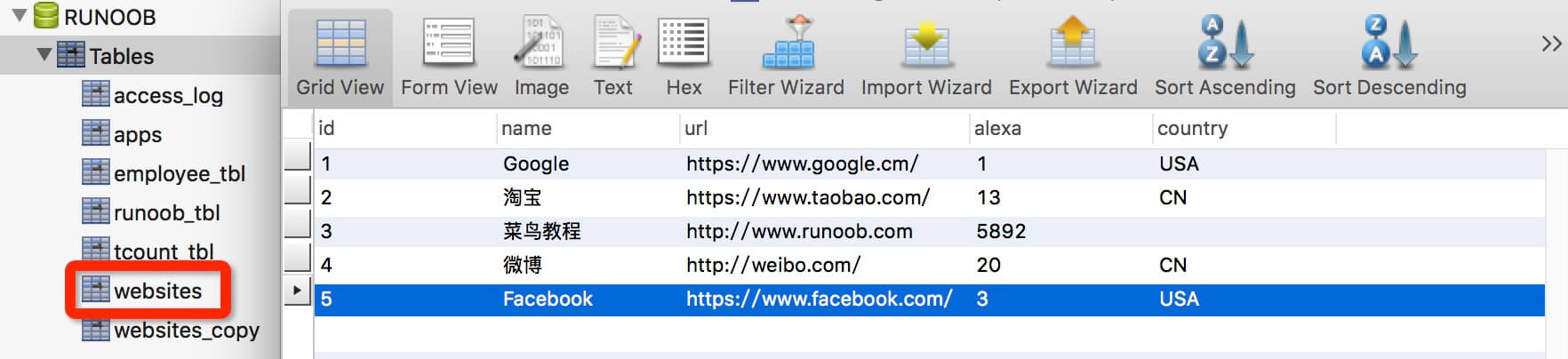
Next, we create the EXAMPLE database in MySQL and create the websites data table. The table structure is as follows:
CREATE TABLE `websites` (
  `id` int(11) NOT NULL AUTO_INCREMENT,
  `name` char(20) NOT NULL DEFAULT '' COMMENT '站点名称',
  `url` varchar(255) NOT NULL DEFAULT '',
  `alexa` int(11) NOT NULL DEFAULT '0' COMMENT 'Alexa 排名',
  `country` char(10) NOT NULL DEFAULT '' COMMENT '国家',
  PRIMARY KEY (`id`)
) ENGINE=InnoDB AUTO_INCREMENT=10 DEFAULT CHARSET=utf8;
Insert some data:
INSERT INTO `websites` VALUES ('1', 'Google', 'https://www.google.cm/', '1', 'USA'), ('2', '淘宝', 'https://www.taobao.com/', '13', 'CN'), ('3', 'Example', 'http://www.example.com', '5892', ''), ('4', '微博', 'http://weibo.com/', '20', 'CN'), ('5', 'Facebook', 'https://www.facebook.com/', '3', 'USA');
The data table is displayed as follows:
SELECT Operation
The following example shows us how to use JSTL SQL tags to run SQL SELECT statements:
<%@ page language="java" contentType="text/html; charset=UTF-8"
    pageEncoding="UTF-8"%>
<%@ page import="java.io.*,java.util.*,java.sql.*"%>
<%@ page import="javax.servlet.http.*,javax.servlet.*" %>
<%@ taglib uri="http://java.sun.com/jsp/jstl/core" prefix="c"%>
<%@ taglib uri="http://java.sun.com/jsp/jstl/sql" prefix="sql"%>

<html>
<head>
<title>SELECT 操作</title>
</head>
<body>
<!--
JDBC 驱动名及数据库 URL
数据库的用户名与密码,需要根据自己的设置
useUnicode=true&characterEncoding=utf-8 防止中文乱码
 -->
<sql:setDataSource var="snapshot" driver="com.mysql.jdbc.Driver"
     url="jdbc:mysql://localhost:3306/EXAMPLE?useUnicode=true&characterEncoding=utf-8"
     user="root"  password="123456"/>

<sql:query dataSource="${snapshot}" var="result">
SELECT * from websites;
</sql:query>
<h1>JSP 数据库实例 - Example</h1>
<table border="1" width="100%">
<tr>
   <th>ID</th>
   <th>站点名</th>
   <th>站点地址</th>
</tr>
<c:forEach var="row" items="${result.rows}">
<tr>
   <td><c:out value="${row.id}"/></td>
   <td><c:out value="${row.name}"/></td>
   <td><c:out value="${row.url}"/></td>
</tr>
</c:forEach>
</table>

</body>
</html>
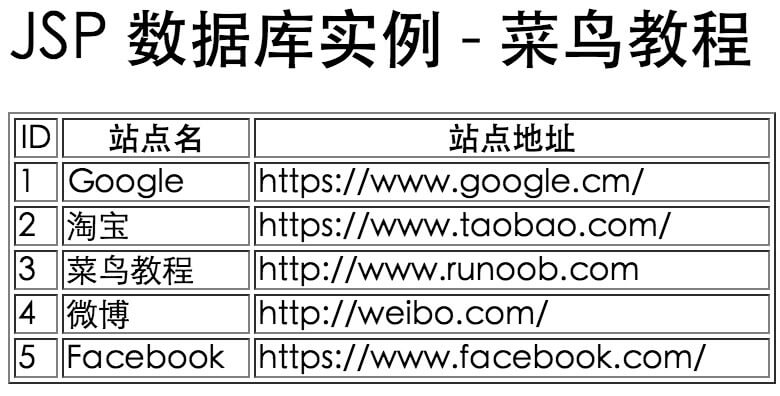
Access this JSP example, and the running result is as follows:
INSERT Operation
This example shows us how to use JSTL SQL tags to run SQL INSERT statements:
<%@ page language="java" contentType="text/html; charset=UTF-8"
    pageEncoding="UTF-8"%>
<%@ page import="java.io.*,java.util.*,java.sql.*"%>
<%@ page import="javax.servlet.http.*,javax.servlet.*" %>
<%@ taglib uri="http://java.sun.com/jsp/jstl/core" prefix="c"%>
<%@ taglib uri="http://java.sun.com/jsp/jstl/sql" prefix="sql"%>

<html>
<head>
<title>SELECT 操作</title>
</head>
<body>
<!--
JDBC 驱动名及数据库 URL
数据库的用户名与密码,需要根据自己的设置
useUnicode=true&characterEncoding=utf-8 防止中文乱码
 -->
<sql:setDataSource var="snapshot" driver="com.mysql.jdbc.Driver"
     url="jdbc:mysql://localhost:3306/EXAMPLE?useUnicode=true&characterEncoding=utf-8"
     user="root"  password="123456"/>
<!--
插入数据
 -->
<sql:update dataSource="${snapshot}" var="result">
INSERT INTO websites (name,url,alexa,country) VALUES ('Example移动站', 'http://m.example.com', 5093, 'CN');
</sql:update>
<sql:query dataSource="${snapshot}" var="result">
SELECT * from websites;
</sql:query>
<h1>JSP 数据库实例 - Example</h1>
<table border="1" width="100%">
<tr>
   <th>ID</th>
   <th>站点名</th>
   <th>站点地址</th>
</tr>
<c:forEach var="row" items="${result.rows}">
<tr>
   <td><c:out value="${row.id}"/></td>
   <td><c:out value="${row.name}"/></td>
   <td><c:out value="${row.url}"/></td>
</tr>
</c:forEach>
</table>

</body>
</html>
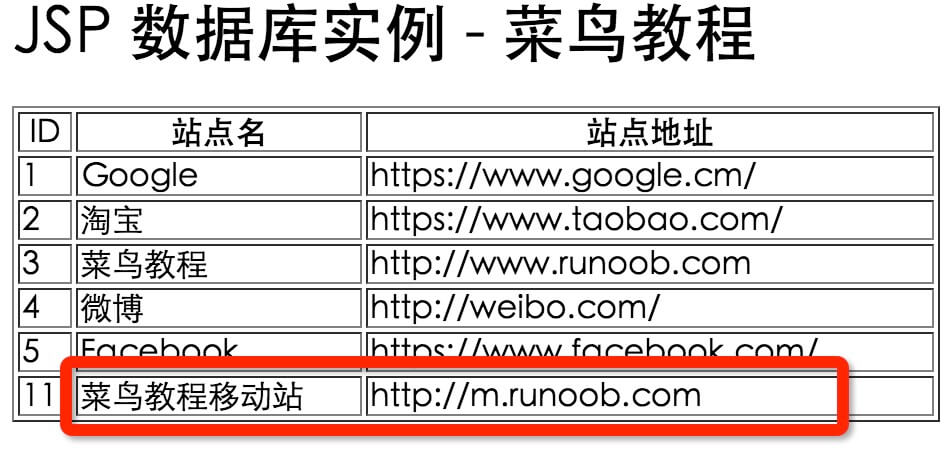
Access this JSP example, and the running result is as follows:
DELETE Operation
This example shows us how to use JSTL SQL tags to run SQL DELETE statements:
<%@ page language="java" contentType="text/html; charset=UTF-8"
    pageEncoding="UTF-8"%>
<%@ page import="java.io.*,java.util.*,java.sql.*"%>
<%@ page import="javax.servlet.http.*,javax.servlet.*" %>
<%@ taglib uri="http://java.sun.com/jsp/jstl/core" prefix="c"%>
<%@ taglib uri="http://java.sun.com/jsp/jstl/sql" prefix="sql"%>

<html>
<head>
<title>SELECT 操作</title>
</head>
<body>
<!--
JDBC 驱动名及数据库 URL
数据库的用户名与密码,需要根据自己的设置
useUnicode=true&characterEncoding=utf-8 防止中文乱码
 -->
<sql:setDataSource var="snapshot" driver="com.mysql.jdbc.Driver"
     url="jdbc:mysql://localhost:3306/EXAMPLE?useUnicode=true&characterEncoding=utf-8"
     user="root"  password="123456"/>

<!--
删除 ID 为 11 的数据
 -->
<sql:update dataSource="${snapshot}" var="count">
  DELETE FROM websites WHERE Id = ?
  <sql:param value="${11}" />
</sql:update>

<sql:query dataSource="${snapshot}" var="result">
SELECT * from websites;
</sql:query>
<h1>JSP 数据库实例 - Example</h1>
<table border="1" width="100%">
<tr>
   <th>ID</th>
   <th>站点名</th>
   <th>站点地址</th>
</tr>
<c:forEach var="row" items="${result.rows}">
<tr>
   <td><c:out value="${row.id}"/></td>
   <td><c:out value="${row.name}"/></td>
   <td><c:out value="${row.url}"/></td>
</tr>
</c:forEach>
</table>

</body>
</html>
Access this JSP example, and the running result is as follows:
UPDATE Operation
This example shows us how to use JSTL SQL tags to run SQL UPDATE statements:
<%@ page language="java" contentType="text/html; charset=UTF-8"
    pageEncoding="UTF-8"%>
<%@ page import="java.io.*,java.util.*,java.sql.*"%>
<%@ page import="javax.servlet.http.*,javax.servlet.*" %>
<%@ taglib uri="http://java.sun.com/jsp/jstl/core" prefix="c"%>
<%@ taglib uri="http://java.sun.com/jsp/jstl/sql" prefix="sql"%>

<html>
<head>
<title>SELECT 操作</title>
</head>
<body>
<!--
JDBC 驱动名及数据库 URL
数据库的用户名与密码,需要根据自己的设置
useUnicode=true&characterEncoding=utf-8 防止中文乱码
 -->
<sql:setDataSource var="snapshot" driver="com.mysql.jdbc.Driver"
     url="jdbc:mysql://localhost:3306/EXAMPLE?useUnicode=true&characterEncoding=utf-8"
     user="root"  password="123456"/>

<!--
修改 ID 为 3 的名字:Example改为 EXAMPLE
 -->
<c:set var="SiteId" value="3"/>

<sql:update dataSource="${snapshot}" var="count">
  UPDATE websites SET name = 'EXAMPLE' WHERE Id = ?
  <sql:param value="${SiteId}" />
</sql:update>

<sql:query dataSource="${snapshot}" var="result">
SELECT * from websites;
</sql:query>
<h1>JSP 数据库实例 - Example</h1>
<table border="1" width="100%">
<tr>
   <th>ID</th>
   <th>站点名</th>
   <th>站点地址</th>
</tr>
<c:forEach var="row" items="${result.rows}">
<tr>
   <td><c:out value="${row.id}"/></td>
   <td><c:out value="${row.name}"/></td>
   <td><c:out value="${row.url}"/></td>
</tr>
</c:forEach>
</table>

</body>
</html>
Access this JSP example, and the running result is as follows: