JSP Session
HTTP is a stateless protocol, meaning that each time a client retrieves a webpage, a separate server connection is opened, so the server does not record any information from previous client requests.
There are three ways to maintain a session between the client and the server:
Cookies
The web server can assign a unique session ID as a cookie to represent each client, and use it to identify this client's subsequent requests.
This may not be an effective method, because in many cases browsers do not necessarily support cookies, so we do not recommend using this method to maintain sessions.
Hidden form fields
A web server can send a hidden HTML form field along with a unique session ID, like this:
<input type="hidden" name="sessionid" value="12345">
This entry means that when the form is submitted, the specified name and value will automatically be included in the GET or POST data. Whenever the browser sends a request, the value of session_id can be used to keep track of different browsers.
This method can be effective, but clicking hyperlinks in <A HREF> tags does not generate form submission events, so hidden form fields also do not support general session tracking.
URL rewriting
You can add some extra data after each URL to differentiate sessions, and the server can associate session identifiers based on this data.
For example, http://w3cschool.cc/file.htm;sessionid=12345, the session identifier is sessionid=12345, and the server can use this data to identify the client.
In contrast, URL rewriting is a better way because it works even if the browser does not support cookies, but the disadvantage is that you must dynamically specify the session ID for every URL, even for a simple HTML page.
session object
In addition to the above methods, JSP uses the HttpSession interface provided by servlets to identify a user and store all access information for that user.
By default, JSP enables session tracking, and a new HttpSession object will be automatically instantiated for new clients. To disable session tracking, you need to explicitly turn it off by setting the session attribute in the page directive to false, as follows:
<%@ page session="false" %>
The JSP engine exposes the implicit session object to developers. With the session object provided, developers can conveniently store or retrieve data.
The following table lists some important methods of the session object:
| S.N. | Method & Description |
|---|---|
| 1 | public Object getAttribute(String name) |
JSP Session Application
This example describes how to use the HttpSession object to get the creation time and last access time. We will associate a new session object with the request object if it does not already exist.
<%@ page language="java" contentType="text/html; charset=UTF-8"
    pageEncoding="UTF-8"%>
<%@ page import="java.io.*,java.util.*" %>
<%
   // 获取session创建时间
   Date createTime = new Date(session.getCreationTime());
   // 获取最后访问页面的时间
   Date lastAccessTime = new Date(session.getLastAccessedTime());

   String title = "再次访问Example实例";
   Integer visitCount = new Integer(0);
   String visitCountKey = new String("visitCount");
   String userIDKey = new String("userID");
   String userID = new String("ABCD");

   // 检测网页是否有新的访问用户
   if (session.isNew()){
      title = "访问Example实例";
      session.setAttribute(userIDKey, userID);
      session.setAttribute(visitCountKey,  visitCount);
   } else {
       visitCount = (Integer)session.getAttribute(visitCountKey);
       visitCount += 1;
       userID = (String)session.getAttribute(userIDKey);
       session.setAttribute(visitCountKey,  visitCount);
   }
%>
<html>
<head>
<title>Session 跟踪</title>
</head>
<body>

<h1>Session 跟踪</h1>

<table border="1" align="center">
<tr bgcolor="#949494">
   <th>Session 信息</th>
   <th>值</th>
</tr>
<tr>
   <td>id</td>
   <td><% out.print( session.getId()); %></td>
</tr>
<tr>
   <td>创建时间</td>
   <td><% out.print(createTime); %></td>
</tr>
<tr>
   <td>最后访问时间</td>
   <td><% out.print(lastAccessTime); %></td>
</tr>
<tr>
   <td>用户 ID</td>
   <td><% out.print(userID); %></td>
</tr>
<tr>
   <td>访问次数</td>
   <td><% out.print(visitCount); %></td>
</tr>
</table>
</body>
</html>
Try visitinghttp://localhost:8080/testjsp/main.jsp, the first run will produce the following result:
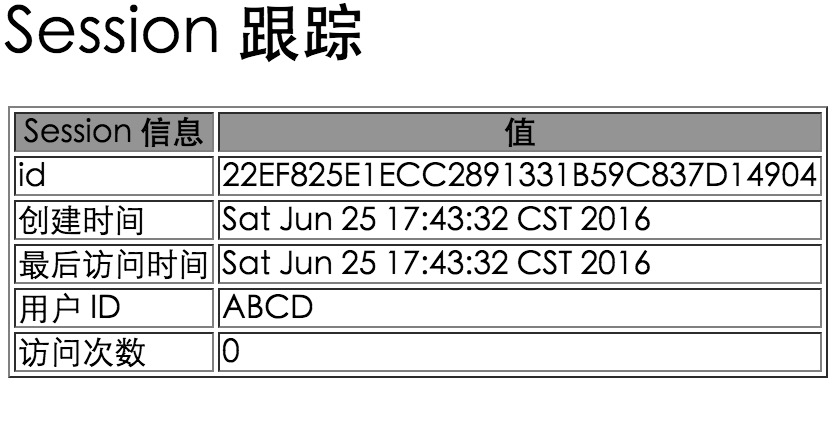
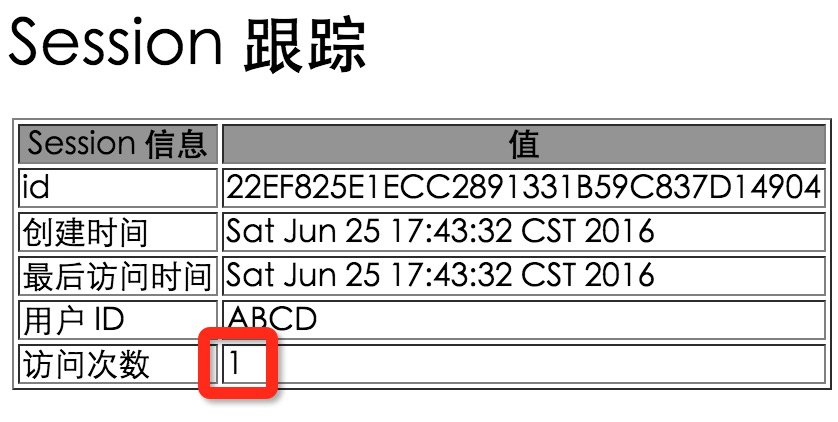
Visiting again will produce the following result:
Deleting Session Data
After processing a user's session data, you have the following options:
- Remove a specific attribute:
Call the public void removeAttribute(String name) method to remove the specified attribute.
- Delete the entire session:
Call the public void invalidate() method to invalidate the entire session.
- Set the session timeout:
Call the public void setMaxInactiveInterval(int interval) method to set the session timeout.
- Log out the user:
For servers supporting servlet 2.4, you can call the logout() method to log out the user and invalidate all related sessions.
- Configure the web.xml file:
If you are using Tomcat, you can configure the web.xml file as follows:
  <session-config>
    <session-timeout>15</session-timeout>
  </session-config>
The timeout is in minutes, and the default timeout in Tomcat is 30 minutes.
The getMaxInactiveInterval() method in Servlet returns the timeout in seconds. If 15 minutes is configured in web.xml, the getMaxInactiveInterval() method will return 900.
Other extensions