JSP Syntax
This section briefly introduces the basic syntax in JSP development.
Scriptlet
A scriptlet can contain any amount of Java statements, variables, methods, or expressions, as long as they are valid in the scripting language.
The syntax format of a scriptlet:
<% code snippet %>
Alternatively, you can also write the equivalent XML statement, like this:
<jsp:scriptlet>
   代码片段
</jsp:scriptlet>
Any text, HTML tags, or JSP elements must be written outside the scriptlet.
Below is an example, and it is also the first JSP example in this tutorial:
<html>
<head><title>Hello World</title></head>
<body>
Hello World!<br/>
<%
out.println("Your IP address is " + request.getRemoteAddr());
%>
</body>
</html>
Note:Please make sure Apache Tomcat is installed in the C:\apache-tomcat-7.0.2 directory and the runtime environment is correctly configured.
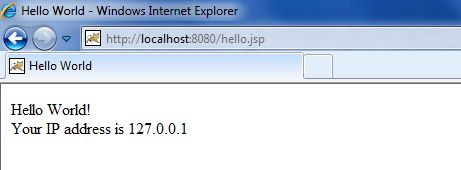
Save the above code as hello.jsp, then place it in the C:\apache-tomcat-7.0.2\webapps\ROOT directory, open a browser and enter http://localhost:8080/hello.jsp in the address bar. After running, you will get the following result:
Chinese Encoding Issue
If we want to display Chinese correctly on the page, we need to add the following code at the top of the JSP file:
<%@ page language="java" contentType="text/html; charset=UTF-8"
    pageEncoding="UTF-8"%>
Next, we modify the above program to:
<%@ page language="java" contentType="text/html; charset=UTF-8"
    pageEncoding="UTF-8"%>
<!DOCTYPE html>
<html>
<head>
<meta charset="utf-8">
<title>Example(example.com)</title>
</head>
<body>
Hello World!<br/>
<%
out.println("你的 IP 地址 " + request.getRemoteAddr());
%>
</body>
</html>
In this way, Chinese can be displayed correctly.
JSP Declaration
A declaration statement can declare one or more variables or methods for use by subsequent Java code. In a JSP file, you must declare these variables and methods before you can use them.
The syntax format of a JSP declaration:
<%! declaration; [ declaration; ]+ ... %>
Alternatively, you can also write the equivalent XML statement, like this:
<jsp:declaration>
   代码片段
</jsp:declaration>
Example program:
<%! int i = 0; %>
<%! int a, b, c; %>
<%! Circle a = new Circle(2.0); %>
JSP Expression
The scripting language expression contained in a JSP expression is first converted to a String, and then inserted where the expression appears.
Since the value of the expression is converted to a String, you can use the expression in a line of text without worrying about whether it is an HTML tag.
The expression element can contain any expression that conforms to the Java language specification, but you cannot use a semicolon to end the expression.
The syntax format of a JSP expression:
<%= expression %>
Likewise, you can also write the equivalent XML statement:
<jsp:expression>
   表达式
</jsp:expression>
Example program:
<%@ page language="java" contentType="text/html; charset=UTF-8"
    pageEncoding="UTF-8"%>
<!DOCTYPE html>
<html>
<head>
<meta charset="utf-8">
<title>Example(example.com)</title>
</head>
<body>
<p>
   今天的日期是: <%= (new java.util.Date()).toLocaleString()%>
</p>
</body>
</html>
After running, you will get the following result:
今天的日期是: 2016-6-25 13:40:07
JSP Comments
JSP comments mainly have two purposes: to comment on code and to comment out a block of code.
The syntax format of JSP comments:
<%@ page language="java" contentType="text/html; charset=UTF-8"
    pageEncoding="UTF-8"%>
<!DOCTYPE html>
<html>
<head>
<meta charset="utf-8">
<title>Example(example.com)</title>
</head>
<body>
<%-- 该部分注释在网页中不会被显示--%>
<p>
   今天的日期是: <%= (new java.util.Date()).toLocaleString()%>
</p>
</body>
</html>
After running, you will get the following result:
今天的日期是: 2016-6-25 13:41:26
Syntax rules for using comments in different situations:
| Syntax | Description |
|---|---|
| <%-- comment --%> | JSP comment; the comment content is not sent to the browser and is not even compiled. |
| <!-- comment --> | HTML comment; the comment content can be seen when viewing the page source code in the browser. |
| <\% | Represents static <% constant |
| %\> | Represents static %> constant |
| \' | Single quotes used in attributes |
| \" | Double quotes used in attributes |
JSP Directives
JSP directives are used to set properties related to the entire JSP page.
The syntax format of JSP directives:
<%@ directive attribute="value" %>
There are three types of directive tags:
| Directive | Description |
|---|---|
| <%@ page ... %> | Defines page-dependent attributes, such as scripting language, error page, cache requirements, etc. |
| <%@ include ... %> | Includes other files |
| <%@ taglib ... %> | Introduces tag library definitions, which can be custom tags. |
JSP Actions
JSP action tags use XML syntax structure to control the servlet engine. They can dynamically insert a file, reuse JavaBean components, redirect users to another page, generate relevant HTML for Java plugins, etc.
Action tags have only one syntax format, which strictly follows the XML standard:
<jsp:action_name attribute="value" />
Action tags are basically predefined functions. The following table lists some available JSP action tags:
| Syntax | Description |
|---|---|
| jsp:include | Used to include static or dynamic resources in the current page |
| jsp:useBean | Finds and initializes a JavaBean component |
| jsp:setProperty | Sets the value of a JavaBean component |
| jsp:getProperty | Inserts the value of a JavaBean component into the output |
| jsp:forward | Passes a request object containing the user's request from one JSP file to another |
| jsp:plugin | Used to include Applet and JavaBean objects in the generated HTML page |
| jsp:element | Dynamically creates an XML element |
| jsp:attribute | Defines attributes of a dynamically created XML element |
| jsp:body | Defines the body of a dynamically created XML element |
| jsp:text | Used to encapsulate template data |
JSP Implicit Objects
JSP supports nine automatically defined variables, commonly known as implicit objects. They are objects automatically available in JSP pages without requiring additional declaration or initialization.
The following table gives a brief introduction to these nine implicit objects:
| Object | Description |
|---|---|
| request | HttpServletRequestInstance of the class, an object representing the HTTP request, containing information sent from the client to the server, such as form data, URL parameters, etc. |
| response | HttpServletResponseInstance of the class, an object representing the HTTP response, used to send data and responses to the client. |
| out | JspWriterInstance of the class, an object used to output text content to the client, typically used to generate HTML. |
| session | HttpSessionInstance of the class, an object representing the user session, can be used to store and retrieve user-specific data across multiple pages. |
| application | ServletContextInstance of the class, represents the web application context, can be used to store and retrieve global application data. |
| config | ServletConfigInstance of the class, contains configuration information about the current JSP page, such as initialization parameters. |
| pageContext | PageContextInstance of the class, provides access to all objects and namespaces of the JSP page. |
| page | Similar to the `this` keyword in Java classes, it represents the current JSP page instance and can be used to call methods of the page. |
| exception | exceptionAn object of the class, representing the corresponding exception object in the JSP page where the error occurred. It is used to handle exceptions in JSP pages, and can be used to catch and handle exceptions that occur on the page. |
Control Flow Statements
JSP provides comprehensive support for the Java language. You can use Java APIs in JSP programs and even create Java code blocks, including conditional statements and loop statements, etc.
Conditional Statements
if…elseBlock, see the following example:
<%@ page language="java" contentType="text/html; charset=UTF-8"
    pageEncoding="UTF-8"%>
<%! int day = 3; %>
<!DOCTYPE html>
<html>
<head>
<meta charset="utf-8">
<title>Example(example.com)</title>
</head>
<body>
<h3>IF...ELSE 实例</h3>
<% if (day == 1 || day == 7) { %>
      <p>今天是周末</p>
<% } else { %>
      <p>今天不是周末</p>
<% } %>
</body>
</html>
After running, you will get the following result:
IF...ELSE 实例
今天不是周末
Now let's look at the switch...case block, which is quite different from the if...else block. It uses out.println(), and the whole thing is contained within scriptlet tags, as shown below:
<%@ page language="java" contentType="text/html; charset=UTF-8"
    pageEncoding="UTF-8"%>
<%! int day = 3; %>
<!DOCTYPE html>
<html>
<head>
<meta charset="utf-8">
<title>Example(example.com)</title>
</head>
<body>
<h3>SWITCH...CASE 实例</h3>
<%
switch(day) {
case 0:
   out.println("星期天");
   break;
case 1:
   out.println("星期一");
   break;
case 2:
   out.println("星期二");
   break;
case 3:
   out.println("星期三");
   break;
case 4:
   out.println("星期四");
   break;
case 5:
   out.println("星期五");
   break;
default:
   out.println("星期六");
}
%>
</body>
</html>
Access via browser, after running you get the following result:
SWITCH...CASE 实例

星期三
Loop Statements
In JSP programs, you can use Java's three basic loop types: for, while, and do...while.
Let's take a look at the for loop example. The following outputs "Example Tutorial" in different font sizes:
<%@ page language="java" contentType="text/html; charset=UTF-8"
    pageEncoding="UTF-8"%>
<%! int fontSize; %>
<!DOCTYPE html>
<html>
<head>
<meta charset="utf-8">
<title>Example(example.com)</title>
</head>
<body>
<h3>For 循环实例</h3>
<%for ( fontSize = 1; fontSize <= 3; fontSize++){ %>
   <font color="green" size="<%= fontSize %>">
    Example
   </font><br />
<%}%>
</body>
</html>
After running, you will get the following result:

Rewrite the above example using a while loop:
<%@ page language="java" contentType="text/html; charset=UTF-8"
    pageEncoding="UTF-8"%>
<%! int fontSize=0; %>
<!DOCTYPE html>
<html>
<head>
<meta charset="utf-8">
<title>Example(example.com)</title>
</head>
<body>
<h3>While 循环实例</h3>
<%while ( fontSize <= 3){ %>
   <font color="green" size="<%= fontSize %>">
    Example
   </font><br />
<%fontSize++;%>
<%}%>
</body>
</html>
Access via browser, the output result is (fontSize is initialized to 0, so one extra line is output):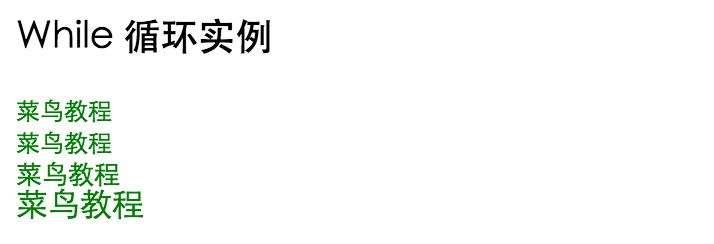
JSP supports all Java logical and arithmetic operators.
The following table lists common JSP operators, with priority from high to low:
| Category | Operator | Associativity |
|---|---|---|
| Postfix | () [] . (dot operator) | Left to right |
| Unary | ++ - - ! ~ | Right to left |
| Multiplicative | * / % | Left to right |
| Additive | + - | Left to right |
| Shift | >> >>> << | Left to right |
| Relational | > >= < <= | Left to right |
| Equality / Inequality | == != | Left to right |
| Bitwise AND | & | Left to right |
| Bitwise XOR | ^ | Left to right |
| Bitwise OR | | | Left to right |
| Logical AND | && | Left to right |
| Logical OR | || | Left to right |
| Conditional | ?: | Right to left |
| Assignment | = += -= *= /= %= >>= <<= &= ^= |= | Right to left |
| Comma | , | left to right |
JSP Literals
The JSP language defines the following literals:
- Boolean (boolean): true and false;
- Integer (int): same as in Java;
- Float (float): same as in Java;
- String (string): starts and ends with single or double quotes;
- Null:null。