JSP Client Request
When a browser requests a web page, it sends a series of information to the web server that cannot be read directly, because this information is transmitted as part of the HTTP headers. You can consult the HTTP protocol for more information.
The following table lists some important contents of the browser-side headers, which will often be seen in future network programming:
| Information | Description |
|---|---|
| Accept | Specifies the MIME types that the browser or other clients can handle. Its value is usuallyimage/pngorimage/jpeg |
| Accept-Charset | Specifies the character set to be used by the browser. For example ISO-8859-1 |
| Accept-Encoding | Specifies the encoding type. Its value is usuallygziporcompress |
| Accept-Language | Specifies the client's preferred language. The servlet will give priority to returning result sets composed in the current language, if the servlet supports that language. For example en, en-us, ru, etc. |
| Authorization | Identifies different users when accessing password-protected web pages |
| Connection | Indicates whether the client can handle HTTP persistent connections. Persistent connections allow the client or browser to fetch multiple files in one request.Keep-AliveIndicates that persistent connection is enabled |
| Content-Length | Only applies to POST requests, indicates the number of bytes of POST data |
| Cookie | Returns cookies previously sent to the browser to the server |
| Host | Indicates the host name and port number in the original URL |
| If-Modified-Since | Indicates that the client only needs this web page if it has been modified after the specified date. The server sends a 304 code to the client, indicating there are no newer resources. |
| If-Unmodified-Since | The opposite of If-Modified-Since. The operation only succeeds if the document has not been modified after the specified date. |
| Referer | Marks the URL of the referring page. For example, if you are on page 1 and click a link to page 2, then the URL of page 1 will be included in the headers of the browser's request for page 2. |
| User-Agent | Used to distinguish requests sent by different browsers or clients, and return different content to different types of browsers. |
HttpServletRequest Class
The request object is an instance of the javax.servlet.http.HttpServletRequest class. Every time a client requests a page, the JSP engine creates a new object to represent that request.
The request object provides a series of methods to obtain HTTP headers, including form data, cookies, HTTP methods, and so on.
Next, some methods commonly used in JSP programming to obtain HTTP headers will be introduced. See the following table for details:
| No. | Method& Description |
|---|---|
| 1 | Cookie[] getCookies()Returns an array of all the cookies from the client |
| 2 | Enumeration getAttributeNames()Returns a collection of all attribute names of the request object |
| 3 | Enumeration getHeaderNames()Returns a collection of names of all HTTP headers |
| 4 | Enumeration getParameterNames()Returns a collection of all parameters in the request |
| 5 | HttpSession getSession()Returns the session object corresponding to the request, or creates one if it does not exist |
| 6 | HttpSession getSession(boolean create)Returns the session object corresponding to the request. If there is none and the create parameter is true, returns a new session object. |
| 7 | Locale getLocale()Returns the Locale object for the current page, which can be set in the response |
| 8 | Object getAttribute(String name)Returns the attribute value with the specified name, or null if it does not exist. |
| 9 | ServletInputStream getInputStream()Returns the input stream of the request |
| 10 | String getAuthType()Returns the name of the authentication scheme used to protect the servlet, such as "BASIC" or "SSL", or null if the JSP has no protection measures set. |
| 11 | String getCharacterEncoding()Returns the character encoding name of the request |
| 12 | String getContentType()Returns the MIME type of the request body, or null if unknown |
| 13 | String getContextPath()Returns the context path specified in the request URI |
| 14 | String getHeader(String name)Returns the header specified by name |
| 15 | String getMethod()Returns the HTTP method of this request, such as GET, POST, or PUT |
| 16 | String getParameter(String name)Returns the parameter with the specified name in this request, or null if it does not exist |
| 17 | String getPathInfo()Returns any extra path information associated with this request URL |
| 18 | String getProtocol()Returns the protocol name and version used by this request |
| 19 | String getQueryString()Returns the query string contained in this request URL |
| 20 | String getRemoteAddr()Returns the IP address of the client |
| 21 | String getRemoteHost()Returns the fully qualified name of the client |
| 22 | String getRemoteUser()Returns the user who has been authenticated via login on the client, or null if the user has not been authenticated |
| 23 | String getRequestURI()Returns the URI of the request |
| 24 | String getRequestedSessionId()Returns the session ID specified by the request |
| 25 | String getServletPath()Returns the servlet path of the requested servlet |
| 26 | String[] getParameterValues(String name)Returns all values of the parameter with the specified name, or null if it does not exist |
| 27 | boolean isSecure()Returns whether the request used a secure channel, such as HTTPS |
| 28 | int getContentLength()Returns the number of bytes contained in the request body, or -1 if unknown |
| 29 | int getIntHeader(String name)Returns the value of the request header with the specified name |
| 30 | int getServerPort()Returns the server port number |
HTTP Header Example
In this example, we will use the getHeaderNames() method of the HttpServletRequest class to read HTTP headers. This method returns the header information of the current HTTP request in the form of an enumeration.
After obtaining the Enumeration object, traverse the Enumeration object in the standard way, use the hasMoreElements() method to determine when to stop, and use the nextElement() method to get the name of each parameter.
<%@ page language="java" contentType="text/html; charset=UTF-8"
    pageEncoding="UTF-8"%>
<%@ page import="java.io.*,java.util.*" %>
<!DOCTYPE html>
<html>
<head>
<meta charset="utf-8">
<title>Example(example.com)</title>
</head>
<body>
<h2>HTTP 头部请求实例</h2>
<table width="100%" border="1" align="center">
<tr bgcolor="#949494">
<th>Header Name</th><th>Header Value(s)</th>
</tr>
<%
   Enumeration headerNames = request.getHeaderNames();
   while(headerNames.hasMoreElements()) {
      String paramName = (String)headerNames.nextElement();
      out.print("<tr><td>" + paramName + "</td>\n");
      String paramValue = request.getHeader(paramName);
      out.println("<td> " + paramValue + "</td></tr>\n");
   }
%>
</table>
</body>
</html>
Visiting main.jsp will produce the following result:
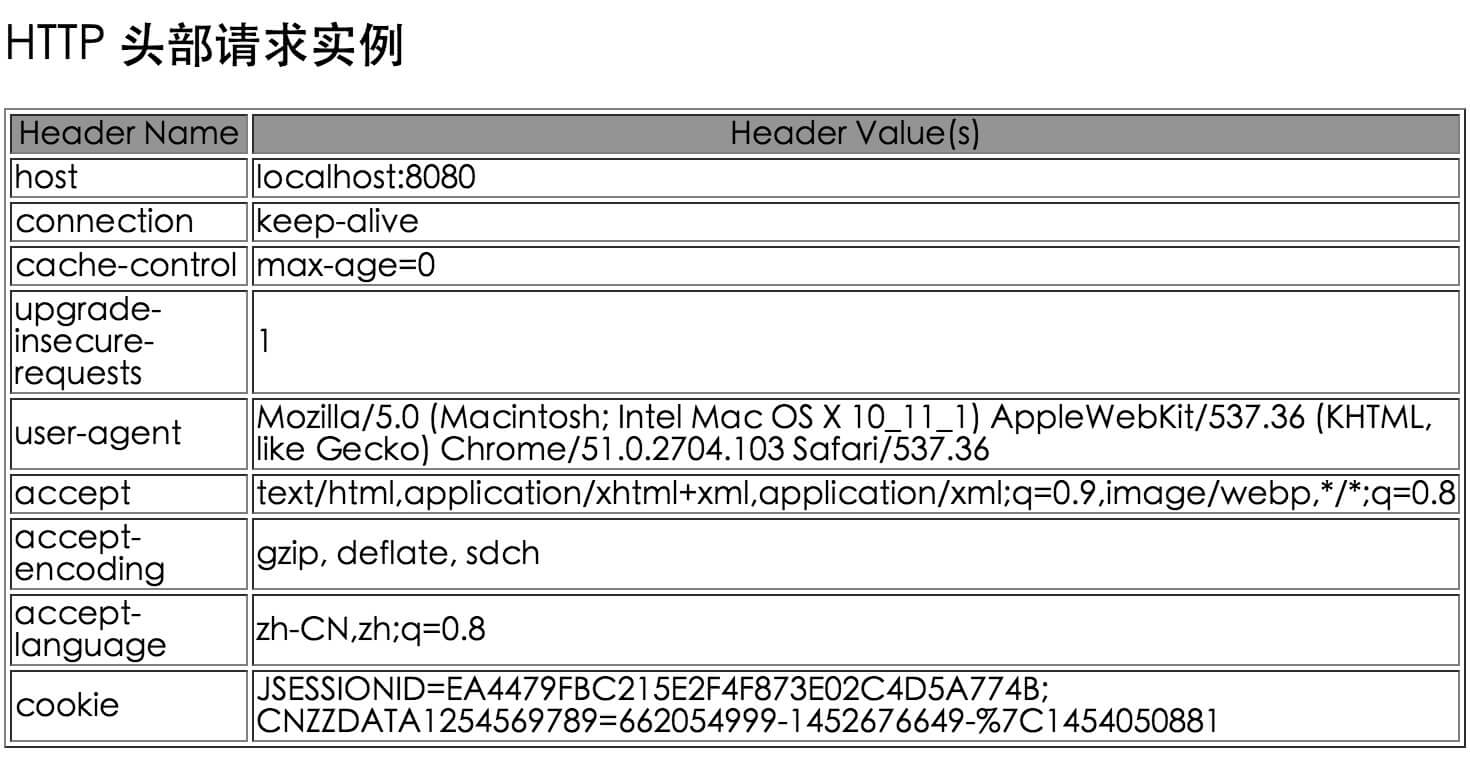
You can try other methods of the HttpServletRequest class in the above code.
Other extensions