SQL SELECTStatements
The SELECT statement is used to select data from a database.
SQL SELECT Statement
The SELECT statement is used to select data from a database.
The results are stored in a result table, called the result set.
SQL SELECT Syntax
SELECT column1, column2, ...
FROM table_name;
and
SELECT * FROM table_name;
Parameter description:
- column1, column2, ...: The name(s) of the columns to select. Multiple columns can be specified. If no column names are specified, all columns will be selected.
- table_name: The name of the table to query.
*: A wildcard, indicating that all columns in the table are selected.
Demo Database
In this tutorial, we will use the EXAMPLE sample database.
Below is the data selected from the "Websites" table:
+----+--------------+---------------------------+-------+---------+
| id | name         | url                       | alexa | country |
+----+--------------+---------------------------+-------+---------+
| 1  | Google       | https://www.google.cm/    | 1     | USA     |
| 2  | 淘宝          | https://www.taobao.com/   | 13    | CN      |
| 3  | Example      | http://www.example.com/    | 4689  | CN      |
| 4  | 微博          | http://weibo.com/         | 20    | CN      |
| 5  | Facebook     | https://www.facebook.com/ | 3     | USA     |
+----+--------------+---------------------------+-------+---------+
SELECT Column Example
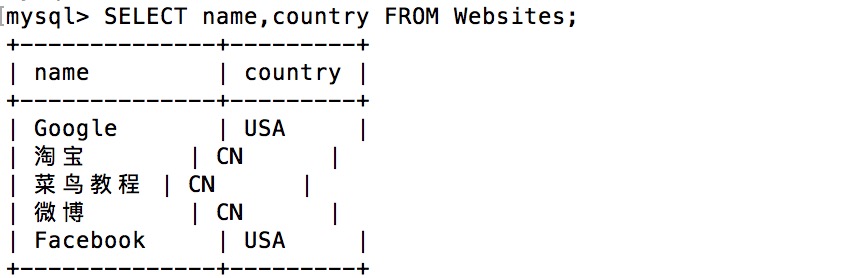
The following SQL statement selects the "name" and "country" columns from the "Websites" table:
Example
The output result is:
SELECT * Example
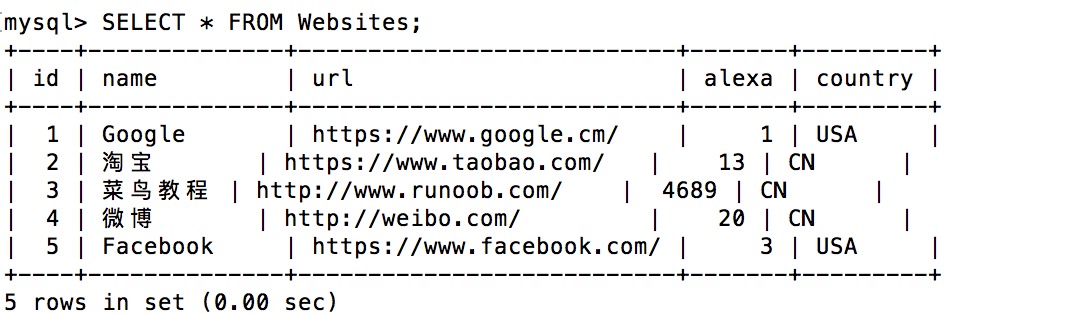
The following SQL statement selects all columns from the "Websites" table:
Example
The output result is:
Navigation in the Result Set
Most database software systems allow the use of programming functions to navigate through the result set, for example: Move-To-First-Record, Get-Record-Content, Move-To-Next-Record, etc.
Programming functions similar to these are not covered in this tutorial. If you want to learn about accessing data through function calls, please visit ourADO TutorialorPHP Tutorial。
Other Extensions