SQL AVG()Function
AVG() Function
The AVG() function returns the average value of a numeric column.
SQL AVG() Syntax
SELECT AVG(column_name) FROM table_name
Demonstration Database
In this tutorial, we will use the EXAMPLE sample database.
The following is data selected from the "access_log" table:
+-----+---------+-------+------------+
| aid | site_id | count | date       |
+-----+---------+-------+------------+
|   1 |       1 |    45 | 2016-05-10 |
|   2 |       3 |   100 | 2016-05-13 |
|   3 |       1 |   230 | 2016-05-14 |
|   4 |       2 |    10 | 2016-05-14 |
|   5 |       5 |   205 | 2016-05-14 |
|   6 |       4 |    13 | 2016-05-15 |
|   7 |       3 |   220 | 2016-05-15 |
|   8 |       5 |   545 | 2016-05-16 |
|   9 |       3 |   201 | 2016-05-17 |
+-----+---------+-------+------------+
SQL AVG() Example
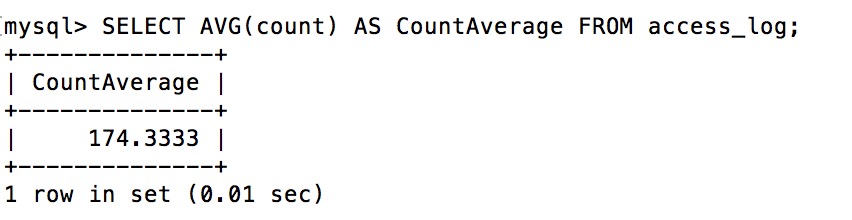
The following SQL statement gets the average value from the "count" column of the "access_log" table:
Example
SELECT AVG(count) AS CountAverage FROM access_log;
After executing the above SQL, the output result is as follows:
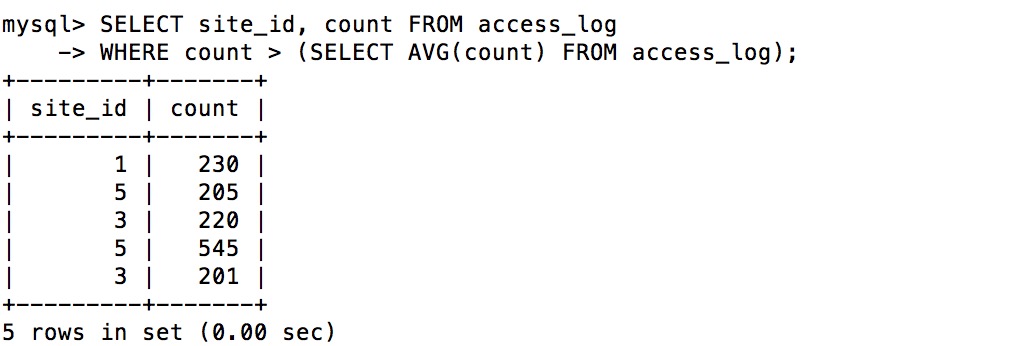
The following SQL statement selects the "site_id" and "count" whose visits are higher than the average visits:
Example
SELECT site_id, count FROM access_log
WHERE count > (SELECT AVG(count) FROM access_log);
WHERE count > (SELECT AVG(count) FROM access_log);
After executing the above SQL, the output result is as follows:
Other Extensions