SQL JOIN
SQL JOIN is used to combine rows from two or more tables.
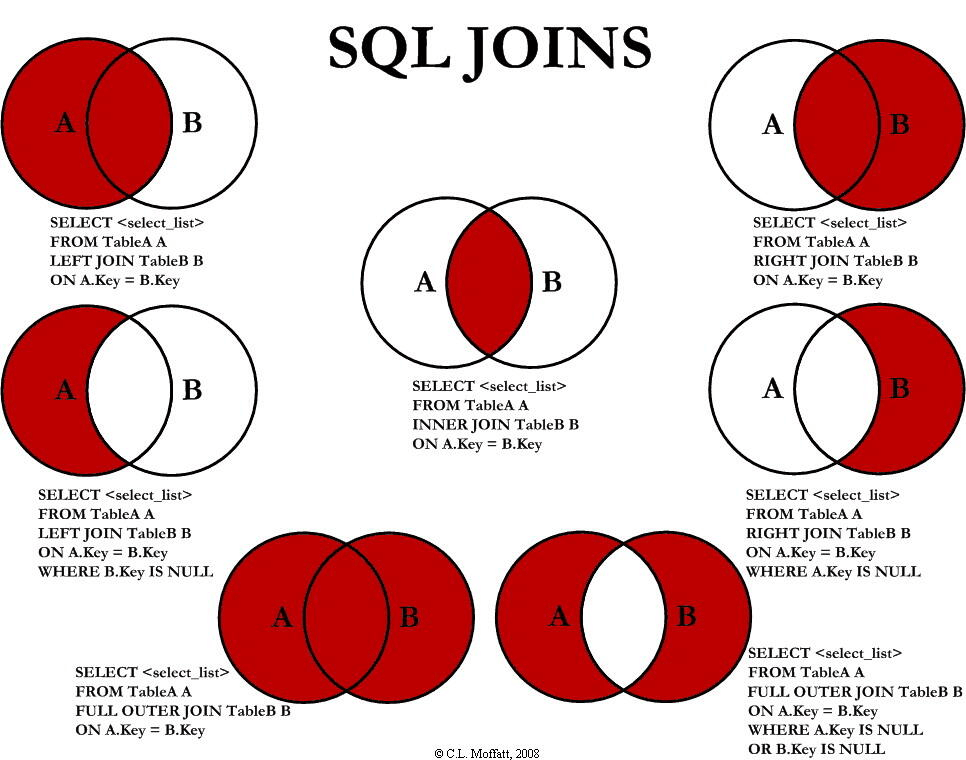
The following diagram shows the 7 usages related to LEFT JOIN, RIGHT JOIN, INNER JOIN, and OUTER JOIN.
| Type | Description |
|---|---|
| INNER JOIN | Returns records that satisfy the join condition in both tables (intersection). |
| LEFT JOIN | Returns all records from the left table, even if there are no matching records in the right table (preserves the left table). |
| RIGHT JOIN | Returns all records from the right table, even if there are no matching records in the left table (preserves the right table). |
| FULL OUTER JOIN | Returns the union of both tables, including matched and unmatched records. |
| CROSS JOIN | Returns the Cartesian product of the two tables, combining each left-table record with each right-table record. |
| SELF JOIN | Joins a table with itself. |
| NATURAL JOIN | Automatically matches and joins tables based on fields with the same name. |
Sample data
Table 1: Customers
| CustomerID | Name |
|---|---|
| 1 | Alice |
| 2 | Bob |
| 3 | Charlie |
Table 2: Orders
| OrderID | CustomerID | Product |
|---|---|---|
| 101 | 1 | Laptop |
| 102 | 2 | Phone |
| 103 | 4 | Tablet |
Comparison of join results
| JOIN Types | Result |
|---|---|
| INNER JOIN | Returns records that match in both tables. In the given example, only records with CustomerID 1 and 2 have matches in both tables, so only these records are returned. |
| LEFT JOIN | Returns all records from the left table (Customers), even if there are no matching records in the right table (Orders). For left-table records that have no match in the right table, the right-table fields in the result will be NULL. In the example, the record with CustomerID 3 has no match in the right table, so its corresponding Product will be NULL. |
| RIGHT JOIN | Returns all records from the right table (Orders), even if there are no matching records in the left table (Customers). For right-table records that have no match in the left table, the left-table fields in the result will be NULL. In the example, the record with OrderID 103 has no match in the left table, so its corresponding Name will be NULL. |
| FULL OUTER JOIN | Returns all records from both tables, whether they match or not. If a table has no matching records, its fields will be NULL. In the example, the records with CustomerID 3 and OrderID 103 will show as NULL in the other table respectively. |
| CROSS JOIN | Returns the Cartesian product of the two tables, that is, each row in the left table is combined with each row in the right table. In the example, each customer will be combined with each order, producing multiple results. |
| SELF JOIN | Joins a table with itself. This is usually used to query interrelated records in a table, such as the relationship between employees and their managers. |
SQL JOIN
The SQL JOIN clause is used to combine rows from two or more tables based on common fields between these tables.
The most common JOIN types:SQL INNER JOIN (simple JOIN)SQL INNER JOIN returns all rows from multiple tables that satisfy the JOIN condition.
Syntax:
SELECT column1, column2, ...
FROM table1
JOIN table2 ON condition;
Parameter description:
- column1, column2, ...: The names of the fields to select, can be multiple fields. If no field names are specified, all fields will be selected.
- table1: The first table to join.
- table2: The second table to join.
- condition: The join condition, used to specify how to join.
Demo database
In this tutorial, we will use the EXAMPLE sample database.
Below is the data selected from the "Websites" table:
+----+--------------+---------------------------+-------+---------+
| id | name         | url                       | alexa | country |
+----+--------------+---------------------------+-------+---------+
| 1  | Google       | https://www.google.cm/    | 1     | USA     |
| 2  | 淘宝          | https://www.taobao.com/   | 13    | CN      |
| 3  | Example      | http://www.example.com/    | 4689  | CN      |
| 4  | 微博          | http://weibo.com/         | 20    | CN      |
| 5  | Facebook     | https://www.facebook.com/ | 3     | USA     |
| 7  | stackoverflow | http://stackoverflow.com/ |   0 | IND     |
+----+---------------+---------------------------+-------+---------+
Below is the data from the "access_log" website access log table:
mysql> SELECT * FROM access_log;
+-----+---------+-------+------------+
| aid | site_id | count | date       |
+-----+---------+-------+------------+
|   1 |       1 |    45 | 2016-05-10 |
|   2 |       3 |   100 | 2016-05-13 |
|   3 |       1 |   230 | 2016-05-14 |
|   4 |       2 |    10 | 2016-05-14 |
|   5 |       5 |   205 | 2016-05-14 |
|   6 |       4 |    13 | 2016-05-15 |
|   7 |       3 |   220 | 2016-05-15 |
|   8 |       5 |   545 | 2016-05-16 |
|   9 |       3 |   201 | 2016-05-17 |
+-----+---------+-------+------------+
9 rows in set (0.00 sec)
Note that the " in the "Websites" tableid" column points to the field " in the "access_log" tablesite_id". The above two tables are linked through the "site_id" column.
Then, if we run the following SQL statement (containing INNER JOIN):
Examples
FROM Websites
INNER JOIN access_log
ON Websites.id=access_log.site_id;
Executing the above SQL outputs the following result:

Different SQL JOINs
Before we continue with examples, let's first list the different SQL JOIN types you can use:
- INNER JOIN: Returns rows if there is at least one match in the table
- LEFT JOIN: Returns all rows from the left table even if there are no matches in the right table
- RIGHT JOIN: Returns all rows from the right table even if there are no matches in the left table
- FULL JOIN: Returns rows as long as there is a match in one of the tables