SQL ORDER BYKeywords
The ORDER BY keyword is used to sort the result set.
SQL ORDER BY Keyword
The ORDER BY keyword is used to sort the result set by one or more columns.
The ORDER BY keyword sorts records in ascending order by default. If you need to sort records in descending order, you can use the DESC keyword.
SQL ORDER BY Syntax
SELECT column1, column2, ...
FROM table_name
ORDER BY column1, column2, ... ASC|DESC;
- column1, column2, ...: The field name to sort by, can be multiple fields.
- ASC: Indicates sorting in ascending order.
- DESC: Indicates sorting in descending order.
Demo Database
In this tutorial, we will use the EXAMPLE sample database.
Below is data selected from the "Websites" table:
+----+--------------+---------------------------+-------+---------+
| id | name         | url                       | alexa | country |
+----+--------------+---------------------------+-------+---------+
| 1  | Google       | https://www.google.cm/    | 1     | USA     |
| 2  | 淘宝          | https://www.taobao.com/   | 13    | CN      |
| 3  | Example      | http://www.example.com/    | 4689  | CN      |
| 4  | 微博          | http://weibo.com/         | 20    | CN      |
| 5  | Facebook     | https://www.facebook.com/ | 3     | USA     |
+----+--------------+---------------------------+-------+---------+
ORDER BY Example
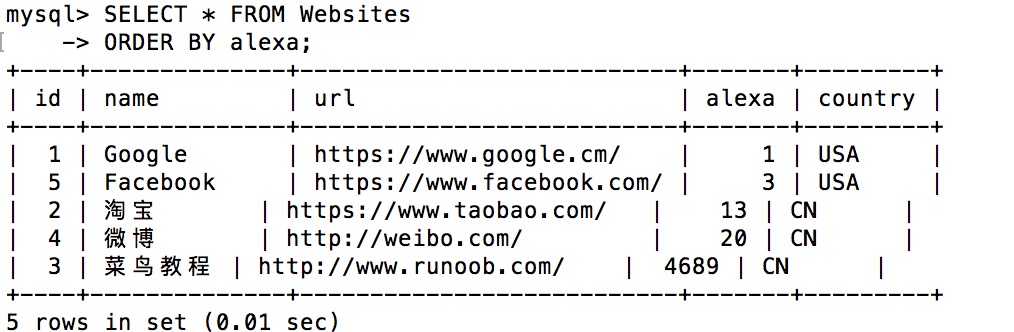
The following SQL statement selects all websites from the "Websites" table and sorts them by the "alexa" column:
Example
Execution output result:
ORDER BY DESC Example
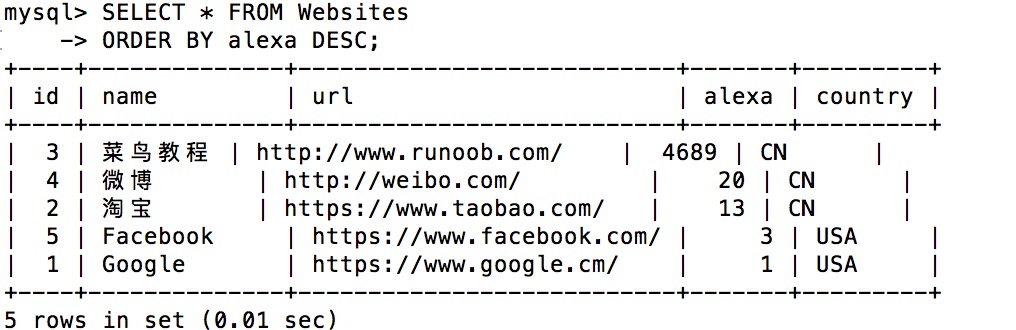
The following SQL statement selects all websites from the "Websites" table and sorts them by the "alexa" column in descending order:
Example
Execution output result:
ORDER BY Multiple Columns
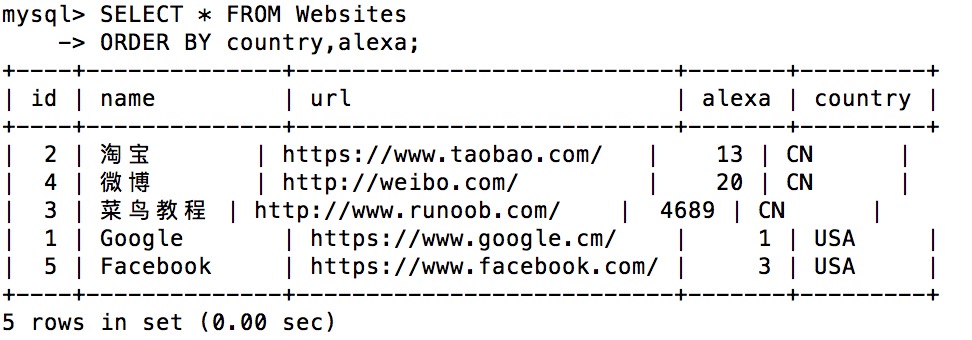
The following SQL statement selects all websites from the "Websites" table and sorts them by the "country" and "alexa" columns:
Example
Execution output result: