SQL SELECT DISTINCTStatements
The SELECT DISTINCT statement is used to return unique different values.
In a table, a column may contain multiple duplicate values, and sometimes you may want to list only distinct values.
The DISTINCT keyword is used to return unique different values.
SQL SELECT DISTINCT Syntax
SELECT DISTINCT column1, column2, ...
FROM table_name;
Parameter description:
- column1, column2, ...: The name of the field(s) to select, can be multiple fields. If no field name is specified, all fields will be selected.
- table_name: The name of the table to query.
In this tutorial, we will use the EXAMPLE sample database.
The following is the data selected from the "Websites" table:
+----+--------------+---------------------------+-------+---------+
| id | name         | url                       | alexa | country |
+----+--------------+---------------------------+-------+---------+
| 1  | Google       | https://www.google.cm/    | 1     | USA     |
| 2  | 淘宝          | https://www.taobao.com/   | 13    | CN      |
| 3  | Example      | http://www.example.com/    | 4689  | CN      |
| 4  | 微博          | http://weibo.com/         | 20    | CN      |
| 5  | Facebook     | https://www.facebook.com/ | 3     | USA     |
+----+--------------+---------------------------+-------+---------+
SELECT DISTINCT Example
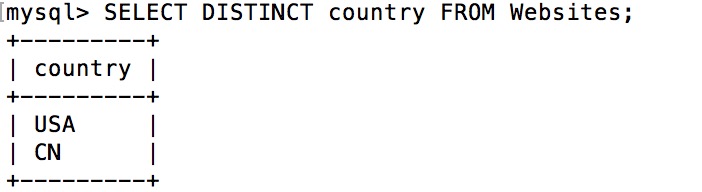
The following SQL statement selects only unique values from the "country" column in the "Websites" table, that is, removing duplicate values from the "country" column:
Example
SELECT DISTINCT country FROM Websites;
Output result: