SQL Alias
By using SQL, you can specify an alias for a table name or a column name.
SQL Alias
By using SQL, you can specify an alias for a table name or a column name.
Basically, aliases are created to make column names more readable.
SQL Alias Syntax for Columns
SELECT column_name AS alias_name
FROM table_name;
SQL Alias Syntax for Tables
SELECT column_name(s)
FROM table_name AS alias_name;
Demo Database
In this tutorial, we will use the EXAMPLE sample database.
Below is the data selected from the "Websites" table:
mysql> SELECT * FROM Websites;
+----+---------------+---------------------------+-------+---------+
| id | name          | url                       | alexa | country |
+----+---------------+---------------------------+-------+---------+
|  1 | Google        | https://www.google.cm/    |     1 | USA     |
|  2 | 淘宝          | https://www.taobao.com/   |    13 | CN      |
|  3 | Example       | http://www.example.com/    |  5000 | USA     |
|  4 | 微博           | http://weibo.com/         |    20 | CN      |
|  5 | Facebook      | https://www.facebook.com/ |     3 | USA     |
|  7 | stackoverflow | http://stackoverflow.com/ |     0 | IND     |
+----+---------------+---------------------------+-------+---------+
Below is the data from the "access_log" website access log table:
mysql> SELECT * FROM access_log;
+-----+---------+-------+------------+
| aid | site_id | count | date       |
+-----+---------+-------+------------+
|   1 |       1 |    45 | 2016-05-10 |
|   2 |       3 |   100 | 2016-05-13 |
|   3 |       1 |   230 | 2016-05-14 |
|   4 |       2 |    10 | 2016-05-14 |
|   5 |       5 |   205 | 2016-05-14 |
|   6 |       4 |    13 | 2016-05-15 |
|   7 |       3 |   220 | 2016-05-15 |
|   8 |       5 |   545 | 2016-05-16 |
|   9 |       3 |   201 | 2016-05-17 |
+-----+---------+-------+------------+
9 rows in set (0.00 sec)
Column Alias Examples
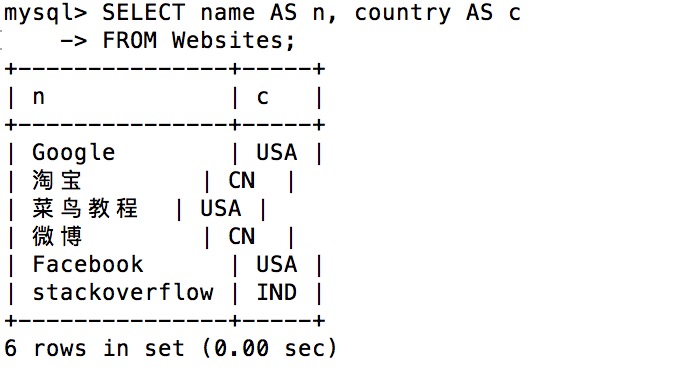
The following SQL statement specifies two aliases, one for the name column and one for the country column.Tip:If a column name contains spaces, double quotes or square brackets are required:
Example
FROM Websites;
Execution output:
In the following SQL statement, we combine three columns (url, alexa, and country) and create an alias named "site_info":
Example
FROM Websites;
Execution output:
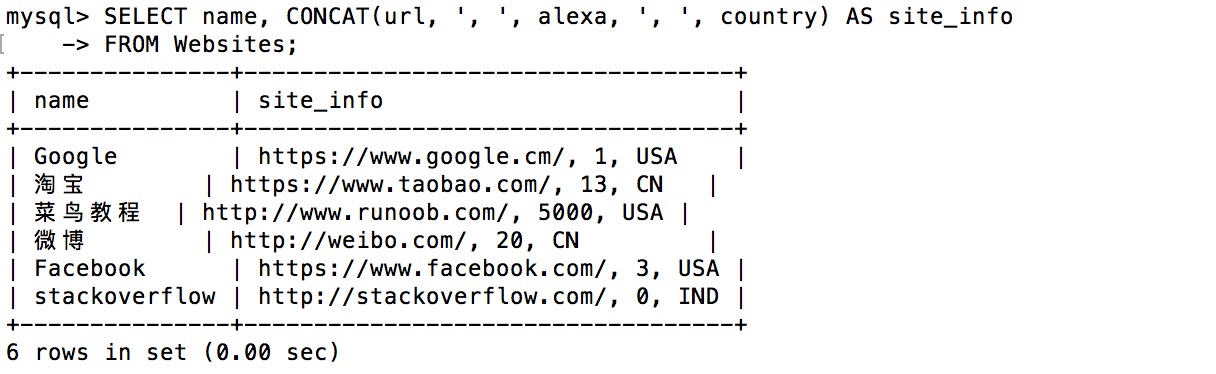
Table Alias Examples
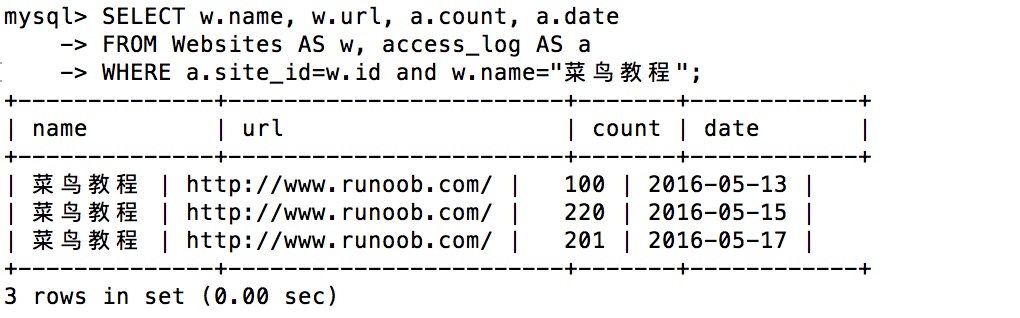
The following SQL statement selects all access records for "Example". We use the "Websites" and "access_log" tables and assign table aliases "w" and "a" respectively (using aliases makes the SQL shorter):
Example
FROM Websites AS w, access_log AS a
WHERE a.site_id=w.id and w.name="Example";
Execution output:
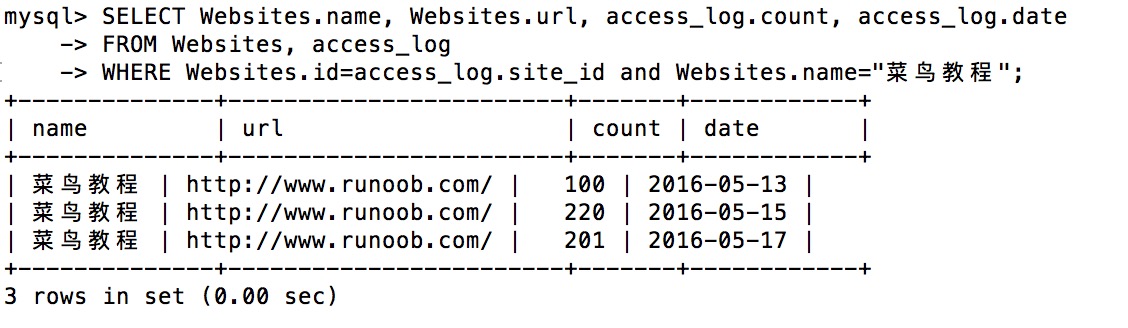
The same SQL statement without aliases:
Example
FROM Websites, access_log
WHERE Websites.id=access_log.site_id and Websites.name="Example";
Execution output:
Using aliases is useful in the following cases:
- More than one table is involved in a query
- Functions are used in a query
- Column names are long or hard to read
- Two or more columns need to be combined