SQL BETWEENOperators
The BETWEEN operator selects values within a data range between two values. These values can be numeric, text, or dates.
SQL BETWEEN Syntax
SELECT column1, column2, ...
FROM table_name
WHERE column BETWEEN value1 AND value2;
Parameter Description:
- column1, column2, ...: The field names to select, can be multiple fields. If no field names are specified, all fields will be selected.
- table_name: The name of the table to query.
- column: The name of the field to query.
- value1: The starting value of the range.
- value2: The ending value of the range.
Demo Database
In this tutorial, we will use the EXAMPLE sample database.
The following is data selected from the "Websites" table:
mysql> SELECT * FROM Websites;
+----+---------------+---------------------------+-------+---------+
| id | name          | url                       | alexa | country |
+----+---------------+---------------------------+-------+---------+
|  1 | Google        | https://www.google.cm/    |     1 | USA     |
|  2 | 淘宝          | https://www.taobao.com/   |    13 | CN      |
|  3 | Example       | http://www.example.com/    |  5000 | USA     |
|  4 | 微博           | http://weibo.com/         |    20 | CN      |
|  5 | Facebook      | https://www.facebook.com/ |     3 | USA     |
|  7 | stackoverflow | http://stackoverflow.com/ |     0 | IND     |
+----+---------------+---------------------------+-------+---------+
BETWEEN Operator Example
The following SQL statement selects all websites with an alexa between 1 and 20:
Example
WHERE alexa BETWEEN 1 AND 20;
Execution Output Result:

NOT BETWEEN Operator Example
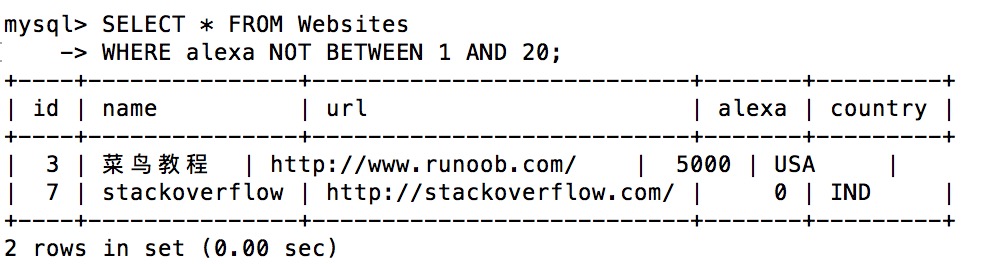
To display websites not within the range of the above example, use NOT BETWEEN:
Example
WHERE alexa NOT BETWEEN 1 AND 20;
Execution Output Result:
BETWEEN Operator with IN Example
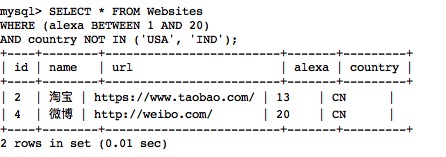
The following SQL statement selects all websites whose alexa is between 1 and 20 but whose country is not USA and IND:
Example
WHERE (alexa BETWEEN 1 AND 20)
AND country NOT IN ('USA', 'IND');
Execution Output Result:
BETWEEN Operator with Text Values Example
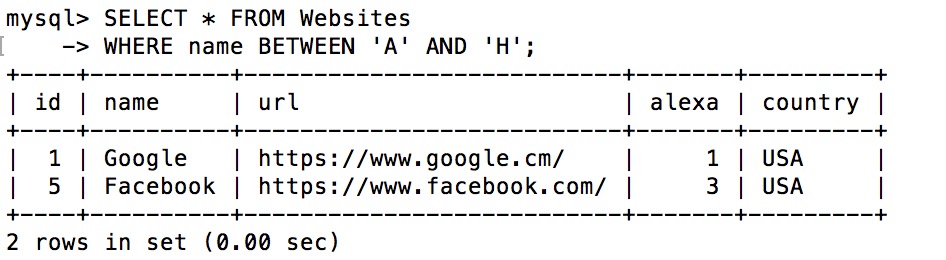
The following SQL statement selects all websites whose name starts with a letter between 'A' and 'H':
Example
WHERE name BETWEEN 'A' AND 'H';
Execution Output Result:
NOT BETWEEN Operator with Text Values Example
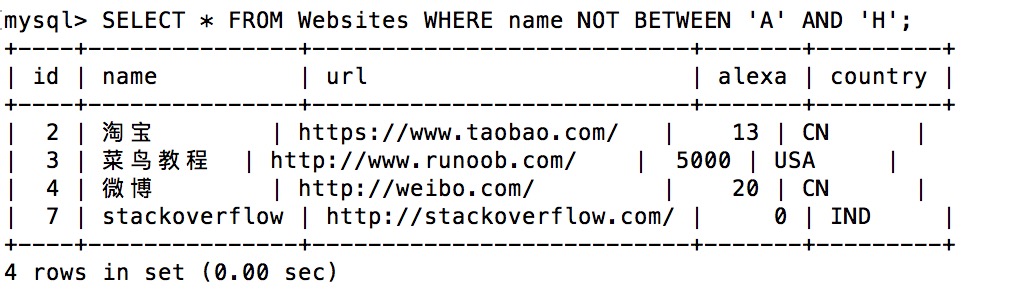
The following SQL statement selects all websites whose name does not start with a letter between 'A' and 'H':
Example
WHERE name NOT BETWEEN 'A' AND 'H';
Execution Output Result:
Example Table
The following is the data from the "access_log" website access log table, where:
- aid:is the auto-increment id.
- site_id: is the website id corresponding to the websites table.
- count: the number of visits.
- date:is the visit date.
mysql> SELECT * FROM access_log;
+-----+---------+-------+------------+
| aid | site_id | count | date       |
+-----+---------+-------+------------+
|   1 |       1 |    45 | 2016-05-10 |
|   2 |       3 |   100 | 2016-05-13 |
|   3 |       1 |   230 | 2016-05-14 |
|   4 |       2 |    10 | 2016-05-14 |
|   5 |       5 |   205 | 2016-05-14 |
|   6 |       4 |    13 | 2016-05-15 |
|   7 |       3 |   220 | 2016-05-15 |
|   8 |       5 |   545 | 2016-05-16 |
|   9 |       3 |   201 | 2016-05-17 |
+-----+---------+-------+------------+
9 rows in set (0.00 sec)
The SQL file for the access_log table used in this tutorial:access_log.sql。
BETWEEN Operator with Date Values Example
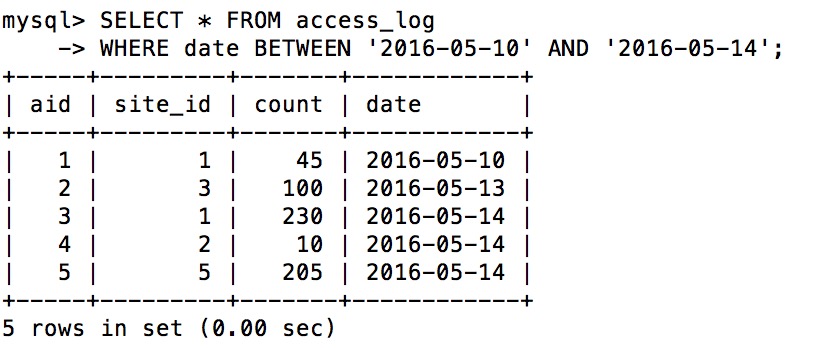
The following SQL statement selects all visit records where the date is between '2016-05-10' and '2016-05-14':
Example
WHERE date BETWEEN '2016-05-10' AND '2016-05-14';
Execution Output Result:
 |
Please note that the BETWEEN operator may produce different results in different databases! Therefore, please check how your database handles the BETWEEN operator! |
|---|