SQL LEN()Functions
LEN() Function
The LEN() function returns the length of a value in a text field.
SQL LEN() Syntax
SELECT LEN(column_name) FROM table_name;
In MySQL, the function is LENGTH():
SELECT LENGTH(column_name) FROM table_name;
Demo Database
In this tutorial, we will use the EXAMPLE sample database.
Here is the data selected from the "Websites" table:
+----+--------------+---------------------------+-------+---------+
| id | name         | url                       | alexa | country |
+----+--------------+---------------------------+-------+---------+
| 1  | Google       | https://www.google.cm/    | 1     | USA     |
| 2  | 淘宝          | https://www.taobao.com/   | 13    | CN      |
| 3  | Example      | http://www.example.com/    | 4689  | CN      |
| 4  | 微博          | http://weibo.com/         | 20    | CN      |
| 5  | Facebook     | https://www.facebook.com/ | 3     | USA     |
| 7  | stackoverflow | http://stackoverflow.com/ |   0 | IND     |
+----+---------------+---------------------------+-------+---------+
SQL LEN() Example
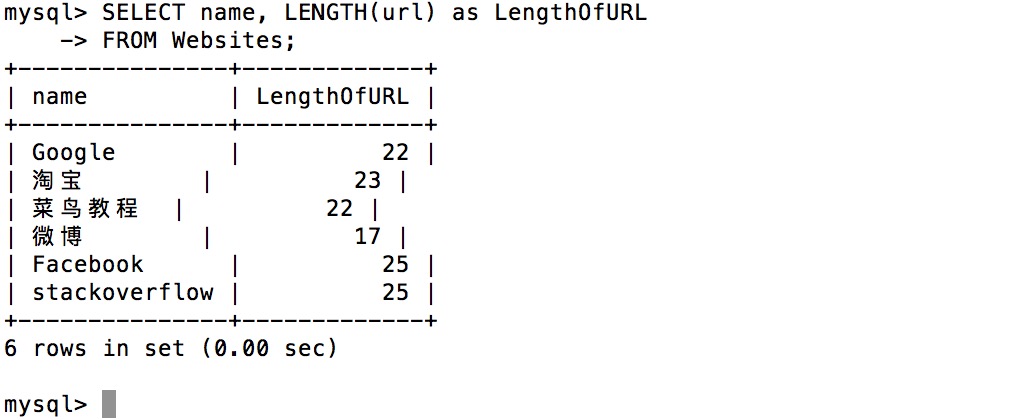
The following SQL statement selects the length of the values in the "name" and "url" columns from the "Websites" table:
Example
SELECT name, LENGTH(url) as LengthOfURL
FROM Websites;
FROM Websites;
Executing the above SQL produces the following output: