SQL DELETEStatements
The DELETE statement is used to delete records in a table.
SQL DELETE Statement
The DELETE statement is used to delete rows in a table.
SQL DELETE Syntax
DELETE FROM table_name
WHERE condition;
Parameter description:
- table_name: The name of the table to delete.
- condition: The deletion condition, used to specify which data to delete.
 |
Please note the WHERE clause in the SQL DELETE statement! The WHERE clause specifies which record or records need to be deleted. If you omit the WHERE clause, all records will be deleted! |
|---|
Demo Database
In this tutorial, we will use the EXAMPLE sample database.
Below is the data selected from the "Websites" table:
+----+--------------+---------------------------+-------+---------+
| id | name         | url                       | alexa | country |
+----+--------------+---------------------------+-------+---------+
| 1  | Google       | https://www.google.cm/    | 1     | USA     |
| 2  | 淘宝       | https://www.taobao.com/   | 13    | CN      |
| 3  | Example | http://www.example.com/    | 4689  | CN      |
| 4  | 微博       | http://weibo.com/         | 20    | CN      |
| 5  | Facebook     | https://www.facebook.com/ | 3     | USA     |
+----+--------------+---------------------------+-------+---------+
SQL DELETE Example
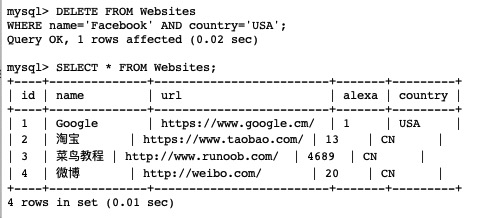
Suppose we want to delete the website with the website name "Facebook" and country USA from the "Websites" table.
We use the following SQL statement:
Example
DELETE FROM Websites
WHERE name='Facebook' AND country='USA';
After executing the above SQL and reading the "Websites" table again, the data is as follows:
Delete All Data
You can delete all rows in a table without deleting the table. This means that the table structure, attributes, and indexes will remain unchanged:
DELETE FROM table_name;
Note:Be extremely careful when deleting records! Because you cannot do it again!
Other Extensions