ICMP Protocol
ICMP (Internet Control Message Protocol) is a network layer protocol in the TCP/IP protocol suite, used to transmit control messages and error reports over IP networks.
ICMP is mainly used to diagnose network problems, detect network reachability, and report error conditions.
ICMP is an important tool for network management and troubleshooting. Common tools such as ping and traceroute rely on ICMP.
How ICMP Works
ICMP implements network diagnosis and error reporting by encapsulating control messages in IP packets.
1. ICMP Message Types
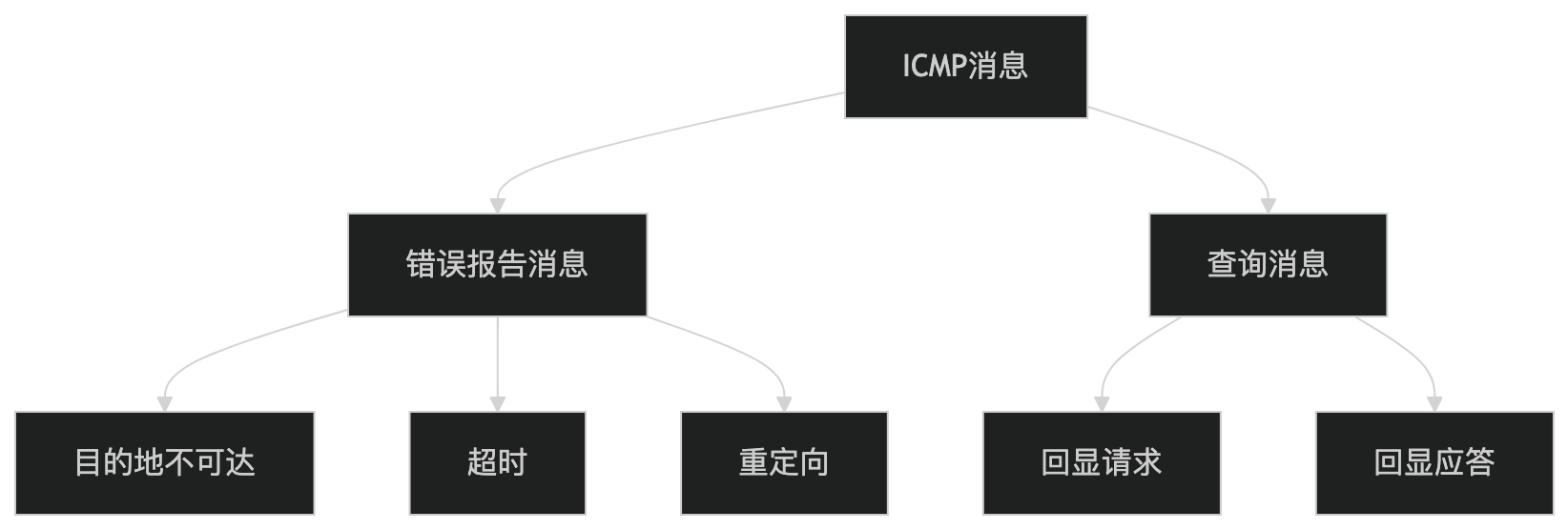
ICMP messages fall into two main categories:
- Error Reporting Messages:
- Used to report error conditions in the network, such as destination unreachable, timeout, etc.
- Query Messages:
- Used for network diagnostics, such as Echo Request and Echo Reply.
2. ICMP Message Format
ICMP messages are encapsulated in IP packets, and their format is as follows:

- Type: Identifies the type of ICMP message (e.g., Echo Request, Destination Unreachable).
- Code: Provides more detailed error information.
- Checksum: Used to verify the integrity of the message.
- Message Body: Contains specific control information or error data.
3. Common ICMP Message Types
The following are common ICMP message types and their uses:
- Echo Request and Echo Reply:
- Used for
pingtools to detect network connectivity.
- Used for
- Destination Unreachable:
- Reports the reason why a packet cannot reach the destination address (e.g., network unreachable, port unreachable).
- Time Exceeded:
- Reports that the TTL (Time to Live) value of a packet has expired, commonly used for
traceroutetools.
- Reports that the TTL (Time to Live) value of a packet has expired, commonly used for
- Redirect:
- Notifies the sender to use a better routing path.
Key Features of ICMP
- Network Diagnostics:
- Detect network connectivity through Echo Request and Echo Reply.
- Error Reporting:
- Report error conditions in the network, such as destination unreachable, timeout, etc.
- Lightweight Protocol:
- ICMP messages are encapsulated in IP packets, with low overhead.
- Works with the IP Protocol:
- ICMP relies on the IP protocol to transmit messages, but does not provide reliability guarantees.
Application Scenarios of ICMP
ICMP is widely used in the following scenarios:
- Network Connectivity Testing:
- Use
pingtools to check whether the target device is reachable.
- Use
- Path Tracing:
- Use
traceroutetools to detect the transmission path of packets.
- Use
- Error Diagnosis:
- Diagnose network problems through ICMP error reporting messages.
- Network Optimization:
- Use ICMP Redirect messages to optimize routing paths.
Advantages and Disadvantages of ICMP
Advantages:
- Simple and Efficient:
- ICMP messages have a simple structure and low overhead.
- Widely Supported:
- Almost all devices that support the IP protocol also support ICMP.
- Powerful Diagnostic Functions:
- Provides rich network diagnosis and error reporting capabilities.
Disadvantages:
- Security Issues:
- ICMP can be used in network attacks (such as Ping Flood, Smurf Attack).
- Unreliability:
- ICMP does not provide reliability guarantees; messages may be lost or ignored.
ICMP Security
To improve ICMP security, the following measures can be taken:
- Firewall Filtering:
- Configure firewall rules to restrict the transmission of ICMP messages.
- Rate Limiting:
- Limit the sending rate of ICMP messages to prevent network attacks.
- Disable Unnecessary ICMP Features:
- Disable unnecessary ICMP message types on network devices.
Alternatives to ICMP
In some scenarios, the following alternatives can be used:
- TCP/UDP Port Scanning:
- Use TCP or UDP protocols to detect the availability of the target device.
- Active Probing Tools:
- Use active probing tools (such as Nmap) for network diagnosis.
In summary, ICMP is a protocol used for network diagnosis and error reporting. It implements network management through control messages encapsulated in IP packets. It is widely used in scenarios such as network connectivity testing, path tracing, and error diagnosis, and is an important tool for network management and troubleshooting.
Other Extensions