Vue3 Lifecycle Hooks
In Vue.js, lifecycle hook functions are a series of methods automatically called by Vue during the creation, update, destruction, and other processes of a component instance. During these steps, the component triggers a series of functions called "lifecycle hooks", allowing developers to execute custom code at specific times.
Registration and Usage of Lifecycle Hooks
mounted hook: This hook is triggered after the component completes its initial rendering and generates DOM nodes. For example:
export default {
  mounted() {
    console.log(`组件已挂载。`);
  }
}
Other common hooks: In addition to mounted, there are also hooks such as updated and unmounted, which are called at different lifecycle stages of the instance.
Notes on Lifecycle Hooks
this context:In all lifecycle hook functions, `this` automatically points to the component instance that calls it.
Avoid using arrow functions:When defining lifecycle hooks, do not use arrow functions, as this will make it impossible to access the component instance via `this`.
By using lifecycle hooks appropriately, developers can execute specific logic at different stages of a component, enhancing the component's flexibility and functionality.
Below is a diagram of the instance lifecycle:
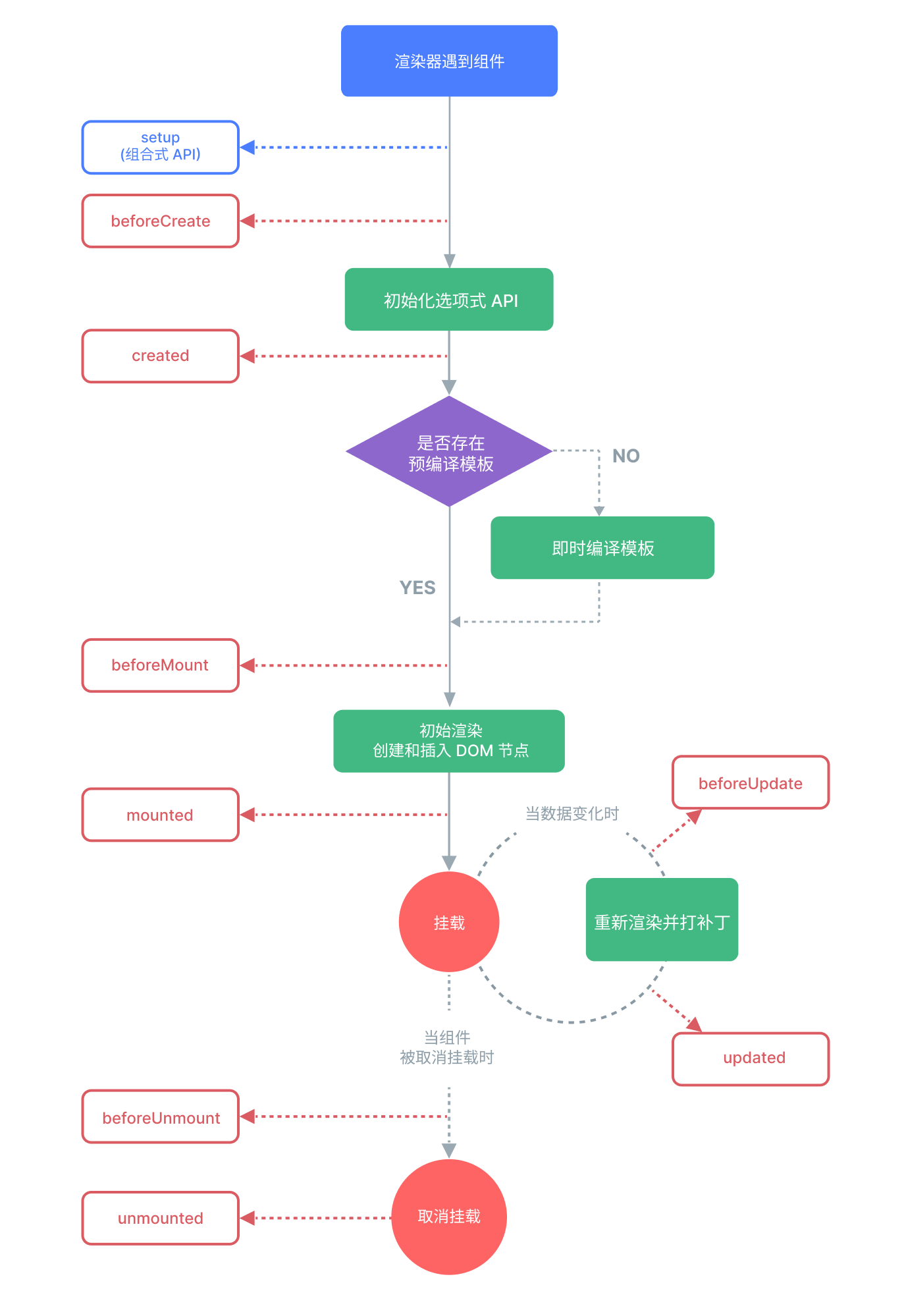
The following are the Vue.js lifecycle hook functions
| Hook Name | Trigger Timing |
|---|---|
beforeCreate | Called after the instance is initialized, before data observation and event configuration. |
created | Called immediately after the instance is created. At this point, the instance has completed data observation, the computation of properties and methods, and watch/event callbacks. |
beforeMount | Called before mounting begins: the relevant render function is called for the first time. |
mounted | elBy the newly createdvm.$elreplaced, and this hook is called after it is mounted to the instance. |
beforeUpdate | Called when data is updated, before the virtual DOM is re-rendered and patched. |
updated | Called after the virtual DOM is re-rendered and patched due to data changes. |
beforeUnmount | Called before the instance is unmounted. |
unmounted | Called after the instance is unmounted. |
The following is a detailed introduction to Vue component lifecycle hooks:
In Vue.js, lifecycle hook functions refer to a series of methods that Vue automatically calls during the creation, update, destruction, and other processes of a component instance. Through these hook functions, specific operations can be performed at different lifecycle stages of a component. The following is a detailed introduction to Vue component lifecycle hooks:
1. beforeCreate
- Description: Called after the instance is initialized, before data observation and event configuration.
- Usage: You can initialize some data not proxied by Vue at this stage.
Example:
Example
console.log('beforeCreate:Instance has just been created');
}
2. created
- Description: Called immediately after the instance is created. At this point, the instance has completed the following configurations: data observation, computation of properties and methods, and watch/event callbacks; the mounting phase has not yet begun.
- Usage: You can access and modify data at this stage, but the DOM is not yet mounted.
Example:
Example
console.log('created:Instance creation complete');
}
3. beforeMount
- Description: Called before mounting begins: the relevant render function is called for the first time.
- Usage: Perform some operations before mounting, such as modifying the DOM structure, etc.
Example:
Example
console.log('beforeMount:Before mounting begins');
}
4. mounted
- Description:
elBy the newly createdvm.$elreplaced, and this hook is called after it is mounted to the instance. - Usage: You can manipulate the DOM at this stage and execute DOM-related logic.
Example:
Example
console.log('mounted:Instance mounted');
}
5. beforeUpdate
- Description: Called when data is updated, before the virtual DOM is re-rendered and patched.
- Usage: You can access the state before the update at this stage.
Example:
Example
console.log('beforeUpdate:Before data update');
}
6. updated
- Description: Called after the virtual DOM is re-rendered and patched due to data changes.
- Usage: You can manipulate the DOM at this stage, but avoid changing data during this period, as it may cause an infinite loop of updates.
Example:
Example
console.log('updated:Data update complete');
}
7. beforeUnmount(Vue 3)
- Description: Called before the instance is unmounted.
- Usage: Perform some cleanup operations before the instance is unmounted, such as removing event listeners, etc.
Example:
Example
console.log('beforeUnmount:Before instance unmount');
}
8. unmounted(Vue 3)
- Description: Called after the instance is unmounted.
- Usage: Perform some cleanup operations after the instance is unmounted, such as destroying timers, etc.
Example:
Example
console.log('unmounted:Instance unmounted');
}
Lifecycle Hook Execution Order
- beforeCreate
- created
- beforeMount
- mounted
- beforeUpdate (triggered when data changes)
- updated (triggered when data changes)
- beforeUnmount
- unmounted
Example
The following is a complete Vue component example that demonstrates the use of all lifecycle hook functions:
Example
template: `<div>{{ message }}</div>`,
data() {
return {
message: 'Hello, Vue!'
};
},
beforeCreate() {
console.log('beforeCreate:Instance has just been created');
},
created() {
console.log('created:Instance creation complete');
},
beforeMount() {
console.log('beforeMount:Before mounting begins');
},
mounted() {
console.log('mounted:Instance mounted');
},
beforeUpdate() {
console.log('beforeUpdate:Before data update');
},
updated() {
console.log('updated:Data update complete');
},
beforeUnmount() {
console.log('beforeUnmount:Before instance unmount');
},
unmounted() {
console.log('unmounted:Instance unmounted');
}
};
const app = Vue.createApp({
components: {
LifecycleDemo
}
});
app.mount('#app');
Try it »
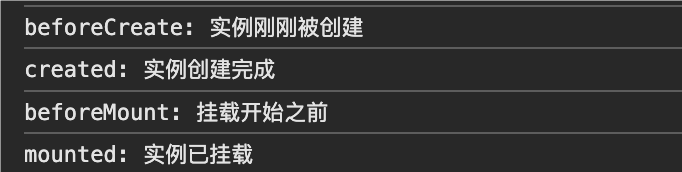
This example will print the logs of each lifecycle hook function to the console, helping to understand the order and purpose of each lifecycle stage.
Composition API Hooks
Vue 3 introduces the Composition API (Composition API), through thesetupfunction, lifecycle hooks can be organized more clearly in terms of logic. When using the Composition API, these hooks are defined through theonXxxfunction:
onMounted: equivalent tomounted。onBeforeUnmount: equivalent tobeforeUnmount。onUnmounted: equivalent tounmounted。onBeforeMount: equivalent tobeforeMount。onBeforeUpdate: equivalent tobeforeUpdate。onUpdated: equivalent toupdated。onCreatedandonBeforeCreateThey are generally not commonly used in the Composition API, becausesetupthe code in it will run during the creation phase.
Lifecycle Hooks with the Composition API:
Example
export default {
setup() {
onMounted(() => {
console.log('Component mounted!');
// Perform initialization here
});
onBeforeUnmount(() => {
console.log('Component about to unmount!');
// Perform cleanup here
});
}
};
Advantages of the Composition API:
- Strong reusability: Lifecycle hooks can be combined with other logic, making them easy to encapsulate and reuse.
- Clearer logic: With
setupthe other logic within it implemented in one function, reducing code scattering and complexity.