Vue3 Computed Properties
Computed properties are used to dynamically calculate derived property values based on changes in other data, and they have a caching mechanism; they are only recalculated when related dependencies change.
Computed property keyword:computed。
Computed properties are very useful when handling some complex logic.
You can look at the following example of reversing a string:
In Example 1, the template becomes very complex and is not easy to read and understand.
Next, let's look at an example using computed properties:
Example 2
Try it »
In Example 2, a computed property `reversedMessage` is declared.
The provided function will be used as the getter for the property `vm.reversedMessage`.
`vm.reversedMessage` depends on `vm.message`. When `vm.message` changes, `vm.reversedMessage` will also be updated.
Use the `computed` function to define computed properties:
Example
<div>
<p>Product name:{{ productName }}</p>
<p>Product price:{{ formattedPrice }}</p>
<button @click="increasePrice">Increase price</button>
</div>
</template>
<script>
import { reactive, computed } from 'vue';
export default {
setup() {
// reactive data
const state = reactive({
name: 'Mobile phone',
price: 2000
});
// computed property
const productName = computed(() => {
return`Discount ${state.name}`;
});
const formattedPrice = computed(() => {
return `¥${state.price.toFixed(2)}`;
});
// method
const increasePrice = () => {
state.price += 100;
};
return {
productName,
formattedPrice,
increasePrice
};
}
};
</script>
Description
computedFunction:
- In
setupUsed in the functioncomputedUse a function to define computed properties. - Return the computed value through an arrow function, which automatically tracks the reactive data it depends on (
statein the objectnameandprice)。
Use computed properties:
productNameComputed properties are derived fromstate.name, wheneverstate.namewhen changes occur,productNameit will automatically update.formattedPriceComputed properties are derived fromstate.price, wheneverstate.pricewhen changes occur,formattedPriceit will automatically update.
reactive data:
- Use
reactivefunction createsstateobject, making it reactive data, allowing you to listen to changes in its properties.
Method:
increasePriceThe method is used to increasestate.pricethe value, and each time the button is clicked,state.pricethe value increases by 100, andformattedPricethe computed property will update accordingly.
computed vs methods
We can use `methods` to replace `computed`. The effect is the same for both, but `computed` is cached based on its dependencies, and only recalculates when related dependencies change. With `methods`, the function is always called and executed again on every re-render.
Example 3
Try it »
It can be said that using `computed` gives better performance, but if you don't want caching, you can use the `methods` property.
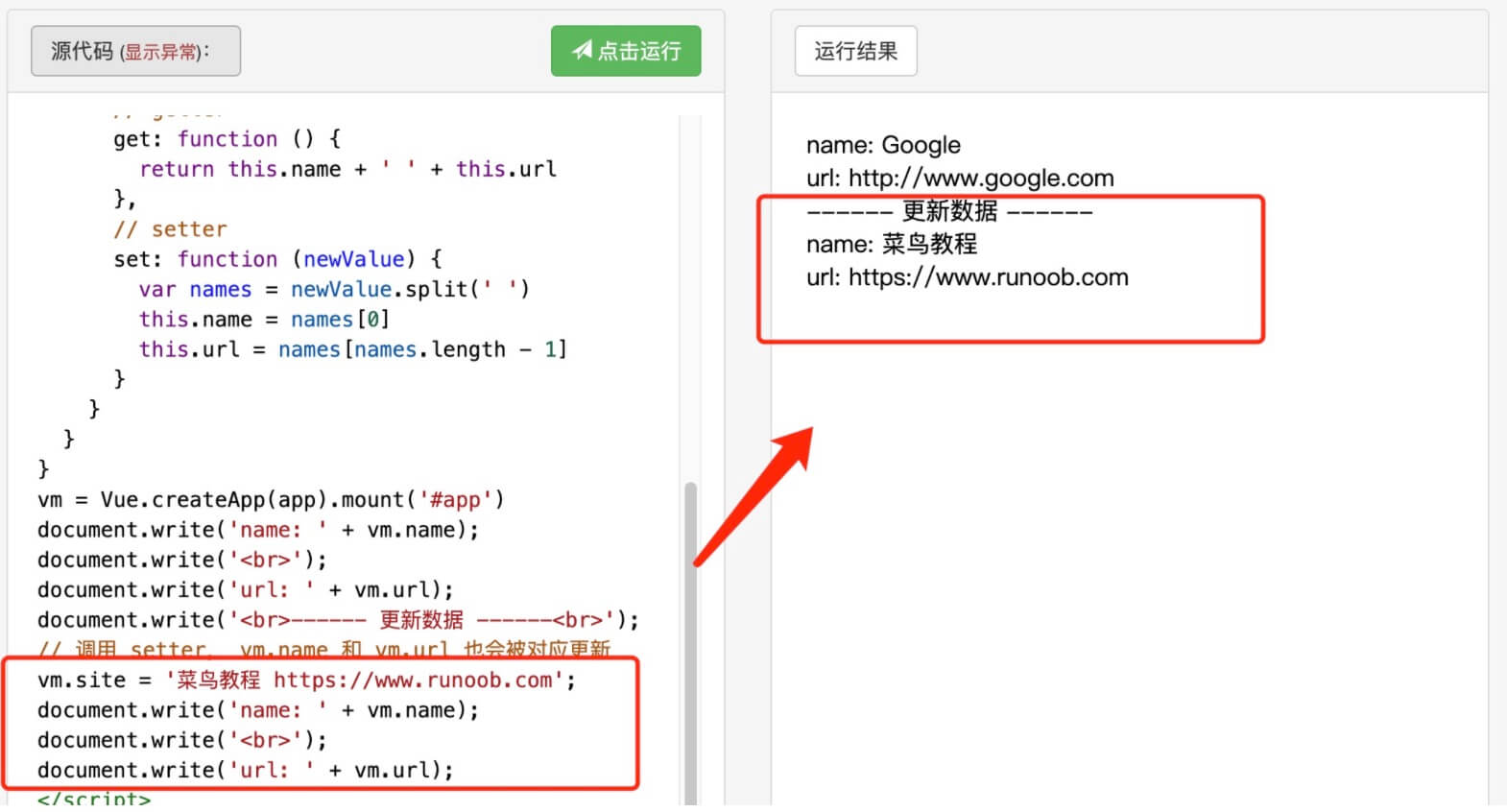
computed setter
Computed properties have only a getter by default, but you can also provide a setter when needed:
Example 4
Try it »
From the running result of the example, when runningvm.site = 'Example http://www.example.com';when,setterwill be called,vm.nameandvm.urlwill also be updated accordingly.